uv on macOS: Managing Python Versions, Projects, and Tools

This guide is for Python developers on macOS who are moving to uv from pip, venv, pip-tools, pyenv, or pipx. uv supports four kinds of work: a project, a single-file script, a one-off CLI run with uvx, and a CLI installed on PATH. All four can use the Python versions that uv installs. You will learn the commands for each and how to choose between them.
I switched my own Python workflow to uv. One executable now covers the work I used to split across those tools.
Quick start
# Install uv with Homebrew
brew install uv

# Start a project
uv init --no-package example-app
cd example-app
uv add httpx
uv run python main.py
# Prints "Hello from example-app!"

# Run an isolated CLI without installing it permanently
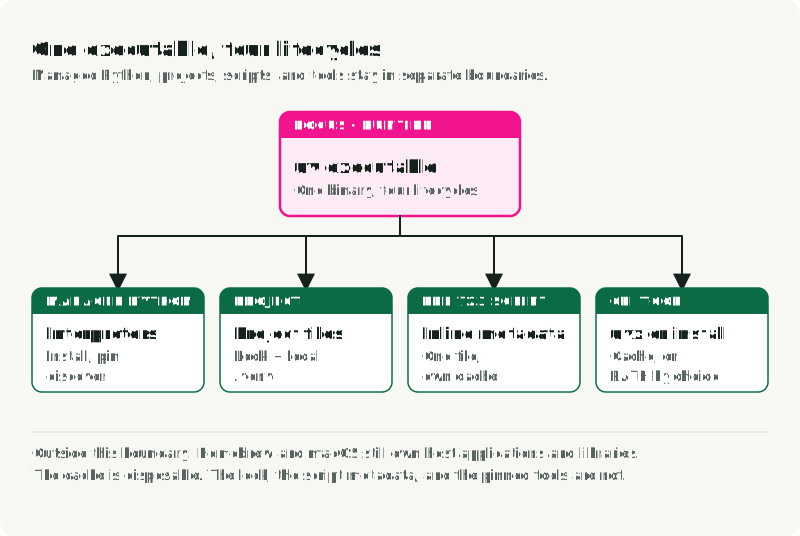
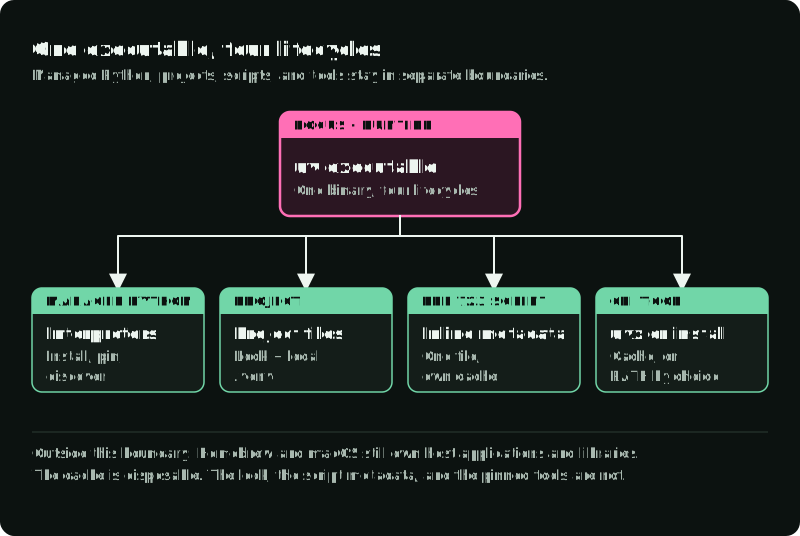
uvx ruff check .The figure shows where each of the four workflows keeps its environment, what you keep for each, and the managed Python installs they share.
Install and update uv
Homebrew is a convenient macOS installation path. See uv’s installation guide for the supported methods:
brew install uv
uv --version
If Homebrew installed uv, Homebrew should upgrade it:
brew upgrade uvuv self update is for uv’s standalone installation method and is disabled for package-manager installations. Upgrade uv with the same tool that installed it.
To see where uv, its Python installs, its tools, and its cache live:
command -v uv
uv python dir
uv tool dir
uv cache dir
Managed Python installations, persistent tools, and disposable cache entries have separate directories. The cache may be deleted and rebuilt. It is not a source of truth. On macOS, uv clones packages from the cache into each environment (copy-on-write) instead of copying them. Rebuilding .venv reuses any needed artifacts still in the cache.
Projects: declarations, resolution, and environment
A uv project normally has three parts:
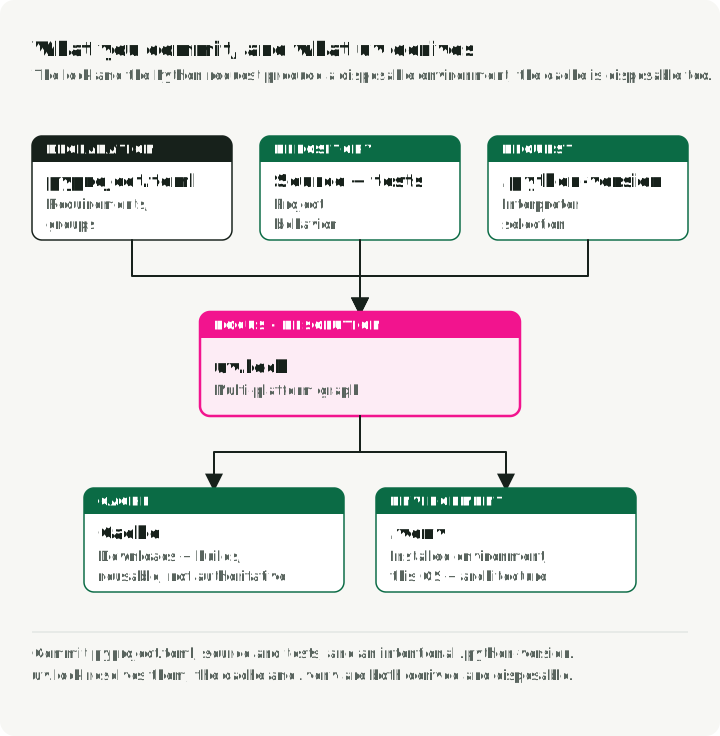
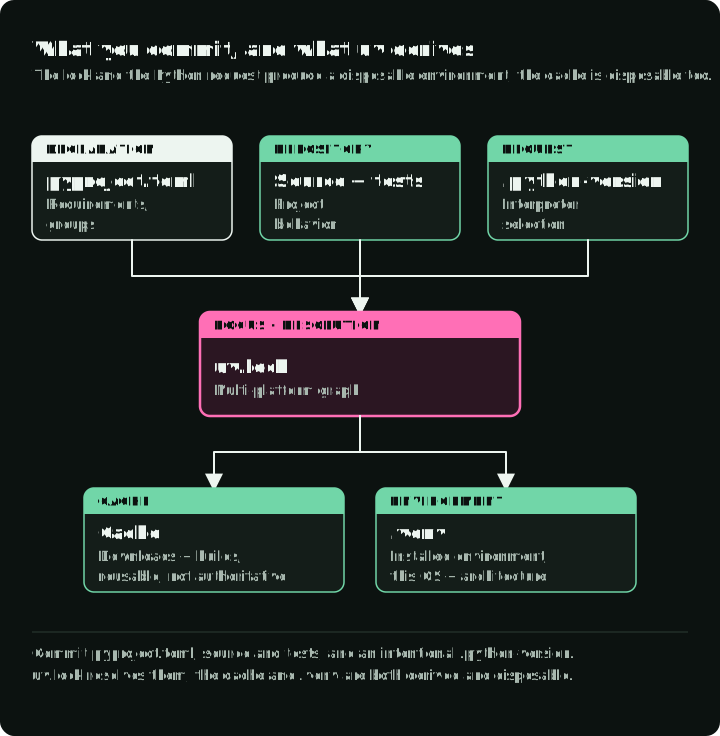
pyproject.tomldeclares project metadata and direct requirements.uv.lockstores uv’s cross-platform resolution..venvis the local installed environment and should be disposable.
The figure sorts the project files by who writes them and whether git keeps them.
Create an application and add runtime and test requirements:
uv init --no-package forecast-app
cd forecast-app

uv add httpx
uv add --group test pytest
uv run python main.py
uv run --group test pytest --version
The application prints Hello from forecast-app!; the final command checks that pytest is installed. Once you have tests, run them with uv run --group test pytest.
The --no-package template creates main.py, pyproject.toml, README.md, and .python-version without a build system. Since uv 0.12, plain uv init creates a packaged application with a src layout and build backend. Use uv init --lib for a packaged library. See uv’s project creation guide.
uv run checks the project, updates the lock when needed, syncs required dependencies, and runs the command. See uv’s project layout and sync documentation for this lifecycle. The first project operation creates .venv and uv.lock as needed. uv init itself only creates the project files.
uv installs the dev group by default. Other groups, such as test, need --group on each command, or default-groups under [tool.uv]. To install one group alone, for example in a docs CI job, use uv sync --only-group docs.
Groups stay local and are never published. A published extra is different: uv add --optional cli rich adds an extra that users install as forecast-app[cli].
To use the project in Jupyter notebooks in VS Code, run uv add --dev ipykernel and select .venv as the kernel. See uv’s Jupyter guide.
Commit inputs, not the environment
Commit pyproject.toml, uv.lock, source, and an intentional .python-version. Ignore .venv and uv’s caches.
A teammate who clones the repository gets the locked environment with one command:
git clone https://github.com/example/forecast-app.git
cd forecast-app
uv sync --locked
To see why a package is installed, and to move the lock to newer versions:
uv tree                            # show the dependency graph
uv tree --outdated                 # show newer versions where they exist
uv lock --upgrade-package httpx    # move one package, keep the rest
uv lock --upgrade                  # re-resolve everything
Commit the changed uv.lock with the change that needed it.
The lock records a resolution across supported markers and platforms. It does not make native wheels identical across macOS, Linux, Intel, and Apple Silicon. Test every deployment platform.
uv can enforce part of this. required-environments under [tool.uv] makes resolution fail when a package without a source distribution has no wheel for a listed platform:
[tool.uv]
required-environments = [
    "sys_platform == 'darwin' and platform_machine == 'arm64'",
    "sys_platform == 'linux' and platform_machine == 'x86_64'",
]
no-build-package forbids source builds for named packages, so a missing wheel fails the install instead of starting a compiler. If you also deploy PyTorch on Linux with CUDA, follow uv’s PyTorch guide for the index setup.
Lock freshness: --locked is not --frozen
By default, project commands may update uv.lock when declarations change. See uv’s locking and syncing documentation for the freshness and exactness flags.
Use --locked to require the lock to be current with project metadata:
uv lock --check
uv sync --locked --group test
uv run --locked --group test pytest
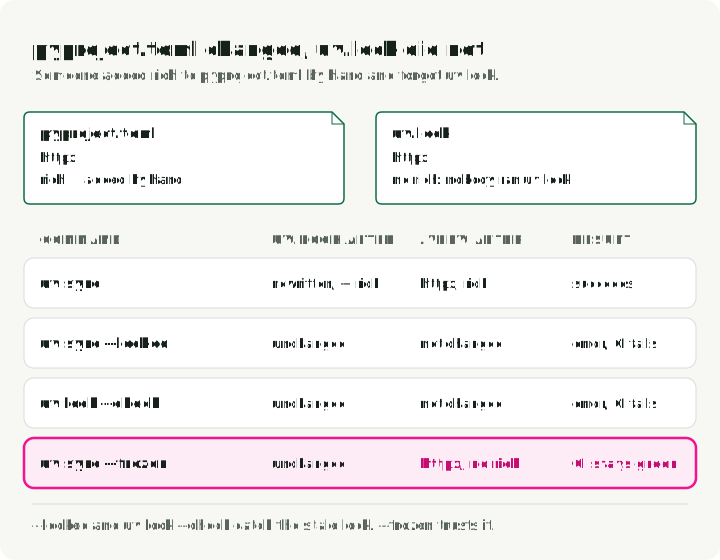
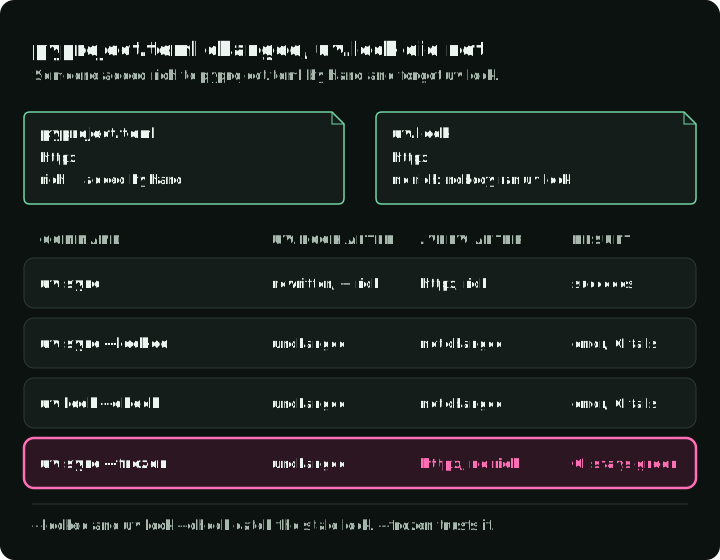
If pyproject.toml and uv.lock disagree, these commands fail instead of resolving a new lock. Use them in CI so a stale lock fails the build.
Use --frozen only when you intentionally want uv to use the existing lock without checking whether it is current:
uv sync --frozenThat can be useful in a controlled build stage where the lock was already validated, but it is not a stale-lock detector.
The figure follows one stale project through four commands: rich was added to pyproject.toml by hand, and uv.lock was not updated.
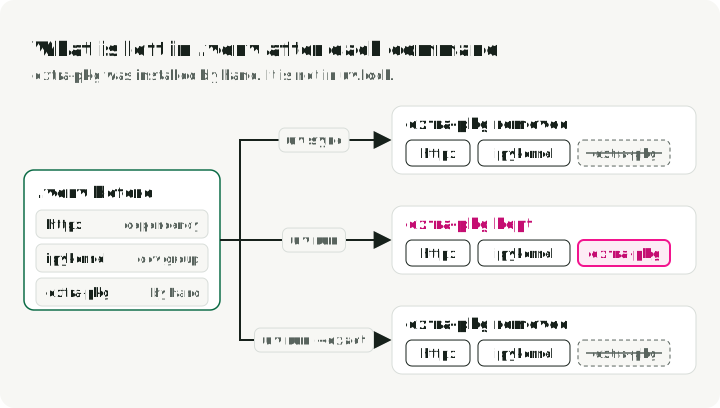
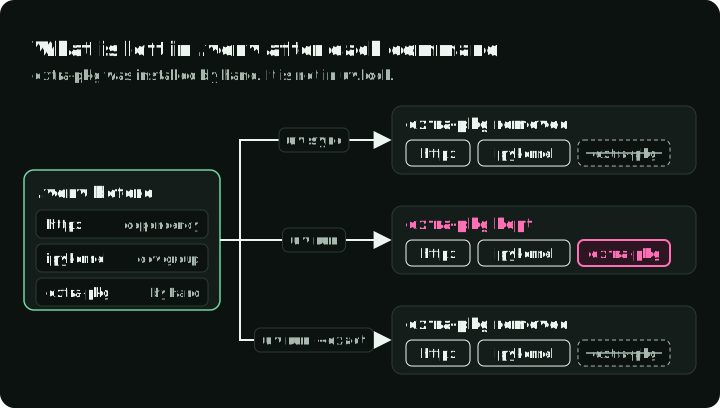
Exactness is a separate setting from freshness. uv sync is exact by default and removes extraneous packages. uv run uses an inexact sync by default unless --exact is requested. The figure follows one package installed by hand through uv sync, uv run, and uv run --exact.
Install and pin Python versions
uv can download and manage Python distributions:
uv python install 3.12 3.13
uv python list --only-installed
uv python pin 3.12
uv’s managed CPython builds come from the python-build-standalone project. uv can also discover system, Homebrew, pyenv, Conda, and other interpreters. See uv’s Python version documentation for the supported sources and discovery behavior.
.python-version is a version request discovered by uv and other compatible tools. uv python pin writes this file, and uv init creates one. requires-python in pyproject.toml is the project’s compatibility contract. Keep both intentional:
[project]
requires-python = ">=3.12,<3.14"
uv takes the version request from --python first, then .python-version, then requires-python.
Pinning 3.12 does not guarantee the same patch build forever or the same artifact on every operating system. Request an exact patch when you need one. In CI, select the interpreter and print it, with uv run --python 3.12.7 python -VV or by setting UV_PYTHON=3.12.7 for the job.
Use another Python manager when a project needs a distribution or build configuration uv does not supply. uv can still use that interpreter via --python or normal discovery.
Choose among uv run, uvx, and installed tools
Choose by whether the tool needs the project’s installed packages, must stay on PATH, or can run independently. The figure shows which dependencies are available and how long each environment lives.
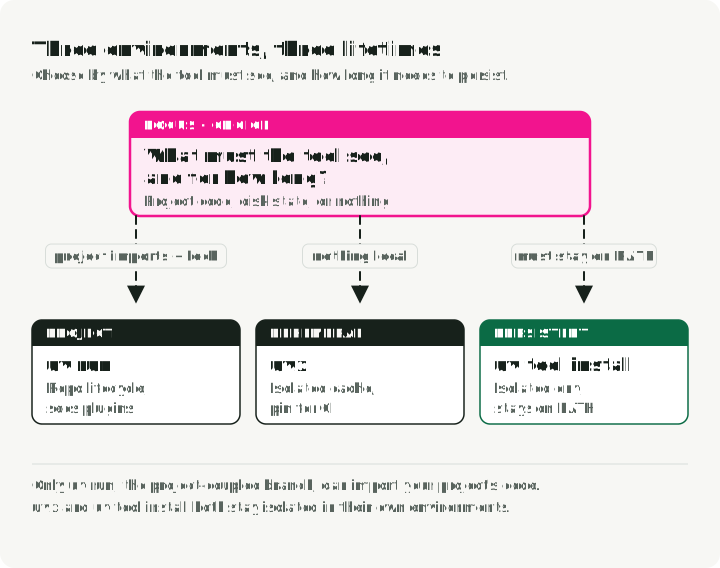
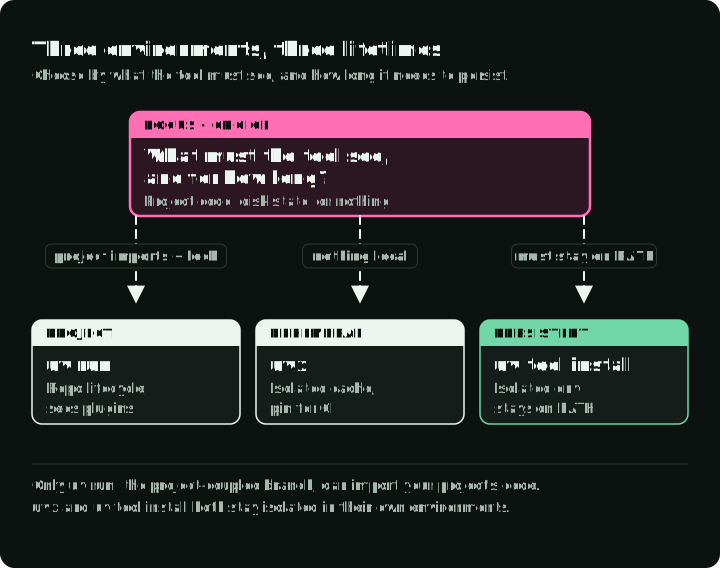
Project-coupled tools: uv run
If pytest, mypy, a code generator, or another tool must import the project or use its locked plugins, declare it in a dependency group:
uv add --group lint ruff
uv run --group lint ruff check .
uvx does not automatically install the project’s package or dependencies. A tool can still import local source files if its import behavior allows it; use uv run when it needs the installed project or its dependencies.
Ad hoc tools: uvx
uvx is an alias for uv tool run. It reuses a compatible tool installed with uv tool install; otherwise, it uses an isolated environment stored in the disposable uv cache. The uv tools documentation describes this cache and the persistent-tool lifecycle:
uvx ruff@0.12.0 check .
uvx ruff@latest check .
uvx --from jupyterlab jupyter lab
uvx --from httpie http --version
uvx --with mkdocs-material mkdocs --help
Pin the tool version in CI or documentation. With no installed tool, an unversioned first invocation selects the latest available release; later invocations may reuse cache state. @latest ignores an installed version and refreshes the cache for the newest release. Use --from when the package name differs from the command name, as with jupyterlab and httpie.
Persistent executables: uv tool install
Install a tool when scripts outside your control need its command on PATH, or when your machine setup manifest should own it:
uv tool install ruff
uv tool list
uv tool upgrade ruff
uv tool upgrade --all
uv tool uninstall ruff
If installation warns that the executable directory is absent from PATH, run uv tool update-shell and restart your shell before using the command. See uv’s tool executable documentation.
Persistent tools still use isolated environments. Do not mutate those environments manually with pip.
Single-file scripts with PEP 723
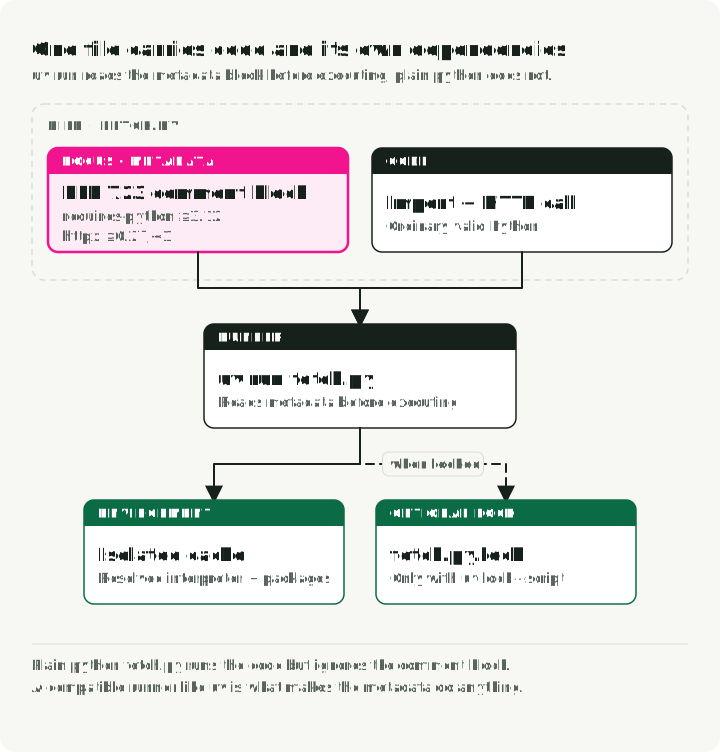
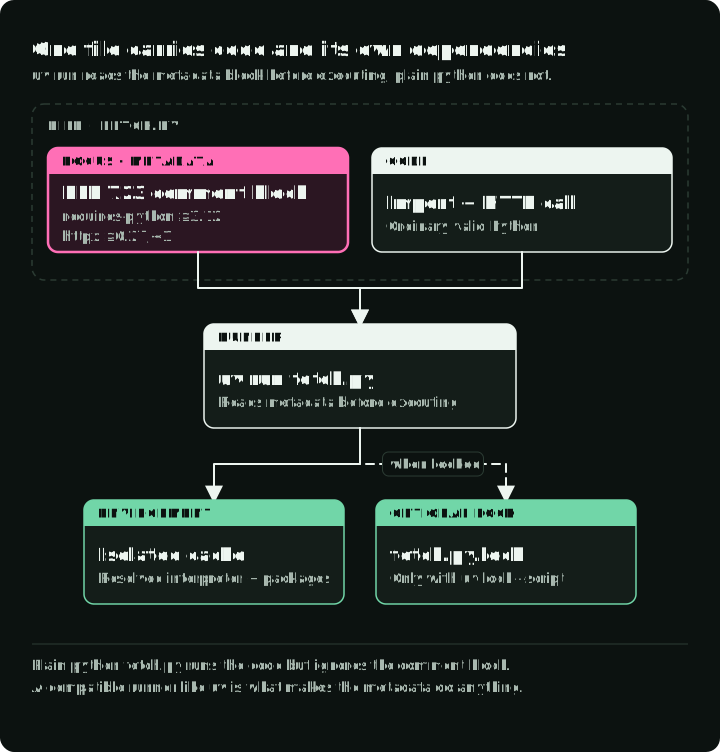
PEP 723 defines inline script metadata. A compatible runner can read the comment block and build an isolated environment. See the uv scripts guide and PEP 723 for the metadata format and runner behavior.
The figure marks the metadata block in fetch.py and shows what uv run and plain python do with the file.
uv can write the metadata block for you:
uv init --script fetch.py --python 3.12A finished script looks like this:
# /// script
# requires-python = ">=3.12"
# dependencies = [
#   "httpx>=0.27,<1",
# ]
# ///
import httpx

response = httpx.get("https://example.com", timeout=10)
response.raise_for_status()
print(response.status_code)
Run and edit metadata with uv:
uv run fetch.py
uv add --script fetch.py rich
uv remove --script fetch.py rich
Plain python fetch.py ignores the comment metadata. The script therefore depends on a compatible runner even though the Python syntax remains valid. uv is one runner. pipx run, Hatch, and PDM also read the block.
To run the script as ./fetch.py, add a shebang that calls uv:
#!/usr/bin/env -S uv run --script
# /// script
# dependencies = ["httpx"]
# ///
import httpx
chmod +x fetch.py
./fetch.pyThe -S flag makes env split the line into separate arguments, so --script reaches uv.
For a quick experiment, pass dependencies on the command line instead of writing metadata. The second line starts a Python REPL with pandas available:
uv run --with httpx scratch.py
uv run --with pandas python
For a script that must reproduce a resolution later, create an adjacent lock:
uv lock --script fetch.py
uv run --script fetch.py
This writes fetch.py.lock. An exclude-newer timestamp in the metadata block makes uv ignore package versions published after that date:
# /// script
# dependencies = ["httpx"]
# [tool.uv]
# exclude-newer = "2025-04-17T00:00:00Z"
# ///
It is weaker than a lock. It does not pin exact versions, and it cannot restore a file that the index later removes.
Use a project instead when several files share dependencies, the code is importable as a package, tests need project state, or multiple scripts must move together.
Existing requirements.txt projects
A requirements.txt file can contain loose inputs, exact pins, hashes, constraints, indexes, URLs, or a resolver-generated requirements export. Its reproducibility depends on how it was produced and consumed. The filename alone says nothing.
You have two options: keep the pip format and run it with uv pip, or, for an application you own, migrate to uv.lock.
For a fully resolved file that lists direct and transitive dependencies, use uv’s pip-compatible interface without migrating:
uv venv
uv pip sync requirements.txt
.venv/bin/python app.py
Run the installed interpreter directly here. If a pyproject.toml is present, uv run can lock and sync its requirements before execution, replacing the packages you just installed. See uv’s script guide.
uv pip sync makes the environment match a fully resolved file. If requirements.txt contains only direct requirements, use uv pip install -r requirements.txt to resolve and install their dependencies. uv pip install -r is additive. See uv’s pip locking guide.
For an owned application, a staged migration can be useful:
uv init --bare
uv add -r requirements.in
uv add --group test -r requirements-test.in
uv lock
uv sync --locked
Run the complete test and deployment path before deleting old files. If a downstream system still expects pip format, derive it from the validated uv lock with uv’s export command:
uv export --format requirements.txt \
  --output-file requirements.txt
Do not maintain uv.lock and a hand-edited export as two competing resolutions.
Cache and private indexes
The uv cache improves repeated installs but remains disposable:
uv cache prune
uv cache clean
Prefer prune for routine cleanup. clean removes all cache entries and forces later downloads and builds.
A lockfile improves repeatability. It does not make dependencies trustworthy.
For a private index, put its name and URL in pyproject.toml and keep the credentials out of the file:
[[tool.uv.index]]
name = "internal"
url = "https://pypi.example.com/simple"
Pass the credentials through UV_INDEX_INTERNAL_USERNAME and UV_INDEX_INTERNAL_PASSWORD, or through keyring. uv builds the variable names from the index name. See uv’s index authentication docs.
Old commands and their uv equivalents
If you are moving from the older tools, this table maps each familiar command to the uv command that does the same job.
| Job | Before | uv |
|---|---|---|
| Install Python | pyenv install 3.12 | uv python install 3.12 |
| New project and environment | mkdir proj && cd proj && python -m venv .venv | uv init proj && cd proj && uv sync |
| Add a package | pip install pandas && pip freeze > requirements.txt | uv add pandas |
| Compile pins | pip-compile requirements.in | uv lock |
| Upgrade one package | pip-compile --upgrade-package httpx | uv lock --upgrade-package httpx |
| Run in the environment | source .venv/bin/activate && python app.py | uv run app.py |
| Script with dependencies | a manual venv for one file | PEP 723 block + uv run |
| Run a tool once | pipx run black | uvx black |
| Install a tool | pipx install ruff | uv tool install ruff |
| Reproducible CI install | pip install -r requirements.txt | uv sync --locked |
A compact operating checklist
For each project:
- Define
requires-pythonand direct dependencies inpyproject.toml. - Separate published extras (
--optional) from local dependency groups (--group). - Commit
uv.lock. Ignore.venvand cache state. - Run project-coupled tools through the project environment.
- Use
uv lock --checkor--lockedin CI. - Test every target OS and architecture represented by the lock.
- Export compatibility formats only for named downstream consumers.
- Keep index credentials out of committed files. Pass them through environment variables or keyring.
I use uv as my default Python tool on macOS because one binary covers these jobs and keeps project and tool dependencies separate.