pyproject.toml Guide: Packaging, Dependencies, and Tools

Older Python projects often spread configuration across setup.py, setup.cfg, requirements files, MANIFEST.in, and separate files for development tools. pyproject.toml gives those concerns a common home, although it does not replace every project file or make every section part of one standard.
This guide is for Python developers who maintain a package or an application. You will learn what each of the four main tables holds ([build-system], [project], [dependency-groups], [tool.*]), how they differ from a lockfile and requirements.txt, which build backend to pick, and how to migrate an older project and set up a new one with uv.
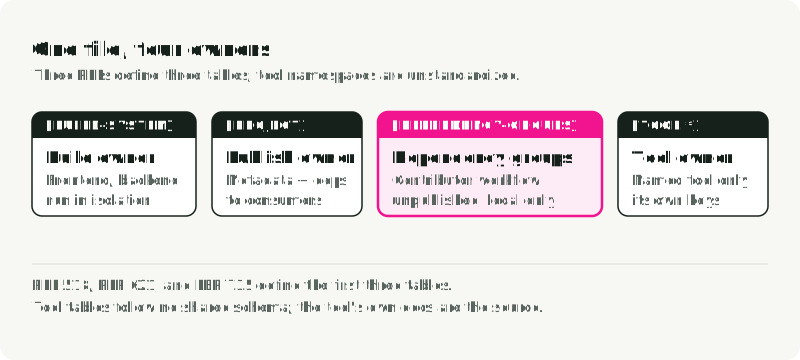
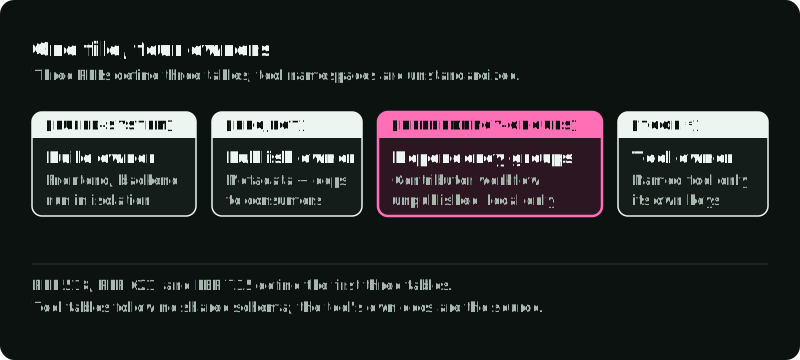
One file, four tables
Three packaging standards established the core structure:
- PEP 518 defines build-system requirements.
- PEP 621 defines project metadata.
- PEP 735 defines unpublished dependency groups.
Tool authors can also claim a namespace below [tool]. Nothing standardizes what goes there: every tool defines its own keys and behavior.
The figure splits the example file from the next section into its four tables and shows which program reads each one. Only [project] reaches users, through the metadata in the built wheel.
Here is a small packaged library:
[build-system]
requires = ["hatchling>=1.26"]
build-backend = "hatchling.build"

[project]
name = "weather-client"
version = "0.1.0"
description = "A small weather API client"
readme = "README.md"
requires-python = ">=3.11"
dependencies = [
  "httpx>=0.27",
]

[project.optional-dependencies]
cli = ["rich>=13"]

[project.scripts]
weather = "weather_client.cli:main"

[dependency-groups]
test = ["pytest>=8", "pytest-cov>=5"]
lint = ["ruff>=0.12"]

[tool.pytest.ini_options]
testpaths = ["tests"]

[tool.ruff]
line-length = 100
target-version = "py311"
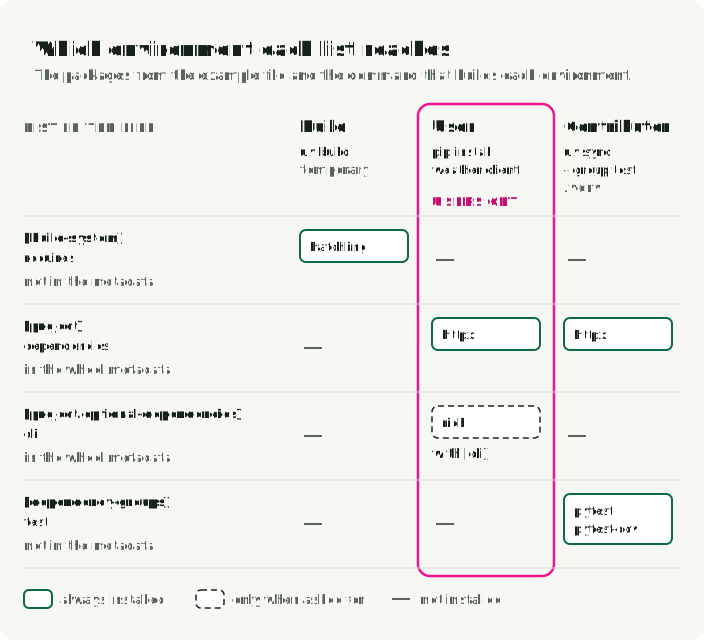
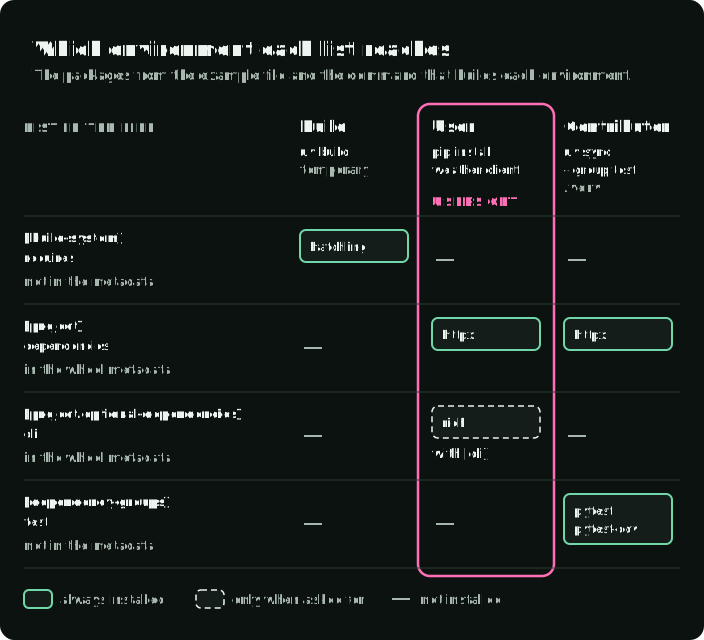
The file has four dependency lists. dependencies lists what the package needs at runtime, optional-dependencies lists what users can opt into, [dependency-groups] lists what contributors install locally, and [build-system].requires lists what the backend needs to build.
[build-system]: how source becomes a distribution
A build frontend such as python -m build, pip, or uv invokes a build backend. The backend decides how the source tree becomes an sdist or wheel and which files enter those artifacts. In the example, build-backend names hatchling, and requires lists what the frontend installs to run it.
An sdist is a source archive that an installer builds before installation; a wheel contains the files ready to install.
The build runs in this order. The frontend reads [build-system], installs requires into a temporary build environment, and runs the backend. The backend reads [project] and writes the sdist and wheel.
requires contains dependencies needed to run the backend in its isolated build environment. It is not the runtime dependency list for your package.
Declare a build system when the project produces a distribution or needs its own code installed as a package. A non-package project can still use pyproject.toml; PEP 735 even permits a file containing only dependency groups. Without a build system, uv does not install the project into its own environment: importing your own code works only from the repository root, and uv creates no [project.scripts] commands. Set tool.uv.package = true or add a build system when you need either (uv project packaging).
Choosing a backend
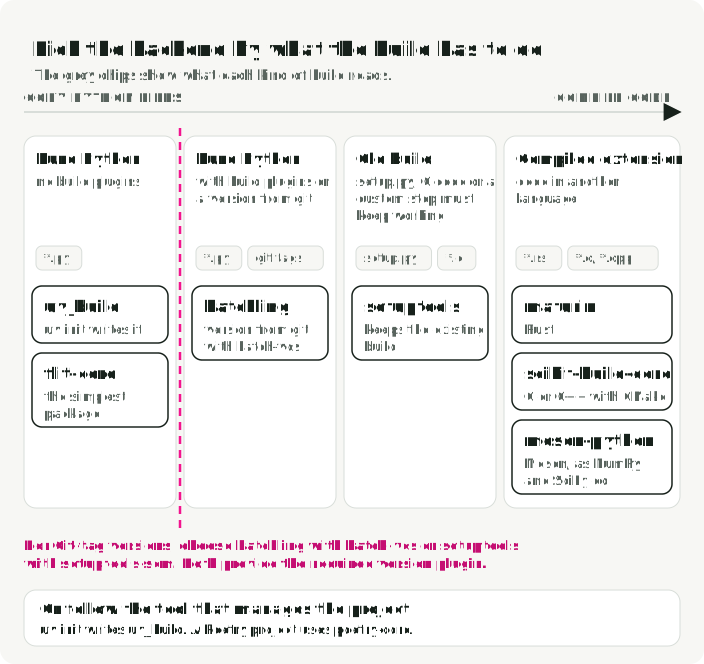
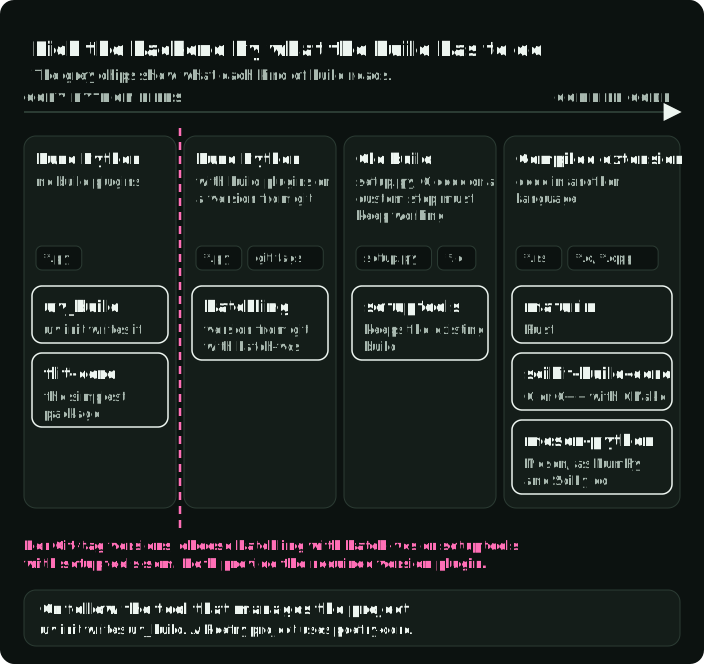
Pick the backend from what the build has to do:
| Backend | Use it when |
|---|---|
uv_build | The project is pure Python, managed with uv, and needs no build plugins. uv init writes it. |
hatchling | The project is pure Python and needs build plugins or a version from git (hatch-vcs). |
flit-core | The project is the simplest pure-Python package and needs no build plugins. |
setuptools | An existing setup.py, C extensions, or a custom build step must keep working. |
poetry-core | The team manages the project with Poetry. |
maturin | The extension is written in Rust. |
scikit-build-core | The extension is C or C++ built with CMake. |
meson-python | The project builds with Meson, as NumPy and SciPy do. |
The figure places the backends from builds that only copy Python files to builds that compile code. For a version derived from Git tags, use a backend with Git-version support, such as hatchling with hatch-vcs or setuptools with setuptools-scm.
Copy the backend’s current recommended table from its documentation. Do not add wheel to build requirements by habit; the backend declares what it needs.
[project]: metadata consumers receive
The [project] table describes the distribution: its name, version, Python compatibility, runtime dependencies, entry points, and other index metadata.
The dependency specifiers, such as httpx>=0.27 in the example, are constraints for a resolver, not a snapshot of one environment. They become part of wheel and sdist metadata, so downstream installers can combine them with requirements from other packages.
Extras are a public installation interface
[project.optional-dependencies] defines extras that consumers can request. With the cli extra from the example, a consumer can install weather-client[cli]. Because extra names and requirements are published, treat them as product capabilities and name them that way, such as cli or postgres. Do not use an extra named dev merely to hold every contributor tool.
Entry points connect installed commands to Python
The example’s [project.scripts] table has one entry, weather = "weather_client.cli:main". After the distribution is installed, the environment exposes a weather command that imports weather_client.cli and calls main. The weather command is installed even without the cli extra, so cli.py must work without rich or tell the user to install weather-client[cli].
Test the command from a built wheel, not only from the repository root; the wheel is what users receive. The migration section shows the commands.
[dependency-groups]: local, unpublished environments
PEP 735 dependency groups describe development or non-package environments without publishing them as package metadata.
[dependency-groups]
test = ["pytest>=8", "pytest-cov>=5"]
lint = ["ruff>=0.12"]
dev = [
  { include-group = "test" },
  { include-group = "lint" },
]
This is the right place for tests, linters, documentation builders, and similar contributor tools. It is also useful for applications or notebooks that do not build a distribution. include-group lets one group reuse another; extras have no equivalent.
PEP 735 does not define a command-line interface, so each installer has its own flags. Groups and extras install like this:
# Dependency groups (not published)
pip install --group test        # pip 25.1 and later
uv sync --group test
uv sync --all-groups

# Extras (published)
pip install "weather-client[cli]"
uv sync --extra clipyproject.toml declares dependencies; it does not create an environment. The commands that create one and install the project with a group differ by tool:
| Workflow | Create the environment | Install the project and the test group |
|---|---|---|
| pip | python -m venv .venv, then activate it | pip install -e . --group test |
| uv | uv sync creates .venv when it is missing | uv sync --group test (also installs the project and dev) |
[tool.*]: configuration owned by one tool
Tool tables do not share a schema. In the example, [tool.pytest.ini_options] and [tool.ruff] each use keys that only their own tool reads. Use a [tool.*] table only if the tool documents it. These common tools read their settings from pyproject.toml:
| Job | Tool | Table |
|---|---|---|
| Formatting and linting | Ruff | [tool.ruff] |
| Tests | pytest | [tool.pytest.ini_options] or [tool.pytest] |
| Type checking | mypy | [tool.mypy] |
| Coverage | coverage.py | [tool.coverage.run], [tool.coverage.report] |
pytest 9.0 added [tool.pytest], which uses native TOML types such as a list for addopts; older versions read only [tool.pytest.ini_options].
Some settings still belong in their own files because another program reads them or the file needs a different format. flake8 does not read pyproject.toml; it reads .flake8, setup.cfg, or tox.ini. pre-commit reads .pre-commit-config.yaml.
Declarations, locks, and requirements files solve different problems
The figure follows the packages from the example file. Each list reaches a different environment, and users get only the two [project] lists.
Five places hold dependency information. Each has one job:
| Artifact | Primary purpose | Typical contents |
|---|---|---|
[project.dependencies] | Published runtime contract | Direct requirements and compatible ranges |
[project.optional-dependencies] | Published opt-in capabilities | Consumer-facing extras |
[dependency-groups] | Unpublished local environments | Test, lint, docs, or application groups |
| Lockfile | Reproduce a resolved environment | Exact versions, sources, and resolution metadata |
requirements.txt | pip-compatible installation input | Requirements plus pip-specific options, constraints, URLs, or hashes |
A library normally publishes compatible constraints and tests against a range. An application usually commits the environment manager’s lockfile. Exact pins belong in the resolved deployment artifact, not blindly in a library’s public metadata. For example, a library declares httpx>=0.27 and the user’s resolver picks the version. An application commits uv.lock and installs it with uv sync --locked.
Keep a requirements file when an integration requires pip’s format or features. If a uv-managed project needs one, export it from the lock rather than maintaining two independent dependency sets:
uv export --format requirements.txt --output-file requirements.txtThe export is derived compatibility output. The lock remains the resolved source for that workflow.
A migration that preserves behavior
Do not start by deleting setup.py or requirements.txt. First classify what each existing file does. The figure shows where each part of an old setup moves in pyproject.toml, and which files stay.
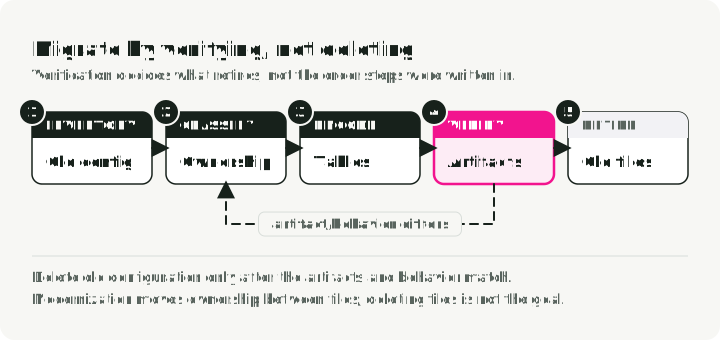
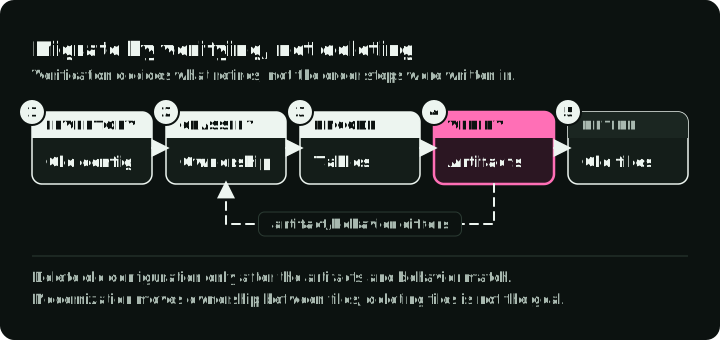
- Inventory build logic, metadata, runtime requirements, extras, developer environments, tool settings, package data, and entry points.
- Select a backend that can reproduce current file inclusion, compiled artifacts, and editable installs.
- Move static published metadata into
[project]; keep genuinely dynamic fields explicit. - Move contributor-only requirements into
[dependency-groups], not public extras. - Move tool settings only where the tool supports equivalent semantics.
- Build both an sdist and wheel, inspect their contents, and install the wheel in a clean environment.
- Run entry points, tests, import checks, and the actual deployment path.
- Delete old configuration only after the artifacts and behavior match.
Steps 6 and 7 look like this for the example library:
uv build                        # or: python -m build
unzip -l dist/*.whl             # files in the wheel
tar -tzf dist/*.tar.gz          # files in the sdist

uv venv /tmp/check
uv pip install --python /tmp/check dist/*.whl
/tmp/check/bin/weather --help
Compare both file lists with the old build before you delete anything. A missing data file or module shows up here, not in the repository checkout.
MANIFEST.in may still be needed with some setuptools layouts, and a small setup.py can remain valid for programmatic build behavior.
A current uv workflow
uv init creates a different layout for each flag. Choose one of these alternatives:
# Packaged application: src/weather_app/, uv_build, and a weather-app command
uv init weather-app

# Single main.py and no build system
uv init --no-package weather-app

# Library: src layout, uv_build, and a py.typed marker
uv init --lib weather-client
uv 0.12.0 made the packaged layout the default. Earlier versions created the main.py layout by default.
uv init creates project files. uv lock creates or updates uv.lock without creating .venv. uv sync or uv run updates the lockfile and creates and synchronizes .venv as needed.
Continue with the library created by uv init --lib weather-client. It contains a generated hello() function, so add a small test before running pytest:
cd weather-client
uv add httpx
uv add --group test pytest pytest-cov
mkdir -p tests
cat > tests/test_weather_client.py <<'PY'
from weather_client import hello

def test_hello():
    assert hello() == "Hello from weather-client!"
PY
uv run --group test pytest
uv build
The test should report 1 passed. --group test selects the test dependencies even after a default uv sync has removed them.
Inspect the archives and install the wheel in a clean environment as shown in the migration section before you publish. This generated library has no weather command, so check import weather_client instead. When ready, upload the files in dist/ to PyPI:
uv publishOutside uv, python -m build followed by twine upload dist/* does the same.
uv places local development requirements in standardized dependency groups. Its native uv_build backend supports pure-Python projects only; compiled extensions need another backend from the table above, such as maturin or scikit-build-core. See uv’s project configuration documentation for the current backend settings.
Several packages in one repository
A repository with several packages can make them one uv workspace. The root pyproject.toml lists the members:
[tool.uv.workspace]
members = ["packages/*"]
The members share one uv.lock and one .venv. uv run --package <name> runs a command in the context of one member.