MCP Server Tutorial: Build with Python, uv, and FastMCP

This MCP server tutorial builds a small feature store server with FastMCP, runs it with uv, and connects it to Claude Desktop. It is for Python developers who want to expose one local database workflow to an MCP host. By the end, you will have a pinned v1 SDK environment, a server with three tools and a resource, and a local check to run before you connect Claude Desktop.
What is an MCP server?
The Model Context Protocol (MCP) is an open protocol for connecting AI applications to external systems. It replaces a separate custom integration for every tool with one set of conventions.
In this tutorial we’ll build a FeatureStoreLite MCP server. It sits between an LLM and a feature store, meaning a database of precomputed ML features. The server exposes tools for querying and writing feature vectors keyed by user, product, or document.
Why build this?
Debugging a feature pipeline usually means dropping into SQL or writing a throwaway script to check a value. With the server running, you ask Claude instead: “What is the feature vector for user_123?” or “Show me the metadata for product_abc.”
Why use uv?
We’ll use uv to install packages, resolve dependencies, and manage the virtual environment. The Claude Desktop configuration will run this project from its own directory with --locked, so it uses the mcp[cli] dependency declared here and the versions recorded in uv.lock.
Tools, resources, and prompts
An MCP server can offer three kinds of things. The MCP specification separates them by who decides to use each one:
| Primitive | Who triggers it | In this server |
|---|---|---|
| Tool | The model decides to call it | get_feature, store_feature, list_features |
| Resource | The host decides how to include it in context | schema://main |
| Prompt | The user picks it, like a saved message template | Not used here |
Tools let the model request an action. Resources supply context through the host; section 4.4 shows why exposing a resource does not guarantee that an answer uses it.
Architecture overview
The diagram shows which parts run on your machine and which data goes to the model:
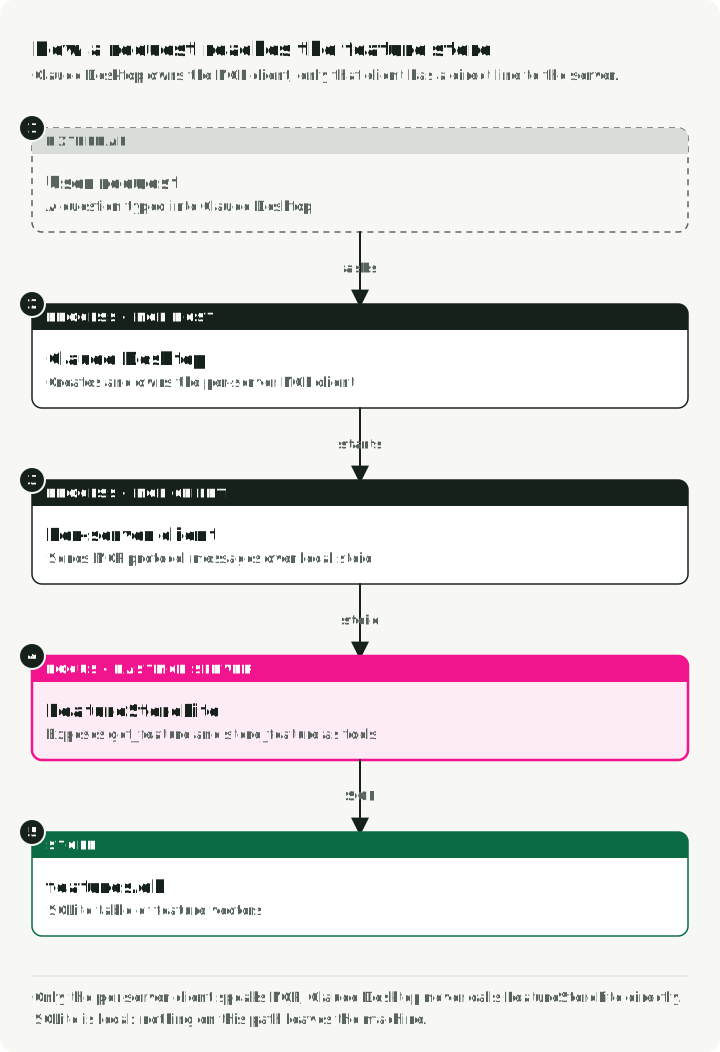
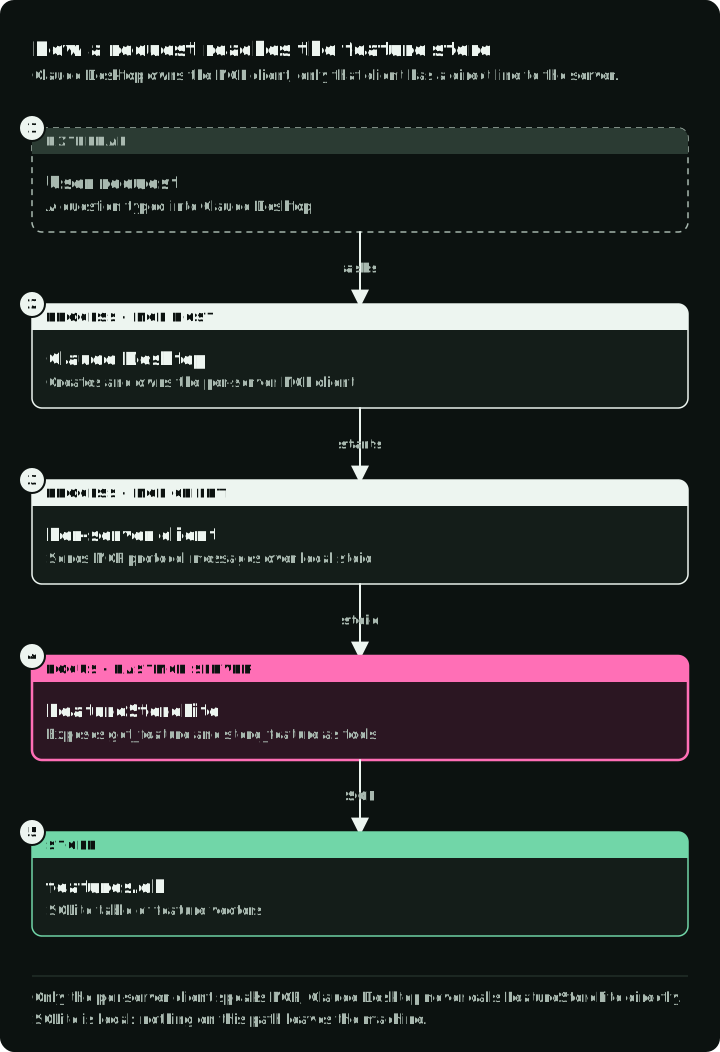
- The user asks a question in natural language.
- Claude Desktop is the MCP host. It sends the conversation to the Claude model, creates one MCP client for this server, and manages the connection.
- Our
FastMCPserver exposes three tools (get_feature,store_feature,list_features) and one resource (schema://main). - SQLite is the backing store for the feature vectors.
The host passes the tool list to Claude. Claude may request a tool call, but the per-server MCP client sends the protocol messages. The server and SQLite run locally, but tool results go to the model as part of the conversation. Expose only data you would also paste into the chat.
1. Setup and installation
1.1. Install uv
If you don’t already have uv, install it. The rest of the tutorial assumes it’s on your PATH.
# macOS/Linux
curl -LsSf https://astral.sh/uv/install.sh | sh

# Or via Homebrew
brew install uv
1.2. Initialize the project
Create a new directory and initialize a Python project. uv init creates a pyproject.toml for you.
# Create project directory
mkdir mcp-featurestore
cd mcp-featurestore

# Initialize Python project
uv init

# Add the MCP SDK with CLI tools
uv add "mcp[cli]>=1.28,<2"
This tutorial uses the MCP Python SDK v1 API. The official v1 SDK documentation instructs v1 users to pin mcp>=1.28,<2, so keep the <2 upper bound until you migrate the code. uv.lock records the complete resolved environment after this command.
The code uses the FastMCP that ships with the official SDK (mcp.server.fastmcp). The standalone fastmcp package is a separate project with a different API, so do not mix its documentation with this code.
2. Building the server
Two files, split by concern:
database.pyhandles SQLite operations.featurestore_server.pydefines the MCP server.
2.1. The database layer (database.py)
This module owns the SQLite connection and a couple of helpers. We seed it with two example rows so the server has something to return on the first query.
Create database.py:
# database.py
import json
import os
import sqlite3

def get_db_path() -> str:
    """Get the database path - always in the script's directory"""
    script_dir = os.path.dirname(os.path.abspath(__file__))
    return os.path.join(script_dir, "features.db")

def init_db() -> None:
    """Initialize the feature store database with table and sample data"""
    conn = sqlite3.connect(get_db_path())
    conn.execute("""
        CREATE TABLE IF NOT EXISTS features (
            key TEXT PRIMARY KEY,
            vector TEXT NOT NULL,
            metadata TEXT,
            created_at TIMESTAMP DEFAULT CURRENT_TIMESTAMP
        )
    """)

    # Sample data for experimentation
    example_features = [
        (
            "user_123",
            "[0.1, 0.2, -0.5, 0.8, 0.3, -0.1, 0.9, -0.4]",
            json.dumps({"type": "user", "id": 123, "segment": "premium"}),
        ),
        (
            "product_abc",
            "[0.7, -0.3, 0.4, 0.1, -0.8, 0.6, 0.2, -0.5]",
            json.dumps({"type": "product", "id": "abc", "category": "electronics"}),
        ),
    ]

    # Insert if not exists
    for key, vector, metadata in example_features:
        try:
            conn.execute(
                "INSERT INTO features (key, vector, metadata) VALUES (?, ?, ?)",
                (key, vector, metadata),
            )
        except sqlite3.IntegrityError:
            pass  # Already exists

    conn.commit()
    conn.close()

def get_db_connection() -> sqlite3.Connection:
    """Get a database connection"""
    return sqlite3.connect(get_db_path())

if __name__ == "__main__":
    init_db()
    print("✅ Database initialized successfully!")
Initialize the database:
uv run python database.py2.2. The MCP server (featurestore_server.py)
FastMCP does most of the work. Decorate a plain Python function and it gets registered as an MCP tool or resource. FastMCP builds each tool’s input schema from the type hints and uses the docstring as the tool description. The model sees both, so write the docstring for the model: say what the tool does and what each argument looks like.
Create featurestore_server.py:
# featurestore_server.py
import json
from typing import Annotated, Any

from mcp.server.fastmcp import FastMCP
from pydantic import Field

from database import get_db_connection, init_db

# Initialize the MCP Server
mcp = FastMCP("FeatureStoreLite")

# Ensure DB is ready when server starts
init_db()

# A float that rejects NaN and infinities
FiniteFloat = Annotated[float, Field(allow_inf_nan=False)]

@mcp.resource("schema://main")
def get_schema() -> str:
    """The CREATE TABLE statements of the feature store database."""
    conn = get_db_connection()
    try:
        schema = conn.execute(
            "SELECT sql FROM sqlite_master WHERE type='table'"
        ).fetchall()
        return "\n".join(sql[0] for sql in schema if sql[0]) or "No tables found."
    finally:
        conn.close()

@mcp.tool()
def store_feature(
    key: str,
    vector: Annotated[list[FiniteFloat], Field(min_length=1)],
    metadata: dict[str, Any] | None = None,
) -> str:
    """Store a feature vector under key. Overwrites an existing key.

    vector: non-empty list of finite numbers, e.g. [0.1, 0.2].
    metadata: optional JSON object, e.g. {"type": "user"}.
    """
    metadata_json = None if metadata is None else json.dumps(metadata, allow_nan=False)
    conn = get_db_connection()
    try:
        conn.execute(
            "INSERT OR REPLACE INTO features (key, vector, metadata) VALUES (?, ?, ?)",
            (key, json.dumps(vector), metadata_json),
        )
        conn.commit()
    finally:
        conn.close()
    return f"Stored feature '{key}'"

@mcp.tool()
def get_feature(key: str) -> str:
    """Return the vector and metadata stored under key, as JSON.

    Call list_features first if you do not know the key.
    """
    conn = get_db_connection()
    try:
        row = conn.execute(
            "SELECT vector, metadata FROM features WHERE key = ?", (key,)
        ).fetchone()
    finally:
        conn.close()

    if row is None:
        raise ValueError(f"Feature '{key}' not found. Call list_features for valid keys.")
    return json.dumps(
        {
            "key": key,
            "vector": json.loads(row[0]),
            "metadata": json.loads(row[1]) if row[1] else None,
        },
        indent=2,
    )

@mcp.tool()
def list_features() -> str:
    """Return a JSON array of every stored feature key."""
    conn = get_db_connection()
    try:
        rows = conn.execute("SELECT key FROM features").fetchall()
        return json.dumps([row[0] for row in rows])
    finally:
        conn.close()

if __name__ == "__main__":
    mcp.run()
Four details in this code decide what the model sends and what it gets back:
- Typed
vector. The tool schema asks for a non-empty array of numbers. With SDK 1.30, Pydantic also converts booleans and numeric strings to floats:[true, false]becomes[1.0, 0.0], and["1.5", "2"]becomes[1.5, 2.0]. It then checks that the list is non-empty and every value is finite before the function runs. If a model sends the vector as a JSON string such as"[1, NaN]", FastMCP parses the string first.allow_inf_nan=Falsethen rejectsNaNand infinities, which Python’s JSON parser accepts by default. - Typed
metadata. The schema accepts a JSON object,null, or an omitted value.allow_nan=FalsekeepsNaNout of the stored metadata as well. - Raised errors.
get_featureraisesValueErrorfor a missing key. A raised exception reaches the client as a tool error withisError: true; a returned string looks like a successful result. - Overwrites.
store_featureusesINSERT OR REPLACE, so it replaces an existing key. The docstring states this, so the model knows before it calls the tool.
3. Testing with MCP Inspector
Before wiring this into Claude, check the server with the MCP Inspector. It’s a small web UI that connects to the server the way a host does. In it you can browse the server’s resources, call each tool with your own arguments, and see each request and response.
The SDK launches Inspector through npx, so this step also needs Node.js and npm with npx on your PATH. Inspector 2.10.1 requires Node.js 22.19.0 or later. Check the installed commands, then start Inspector:
node --version
npx --version
uv run mcp dev featurestore_server.py
The command starts the server under the MCP Inspector over stdio. Use the browser URL that the command prints. The Inspector UI port is implementation-dependent, so do not assume a fixed port.
Call get_feature with key="user_123". If it returns the JSON for the seed row, the server is working. Then call it with a key that does not exist: the result is a tool error with isError: true. This checks the local protocol path, tool registration, the database lookup, and the error path. It does not test how Claude picks tools; section 4 checks that.
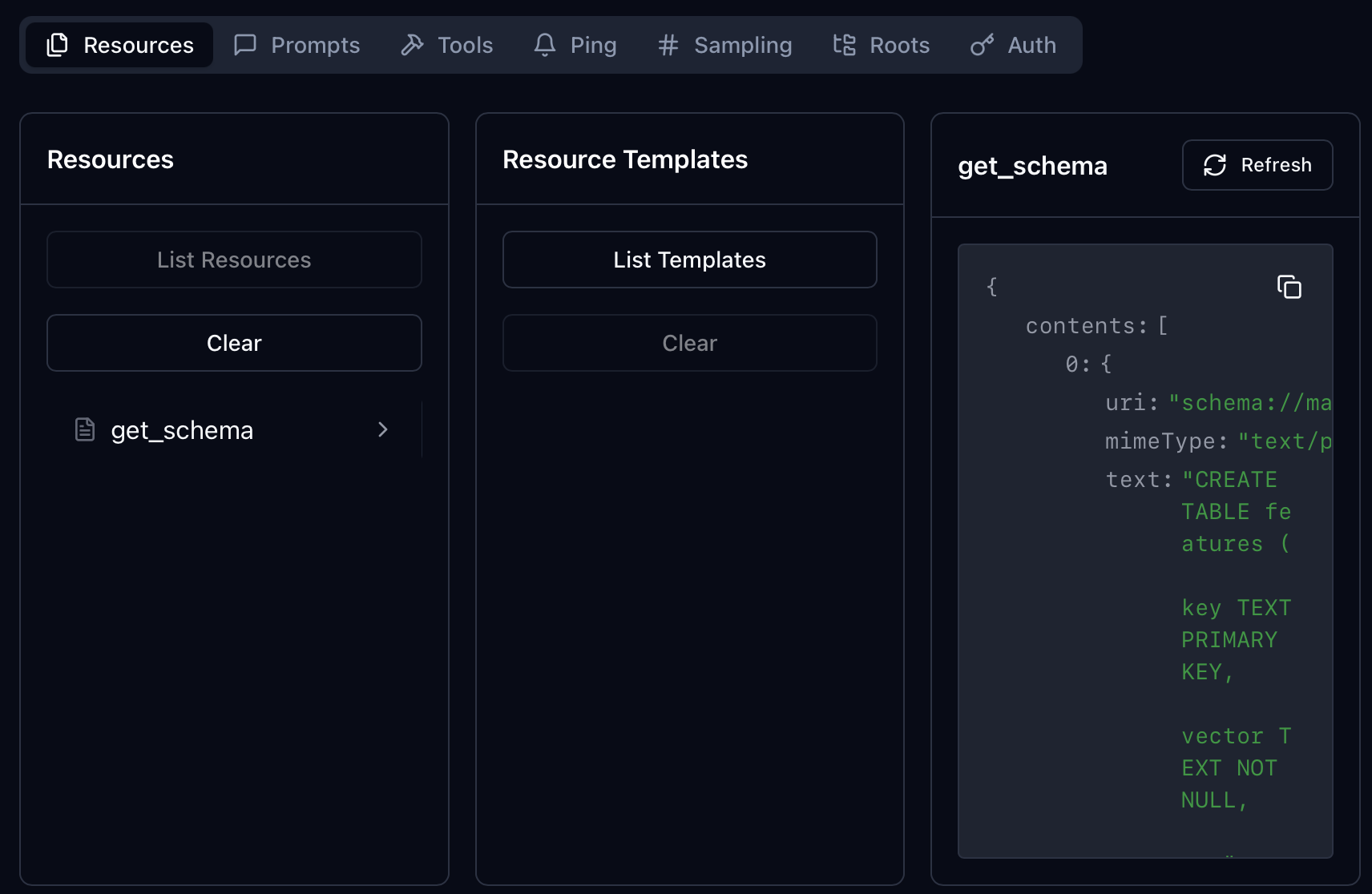
The Inspector reads the SQL schema from the schema://main resource:
4. Connecting to Claude Desktop
Once the Inspector confirms the server works, register it with Claude Desktop.
4.1. Configure Claude
Edit your Claude Desktop configuration file:
- macOS:
~/Library/Application Support/Claude/claude_desktop_config.json - Windows:
%APPDATA%/Claude/claude_desktop_config.json
Add your server to the mcpServers object:
{
    "mcpServers": {
        "featurestore": {
            "command": "uv",
            "args": [
                "run",
                "--directory",
                "/ABSOLUTE/PATH/TO/mcp-featurestore",
                "--locked",
                "mcp",
                "run",
                "/ABSOLUTE/PATH/TO/mcp-featurestore/featurestore_server.py"
            ]
        }
    }
}Important: use absolute paths for both the project directory and featurestore_server.py. Claude Desktop starts the server as a separate process. uv run discovers a project from its working directory for a command such as mcp, so --directory selects this project’s pyproject.toml and uv.lock; --locked then fails instead of changing that lockfile. The uv add command in step 1.2 has already declared mcp[cli] in the project.
The SDK also has a shortcut: uv run mcp install featurestore_server.py writes the Claude Desktop entry for you. In mcp 1.30 that entry runs uv run --frozen --with mcp[cli] mcp run /ABSOLUTE/PATH/featurestore_server.py. It has no --directory, so it does not use this project’s uv.lock, and --with mcp[cli] has no <2 bound. Use it for a quick try; the manual config above is the reproducible one.
4.2. How the interaction works
Here’s what runs end to end when Claude needs a feature lookup. Steps 1 and 2 run once, when Claude Desktop starts the server. Steps 3 to 6 run for every question that needs feature data.
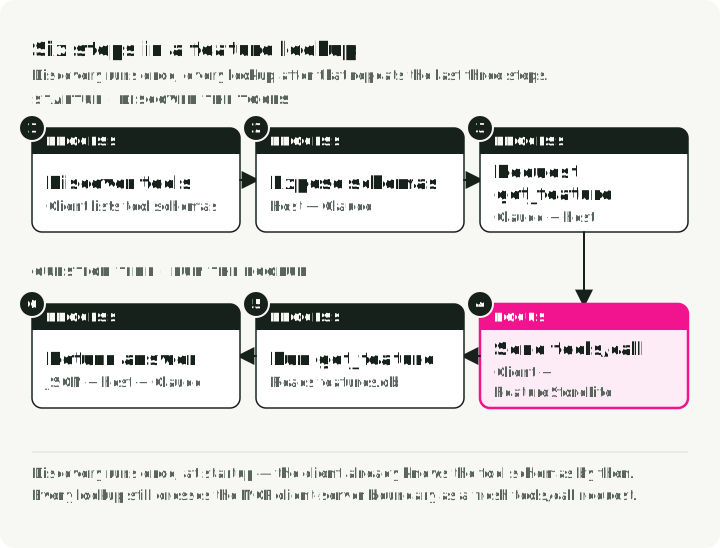
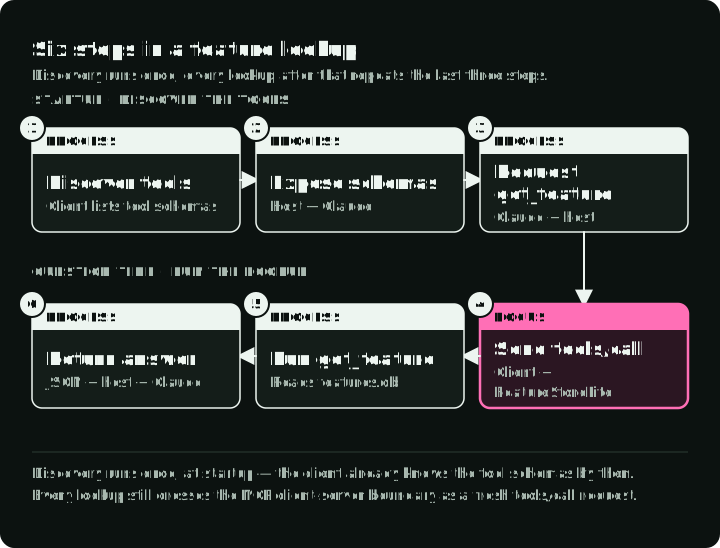
- Claude Desktop starts a dedicated MCP client for the server and discovers its tools.
- The host makes the tool descriptions available to Claude.
- Claude can request a tool call when the question needs feature-store data.
- The MCP client sends that request to the server.
- The server runs the Python function and returns the result to the host.
- The host can provide the result to Claude for the final answer.
This host-client-server separation follows the MCP architecture specification.
4.3. Example queries
Restart Claude Desktop and try a few prompts:
-
“List all available features.” The deterministic result contains the two seeded keys:
user_123andproduct_abc. -
“Get the feature vector for user_123.” The response contains the vector and the
premiummetadata fromdatabase.py. -
“Store a new feature for
new_itemwith the vector[0.5, 0.5]and the metadata{"type": "test"}. Then retrievenew_itemand show the stored vector and metadata.” The validated vector must be non-empty and contain only finite floats after conversion. Metadata may be a JSON object,null, or omitted. The follow-up read checks the complete write/read round trip. -
“Get the feature vector for user_999.”
get_featureraises an error for the missing key. Claude should say that the key does not exist, and it may calllist_featuresto show the valid keys.
4.4. Reading Claude’s answers
The server returns tool and resource data. Claude chooses the tool and writes the explanation around the result.
This screenshot records a June 2025 run with an earlier version of the example. I asked Claude to show the database schema:
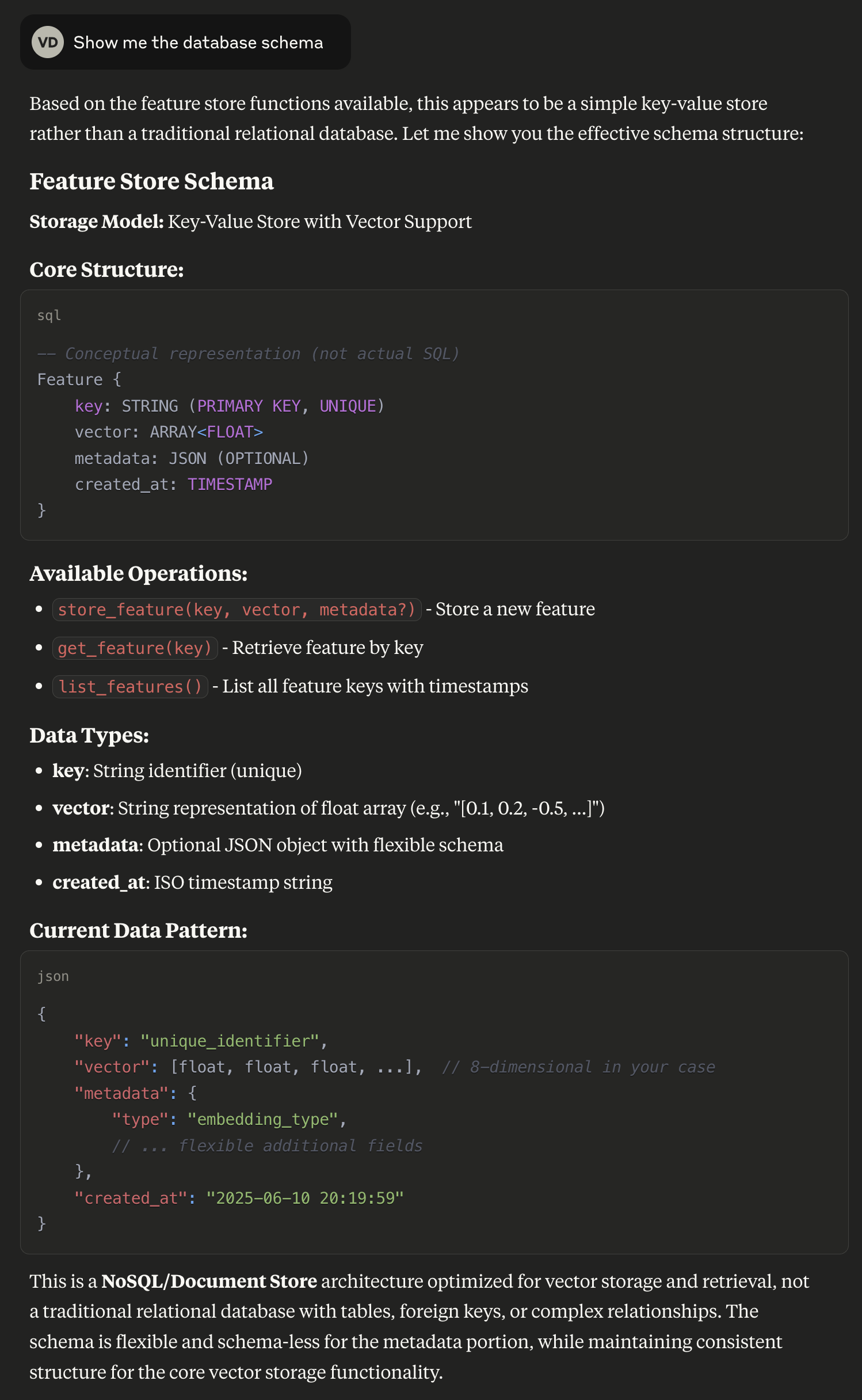
Claude called the system a NoSQL or document store and gave a conceptual schema, but database.py creates a relational SQLite table. The shown answer is not the CREATE TABLE statement returned by schema://main. The screenshot does not record whether Claude Desktop read that resource or which context Claude received, so it does not establish the cause of the mistake.
Resources are application-driven: the host decides how to include them in model context, through user selection or automatic inclusion. MCP does not require the host to pass every resource to the model. If the model should request the schema through a tool call, expose it as a tool as well.
A plausible explanation from the model is not what the tool returned. When the detail matters, check the tool result or the source.
4.5. Other MCP hosts
The server does not depend on Claude Desktop. Any host that starts stdio servers on the same machine can run the same uv command. Claude Desktop uses the JSON from section 4.1; the other two are:
- Claude Code:
claude mcp add featurestore -- uv run --directory /ABSOLUTE/PATH/TO/mcp-featurestore --locked mcp run /ABSOLUTE/PATH/TO/mcp-featurestore/featurestore_server.py. Everything after--is the command that starts the server. - Cursor reads the same
mcpServersJSON shape from~/.cursor/mcp.json, or.cursor/mcp.jsonin a project.
A host on another machine cannot start a stdio process on yours. For a server that several people share, run it over Streamable HTTP with mcp.run(transport="streamable-http") and add authentication in front of it.
5. Troubleshooting
Find which part failed before you change the code: startup errors are in the logs, tool errors repeat in the Inspector without a model, and a wrong answer needs the tool result compared with Claude’s text.
-
“Server connection failed”:
- Check the logs in
~/Library/Logs/Claude/on macOS or%APPDATA%\Claude\logson Windows.mcp.logrecords connection events.mcp-server-featurestore.login the same folder holds the server’s own stderr, so a startup traceback appears there (Claude Desktop logs). - Confirm the config uses an absolute path, not a relative one.
- Confirm
uvis on Claude Desktop’sPATH. If it isn’t, point at the full binary path (which uvwill tell you where it lives). - On stdio, stdout carries the protocol messages. Log to stderr; a
print()in the server corrupts that stream and can break the connection.
- Check the logs in
-
“Tool execution error”:
- Reproduce it in the Inspector with
uv run mcp dev featurestore_server.py. The Inspector shows the error message and the arguments that caused it. - Check that
features.dbis being created next todatabase.py. The path comes fromget_db_path(), which resolves it relative to the script, so a shifting working directory should not move the file.
- Reproduce it in the Inspector with
-
The call succeeds, but the answer is wrong:
- Open the tool result in the chat and compare it with Claude’s text. Section 4.4 shows a model answer that misdescribed the database.
6. Before an agent uses it for real
store_featureoverwrites any key, including the seed rows. Keep per-call approval on for write tools in the host, or move them to a separate server that you enable only when you need it.- Tool results reach the model provider as part of the conversation. Do not return data that must stay on the machine.
- A server that several people share needs Streamable HTTP and authentication instead of stdio (section 4.5).
7. Conclusion
That’s the whole thing: a FastMCP server, a SQLite backing store, and a Claude Desktop config that points at a uv run command. The same shape works for most things you can wrap in a Python function. Swap the SQLite calls for a real feature store, an internal API, or a model registry, and the server stays small.