Stable Diffusion on macOS: Local Image Tools Compared

Running image models locally on macOS starts with choosing a tool. This guide is for Mac users who want to generate images locally: you will learn what each of six tools is good for, how to install it, what a model needs besides its file, and how to test a tool on your machine before you commit to it.
Draw Things, DiffusionBee, ComfyUI, InvokeAI, AUTOMATIC1111, and Fooocus overlap, but they differ in setup, model support, workflow control, extensions, automation, and maintenance. A drag-and-drop app gets you started quickly; a node graph takes longer to learn but exposes more of the pipeline. On Apple Silicon, the application, model family, precision, image size, and workflow all affect whether generation fits in memory.
What a local image app runs
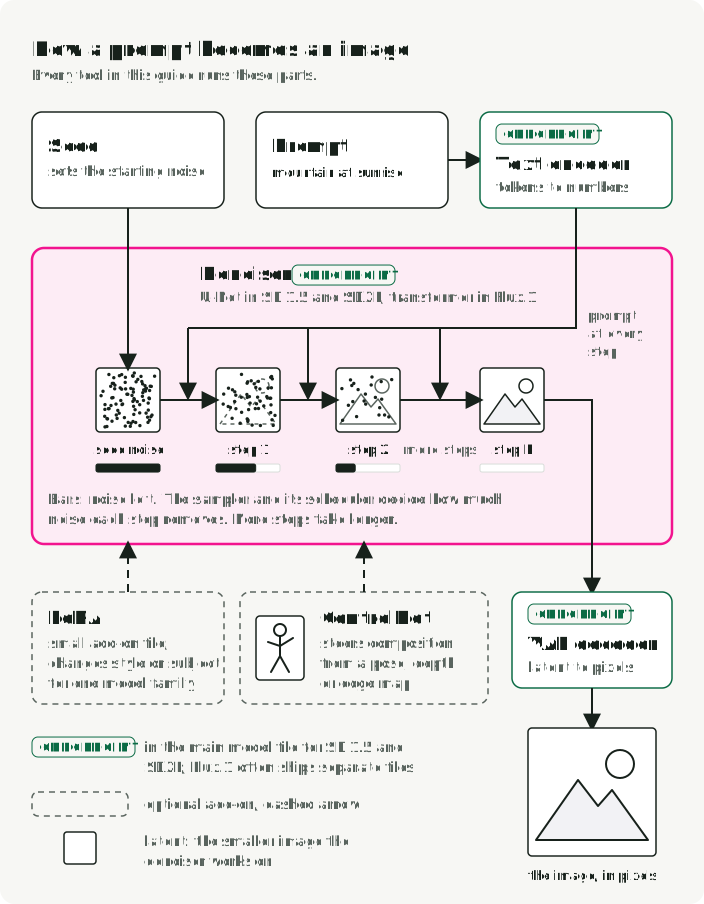
Every tool in this guide runs the same kind of pipeline. At its center is the denoiser: a U-Net in SD 1.5 and SDXL, a transformer in Flux.1. It starts from random noise and removes a little of it at each step, guided by the prompt. The other parts prepare its inputs or turn its output into an image:
| Part | What it does |
|---|---|
| Checkpoint | The main model file. It holds the denoiser and, for SD 1.5 and SDXL, usually the text encoder and VAE too. Flux.1 often ships these parts as separate files. |
| Text encoder | Turns the prompt into numbers the denoiser can use. A tokenizer first splits the prompt into tokens. |
| VAE | Converts between pixels and the smaller “latent” image the denoiser works on. Its decoder turns the final latent into the image you see. |
| Sampler and steps | The seed sets the starting noise. The sampler, with its scheduler, decides how much noise each step removes. More steps take longer. |
| LoRA | A small add-on file that changes the style or subject of the model family it was trained for. A textual inversion embedding is a smaller add-on that teaches the text encoder a new word. |
| ControlNet | An extra model that steers composition from a control image, such as a pose, a depth map, or an edge map. |
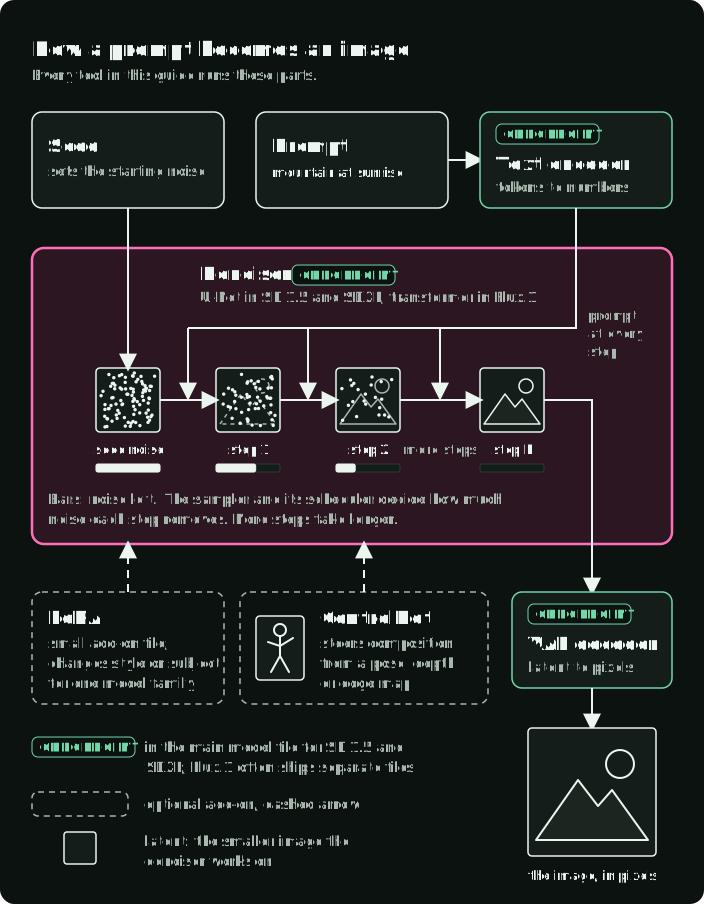
In the figure, follow the latent from seed noise to step N: the prompt reaches the denoiser at every step, the bars show how much noise is left, LoRA and ControlNet are optional inputs, and the VAE decoder turns the small latent into the image. The CHECKPOINT tags mark the parts that one checkpoint file usually holds.
Getting models
Most tools can download a starter model for you. For anything else, two sites cover most needs:
- Hugging Face hosts the official base models from Stability AI, Black Forest Labs, and others. Read the license on the model card: licenses differ even within one family, such as FLUX.1 [schnell] (Apache 2.0) and FLUX.1 [dev] (a non-commercial license). Some repositories ask you to accept the license before the download starts.
- Civitai hosts community checkpoints, LoRAs, and embeddings. Each page names the base model the file was trained for.
Prefer .safetensors files. A .ckpt file is a Python pickle, and loading a pickle can run arbitrary code. A .safetensors file stores only tensors. Load a .ckpt only from a source you trust.
Before you download several gigabytes, check the model family (SD 1.5, SDXL, Flux.1, and so on) against what your tool supports. A LoRA trained for SDXL does not work with an SD 1.5 checkpoint.
A model file is not a portable workflow
Several applications can load .safetensors files, but a matching file extension does not mean the model will work. A complete pipeline may also require a particular architecture, text encoder, VAE, scheduler, ControlNet, LoRA, or application-specific configuration.
Record everything that produced an image:
- application and version
- model repository, revision, and license
- every model component and adapter
- prompt, negative prompt, seed, sampler, steps, guidance, and dimensions
- graph or workflow file when the application exposes one
The same seed can still produce a different image after a backend, model, sampler, or precision change.
Memory, disk space, and the software under each tool
On Apple Silicon the CPU and GPU share one pool of memory. The GPU can use most of it, so a Mac with 32 GB can load models that do not fit on a typical 8 to 12 GB graphics card. The same pool also holds macOS and every open app; Activity Monitor shows app, wired, compressed, and swap use.
Peak memory during generation has four parts: the model components, the working memory for activations and attention, any loaded adapters and control models, and the memory that macOS and your apps already use. The top of the figure draws them as parts of the same memory, plus the memory that remains free; it is not a sizing formula. The bottom compares example unquantized download sizes. These bars measure disk use, not runtime memory.
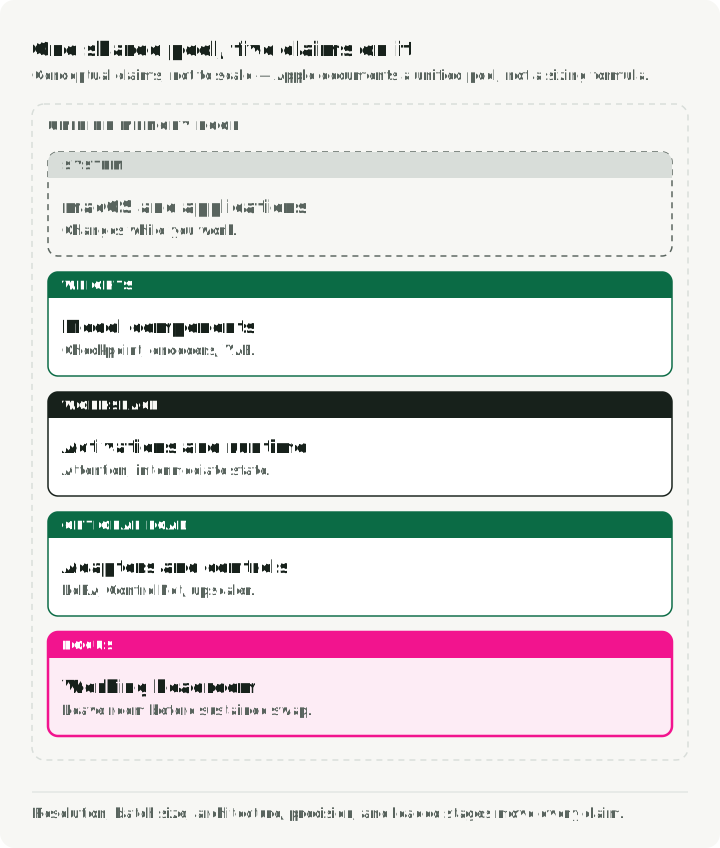
Resolution, batch size, model architecture, upscaling, and ControlNet all change runtime memory use. Download size estimates disk use; runtime memory depends on the precision and quantization the app loads, which components remain loaded, and temporary tensors created during generation. Quantization stores weights with fewer bits, and Draw Things can load FLUX.1 weights on demand rather than keeping all of them in memory. Test the intended workflow, then watch Memory Pressure and Swap Used; sustained swapping is evidence to reduce the workload or choose more memory.
Plan disk space separately. These unquantized downloads on Hugging Face include an SD 1.5 checkpoint of about 4 GB and an SDXL base checkpoint of about 7 GB. The FLUX.1 [schnell] transformer alone is about 24 GB, and a 16-bit T5 text encoder adds about 10 GB. FLUX also needs other components, so these two files are not its complete download. If your Mac is low on space, keep the model folders on an external SSD.
The tools also differ in the software between them and the GPU. ComfyUI, AUTOMATIC1111, Fooocus, and InvokeAI are Python apps that run on PyTorch’s Metal backend, called MPS (Metal Performance Shaders), so their features and speed depend on the installed PyTorch version. Draw Things uses its own engine with Metal FlashAttention kernels. All of them end at Metal and the same unified memory pool.
Six tools compared
| Tool | Install | What you can control | Operational tradeoff |
|---|---|---|---|
| Draw Things | Mac App Store | Native Apple UI with local models, adapters, ControlNet, and scripts | Dense product-specific interface; verify support for the exact model family |
| DiffusionBee | DMG download | Packaged macOS app with an integrated generation workflow | No release since 2.5.3 in August 2024; no support for model families released after that |
| ComfyUI | Comfy Desktop DMG or brew install --cask comfy | Explicit node graph, JSON workflows, API, and custom nodes | More moving parts; graphs and third-party nodes become dependencies |
| InvokeAI | Invoke Launcher DMG | Canvas with inpainting and outpainting, plus a node workflow editor | Needs macOS 14 or later; the docs recommend 16 GB of memory or more |
| AUTOMATIC1111 | Homebrew packages, git clone, and ./webui.sh | Form-based Web UI, scripts, API, and a large set of extensions | Last release in February 2025; documented Apple Silicon limitations; extensions run third-party code in the same environment |
| Fooocus | git clone and a conda environment (unofficial on Mac) | Opinionated, prompt-first SDXL workflow | Bug fixes only; Mac guidance is unofficial and lightly tested |
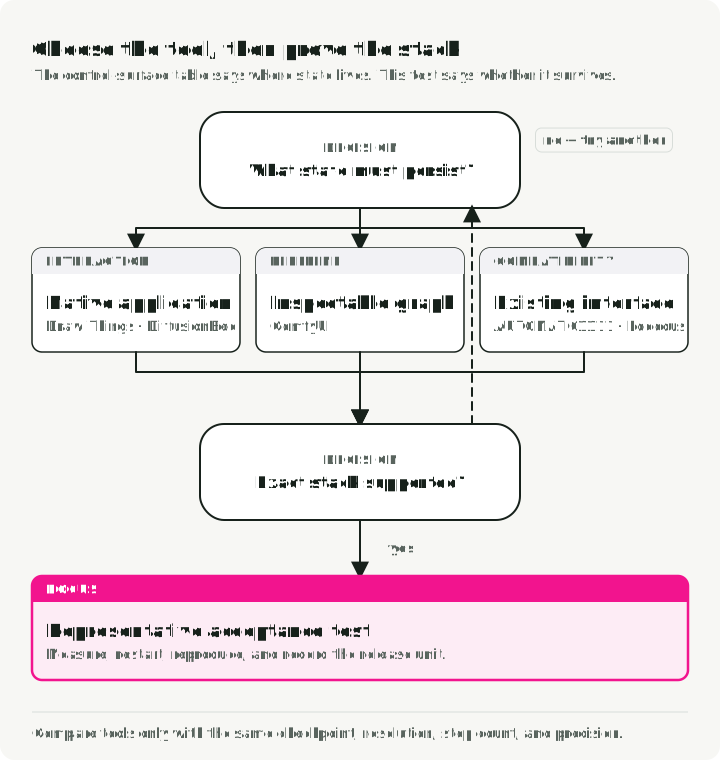
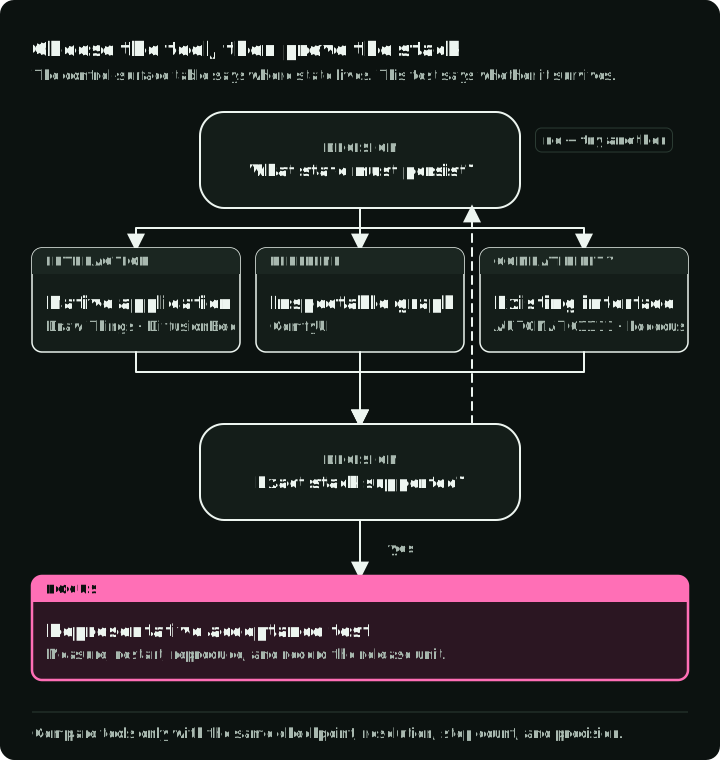
The table shows where your settings are saved: inside the app, in a web form, or in a graph file you can review. The figure starts from a native app and shows when to move to another tool, with a sketch of where each one keeps your settings. Run the acceptance test at the end of this article before you commit to any of them.
Draw Things: native interaction and scripting
Draw Things is an Apple-platform application for local image generation. Install it from the Mac App Store; it needs no Python or terminal. Its current documentation covers models, LoRAs, ControlNet, textual inversion, Core ML, and versioned JavaScript scripting.
Choose it when the work should remain inside a native application but still needs more control than a prompt box. Before standardizing on it, import the exact model components and reproduce one representative edit, adapter, or control workflow. “Native” describes the interface and implementation; it does not guarantee support or speed for every new architecture.
DiffusionBee: packaged macOS workflow
DiffusionBee packages model download and common generation tasks into a desktop application. Download the DMG and move the app to Applications. Its project documentation lists image-to-image, inpainting, outpainting, ControlNet, LoRA, and SDXL, and the app includes upscaling. The DiffusionBee 2.5.3 release notes report Flux.1 support only on arm64 Macs running macOS 13 or later.
The last DiffusionBee release, 2.5.3, shipped in August 2024, and the download page on diffusionbee.com still links to 2.5.1; get 2.5.3 from the GitHub releases page. Do not expect support for model families released after that. Choose it when installation and an integrated UI matter more than exporting a pipeline graph, and when the model you need is one it already lists. A feature label such as “Flux support” does not mean every derivative, quantization, or auxiliary component will load.
ComfyUI: a workflow saved as a file
ComfyUI represents generation as a node graph. Each step is a node, and the graph can branch: one graph can generate an image, upscale it, and pass it to a face-restoration node from a custom node pack. A workflow can be stored as JSON independently of its output, which makes the pipeline inspectable and versionable. Its executor can also avoid recomputing graph sections whose inputs did not change.
Comfy Desktop is a multi-installation manager for local ComfyUI instances. The current macOS documentation supports Apple Silicon on macOS 13 or later and installs from a downloaded .dmg. If you prefer Homebrew, the current cask is comfy (not comfyui):
brew install --cask comfyChoose ComfyUI when a pipeline has branches, reusable components, multiple models, or automation. Keep the JSON, application version, core-node versions, custom-node revisions, and model manifest together.
How do you run the same graph from a script with a new seed? Export the graph with File → Export Workflow (API). The API format keys each node by its numeric ID and keeps only the inputs needed to run it. Then send it to the local server’s /prompt endpoint:
import json
import random
import urllib.request

COMFY_URL = "http://127.0.0.1:8188"  # check the port first, see below
SAMPLER_NODE = "3"  # the KSampler node ID in your exported file

with open("workflow_api.json") as f:
    workflow = json.load(f)

workflow[SAMPLER_NODE]["inputs"]["seed"] = random.randint(0, 2**32 - 1)

request = urllib.request.Request(
    f"{COMFY_URL}/prompt",
    data=json.dumps({"prompt": workflow}).encode("utf-8"),
    headers={"Content-Type": "application/json"},
)
with urllib.request.urlopen(request) as response:
    print(json.load(response))  # includes the prompt_id of the queued run
Look at two things in the exported file: the ID of the sampler node ("3" in ComfyUI’s own API example) and its inputs field, which holds the seed, steps, and sampler name. Check the port before you run the script: a manual install listens on 8188 by default, and Comfy Desktop may use a different port, shown in its server settings.
Custom nodes are executable dependencies. Review their source and install scripts, pin revisions, and isolate the environment. A graph from an unknown author can refer to code and models you have not audited.
InvokeAI: a canvas for inpainting and outpainting
InvokeAI is built around a canvas: you select the area to change with a mask and keep generating in the same view. Inpainting regenerates a masked area within the image; outpainting extends it beyond its existing edges. It also has a node-based workflow editor for pipelines you want to save and share. The project still ships regular releases; v6.14.2 came out in September 2026.
Install it with the Invoke Launcher: open the DMG, drag the launcher into Applications, and run it. The launcher installs Python and Invoke for you. The system requirements list macOS 14 or later and say that all Apple Silicon Macs work, with 16 GB of memory or more recommended.
Choose it when most of your work is editing parts of an image rather than generating whole images from a prompt.
AUTOMATIC1111: compatibility with an established Web UI
AUTOMATIC1111 Stable Diffusion WebUI exposes generation settings through a browser interface and supports scripts, extensions, and an API. Pick it when a specific tutorial, automation, or extension is already part of the requirement. The last release, v1.10.1, shipped in February 2025, so check support for any model family released after that before you choose it.
On a Mac it runs on PyTorch’s MPS backend. The official Apple Silicon guide installs it from the terminal; ./webui.sh creates a Python environment and installs the remaining dependencies on first run:
brew install cmake protobuf rust python@3.10 git wget
git clone https://github.com/AUTOMATIC1111/stable-diffusion-webui
cd stable-diffusion-webui
./webui.sh
The same guide documents exceptions and performance limitations, including weak training performance. Confirm that the required feature works on the target macOS and PyTorch versions before adopting an extension-heavy setup.
Extensions run code inside the application environment. Pin them, review updates, and keep the service on loopback unless remote access is deliberate and protected.
Fooocus: SDXL only, bug fixes only
Fooocus deliberately hides many technical choices behind an opinionated prompt-first workflow. That can be useful when its defaults match the task.
The project’s current README says Fooocus is built around SDXL and is in limited long-term support with bug fixes only. It also says Mac is not intensively tested and describes the Mac installation as unofficial: a conda environment, a git clone, and python entry_with_update.py, which downloads the SDXL models on first run. That makes Fooocus a choice for an existing Fooocus workflow, not the default path for new architectures or for a macOS setup you plan to maintain.
Run one representative acceptance test
Use one small acceptance set before committing to a tool:
- Reproduce a baseline text-to-image result from a recorded seed and settings.
- Run the hardest required operation: inpainting, ControlNet, LoRA, upscale, or a multi-stage graph.
- Restart the application and reproduce the workflow from saved files.
- Measure cold start, generation time, peak memory pressure, and output dimensions.
- Move the workflow to a clean user account or machine and list every missing dependency.
- Verify local-network binding, downloads, analytics settings, licenses, and model provenance.
Do not compare tools with different checkpoints, resolutions, step counts, or precision and then call the result a runtime benchmark.
A practical default
For exploratory work, start with a native app and a model it documents. Move to ComfyUI when the workflow itself becomes valuable: when it must be reviewed, repeated, automated, or handed to someone else. Move to InvokeAI when the work is mostly editing regions on a canvas. Keep AUTOMATIC1111 or Fooocus when an existing dependency makes their specific interface useful.
References
- Draw Things documentation and Metal FlashAttention in Draw Things
- DiffusionBee project
- ComfyUI macOS Desktop documentation, Homebrew Comfy Desktop cask, workflow API format, and workflow metadata in output files
- InvokeAI installation and system requirements
- AUTOMATIC1111 Apple Silicon installation notes
- Fooocus project status and macOS notes
- Hugging Face pickle security notes
- Apple Metal unified-memory documentation,
recommendedMaxWorkingSetSize, and Activity Monitor memory-pressure documentation