TypeScript for Python ML engineers: build an agent service

This guide is for experienced Python ML and backend engineers who need to build an AI service in TypeScript and Node. It starts from Python service concepts, not from basic programming or browser code. By the end, you can map a Python service stack to TypeScript, recognize the Python habits that cause JavaScript bugs, and run and change a streaming agent service.
The example service follows a request through validation, tool execution, HTTP streaming, and persistence. It answers three questions: what happens when tool arguments arrive in fragments, a stream fails after HTTP 200, or a worker claims the same job twice? The scope is backend and AI work only: no React and no browser bundler.
The code is in slavadubrov/typescript-agent-service. It includes two agent-loop implementations, Postgres run history, a worker, and an MCP server. You can run its offline demo without an API key, then use the Python-to-TypeScript map below to read and modify the service. Heavy numerics stay in Python; this guide covers orchestration, HTTP, and streaming.
Run the companion first
Install Node 24 and pnpm using the official pnpm installation instructions. Then clone the companion repository and run:
pnpm install
pnpm demo
pnpm check
pnpm demo exercises the HTTP handler, agent loop, and SSE stream with a
scripted model. It also calls the worker’s runSweep computation. It does not
start the worker process or its database queue. The demo needs no API key,
database, or Docker. pnpm check runs the type checker, linter, formatter
check, and tests.
The demo prints the SSE frames of one chat request, then the worker’s sweep. Trimmed:
event: tool_call
data: {"type":"tool_call","callId":"call_1","toolName":"estimate_kv_cache","args":{"model":"llama-3.1-8b","seqLen":32768,"batchSize":16}}

event: tool_result
data: {"type":"tool_result","callId":"call_1","toolName":"estimate_kv_cache","ok":true,"result":{"model":"llama-3.1-8b","seqLen":32768,"batchSize":16,"kvCacheGiB":64},"durationMs":0}

event: done
data: {"type":"done","stopReason":"stop","steps":2,"text":"Llama-3.1-8B at 32k context and batch 16 needs 64 GiB of KV cache."}

--- worker: capacity sweep ---
batch=  1  kv_cache=4.0 GiB
batch= 16  kv_cache=64.0 GiB
Each event:/data: block is one SSE frame: the model asks for a tool, the
tool returns, and the run ends with done. The last part is the worker’s
batch-size sweep.
To run the real API and worker:
cp .env.example .env          # add OPENAI_API_KEY or an OpenAI-compatible URL
pnpm db:up                    # start Postgres in Docker
pnpm db:push                  # create the database schema
pnpm dev:api                  # API at http://localhost:8080
pnpm dev:worker               # run this in a second terminal
Stream an agent run. The response is a series of SSE frames like the demo output above:
curl -N -X POST localhost:8080/v1/chat \
  -H 'content-type: application/json' \
  -d '{"message":"How much KV cache for llama-3.1-70b at 32k context, batch 8?"}'
Queue a long job, then poll it. The first call returns 202 with
{"id":"...","status":"queued"}. The second returns the stored row, with the
result once the worker has finished:
curl -X POST localhost:8080/v1/sweeps \
  -H 'content-type: application/json' \
  -d '{"model":"llama-3.1-70b","seqLen":32768,"batchSizes":[1,4,16]}'

curl localhost:8080/v1/runs/<id>
The pnpm scripts above are the commands I use in the rest of this article.
The repository puts
the lower-level Node and TypeScript commands behind named pnpm scripts, much
as a Python project might put uv run commands behind make targets. Do not
mix npm install into this pnpm repository. Use pnpm install so
pnpm-lock.yaml remains the single lockfile.
What Node, npm, pnpm, TypeScript, and tsx do
The similar names hide separate jobs:
- JavaScript is the language.
- Node.js is the runtime, roughly CPython for JavaScript. Install Node 24 for this project.
- The npm registry is the package index, roughly PyPI. The
npmcommand comes with Node and can install packages from that registry. - pnpm is the package manager this repository chose. It installs from the
npm registry, manages the monorepo workspace, and runs the commands declared
in
package.json. package.jsonis the project manifest, closest topyproject.toml. Itsscriptssection gives names such asdemo,check, anddev:apito longer commands.- TypeScript is JavaScript with static types. Its
tsccommand checks those types. The repository runs it throughpnpm checkorpnpm typecheck. - tsx runs
.tsfiles without a separate build. The development scripts use itswatchmode to restart the API or worker after a source change. You do not invoke it directly in this guide.
For this repository, run the pnpm scripts. Node is the runtime inside those
scripts, and the supplied Dockerfile handles production.
What each script runs:
pnpm demorunstsx scripts/demo.ts.pnpm dev:apirunstsx watch.pnpm checkrunstsc, Biome (the linter), and Vitest (the test runner).- The Docker
CMDrunsnode --import tsx/esm.
All of these run on Node 24. In pnpm check, tsc and Biome only read files;
Vitest runs the tests on Node.
The stack, mapped from Python
Zod, Hono, Drizzle, Vitest, and Biome cover much of the same ground as pydantic, FastAPI, SQLAlchemy, pytest, and Ruff.
Most pairs are direct replacements. Three are not:
| Concern | Python | TypeScript | Why it is not a swap |
|---|---|---|---|
| Validation | pydantic | zod | The schema is the source. The type is generated from it, not the reverse |
| Type check | mypy | TypeScript (pnpm typecheck) | Types are removed before the code runs. No library can read them, so runtime validation needs a separate schema (Zod) |
| Job queue | celery + Redis | bullmq (Redis-backed queue) or SQL | Postgres can implement an at-least-once queue. You may not need a broker |
The companion uses four libraries worth explaining.
Hono for the HTTP layer
Express and Fastify are Node-focused alternatives. Hono uses the Web-standard
Request and Response APIs and
provides adapters for Node and serverless runtimes. That portability is useful
for this small streaming API, so I chose Hono. Choose Fastify when the service
runs only on Node and you want its plugin set and schema-based response
serialization.
Drizzle for SQL
Drizzle keeps the schema in TypeScript and does not require a client-generation step. It also makes raw SQL available when the query builder cannot express a Postgres clause cleanly. I would choose Prisma instead when its generated client and surrounding tooling fit the team better.
Biome for linting and formatting
Biome handles linting, formatting, and import sorting with one binary and one configuration file. Keep ESLint when the project depends on custom rules that Biome does not provide.
Vitest for tests
Vitest runs the companion’s .ts tests without
separate transform configuration. Keep Jest in a repository that already has a
Jest configuration and custom matchers.
Read the TypeScript syntax used below
Keep this table beside the service examples for reference.
| TypeScript | Python / note |
|---|---|
(x) => expression | anonymous function with an expression body, similar to lambda x: expression |
(x) => { statements } | anonymous function with a statement body |
async (x) => { statements } | async anonymous function |
const { model, seqLen } = request | extract the model and seqLen properties from request |
const [first] = xs | first = xs[0]. It yields undefined, not IndexError, when empty |
{ type: "error", message } | {"type": "error", "message": message}. A bare name becomes that field |
`text ${x}` | f-string |
cond ? a : b | a if cond else b |
const / let | Both bind a name. const forbids rebinding, while let allows it |
export | makes a name importable |
switch / case | match, except cases fall through unless they end in break or return |
for await | iterating an async generator |
i++ | increments and returns the old value |
/^https?$/ | a regex literal, no re.compile needed |
T[], Map<K, V> | list[T], dict[K, V] |
Use const unless the binding must change. Use let for a counter,
accumulator, or another binding you will reassign.
A short enum translation
For string-valued states, this repository uses an object plus an inferred string-union type:
const Status = { Queued: "queued", Running: "running" } as const;
type Status = (typeof Status)[keyof typeof Status]; // "queued" | "running"
The object provides Status.Queued while the program runs. The type line
allows only "queued" or "running" during type checking. Together they fill
the two roles of this Python declaration:
from enum import Enum

class Status(str, Enum):
    QUEUED = "queued"
    RUNNING = "running"
You only need to recognize the pattern. as const keeps the object’s values as
the exact strings rather than widening them to any string.
The seven semantic differences that cost time
The syntax table gets you through the examples. These semantic differences are where Python habits cause bugs.
1. Empty arrays and objects are truthy
Python’s “empty container is falsy” is the
habit that transfers worst. if (results) is true for an empty array. Write
if (results.length).
2. null and undefined are different
null usually marks a deliberate absence. undefined usually means that a
value is missing or unassigned, although code can assign it explicitly. Library
code returns undefined constantly. The difference shows up when you write a
default. || substitutes the right side whenever the left side is falsy. That
includes 0, "", and false. ?? substitutes only for null and
undefined. Thus, 0 || 10 is 10, while 0 ?? 10 is 0. That difference is
how a batch size of zero silently becomes ten.
3. A catch block receives unknown
There is no except ValueError:. One catch block gets everything. Because
JavaScript lets you throw a
string, a number, or null, TypeScript types the caught value as unknown, its
“could be literally anything” type under strict. The companion enables
strict, and new projects generally should. To inspect the error, narrow the
value first:
try {
    await risky();
} catch (error) {
    // `error` is `unknown` until you prove otherwise. This line is the
    // TypeScript equivalent of `except Exception as e:` and it is not
    // optional.
    const message = error instanceof Error ? error.message : String(error);
}
4. Promises start immediately
Calling an async function starts executing its body and returns a promise. A
Python coroutine object does nothing until you await or schedule it.
Promise.all is close to asyncio.gather. Promise.allSettled is close to
gather(..., return_exceptions=True), except each result is wrapped as
{ status, value } or { status, reason }.
Node owns runtime scheduling. It keeps the process alive while active handles or
requests, such as timers and sockets, still exist. An ordinary pending promise
alone does not keep Node alive. You do not wrap the program in asyncio.run.
In an ES module, you can use await at the top level when startup must wait for
an async operation.
5. JavaScript has one ordinary numeric type
JavaScript’s number type stores values as 64-bit floating-point numbers, roughly
the same as Python’s float. The technical standard for this format is called
IEEE 754. Decimal values are approximate, so 0.1 + 0.2 is not exactly 0.3, and
integers remain exact only up to 2**53 - 1, or 9,007,199,254,740,991.
Keep 64-bit IDs as strings at service boundaries. Converting a Postgres bigint
to a JavaScript number can round it. For larger exact integers, JavaScript
provides the separate BigInt type, which does not mix with ordinary numbers.
6. Use Map when you need a Python-style dictionary
In JavaScript, {} creates an object. Objects usually represent records with
named fields:
const request = { model: "gpt-5", seqLen: 4096 };
console.log(request.model);
An object is not a clean key-value table like a Python dict. It inherits some
names from JavaScript itself. This can produce a surprising result:
const tools: Record<string, unknown> = {};

tools["constructor"]; // a built-in function, not a missing value
Object.hasOwn(tools, "constructor"); // false
If an external string selects a field from an object, call Object.hasOwn before
reading it. If you need a general-purpose dictionary, use Map. Map is closer to
Python’s dict: a key exists only when your code adds it.
const tools = new Map<string, unknown>();
tools.get("constructor"); // undefined
7. Include the extension in relative imports
A JavaScript source file that shares code with other files is called a module.
This project uses the modern module format, ES modules, usually shortened to
ESM. ES stands for ECMAScript, the formal name of the JavaScript language. In
practice, ESM is the import and export syntax used throughout this project.
For a relative import, Node requires the exact filename. It will not guess whether
./env means ./env.ts or ./env.js:
import { loadEnv } from "./env.ts";Imports from installed or workspace packages still use the package name, with no file extension:
import { z } from "zod";
import { runAgent } from "@agent/core";
Zod: declare the schema, derive the type
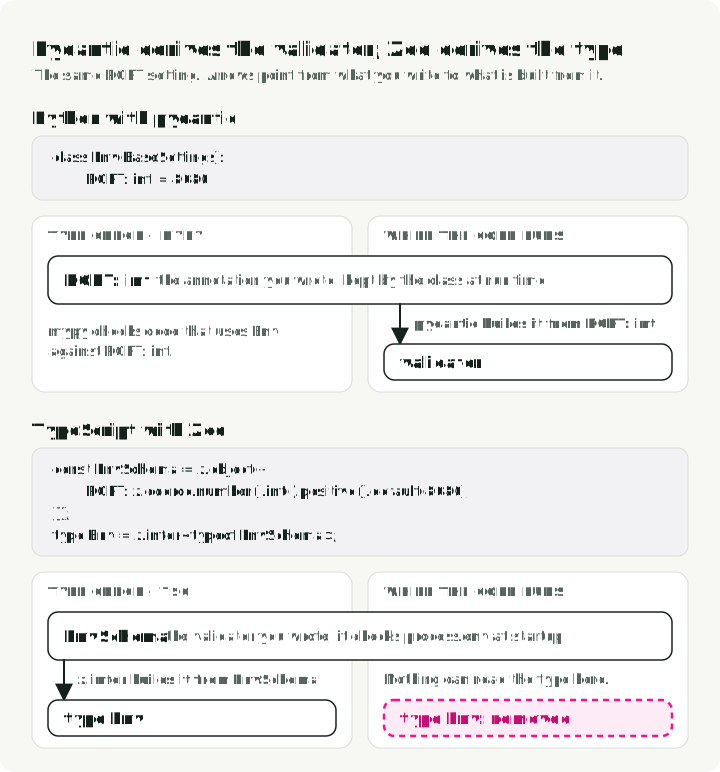
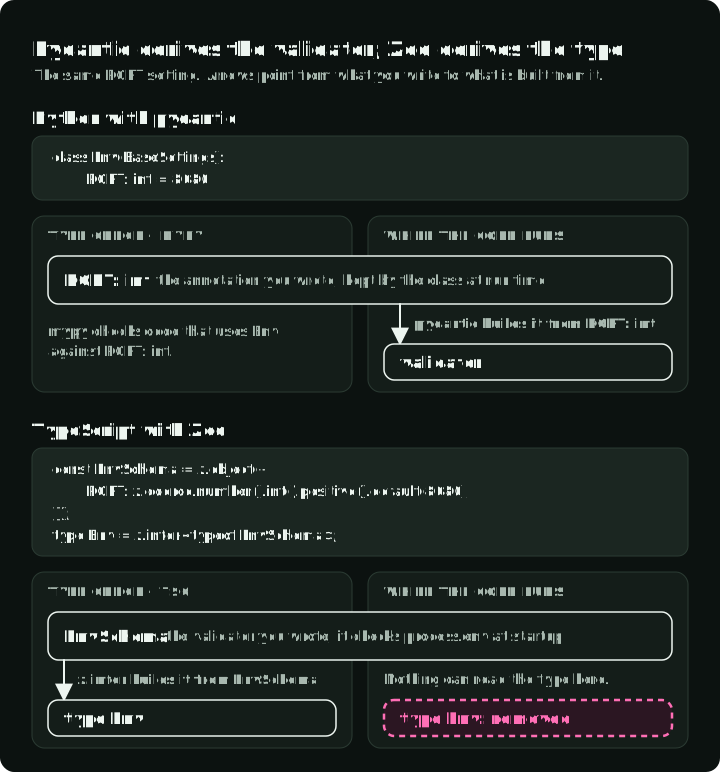
In pydantic you declare a class and get a validator. In Zod you declare a validator and derive the type from it. Same single source of truth, opposite direction.
The figure shows the same PORT setting both ways, and what is left of each
declaration while the code runs.
From packages/schemas/src/env.ts:
import { z } from "zod"; // `z` is Zod's whole API, the way `pd` is pandas

const EnvSchema = z.object({
    PORT: z.coerce.number().int().positive().default(8080),
    // See the note below: a bare z.url() would accept "localhost:8000".
    OPENAI_BASE_URL: z
        .url({ protocol: /^https?$/ })
        .default("https://api.openai.com/v1"),
    DATABASE_URL: z.string().optional(),
});

export type Env = z.infer<typeof EnvSchema>;
z.infer<typeof EnvSchema> reads a static type back out of the runtime schema.
z.coerce.number() handles the fact that each defined value in process.env
(Node’s os.environ) is a string. It serves the same role as pydantic’s numeric
settings coercion, though the exact strings each accepts differ. This follows
the pydantic-settings pattern and runs once at startup. An invalid environment
then produces a readable startup error instead of a TypeError inside a
handler.
A bare z.url() accepts localhost:8000. The URL standard treats everything
before the first colon as the scheme. It therefore reads localhost: as a
protocol named “localhost” and accepts the string. The value then reaches the
HTTP client and fails with less context. Schema validation moves failures
earlier, but it will enforce a permissive schema if that is what you wrote.
Zod 4 also ships z.toJSONSchema, so this project does not need the
zod-to-json-schema dependency common in older tutorials. That matters once one
schema has to feed three consumers, which is what the “One tool, three
consumers” section below is about.
The service
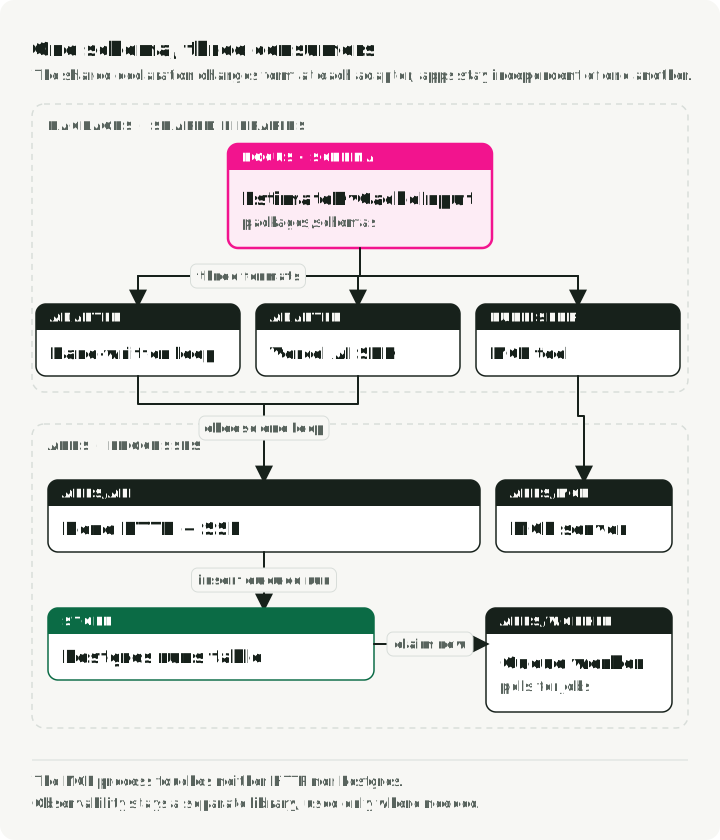
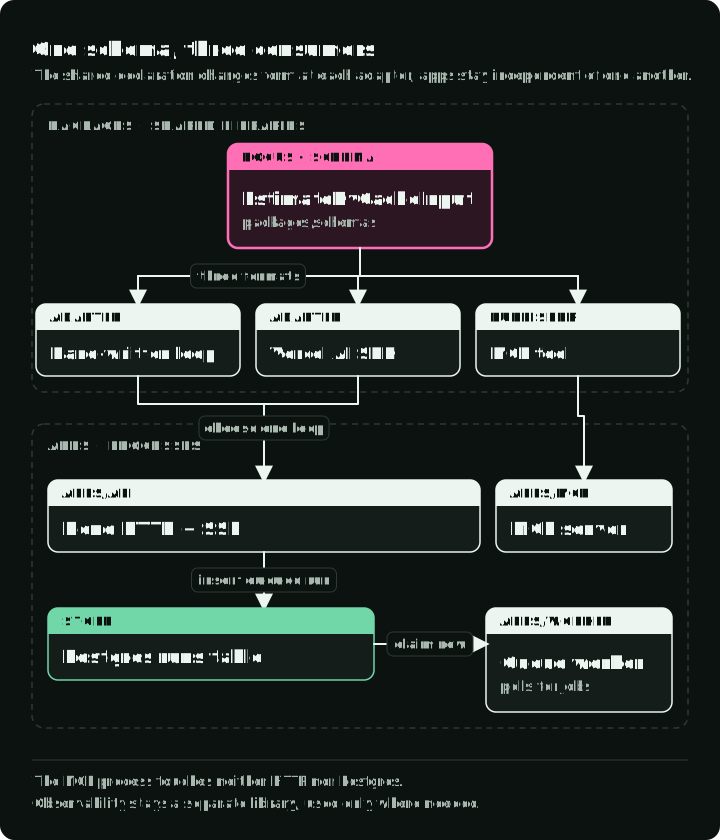
The top row is shared code in packages/. Below it, each app in apps/ is a
separate process. Only the API and the worker touch Postgres, and the MCP server
talks to its client over stdin and stdout.
The demo service sizes LLM deployments. One tool looks up a model’s architecture constants. The other estimates its KV-cache footprint: the GPU memory used to hold attention keys and values for in-flight requests. Both tools are deliberately dull arithmetic. They need no network and give the same answer every time. That makes the service testable without an API key. The KV-cache estimator is also published over the Model Context Protocol (MCP), so other AI clients can call it.
typescript-agent-service/
├── apps/
│   ├── api/           @agent/api: Hono API, streams Server-Sent Events (below)
│   ├── worker/        polls Postgres for long-running jobs
│   └── mcp/           MCP server: exposes one tool to outside AI clients
├── packages/
│   ├── schemas/       package name @agent/schemas: env, API, and tool schemas
│   ├── agent-core/    package name @agent/core: the loop (twice), tools, storage
│   └── observability/ Pino logging, OpenTelemetry tracing
├── pnpm-workspace.yaml
└── package.json
pnpm-workspace.yaml is the file that declares the workspace. Internal packages
get a scoped name like @agent/core, where the @agent/ prefix is a naming
convention, not a language feature. Each package declares its public entry point
in package.json. That package boundary does not depend on which command starts
the application.
This private workspace points those entries at .ts source because every
consumer is part of the same repository. Public npm packages normally publish
JavaScript plus .d.ts type declarations so ordinary Node consumers do not
need the package author’s TypeScript runner or build setup.
Write the tool loop by hand, once
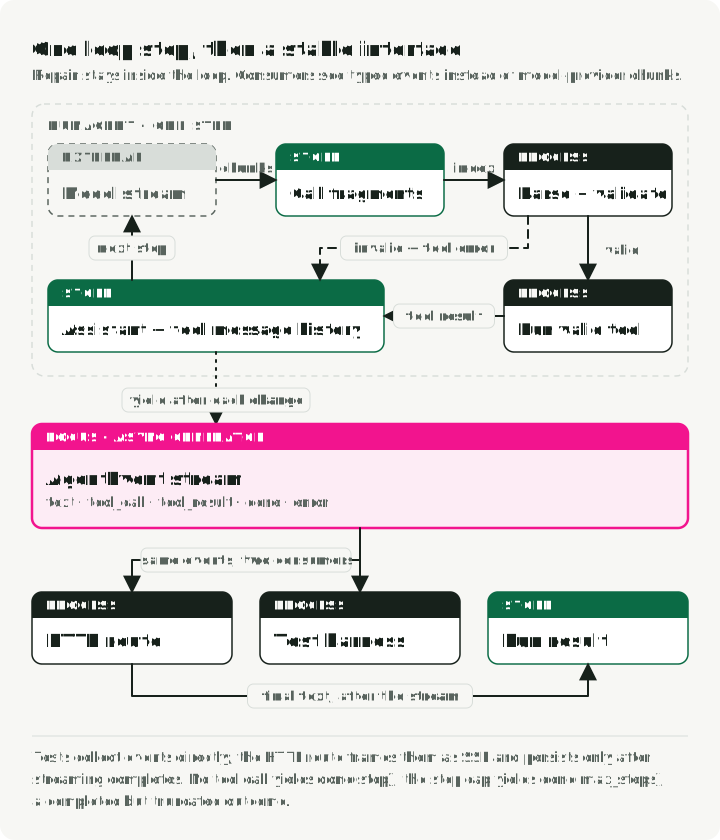
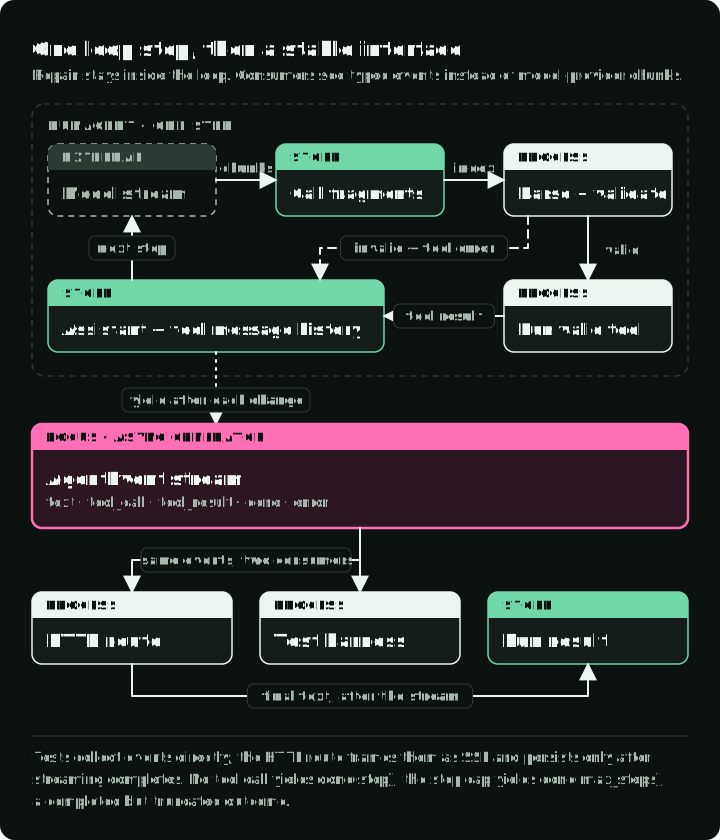
The left column is one model step. The right column is what the loop yields: apart from an exception that leaves the loop, those events are all the HTTP route and the tests see.
Tool-calling agent frameworks wrap the same basic loop:
- Call the model with tool definitions.
- Validate and run the requested tools.
- Append the results to the messages.
- Call the model again.
Writing the loop once makes its hidden failure paths visible.
The loop is an async function*, an async generator, the exact shape of
Python’s async def with yield. The HTTP route iterates that generator, turns
each event into a Server-Sent Events frame, and accumulates the text. After the
stream ends, the route calls storage.createRun once with the final text. Tests
invoke the loop separately and collect its events into an array. An SSE frame is
one chunk of a long-lived HTTP response. The section below explains the format.
The loop has two normal exits. A response with no tool calls yields done with
stopReason: "stop". If the model keeps requesting tools through maxSteps,
the generator still completes and yields done with stopReason: "max_steps".
Treat that result as completed but truncated: the accumulated text may be
partial.
Every value the loop yields is an AgentEvent, a tagged union. Trimmed from
packages/schemas/src/events.ts:
export const AgentEventSchema = z.discriminatedUnion("type", [
    z.object({ type: z.literal("text"), delta: z.string() }),
    z.object({
        type: z.literal("tool_call"),
        callId: z.string(),
        toolName: z.string(),
        args: z.unknown(),
    }),
    z.object({
        type: z.literal("tool_result"),
        callId: z.string(),
        ok: z.boolean(),
        result: z.unknown() /* ... */,
    }),
    z.object({
        type: z.literal("done"),
        stopReason: z.enum(["stop", "max_steps"]),
        steps: z.number(),
        text: z.string(),
    }),
    z.object({ type: z.literal("error"), message: z.string() }),
]);

export type AgentEvent = z.infer<typeof AgentEventSchema>;
z.discriminatedUnion picks the variant by the type field, like a match on
tagged dataclasses. Inside if (event.type === "text") the compiler knows
event.delta exists. Adding a variant does not automatically make an incomplete
switch fail. To get a compiler error for a missing variant, check the remaining
value against never in a default branch. An exhaustiveness lint rule can also
report missing cases. The HTTP route and the AI SDK version below both use the
narrowed event types.
The loop body streams text events and assembles tool calls from fragments. From
packages/agent-core/src/loop.ts:
let text = ""; // the assistant text produced during this model step
// Keyed by the `index` field, because a streamed response interleaves
// fragments of several parallel tool calls and only `index` is present
// on every fragment. `id` and `name` arrive once, `arguments` arrives
// in pieces. `a?.b` below reads `b` only if `a` exists, and gives back
// `undefined` instead of throwing if it doesn't.
const partial = new Map<number, PartialToolCall>();

for await (const chunk of stream) {
    const choice = chunk.choices[0];
    if (!choice) continue;

    if (choice.delta.content) {
        text += choice.delta.content;
        yield { type: "text", delta: choice.delta.content };
    }

    for (const fragment of choice.delta.tool_calls ?? []) {
        const slot = partial.get(fragment.index) ?? { id: "", name: "", args: "" };
        if (fragment.id) slot.id = fragment.id;
        if (fragment.function?.name) slot.name = fragment.function.name;
        if (fragment.function?.arguments) slot.args += fragment.function.arguments;
        partial.set(fragment.index, slot);
    }
}
The loop-local text variable holds one model step. The loop uses it in the
assistant message for the next step or in the final done event. It is not the
route-level accumulator that is later persisted.
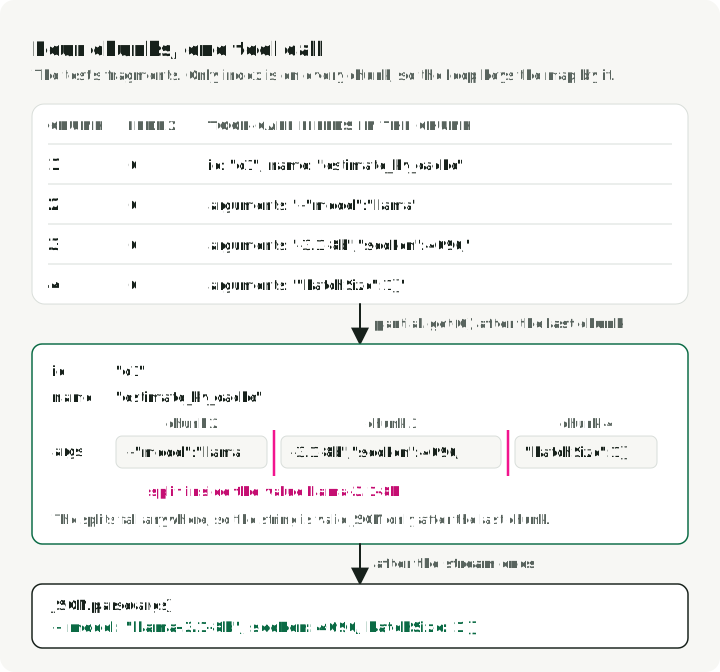
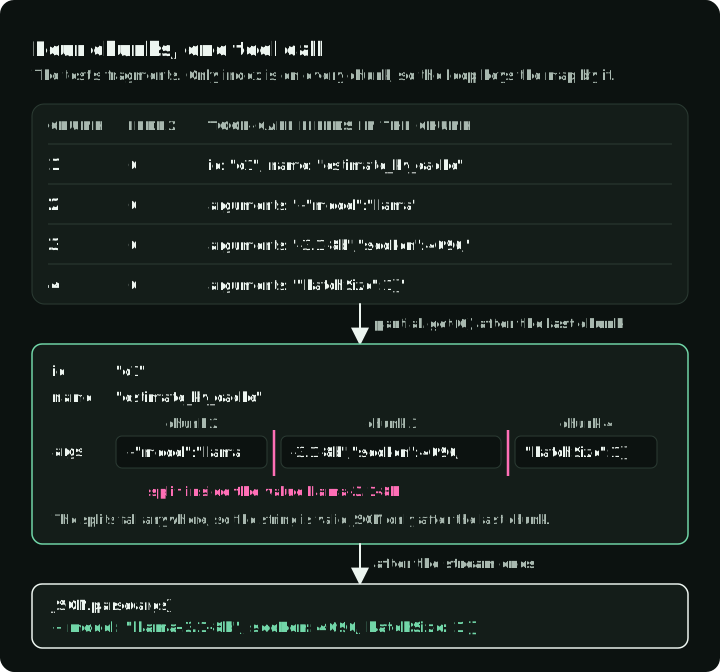
The partial map is the part frameworks hide. The SDK exposes string fragments
of the function arguments, and they may split the serialized JSON at arbitrary
positions. Several parallel calls can also interleave. The repo has a test that
splits {"model":"llama-3.1-8b",...} across four chunks.
The figure follows those four chunks into the map entry for index 0.
The second thing worth writing yourself is what happens when validation fails:
// `tool.parse` is this repo's wrapper, not Zod's. Zod's own `.parse` throws and
// `.safeParse` returns `{ success, data, error }`; this returns
// `{ ok: true, value }` on success and `{ ok: false, error }` on failure, so no
// caller has to catch.
const parsed = tool.parse(raw);
if (!parsed.ok) {
    return {
        ok: false,
        value: { error: `Invalid arguments: ${parsed.error}` },
        parsedArgs: raw,
    };
}
Before execution, the lookup can miss the tool, JSON.parse can reject the
arguments, or Zod can reject their shape. Each failure becomes a message the
model reads. During execution, an expected ToolError also becomes a tool
result so the model can correct its call. An unexpected exception propagates to
the HTTP error path instead of being presented as a domain failure.
z.prettifyError turns Zod’s issue tree into a message the model can act on
instead of a stack trace.
strict: true on an OpenAI function
definition
asks the provider to constrain decoding to the schema. It has no relation to
TypeScript’s strict tsconfig flag. This resembles vLLM’s guided decoding,
although supported schemas and enforcement details differ. It removes one
failure mode, but a self-hosted endpoint may ignore the flag. The arguments must
also survive JSON.parse.
The loop calls /chat/completions because the companion targets
OpenAI-compatible servers. vLLM,
SGLang, and
Ollama document that
endpoint, so OPENAI_BASE_URL can point the same client at any of them. Their
Responses API coverage differs and changes by release. If you control both
sides, check the server’s current compatibility page before choosing between
the two APIs.
Then switch to the AI SDK, and know what you traded
The companion also implements the same agent with the Vercel AI SDK, so you can
compare the two. Both versions yield AgentEvent values, but their terminal
error behavior currently differs. The optional SDK adapter yields an error
event with String(part.error) and returns without done. The current HTTP
route forwards that detail and stores the run as succeeded because the
generator completed without throwing. Before substituting this adapter for the
default raw loop, handle error or a stream that closes without done as a
failed run, sanitize client error messages, and test the stored status together
with the terminal event.
The companion uses AI SDK 7. Its framework implementation lives in
packages/agent-core/src/loop-ai-sdk.ts:
const result = streamText({
    model: provider.chatModel(options.model),
    prompt: options.message,
    tools: aiSdkTools,          // Zod schemas passed straight through
    stopWhen: stepCountIs(options.maxSteps ?? 6),
});

for await (const part of result.fullStream) {
    switch (part.type) {
        case "text-delta": yield { type: "text", delta: part.text }; break;
        case "tool-call":  yield { type: "tool_call", callId: part.toolCallId, /* ... */ }; break;
        // ...
    }
}
The SDK removes five pieces of application code:
- the fragment accumulator
JSON.parseand its error path- the call that runs Zod over the parsed arguments
- provider-specific message assembly
- the step counter
stopWhen accepts several conditions, including a step limit or a specific
tool call. The for await loop does not change when the stop policy changes.
What you give up is direct control over validation failure. The hand-written
loop decides what the model sees after a rejected call. The companion does not
set the SDK’s repairToolCall
option, so it uses the default: with more than one step allowed, AI SDK 7 sends
the failed call back to the model in the next step. Pass a repairToolCall
callback to fix the call yourself, for example with a second model call.
The trade runs the other way too. In the SDK version, a provider change is localized to the provider adapter. It still requires the matching provider package, credentials, configuration, and integration tests. In the raw loop, provider-specific request and stream handling are your code to change.
For a new service, start with the SDK unless you need to control those failure paths. The hand-written version gives you a small implementation to inspect and compare against that choice.
Streaming over HTTP: Hono and SSE
Hono routes read like FastAPI routes. The one addition is zValidator, which
does the job FastAPI gets for free from the type annotations on a handler’s
signature. The c in the handler below is Hono’s request context, the object
FastAPI splits across your parameters. deps is a bag of dependencies the app
is constructed with instead of importing them directly. runAgent is one of
them, and the testing section shows what that buys you.
Trimmed from apps/api/src/app.ts:
app.post("/v1/chat", zValidator("json", ChatRequestSchema), (c) => {
    const body = c.req.valid("json");
    const log = deps.logger.child({ route: "chat" });

    return streamSSE(c, async (stream) => {
        let text = "";
        let done: Extract<AgentEvent, { type: "done" }> | undefined;
        try {
            // The full route wraps this loop in a `withSpan` tracing span.
            for await (const event of deps.runAgent({
                message: body.message,
                maxSteps: body.maxSteps,
            })) {
                if (event.type === "text") text += event.delta;
                if (event.type === "done") done = event;

                await stream.writeSSE({
                    event: event.type,
                    data: JSON.stringify(event),
                });
            }
        } catch (error) {
            log.error({ err: error }, "agent run failed");
            await stream.writeSSE({
                event: "error",
                data: JSON.stringify({
                    type: "error",
                    message: "Agent run failed",
                }),
            });
            return;
        }

        await deps.storage.createRun({
            kind: "chat",
            status:
                done?.stopReason === "max_steps" ? "truncated" : "succeeded",
            input: { message: body.message },
            output: { text },
        });
    });
});
The route keeps the final done event. A loop that stops at max_steps
completes normally, so the route stores it as truncated, not succeeded.
zValidator validates the body and gives c.req.valid("json") the type the
schema produces. Skip it and the body is typed any, TypeScript’s opt-out,
where every property access compiles and nothing is checked. That disables the
schema’s type-safety benefit.
This route uses Server-Sent Events instead of WebSockets. The server keeps an
HTTP response open while it writes event: <name> and data: <json> frames,
then closes it after the final event. Traffic flows from server to client, which
matches this agent stream. A WebSocket would add bidirectional messaging and a
protocol upgrade that this route does not need.
With the default raw loop, a midstream exception changes HTTP error reporting.
Once the first frame has been sent with status 200, the server cannot replace
that response with a 500. The catch block logs the caught error, sends a
constant error event to the client, and returns. That return skips
storage.createRun, so a thrown generator error leaves no row. This catch
does not run when the optional SDK adapter yields an error event and returns.
If you want failed runs for debugging or evaluation, write a failed row in the
catch block with the partial text.
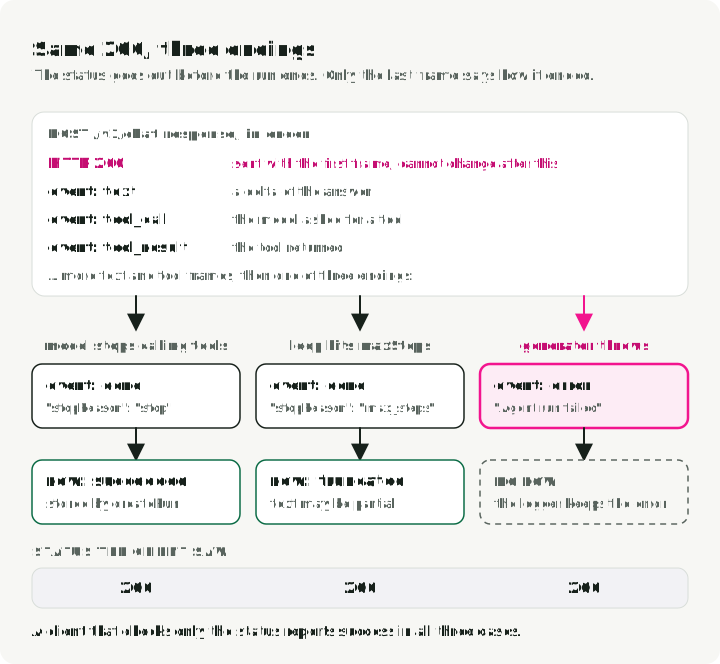
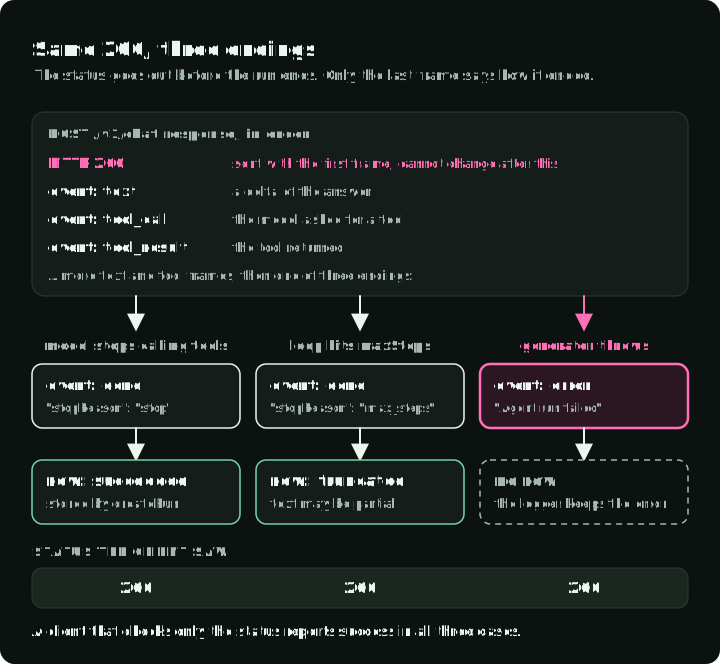
The figure follows one request to its three endings. The status code is the same in all three, so only the last frame tells them apart.
A test covers this path. A generator yields one text delta and then throws. The
response remains 200, and its last frame is an error event with the constant
message Agent run failed. The logger keeps the caught error for server-side
diagnosis. Any client that only checks the status code reports success on a
failed run.
app.ts makes two smaller decisions worth explaining. It treats /healthz as a
liveness endpoint, so that route deliberately does not touch Postgres. A
liveness failure during a database outage could restart every replica without
repairing the dependency. Add a separate readiness check when the orchestrator
must stop routing traffic to an instance that cannot reach Postgres. The error
paths log the caught error but return a constant string. Echoing error.message
into a response body is how connection strings end up in someone else’s
browser.
The Celery-shaped part, without Celery
Long jobs do not belong in a request handler. POST /v1/sweeps validates a
model, a sequence length, and a list of batch sizes, inserts a queued row,
and returns 202 with the run id. The worker claims the row, computes the
KV-cache size for each batch size, and stores the result. GET /v1/runs/:id
reads it.
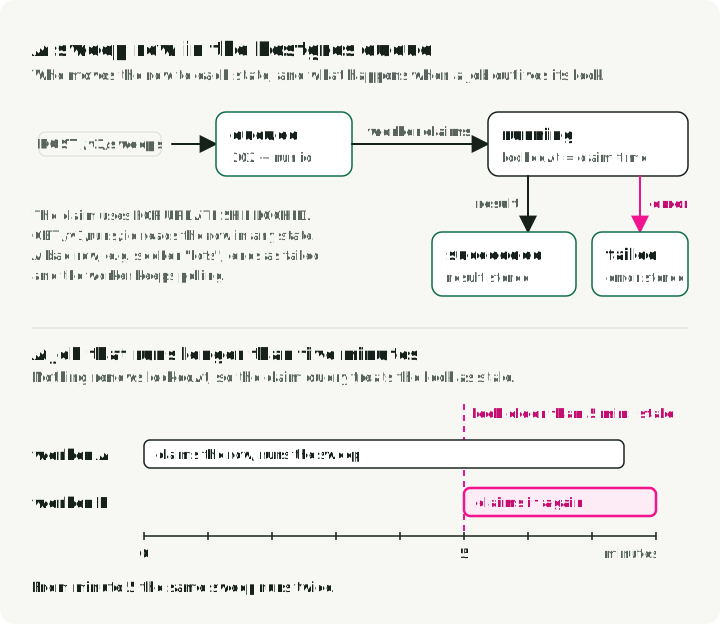
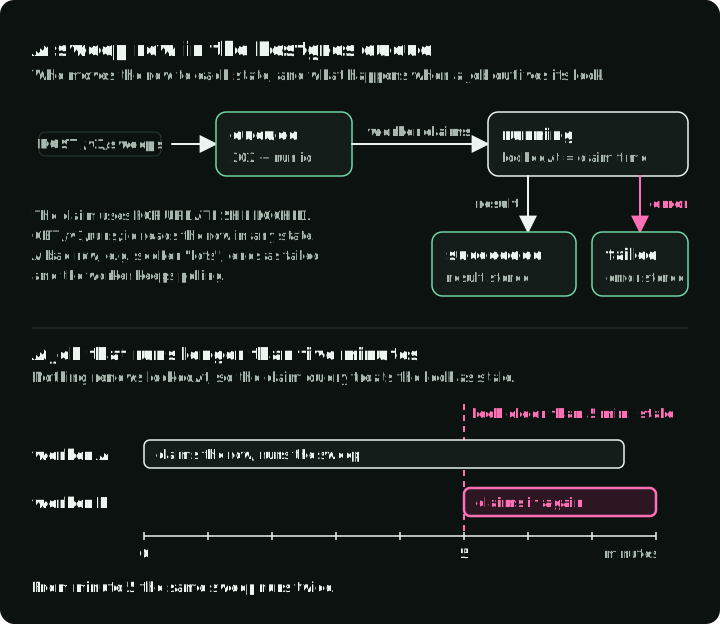
The top half shows the states a sweep row moves through. The timeline shows the stale-lock reclaim explained below: after five minutes, a second worker claims a job that is still running.
There is no Redis here, and no BullMQ. PostgreSQL documents SKIP LOCKED for
multiple consumers of a queue-like table.
The clause gives this small service an at-least-once queue in one table. It is
transactional with the rest of your writes, and it is one fewer service in
docker-compose.yml.
The claim query in
packages/agent-core/src/db/storage.ts
is:
const [candidate] = await tx
    .select({ id: runs.id })
    .from(runs)
    // The real query also picks up rows whose lock went stale; trimmed here.
    .where(and(eq(runs.kind, kind), eq(runs.status, "queued")))
    .orderBy(runs.createdAt)
    .limit(1)
    // `.for()` adds a locking clause; `{ skipLocked: true }` adds SKIP LOCKED.
    .for("update", { skipLocked: true });
The row is locked for the transaction, and any concurrent worker running the
same query skips it instead of blocking. Two simultaneous claims therefore do
not receive the same non-stale row. An integration test fires two claims at once
through Promise.all and asserts they return different rows. The naive version,
SELECT ... LIMIT 1 followed by UPDATE, fails that test: both transactions
read the same row before either writes, so both start the same job.
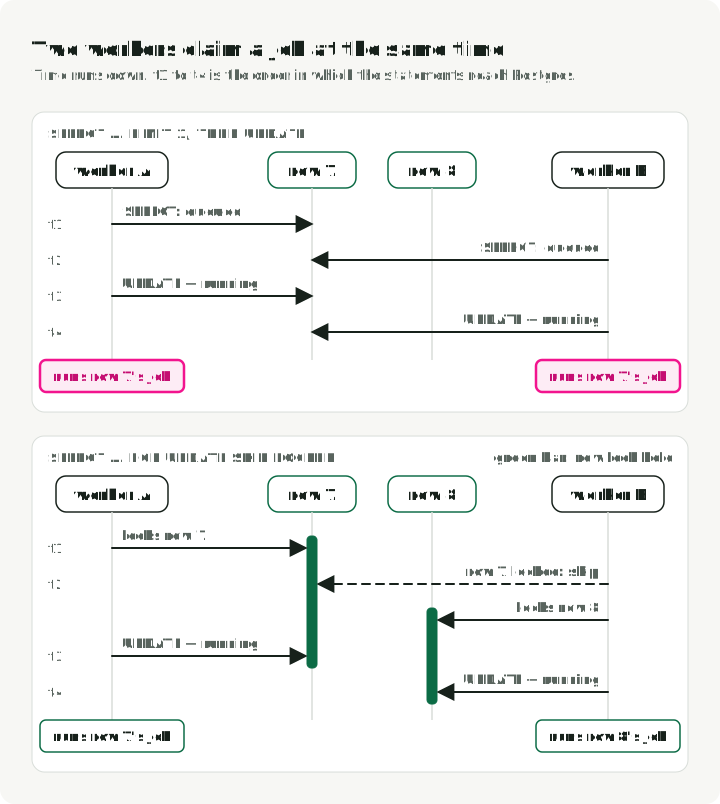
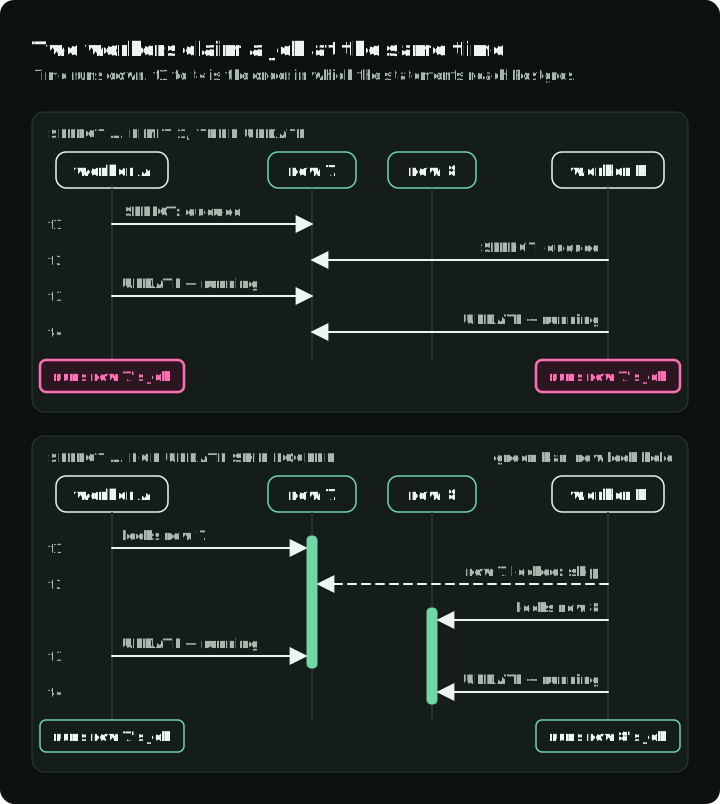
The top panel is the race the test catches; the bottom panel is the claim query above.
This is at-least-once execution: a job can run more than once. The full query also
reclaims a running row when its lock is more than five minutes old, and nothing
renews that lease. A live job that runs longer than five
minutes can therefore be claimed twice. Make jobs idempotent. For long-running
work, add a lease heartbeat or set the stale-lock threshold above the maximum
runtime.
Add BullMQ when you need delayed jobs, repeatable schedules, priorities, rate limits, or a dashboard. The equivalent move in Python is from a database table to Celery. Before that, Redis is one more service to run and monitor.
The worker re-validates what it reads from jsonb:
// The row was validated on the way in, but it has been through a database.
// A stored row can outlive the schema version that accepted it.
// The job is a batch-size sweep. Zod's own `.parse` throws; the poll loop
// catches that and marks the run failed.
const input = SweepRequestSchema.parse(run.input);
The test suite also feeds the worker a sweep row whose seqLen is the string
"lots". The worker fails the run and keeps polling, instead of crashing and
retrying the same poison row forever.
CPU work exposes another Node constraint. A synchronous callback runs on the
event-loop thread and is not preempted. A for loop doing arithmetic
for two seconds blocks every request, timer, and liveness check on that process
for two seconds. A tight loop inside an async def blocks asyncio in the same
way. Both runtimes require you to offload CPU work explicitly.
await setTimeout(0) from node:timers/promises (the node: prefix means
standard library, so node:timers is to Node what os is to Python) is
await asyncio.sleep(0). The sweep yields after each batch size so the worker
process can service timers and other callbacks. Yielding does not make CPU work
parallel. Node
worker_threads can execute
JavaScript in parallel. For pure Python CPU work under the usual GIL-enabled
CPython build, use a process pool rather than a thread pool. This service uses
neither. Keep heavy numerics in Python where the supporting libraries already
live, and move them off the API event loop.
One tool, three consumers
EstimateKvCacheInput has three consumers:
- The hand-written loop converts it with
z.toJSONSchema. - The AI SDK receives it unchanged.
- The MCP server publishes its shape.
That reuse is why packages/schemas exists.
From apps/mcp/src/index.ts:
server.registerTool(
    "estimate_kv_cache",
    {
        description: "Estimate KV-cache VRAM in GiB for a served model...",
        // A Zod object schema keeps the map of fields you passed in on
        // `.shape`. This SDK wants that map, not the schema wrapped around it.
        inputSchema: EstimateKvCacheInput.shape,
    },
    async ({ model, seqLen, batchSize }) => {
        /* ... */
    },
);

await server.connect(new StdioServerTransport());
Two details matter before you connect a client. First, a server started this
way uses its own stdin and stdout to communicate with the client. Each line is
a JSON-RPC message.
A stray console.log, the JavaScript equivalent of print, then corrupts a
message. The client disconnects with a parse error that names no file. Send all
diagnostics to stderr instead.
Second, a domain failure should return isError: true with a message. The
calling model can then correct the call, just as it can after invalid tool
arguments in the agent loop.
You can drive the server with printf and a pipe, which is worth doing once
before you point a real client at it:
printf '%s\n' \
  '{"jsonrpc":"2.0","id":1,"method":"initialize","params":{"protocolVersion":"2025-06-18","capabilities":{},"clientInfo":{"name":"probe","version":"1"}}}' \
  '{"jsonrpc":"2.0","method":"notifications/initialized"}' \
  '{"jsonrpc":"2.0","id":2,"method":"tools/call","params":{"name":"estimate_kv_cache","arguments":{"model":"llama-3.1-70b","seqLen":8192,"batchSize":4}}}' \
  | pnpm -s mcp   # -s suppresses pnpm's own output so only JSON-RPC comes back
The probe matches the protocol version used by the companion README. For a real client, use the SDK rather than maintaining JSON-RPC messages by hand.
Testing an agent with no API key
Vitest fills pytest’s role, but the structure is different. describe groups
related tests. it and test each define one test case. test.each is close to
parametrize, beforeEach provides per-test setup, vi.fn() creates a mock
function, and describe.skipIf conditionally skips a group.
Agent tests depend on one decision: runAgent takes an OpenAI client as a
parameter instead of constructing one. The fake is an object with a
chat.completions.create method returning a scripted async iterable:
function fakeClient(scripts: Chunk[][]): OpenAI {
    let call = 0;
    return {
        chat: {
            completions: {
                create: async () => {
                    const script = scripts[call++] ?? [];
                    // Defines an async generator and calls it on the same
                    // line, so `create` hands back something you can
                    // `for await` over, which is the shape a real streaming
                    // response has.
                    return (async function* () {
                        for (const chunk of script) yield chunk;
                    })();
                },
            },
        },
        // TypeScript refuses a direct cast between unrelated shapes, so you
        // cast through `unknown` first. This disables type checking for that
        // value, so keep it to test code.
    } as unknown as OpenAI;
}
The tests split one JSON argument string across chunks and handle two tool calls
in one response. They also cover invalid batchSize, malformed JSON, unknown
tool names, and a model that keeps calling tools until maxSteps stops it. The
test file runs in well under a second, with no network and no key.
Integration tests against Postgres use
describe.skipIf(!process.env.DATABASE_URL), so pnpm test works on a fresh
clone with no Postgres running, and CI turns them on by supplying the variable.
The repo has 42 tests. Thirty-eight run without Postgres or an API key.
Log structured events with Pino
Pino fills the same role as structlog: one JSON object per line, child
loggers with bound fields, and explicit redaction. The companion configures it
in packages/observability/src/logger.ts:
const log = pino({
    redact: {
        paths: [
            "req.headers.authorization",
            "apiKey",
            "OPENAI_API_KEY",
            "*.apiKey",
        ],
        censor: "[redacted]",
    },
});
Without redaction, log.info({ req }, "...") can copy an Authorization header
into the log backend.
Trace application work with manual spans
The companion uses OpenTelemetry for three application-level spans:
agent.run, agent.tool, and worker.sweep. It does not install automatic
HTTP or Postgres instrumentation. startTracing() in
packages/observability/src/tracing.ts
creates a NodeSDK with an OTLP trace exporter. If
OTEL_EXPORTER_OTLP_ENDPOINT is absent, it leaves tracing off.
The work itself is wrapped by withSpan() from the same file:
return tracer.startActiveSpan(name, { attributes }, async (span) => {
    try {
        return await fn(span);
    } finally {
        span.end();
    }
});
JavaScript has no Python-style context manager syntax. Here, the callback is the block that a Python context manager would surround. The full helper also records exceptions and sets the span status before rethrowing.
Automatic HTTP and database spans are a separate feature. They require the matching instrumentation packages and initialization before the instrumented modules load. Add that only when those spans are useful, then follow the OpenTelemetry Node SDK setup for the exact package versions you deploy.
Ship the monorepo in Docker
Use the supplied
Dockerfile.
The container starts the API with the tsx loader. You do not need to choose or
invoke a TypeScript runner when you deploy it.
The build uses pnpm fetch so dependency downloads stay cached until the
lockfile changes. It then uses pnpm deploy to copy the API and its production
dependencies into a self-contained directory. The runtime stage runs as the
non-root node user, and its exec-form CMD lets the API receive SIGTERM
directly for graceful shutdown.
Why the Dockerfile loads tsx
Node 24 can run a limited TypeScript subset by stripping type annotations. It
does not type-check the code or perform the transformations that a full
TypeScript runner supports. The repository’s package scripts hide that detail.
pnpm check performs the separate static check.
The container exposes another limit. pnpm deploy copies the workspace
packages under node_modules, and Node deliberately refuses to strip
TypeScript there (Node TypeScript
documentation). Without a loader, the
container fails at startup with ERR_UNSUPPORTED_NODE_MODULES_TYPE_STRIPPING.
The Dockerfile loads tsx, which handles those .ts files before Node runs
them. A team that wants only .js files in its
runtime image can add a compile step instead. That is an alternative production
design, not an extra step required to run this companion.
A three-week path
Experienced Python engineers can skip material that teaches variables and loops. This sequence focuses on the parts that differ from Python. Do the build task in each row; the reading supports it.
| Week | Read | Build |
|---|---|---|
| 1 | javascript.info: modules, promises, and objects only. Keep MDN’s JS Guide as a reference. | Rewrite one Python CLI in TypeScript. Add a package.json script. Run the script and pnpm typecheck. |
| 1-2 | Read TypeScript’s tsconfig reference, the free Total TypeScript tutorials, and the Zod docs. | Build a Zod-validated config module and one tagged union. After checking the tag, the compiler knows which variant the block contains. |
| 2 | Read the Hono, Drizzle, Vitest, and Biome documentation. | Build a streaming proxy to an OpenAI-compatible endpoint with a Drizzle-backed log. |
| 3 | Read the AI SDK and MCP TypeScript SDK documentation. | Build a tool-calling agent. Then build an MCP server that exposes one of its tools. |
Start with the free Total TypeScript tutorials. Pay for the advanced material only when working with library-grade generics and conditional types. Skip every “intro to JavaScript” course, and skip anything React-shaped unless the product requires it.
For a survey of production conventions, goldbergyoni/nodebestpractices is a broad community-maintained checklist. Verify advice that affects runtime behavior or security against the current Node documentation.
Before you adapt the service
The offline tests exercise the service’s control flow with scripted model responses. They do not establish how reliably a live model will complete your tasks. Keep that distinction when you replace the demo tools with real ones.
Validate each value that enters from outside: the environment, the HTTP body,
model tool arguments, and rows read from jsonb.
| Value | Checked by | If it fails |
|---|---|---|
process.env | EnvSchema, in loadEnv() at startup | startup error; the process stops |
| HTTP body | ChatRequestSchema, through zValidator | 400; the handler never runs |
| Tool arguments | tool.parse, after JSON.parse | tool error sent to the model |
runs.input | SweepRequestSchema, in the worker on each claim | run marked failed; the worker keeps polling |
Set the completion policy next: decide whether your application accepts,
retries, or reviews truncated runs, and test the event and the stored status
together. If
jobs can run longer than the stale-lock threshold, add a lease heartbeat before
adding side effects.
Once those behaviors are explicit, add the failed row described in the
streaming section, and use failed and truncated runs to build a separate
agent evaluation suite.
That is where to test task completion; the offline suite remains the faster
check for broken streaming, validation, and persistence behavior.
References
Demo repository
- slavadubrov/typescript-agent-service - the monorepo used throughout this article: Hono API with SSE, two agent loop implementations, Drizzle storage, worker, MCP server, and 42 tests
Runtime and language
- Running TypeScript natively in Node.js - Node’s limited TypeScript support and its
node_modulesrestriction - TypeScript compiler options -
strictand the other checks configured by the companion - MDN JavaScript Guide - the language reference worth keeping open
- javascript.info - modern JavaScript tutorial. Read the modules and promises chapters.
Tooling
- pnpm and pnpm installation - package manager, workspaces, and setup
- Biome - lint, format, and import sorting in one binary
- Vitest - test runner that needs no transform configuration
- Total TypeScript - free tutorials plus a paid track for advanced types
Libraries
- Zod - schema validation and type inference. Version 4 includes
z.toJSONSchema. - Hono - Web-standard HTTP framework
- Drizzle ORM - SQL-first TypeScript ORM with
drizzle-kitmigrations - PostgreSQL SELECT documentation - the
FOR UPDATE ... SKIP LOCKEDlocking clause - BullMQ - Redis-backed queue for when the database table is not enough
AI and agents
- Vercel AI SDK -
streamText,tool,stopWhen, and provider adapters - openai/openai-node - the official TypeScript client
- MCP TypeScript SDK and the MCP specification - building servers and clients
Conventions
- goldbergyoni/nodebestpractices - community-maintained checklist for production conventions