Local LLMs on macOS: Ollama, LM Studio, MLX, llama.cpp

Engineers running local models on an Apple Silicon Mac need to size the complete workload, not just choose a model that downloads. Apple Silicon can run everyday prompts without a remote API because the CPU and GPU share one unified memory pool, but the model weights share that memory with the cache that holds the context, the runtime’s working buffers, and macOS itself.
Once the model, context, and memory headroom fit, choose the tool that matches how you work: Ollama for a managed local service, LM Studio for desktop model exploration, llama.cpp for direct control over runtime flags, or MLX-LM for Apple-native Python. You will learn how to estimate memory, what each tool is for, how to run each one, and how to compare them on the same workload.
For the compact decision table, see Local LLM Tools on macOS in 2026.
How much memory a local model needs
Four terms appear throughout this article:
- Quantization stores model weights in fewer bits to cut memory. In a filename such as
Llama-3.1-8B-Instruct-Q4_K_M.gguf,Q4marks a 4-bit scheme;Q4_K_Maverages just under 5 bits per weight once scales and a few higher-precision tensors are counted. - GGUF is the single-file model format used by llama.cpp and the tools built on it. MLX-LM loads models converted for MLX instead, so the same model ships as separate GGUF and MLX downloads.
- KV cache stores the attention keys and values for every token in the context. It grows with context length and with the number of parallel requests.
- Checkpoint family means one base model at one size, such as Llama 3.1 8B Instruct, whatever its file format or quantization.
The chart adds up weights and KV cache for Llama 3.1 8B at Q4_K_M, at 8K and 32K context. It compares those subtotals with the recommended GPU working set reported on one 16 GB M1 Mac; runtime workspace and macOS need additional memory.
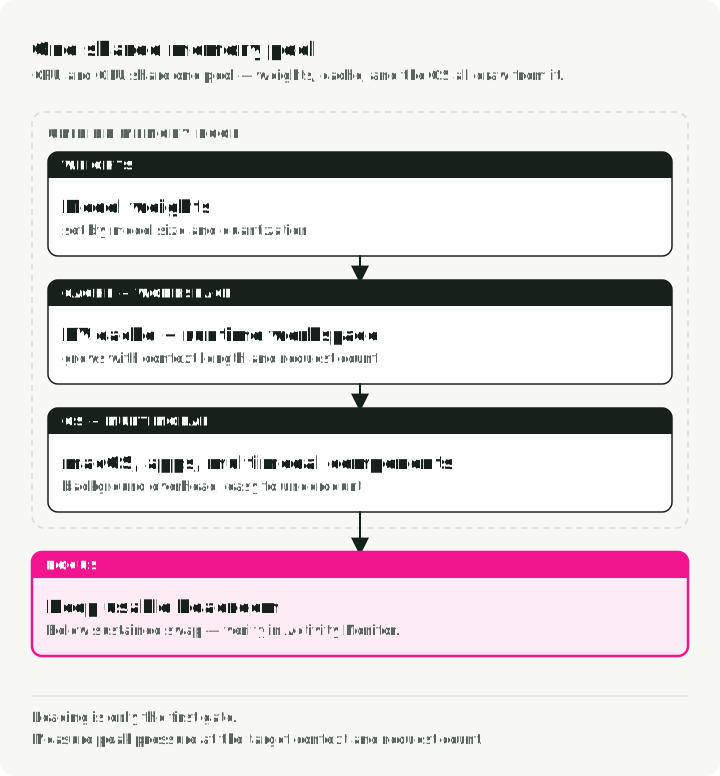
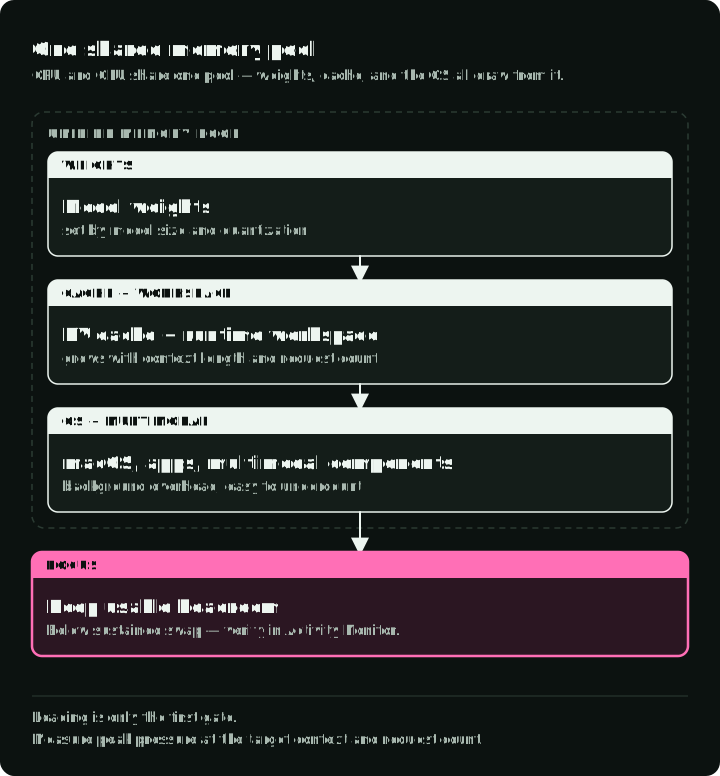
Raw quantized weight size is only the first term:
peak memory ≈ model weights
            + KV cache
            + runtime workspace
            + multimodal components
            + application and OS memory
Context length, cache dtype, parallel requests, and model architecture change the result. The KV cache is the term you control most directly, through the context length:
KV bytes per token = 2 × layers × KV heads × head dimension × bytes per valueFor Llama 3.1 8B (32 layers, 8 KV heads, head dimension 128) with a 16-bit cache, that is 2 × 32 × 8 × 128 × 2 = 131,072 bytes, or 128 KiB per token. An 8K context needs 1 GiB of cache per request, and a 32K context needs 4 GiB. The Q4_K_M weights are a 4.9 GB file (4.6 GiB). Before workspace, the model needs about 5.6 GiB at 8K context and about 8.6 GiB at 32K.
Metal reports a recommended GPU working-set size, recommendedMaxWorkingSetSize, which estimates how much GPU memory can be allocated without affecting runtime performance. It is a performance recommendation, not an enforced allocation limit. In a 2023 report from one 16 GB M1, llama.cpp printed 10,923 MB, about 10.7 GiB or two-thirds of RAM. Against that recommendation, the 8K subtotal leaves 5.1 GiB for workspace and headroom; the 32K subtotal leaves 2.1 GiB. Check the value on your own Mac and measure the complete workload before deciding it fits. An 8 GB Mac has less headroom, with 4.6 GiB already needed for these weights alone.
Plan disk space too. Each 4-bit 7B or 8B model is a 4–5 GB download, and a small library of models in both formats takes 10–20 GB.
Use Activity Monitor or the runtime’s own metrics while testing. Apple defines memory pressure using free memory, swap rate, wired memory, and cached files. Leave enough headroom to avoid sustained swap; a model that loads but pushes the system into memory pressure is not a good interactive fit.
Each tool section below shows where to set the context length, because that setting changes the KV cache the most.
The four tools solve different workflow problems
| Tool | Primary interface | Model format | License | Choose it when |
|---|---|---|---|---|
| Ollama | CLI and local HTTP API | Managed model bundles, mostly GGUF | MIT | An application needs a simple managed local service |
| LM Studio | Desktop UI, CLI, SDKs, local APIs | GGUF and MLX | Proprietary app, free for work; MIT SDKs | A person needs to discover, compare, inspect, and serve models visually |
| llama.cpp | CLI, C/C++ library, local server | GGUF | MIT | You need direct flags, conversion and quantization tools, or embedded inference |
| MLX-LM | Python and CLI | MLX-format weights | MIT | You are writing Python for Apple Silicon or fine-tuning a model on the same Mac |
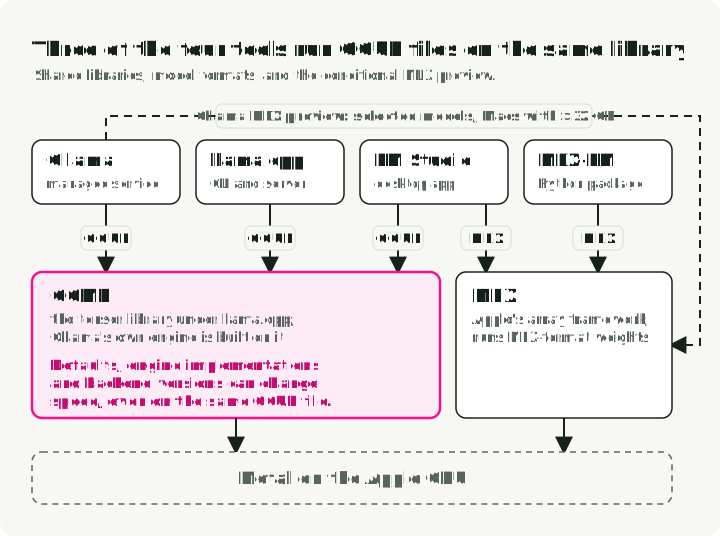
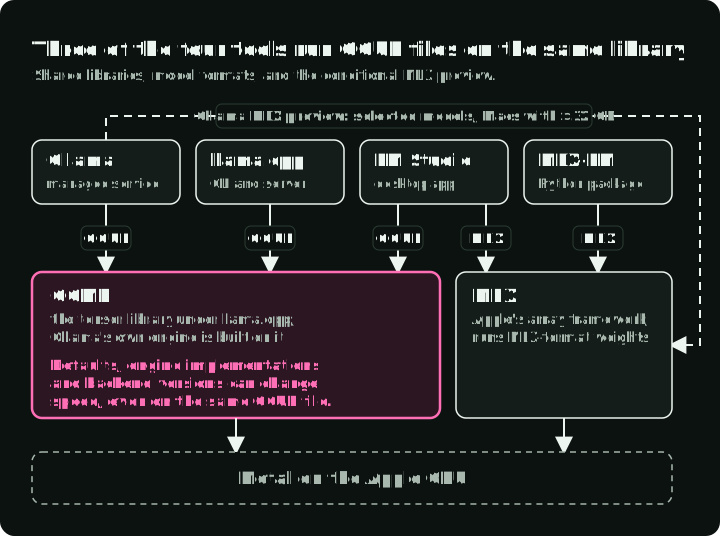
This is a responsibility table, not a speed ranking. Three of the tools share one tensor library. Ollama runs GGUF models with its own engine, which is built on GGML, the library under llama.cpp. Ollama’s March 2026 MLX preview also runs selected models on Macs with more than 32 GB of memory. LM Studio runs GGUF models with llama.cpp and MLX models with MLX. Sharing GGML does not mean the tools use identical inference engines. Even on the same GGUF file, defaults such as context length and batch size, engine implementations, and backend versions can affect speed.
The diagram shows the model formats and shared libraries used by each tool, including Ollama’s conditional MLX path.
If you do not yet know which workflow you have, use the last column of the table. Start with Ollama if you just want something running today.
One job falls outside the four tools: KoboldCpp, a llama.cpp fork with a web UI, is built for long-form fiction and role-play. It is AGPL-licensed, which matters if you ship it inside a product.
One API for all four tools
All four tools can serve an OpenAI-compatible API on localhost. Application code that uses the openai client can switch tools by changing base_url, and the same client can benchmark all four.
| Tool | Server command | Default base URL |
|---|---|---|
| Ollama | ollama serve (the macOS app runs it) | http://localhost:11434/v1 |
| LM Studio | lms server start | http://localhost:1234/v1 |
| llama.cpp | llama-server -hf <repo>:<quant> | http://localhost:8080/v1 |
| MLX-LM | mlx_lm.server --model <repo> | http://localhost:8080/v1 |
The client requires an API-key value. Use local as a placeholder when server authentication is disabled; use your configured token when authentication is enabled. llama-server and mlx_lm.server both default to port 8080, so start one of them with --port 8081 to run both.
The Python examples that import openai need the openai package. The benchmark below includes a command that runs its saved script with that dependency.
from openai import OpenAI

# Swap base_url for :1234 (LM Studio) or :8080 (llama.cpp, MLX-LM).
client = OpenAI(base_url="http://localhost:11434/v1", api_key="local")
The benchmark section below uses this client to time all four tools with one script.
Ollama: managed local service
Ollama manages model downloads, templates, process lifecycle, and a localhost API. It is useful when application code should target a stable local service rather than own inference flags.
MODEL=llama3.2
ollama pull "$MODEL"
ollama show "$MODEL"   # architecture, parameters, context length, quantization
ollama run "$MODEL" "Explain unified memory."

curl http://localhost:11434/api/chat \
    -H 'Content-Type: application/json' \
    -d '{
      "model": "'"$MODEL"'",
      "messages": [{"role": "user", "content": "Explain unified memory."}],
      "options": {"num_ctx": 8192},
      "stream": false
    }'
The num_ctx option sets the context length for one request. To set it for the whole server, start it with OLLAMA_CONTEXT_LENGTH=8192 ollama serve or use the slider in the app settings. Without either, Ollama picks a default from available memory: 4K tokens when less than 24 GiB of GPU memory is available. ollama ps shows the context each loaded model uses.
A short library name such as llama3.2 does not identify a fixed file; the same name can point to a different build after an update. Record the ID that ollama list prints, which is the start of the model digest, with every evaluation.
Ollama trades some low-level visibility for lifecycle convenience. Drop to llama.cpp or another runtime when you need to control a GGUF file, chat template, cache setting, or new backend feature directly.
LM Studio: desktop exploration and local APIs
LM Studio is useful when model discovery, load configuration, chat inspection, and side-by-side human evaluation belong in one workflow. It exposes native Python and TypeScript SDKs, OpenAI-compatible endpoints, structured output, tool use, and a headless daemon, so it is more than a desktop GUI. Its chat view also accepts attached .pdf, .docx, and .txt files as context, which covers simple questions about documents without writing code.
The current Python SDK connects to a model you have already downloaded. Start LM Studio’s local server, save this as lmstudio_demo.py, and run uv run --with lmstudio python lmstudio_demo.py. If authentication is enabled, set LM_API_TOKEN; the SDK reads it automatically.
import lmstudio as lms

MODEL_KEY = "ibm/granite-4-micro"

with lms.Client() as client:
    model = client.llm.model(MODEL_KEY)
    response = model.respond("Write one sentence about local inference.")
    print(response)
Start the local API from the Developer tab or from the CLI. lms load sets the context length when it loads a model, and --estimate-only prints the memory estimate without loading anything:
lms server start
lms load ibm/granite-4-micro --context-length 8192 --estimate-only
lms load ibm/granite-4-micro --context-length 8192
LM Studio can serve on localhost or a local network and supports API tokens in its API authentication settings. Keep it on loopback unless remote access is deliberate. If you expose it on a LAN, require its documented API-token option, apply a host firewall rule, and review tool and integration access.
llama.cpp: direct GGUF execution
llama.cpp is the reference tool for GGUF files when you want to set the runtime flags yourself. It supports Apple Metal along with CPU and other hardware backends.
brew install llama.cpp

# Download through the Hugging Face integration and select a quantization.
MODEL_REPO=ggml-org/gemma-3-1b-it-GGUF
QUANT=Q4_K_M
llama-cli -hf "$MODEL_REPO:$QUANT"

# The same model with explicit settings: one turn, then exit.
llama-cli -hf "$MODEL_REPO:$QUANT" \
    -c 8192 -n 256 --temp 0.7 -st \
    -p "Write a Python function that sorts a list."

# Or start an OpenAI-compatible local server with an 8K context.
llama-server -hf "$MODEL_REPO:$QUANT" -c 8192
-c (--ctx-size) sets the context length, and with it the KV cache size. -n caps the number of generated tokens, --temp sets the sampling temperature, -st runs a single turn and exits, and -p gives the prompt.
The -hf option also downloads a matching multimodal projector when the repository has one. Model support, templates, and CLI flags change quickly, so pin a known build and keep the launch command with the evaluation record.
Choose llama.cpp when direct control is the goal, not because “lower-level” automatically means faster. A managed tool may choose good defaults; direct flags can also make performance worse.
MLX-LM: Apple-native Python work
MLX-LM builds on Apple’s MLX array framework. It supports generation, chat, conversion, quantization, and parameter-efficient fine-tuning for compatible models.
MODEL=mlx-community/Llama-3.2-3B-Instruct-4bit
uv run --with mlx-lm mlx_lm.generate \
    --model "$MODEL" \
    --max-kv-size 8192 \
    --prompt "Explain Metal acceleration in one paragraph."
MLX-LM has no fixed context setting: the cache grows with the prompt and the output. --max-kv-size caps the cache at that many tokens. Past the cap, MLX-LM drops the oldest tokens and keeps the first few.
Python exposes the model and tokenizer directly. Save this as mlx_demo.py and run uv run --with mlx-lm python mlx_demo.py:
from mlx_lm import generate, load

MODEL = "mlx-community/Llama-3.2-3B-Instruct-4bit"

model, tokenizer = load(MODEL)
messages = [{"role": "user", "content": "Give one local-LLM benchmark rule."}]
prompt = tokenizer.apply_chat_template(
    messages,
    tokenize=False,
    add_generation_prompt=True,
)
print(generate(model, tokenizer, prompt=prompt, max_tokens=80))
MLX-LM’s HTTP server, mlx_lm.server, is documented as a development server with basic security checks, not a production service. Use it for local experimentation, or put an authenticated proxy or your own API service in front of it.
Comparing tools on the same workload
Test the same checkpoint family and comparable quantization where formats allow. A GGUF Q4_K_M file and an MLX 4-bit model of the same checkpoint are comparable, not identical.
Use a small prompt set containing:
- one short interactive prompt
- one long prompt near the intended context
- structured output or tool calls if the application needs them
- a representative generation length
- one repeated request to distinguish cold load from warm inference
Record:
| Metric | Why it matters |
|---|---|
| Task result | A fast wrong model is not useful |
| Time to first token | Interactive responsiveness |
| Output tokens per second | Generation throughput |
| Peak memory and pressure | Whether the machine remains usable |
| Cold load time | Desktop and on-demand experience |
| Energy and thermal behavior | Sustained laptop use |
| API/schema compatibility | Whether the tool fits the application |
Each tool prints the speed numbers itself:
- Ollama:
ollama run "$MODEL" --verboseprints load duration, prompt eval rate, and eval rate (output tokens per second) after each reply. - llama.cpp:
llama-bench -hf "$MODEL_REPO:$QUANT" -p 512 -n 128measures processing of a 512-token prompt and generation of 128 tokens, in tokens per second. - MLX-LM:
mlx_lm.generateprints prompt and generation tokens per second and peak memory after each run. - LM Studio: the chat view shows tokens per second and time to first token under each reply, and the native REST API returns the same values in its
statsfield.
To compare client-observed latency, time a streaming request against the OpenAI-compatible endpoints listed under “One API for all four tools”. The script measures total request duration and time to first visible text, then prints the response for inspection. Visible text can follow reasoning or tool output, so this timing is not necessarily the runtime’s time to first generated token.
Start the chosen server with a downloaded model, save the script as benchmark.py, and run uv run --with openai python benchmark.py. Change BASE_URL and MODEL per tool. Set LOCAL_API_KEY to your configured token if server authentication is enabled; otherwise the script uses local as a placeholder.
import os
import time

from openai import OpenAI

BASE_URL = "http://localhost:11434/v1"
MODEL = "llama3.2"

client = OpenAI(base_url=BASE_URL, api_key=os.environ.get("LOCAL_API_KEY", "local"))

start = time.perf_counter()
first = None
parts = []
stream = client.chat.completions.create(
    model=MODEL,
    messages=[{"role": "user", "content": "Explain unified memory in 200 words."}],
    max_tokens=300,
    stream=True,
)
for chunk in stream:
    if chunk.choices and chunk.choices[0].delta.content:
        if first is None:
            first = time.perf_counter()
        parts.append(chunk.choices[0].delta.content)
end = time.perf_counter()

print(f"request duration: {end - start:.2f} s")
if first is None:
    print("time to first visible text: unavailable (no visible text)")
else:
    print(f"time to first visible text: {first - start:.2f} s")
print("response:", "".join(parts))
Streamed text chunks are not token counts. For output tokens per second, use the runtime’s counters listed above and record whether they include reasoning or tool output. For example, LM Studio reports total and reasoning output tokens separately. A stream with no visible text reports that absence instead of assigning a text latency; inspect any reasoning, tool calls, or finish status through the runtime’s interface.
Run each request twice: the first can include the model load, and the second can reuse loaded weights and cached prompt state. Record runtime versions and prompt-cache settings so that repeated requests remain comparable.
Do not compare one tool’s 4-bit model with another tool’s full-precision model and attribute the difference to the runtime.
Security and privacy checklist
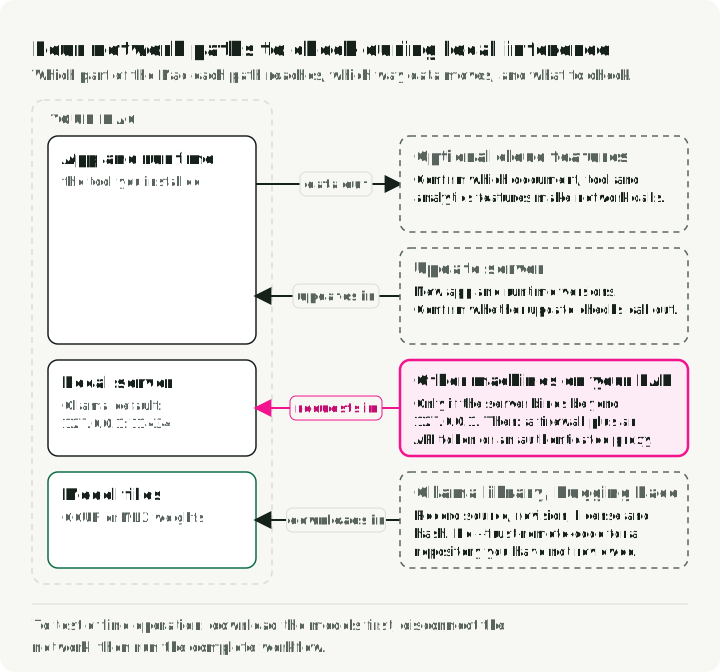
Separate local inference from offline operation. Prompts can stay on the machine while the application still reaches the network for model downloads, updates, or optional features. Ollama documents local execution, model downloads, and optional cloud features separately in its FAQ. Treat offline operation as a workflow requirement to verify per application: download artifacts first, disconnect the network, and test the complete workflow.
The diagram shows four network paths to check during local inference: which part of the Mac each one reaches, which way data moves, and what to check on each. Cloud features and LAN access depend on the application’s configuration.
- Bind APIs to loopback unless network access is required.
- If LAN access is required, use a host firewall and either the tool’s documented authentication or an authenticated reverse proxy in front of the service. API-token support is tool-specific: LM Studio documents API tokens, and
llama-serveraccepts--api-key. Ollama listens on127.0.0.1:11434by default, andOLLAMA_HOSTchanges the bind address. Its local API does not require authentication, so put an authenticated proxy in front of it for LAN use. - Treat model files as third-party artifacts; record source, revision, license, and hash.
- GGUF files contain no executable code. Hugging Face–format models can ship Python code; do not pass
--trust-remote-codeto MLX-LM or Transformers for a repository you have not reviewed. - Confirm whether optional document, tool, update, or analytics features make network calls.
- Do not assume local generation makes retrieved documents, logs, or tool side effects safe.