LoRAX Serving Guide: LoRA Adapters on Kubernetes at Scale

This guide is for inference and platform engineers who need to serve many LoRA variants from one base model. It shows how to test the LoRAX APIs, size the working set, and turn the starter Helm chart into an explicit production plan.
One base model and many LoRA adapters create an unusual serving problem. The base weights are shared, but every request may need a different set of adapter weights. A conventional one-deployment-per-variant design wastes GPU memory when most variants are idle.
LoRAX addresses that long tail. It loads adapters on demand, batches requests for different adapters, and exchanges which adapter weights occupy GPU memory. The attractive headline is “thousands of fine-tuned models on one GPU.” The engineering question is narrower: given your active adapter set, arrival pattern, and latency target, does exchange scheduling help enough to justify another serving runtime?
The serving problem is the working set
LoRA freezes a base model and learns low-rank updates for selected weight matrices. The resulting adapter is usually much smaller than a full checkpoint, but its size still depends on rank, target modules, layer count, and dtype. Fixed claims such as “every adapter is 100 MB” are poor capacity inputs.
If each fine-tuned variant gets its own deployment, each deployment holds a full copy of the base weights, whether it receives traffic or not. The left side of the figure shows that design. The right side shows one base model that loads only the adapters receiving requests.
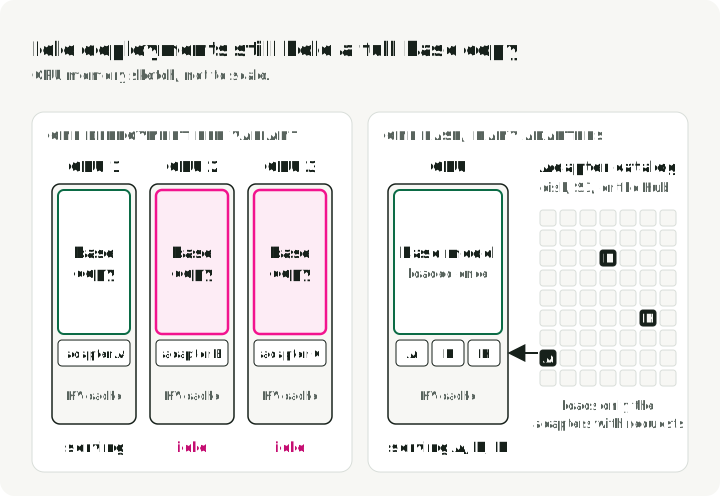
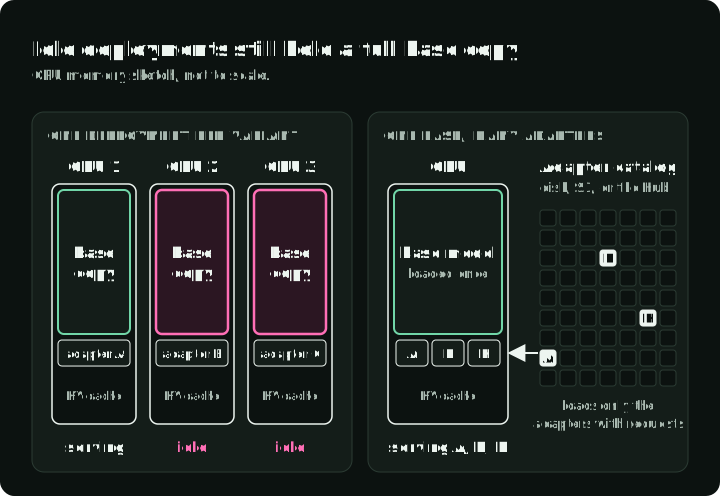
For serving, distinguish three quantities:
- Catalog size: every adapter a platform can resolve from storage
- Active working set: adapters receiving requests within the cache-retention window
- Concurrent set: adapters represented in batches at the same moment
Each set is a subset of the one before it: the concurrent set sits inside the active working set, which sits inside the catalog. Capacity planning starts from the active working set. For example, a catalog of 5,000 adapters might have 200 active in the last hour and 8 in one batch.
A catalog can contain thousands of adapters without fitting thousands in VRAM. What matters is how frequently the active set changes, how large those adapters are, and whether requests for different adapters can share useful batches.
LoRAX combines four mechanisms:
- The base model remains resident for all compatible adapters.
- A request names an adapter, which LoRAX resolves from Hugging Face, Predibase, S3, or a local path (the
adapter_sourceparameter). - Adapter exchange scheduling prefetches adapters and releases GPU weights to make room for others. A later load can reuse cached artifacts.
- Heterogeneous continuous batching groups requests targeting different adapters.
LoRAX is a fork of Hugging Face Text Generation Inference (TGI), so it keeps TGI’s /generate API. It applies different adapters within one batch with SGMV kernels from the Punica project. These kernels group rows that use different adapter matrices at each adapted layer. The LoRAX implementation performs separate shrink and expand projections: first into the low-rank dimension, then back into the layer’s output dimension.
The figure follows four requests through a production setup. A gateway in front of LoRAX checks the tenant and the adapter ID first; the security sections below explain why. LoRAX then finds the adapter. If the adapter is not on the GPU, LoRAX loads cached artifacts or downloads missing files. Retained host tensors can also be reused when the loader keeps them. It then batches the request with requests for other adapters and streams tokens back.
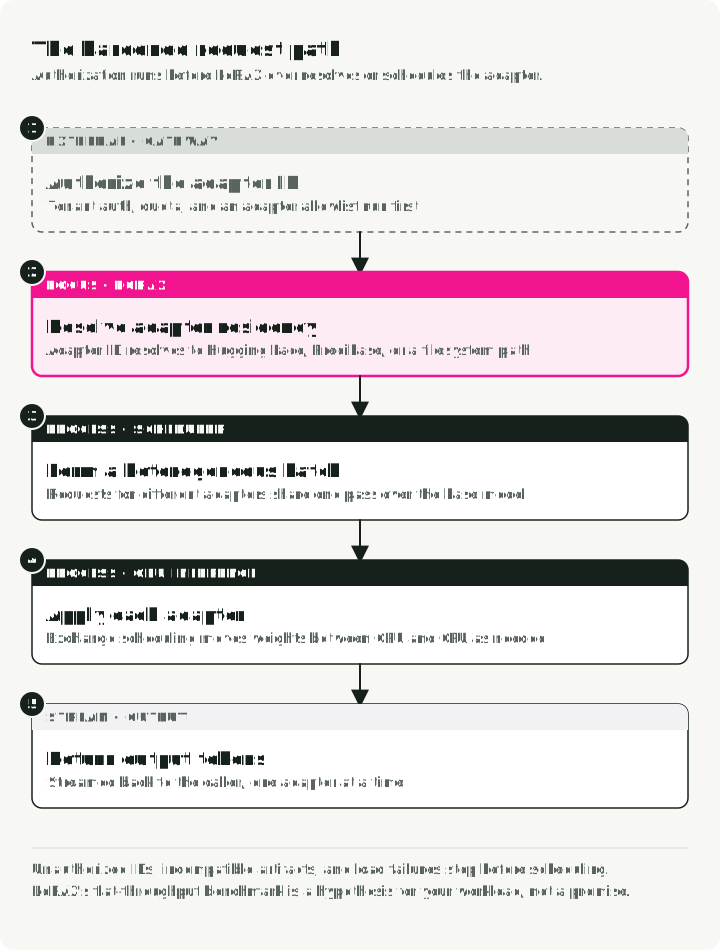
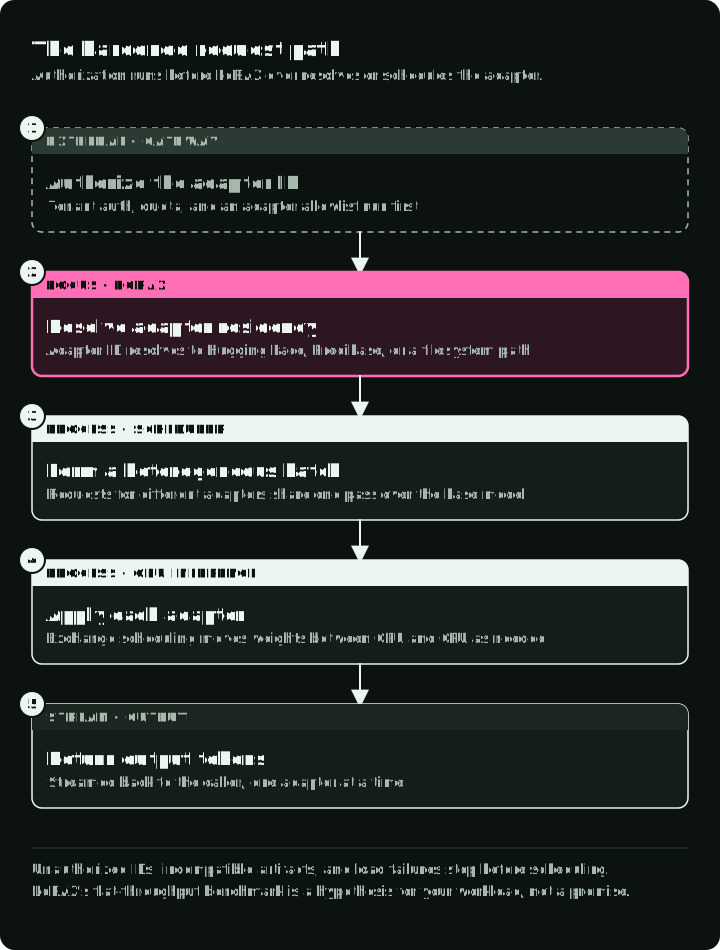
The LoRAX project reports that heterogeneous batching keeps throughput and latency nearly constant as concurrent adapter count grows in its benchmarks. Treat that vendor result as a hypothesis for your workload. Prompt length, output length, rank, target modules, batch occupancy, cache churn, and GPU generation can change the result.
The chart below comes from Predibase’s November 2023 LoRAX launch report. Predibase benchmarked Llama 2 7B with queries spread across 1 to 128 adapters on one NVIDIA A10G. This chart shows the 1-to-32-adapter cost comparison for processing one million tokens, divided evenly among the adapters.
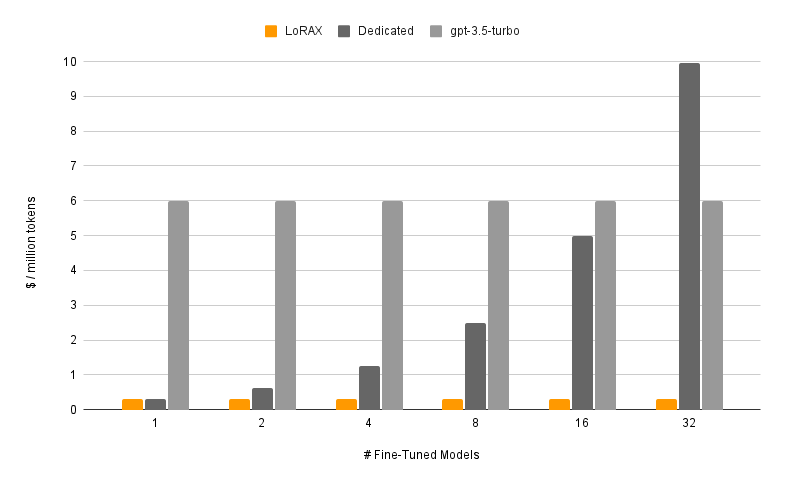
Archived project comparison, reproduced from Predibase’s 2023 LoRAX report. LoRAX and dedicated costs use GPU-hours from that experiment. At the source’s level of detail, the GPT-3.5 Turbo line uses the fine-tuned model’s per-token cost.
Read the flat orange bars as a result of that benchmark design, not as a current price promise. The test sent a fixed total of one million tokens and let different adapters share a batch. The dedicated baseline assumed separate hosted compute for each model, so its cost rose with model count.
Predibase did not publish the token mix, request lengths, batch size, adapter rank, or GPU price, so the dollar values cannot be reproduced.
The chart also does not cover sparse traffic, cold downloads, current cloud prices, newer GPUs, other base models, or adapters with different ranks. Use it as a reason to replay your own traffic.
When LoRAX is a plausible fit
Benchmark LoRAX when all of these are true:
- adapters were trained against the same supported base model and tokenizer contract
- traffic spans many adapters, with a meaningful long tail
- loading a cold adapter on demand is preferable to reserving a deployment for it
- tenant or task routing already exists at the application boundary
- the team can operate a specialized inference runtime and its cache behavior
- the team accepts a runtime with few upstream releases
Typical cases include tenant-specific assistants, many domain variants, and online experiments that share a base checkpoint.
LoRAX is a weaker fit when a few adapters take most of the traffic, or when the models do not share a base. It is also weaker when hard latency targets cannot tolerate cold loads, or when the platform cannot safely control which artifacts the server loads. A standard vLLM or SGLang deployment with a fixed adapter set may be simpler in those cases. Fixed sets are a deployment choice: SGLang also supports dynamic loading, as does vLLM below. TGI itself is now in maintenance mode, and its maintainers recommend vLLM or SGLang.
Check the project’s activity before you commit. As of October 8, 2026, the last LoRAX server release is v0.12.1, from November 2024. The repository had regular commits until April 2025 and only two small fixes since. If you adopt it, plan to own upgrades for new models, CUDA versions, and security fixes.
The figure compares two setups to test by traffic shape: a fixed adapter set when a few adapters take most requests, dynamic LoRAX loading when requests spread over a long tail. A warm active set in dynamic mode can still be evicted; it is not a fixed preloaded set.
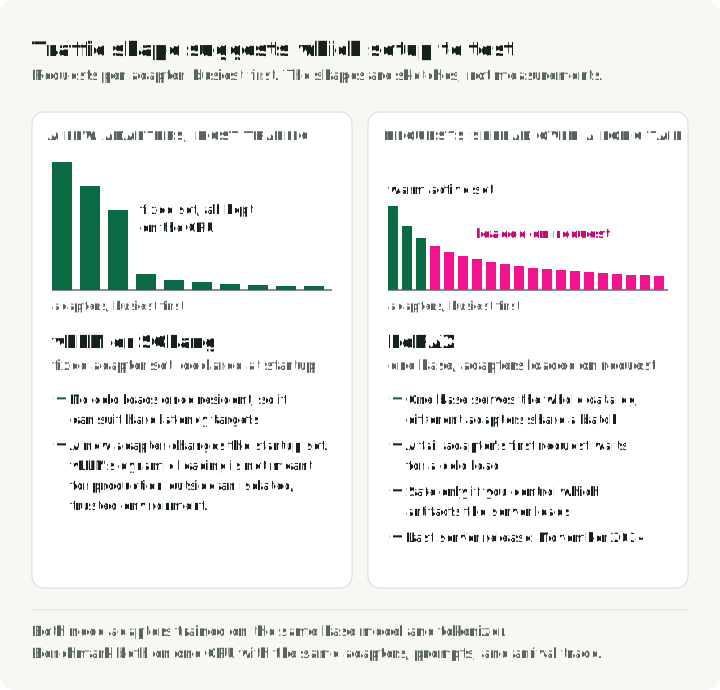
Do not use Kubernetes merely because the catalog is large. First prove the runtime and adapter compatibility on one GPU.
Try one base and one adapter locally
The LoRAX README recommends its prebuilt container. Use an immutable image digest in a real environment. main is shown here only because it is the repository’s documented quick-start tag. Confirm the examples against the image and dependency versions that you deploy.
Before running the container, install and configure NVIDIA Container Toolkit for Docker. The LoRAX README also requires Linux, Docker, an Ampere-or-newer NVIDIA GPU, and CUDA 11.8-compatible drivers. Model licenses and gated repositories may require a Hugging Face token.
mkdir -p data

docker run --rm --gpus all --shm-size 1g \
    -p 127.0.0.1:8080:80 \
    -v "$PWD/data:/data" \
    ghcr.io/predibase/lorax:main \
    --model-id mistralai/Mistral-7B-Instruct-v0.1
The explicit host address binds the published port to loopback; without it, Docker publishes to all host addresses by default. Use Docker 28 or newer: older releases can expose localhost-published ports to hosts on the same network segment. Keep the container running in this terminal. In a second terminal, wait for curl --fail http://127.0.0.1:8080/health to succeed before sending requests.
Start with the base model:
curl http://127.0.0.1:8080/generate \
    -H 'Content-Type: application/json' \
    -d '{
      "inputs": "[INST] Give one reason to measure cold-adapter latency. [/INST]",
      "parameters": {"max_new_tokens": 64}
    }'
Then send a compatible adapter. This GSM8K math adapter declares mistralai/Mistral-7B-Instruct-v0.1 as its base, the same model the server runs:
curl http://127.0.0.1:8080/generate \
    -H 'Content-Type: application/json' \
    -d '{
      "inputs": "[INST] Solve: Natalia sold 48 clips in April and half as many in May. What is the total? [/INST]",
      "parameters": {
        "max_new_tokens": 64,
        "adapter_id": "vineetsharma/qlora-adapter-Mistral-7B-Instruct-v0.1-gsm8k"
      }
    }'
A successful /generate response is a JSON array containing generated_text; the generated answer depends on the model and sampling. The first adapter request may download and load the adapter. Later requests can use cached artifacts and resident weights. Record both paths. A single warm request says little about long-tail behavior.
The adapter above comes from the Hugging Face Hub. In production, load adapters from storage the platform controls. The adapter docs describe two such sources: local for a directory inside the container, and s3 for an S3 URI, with AWS credentials in the environment. After copying the adapter files into the mounted directory, replace parameters in the earlier payload with this fragment:
"parameters": {
    "adapter_id": "/data/adapters/vineetsharma--qlora-adapter-Mistral-7B-Instruct-v0.1-gsm8k",
    "adapter_source": "local"
}
Use the Python client
The lorax-client package wraps /generate. Install it with pip install lorax-client==0.6.3. The same call works with and without adapter_id, so you can compare the base model and the adapter on one prompt:
from lorax import Client

client = Client("http://127.0.0.1:8080")

prompt = (
    "[INST] Natalia sold clips to 48 of her friends in April, and then she "
    "sold half as many clips in May. How many clips did Natalia sell "
    "altogether in April and May? [/INST]"
)

# Base model
print(client.generate(prompt, max_new_tokens=64).generated_text)

# Same prompt through the GSM8K adapter
adapter_id = "vineetsharma/qlora-adapter-Mistral-7B-Instruct-v0.1-gsm8k"
print(
    client.generate(prompt, max_new_tokens=64, adapter_id=adapter_id).generated_text
)
Use an OpenAI-compatible client
LoRAX also exposes an OpenAI-compatible chat endpoint. Install the client with pip install openai==3.26.1. The model field identifies the adapter:
from openai import OpenAI

client = OpenAI(
    api_key="EMPTY",
    base_url="http://127.0.0.1:8080/v1",
)

response = client.chat.completions.create(
    model="vineetsharma/qlora-adapter-Mistral-7B-Instruct-v0.1-gsm8k",
    messages=[
        {"role": "user", "content": "Explain cache locality in two sentences."},
    ],
    max_tokens=100,
)

print(response.choices[0].message.content)
The server does not require an API key by default. That is convenient for localhost and unsafe as an Internet-facing configuration. Put authentication, tenant authorization, quotas, and adapter allowlisting in front of it.
Check adapter compatibility at registration
Before an adapter enters the catalog, verify at least:
- declared base model and revision
- tokenizer and chat-template compatibility
- LoRA rank and target modules supported by the runtime
- artifact format and tensor shapes
- license, provenance, and integrity digest
- a small behavioral and regression test suite
Reject incompatible artifacts during registration rather than on a user’s first request.
Understand residency before deploying
The base model consumes the largest fixed share of GPU memory. Adapter weights, KV cache, batch workspace, and runtime kernels compete for the remainder. /data stores downloaded artifacts. CPU RAM can hold materialized adapter tensors, but only if the loader retains them.
In the checked main implementation at a7394ba, the default single-adapter loader caches file references. Offloading removes GPU weights from the adapter maps; a later request may read and materialize the cached files again. The default loader in v0.12.1 also uses file references. Merged or non-lazy loading and the operating system’s file cache can behave differently, so do not count every offload as a retained-CPU-tensor hit.
These are distinct measured states. A disk or Hub artifact must be read and materialized before it becomes a CPU- or GPU-resident adapter. The figure draws the four possible paths in the table below as time bars; the CPU path applies only when host tensors are retained. Each extra load step adds work before the first token.
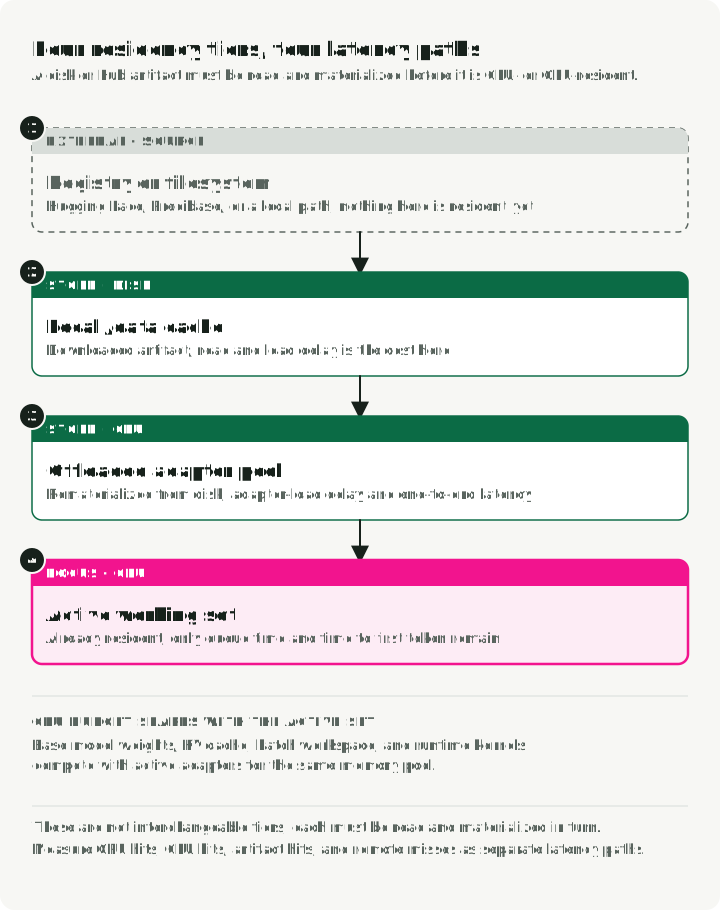
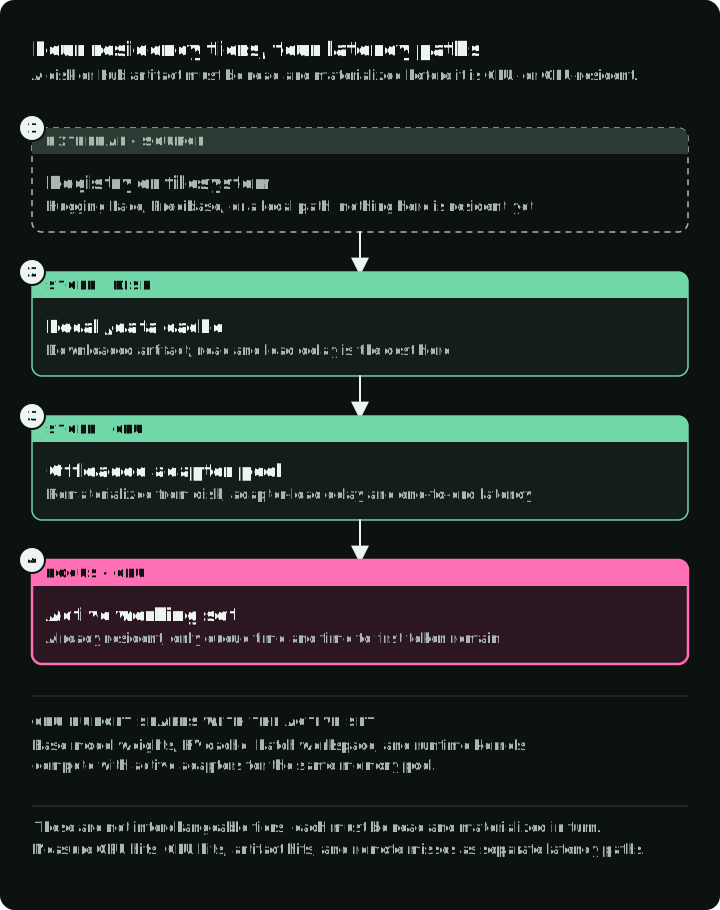
Measure the transitions separately:
| Path | What it includes | Metric to record |
|---|---|---|
| GPU hit | Adapter already resident | queue time and time to first token |
| CPU hit | Transfer retained host tensors, if available | adapter-load delay and end-to-end latency |
| Artifact hit | Read from local /data cache | read/load delay and cache bytes |
| Remote miss | Download plus validation and load | download time, failures, and full cold latency |
Capacity planning should replay the real adapter popularity distribution. Uniform random adapter IDs create a different cache problem from a workload with a few popular adapters and many infrequent ones.
Launcher settings that change the working set
These launcher arguments decide how many adapters stay on the GPU, how much memory they get, and whether loading is fixed or dynamic. Defaults below were checked on October 8, 2026, against main at a7394ba; the launcher reference lists every argument.
| Setting | Default | Change it when |
|---|---|---|
--preloaded-adapter-ids | none | you want a fixed preloaded set and accept disabling dynamic adapter loading |
--max-active-adapters | 1024 | you need to cap how many adapters can be on the GPU and accept requests at once |
--adapter-memory-fraction | 0.1 | GPU hits are low; raising it keeps more adapters on the GPU and shrinks the KV cache |
--adapter-cycle-time-s | 2 | exchanges happen too often (cache churn) or too slowly (queued requests for offloaded adapters) |
--quantize | off | the base model leaves too little GPU memory for adapters and KV cache |
Preloading and dynamic loading are separate modes. Both v0.12.1 and checked main reject new dynamic adapters after registering a preloaded set. Main additionally sets the dynamic adapter-memory reservation to zero when preloaded IDs are present; v0.12.1 does not apply that launcher override.
For dynamic long-tail serving, omit --preloaded-adapter-ids and warm popular adapters with ordinary authorized requests after startup. Memory and scheduling settings affect how long they remain resident; warming does not pin them. Choose these values with the replay in “A production acceptance test” below.
Deploy the repository chart carefully
You need a cluster with GPU nodes that expose nvidia.com/gpu through the NVIDIA device plugin or the GPU Operator, plus kubectl and helm on your workstation. The chart requests that resource, so the pod stays Pending on a cluster without it.
The repository contains charts/lorax, so the repeatable starting point is a pinned repository revision and a local chart:
git clone https://github.com/predibase/lorax.git
cd lorax
git checkout <reviewed-commit-or-release>

helm dependency update charts/lorax
helm template lorax charts/lorax -f values.production.yaml
helm upgrade --install lorax charts/lorax \
    --namespace inference \
    --create-namespace \
    -f values.production.yaml
The chart names the Deployment lorax-<release> and the Service after service.name (lorax by default). Wait for the rollout, follow the logs until the base model has loaded, then forward the Service port and rerun the curl requests from the local section against 127.0.0.1:8080:
kubectl -n inference rollout status deploy/lorax-lorax
kubectl -n inference logs -f deploy/lorax-lorax
kubectl -n inference port-forward svc/lorax 8080:80

# remove the release when you are done
helm uninstall lorax -n inference
As checked on October 8, 2026, the chart values and Deployment template at a7394ba show these defaults:
- the image tag is
latest /datais anemptyDir, so pod replacement discards downloaded artifacts- liveness and readiness probes are empty
- the Hugging Face token is modeled as a literal environment value
- one GPU is requested by default
Use the chart as a starting template and add the production settings below.
Start from the chart’s actual value structure
The chart nests runtime configuration under deployment, and launcher arguments are a list of name/value pairs. A minimal overlay sets only what differs from the defaults above: a tested image digest, the model, the Hub token from a Secret, and a readiness probe. Save it as values.production.yaml and replace the tag and digest placeholders with a verified image reference. One replica, one GPU, and a ClusterIP Service on port 80 are already the chart defaults.
The overlay assumes a lorax-hub Secret with a token key already exists in the inference namespace. Create it before installation if the model needs Hub credentials; otherwise remove the env entry.
deployment:
    image:
        repository: ghcr.io/predibase/lorax
        tag: "<tested-release-tag>@sha256:<verified-image-digest>"

    args:
        - name: "--model-id"
          value: "mistralai/Mistral-7B-Instruct-v0.1"

    env:
        - name: HUGGING_FACE_HUB_TOKEN
          valueFrom:
              secretKeyRef:
                  name: lorax-hub
                  key: token

    readinessProbe:
        httpGet:
            path: /health
            port: http
        periodSeconds: 5
        failureThreshold: 600
Helm replaces the whole args list. The chart default also sets token limits (--max-input-length, --max-total-tokens, --max-batch-total-tokens, --max-batch-prefill-tokens), --compile, and --eager-prefill false; copy the ones you want to keep. Size the token limits from representative prompts, expected concurrency, GPU memory, and load tests. The working-set settings from the table above go into the same list.
Patch the gaps explicitly
The checked chart template passes deployment.env through toYaml, so a normal values overlay can use valueFrom.secretKeyRef for Hub credentials, as above. It formats the image as repository:tag, which accepts the tag-plus-digest value shown above: Kubernetes uses the digest to pull when both are present. The chart hard-codes the emptyDir volumes and has no startupProbe hook. Durable /data and a startup probe therefore need a reviewed chart fork, post-render patch, or higher-level manifest layer.
A values overlay can set the image tag plus digest, launcher args, GPU requests and limits, env (including secretKeyRef), liveness and readiness probes, and the Service type and port. Use that production layer for:
- a PersistentVolumeClaim or node-local artifact cache mounted at
/data - a startup probe before an aggressive liveness probe
- pod disruption policy and topology spread for multiple replicas
- NetworkPolicy, service account restrictions, and an authenticated gateway
- artifact integrity checks
Do not place a Hub token directly in a committed values file. Two replicas provide useful high availability only if both can load the base model. The router must also avoid sending every cold adapter to both pods.
Route for cache locality
Round-robin balancing can turn every replica into a cold cache. A useful router maps an allowed adapter ID to one replica by hash or another stable rule. It keeps a failover path for times when that replica is unavailable. The figure replays six requests for two adapters under both rules.
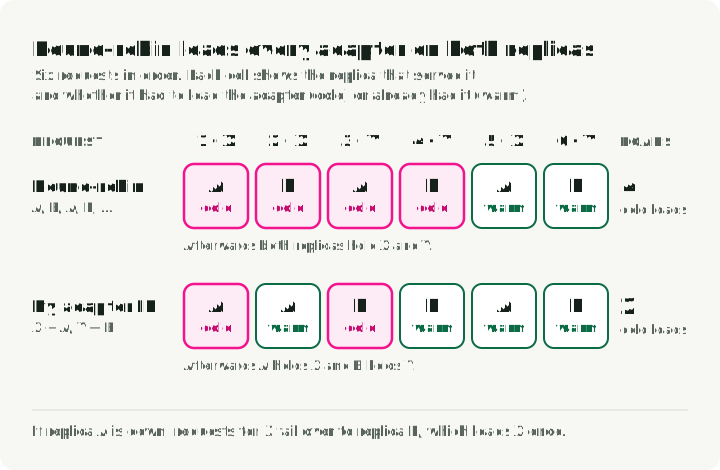
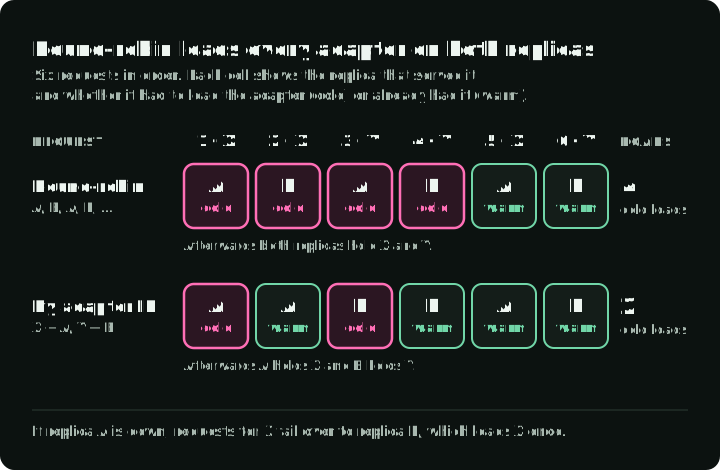
The routing key must come from authenticated application state, not an arbitrary public URL parameter. Otherwise a caller can force remote downloads, churn caches, or probe private adapter names.
LoRAX or vLLM?
vLLM documentation checked on October 8, 2026 describes LoRA modules declared at startup and dynamic loading through endpoints or resolver plugins. It warns that runtime adapter updating has security risks and should not be used in production outside an isolated, trusted environment.
The table compares how each runtime finds, holds, and serves adapters:
| Question | LoRAX | vLLM |
|---|---|---|
| How are long-tail adapters discovered? | Adapter ID can resolve Hugging Face, Predibase, S3, or local-path artifacts on request | Static modules, dynamic management endpoints, or resolver plugins |
| How is residency managed? | Adapter exchange scheduling; reloads use cached files or retained host tensors, depending on the loader | Configured active and CPU LoRA limits plus resolver behavior |
| What is the request interface? | TGI-style /generate, Python client, and OpenAI-compatible chat | OpenAI-compatible serving and native Python APIs |
| What should decide? | Cold/warm latency, cache churn, heterogeneous batch throughput, and operational fit | The same workload replay and operational criteria |
Avoid rules such as “LoRAX for 1,000 adapters, vLLM for ten.” Catalog size alone does not determine performance. Benchmark both with the same base, adapters, prompts, ranks, arrival trace, and hardware.
A production acceptance test
Before expanding the catalog, run a replay that includes:
- A fixed hot set to establish warm throughput and latency.
- A long-tail distribution to measure artifact-cache hits and retained-host-tensor hits, if supported by the loader.
- A burst of previously unseen but allowlisted adapters.
- Pod replacement to measure base and adapter recovery.
- One unavailable or corrupt adapter to verify isolation and fallback.
- Concurrent tenants to verify authentication, quotas, and metric labels.
Track these metrics:
- request rate
- queue time
- time to first token
- inter-token latency
- total latency
- adapter load time
- cache-hit class
- GPU memory
- CPU memory
- download bytes
- failures by reason
Keep adapter IDs out of unbounded metric labels. Map them to controlled dimensions or sampled traces.
Define acceptance thresholds before the test. Set a maximum cold-path error rate and a warm P99 target. Also set a cache-hit target for the observed popularity distribution and a recovery-time objective after pod loss.
Conclusion
LoRAX serves many compatible fine-tunes without many separate copies of the base model. That can be a useful design for long-tail workloads, but it does not make cost or latency flat by definition. The active working set, exchange path, batch mix, and storage layer still set the result.
Prove those mechanics on one GPU first. Then, on Kubernetes: pin artifacts, preserve the cache, protect credentials, authorize adapters, route for locality, and measure every residency path. If LoRAX beats a current vLLM configuration under the same replay, the deployment decision has evidence behind it.
References
- LoRAX repository and README — supported features, requirements, APIs, Python client, and Helm chart
- LoRAX adapter sources — Hub, Predibase, local, and S3 loading
- LoRAX launcher reference — adapter memory, exchange, preload, and quantization arguments
- LoRAX launch report and 2023 benchmark — source and conditions for the cost chart
- LoRAX chart values and Deployment template — checked defaults and volume behavior
- Punica: Multi-Tenant LoRA Serving — the SGMV kernel for mixed-adapter batches
- Text Generation Inference — the project LoRAX forked, now in maintenance mode
- vLLM LoRA adapters — static and dynamic adapter serving
- LoRA paper — low-rank adaptation method
- Hugging Face PEFT documentation — adapter formats and training integration