Schema-Guided Reasoning: vLLM, XGrammar, and Pydantic

This article is for Python engineers who need model output that downstream code can validate. Schema-Guided Reasoning (SGR) gives the model a fixed list of fields to fill, analysis first and decision last, so code can check each step. You will learn how to define a Pydantic schema, request structured output from vLLM, and add application checks for meaning and policy.
Pydantic describes the response fields, vLLM serves the model, and XGrammar restricts which tokens the model can generate. This restriction is called constrained decoding. A token limit can still leave an incomplete JSON prefix, so application code must check completion and validate the result.
What is Schema-Guided Reasoning?
Schema-Guided Reasoning is a technique that Rinat Abdullin described in July 2025. Instead of letting the model freely complete text (which can be inconsistent or ambiguous), you give it a strict template that defines:
- what steps the response should represent
- the intended order of those steps, so a reviewer can inspect the path from data to decision
- where it should focus attention
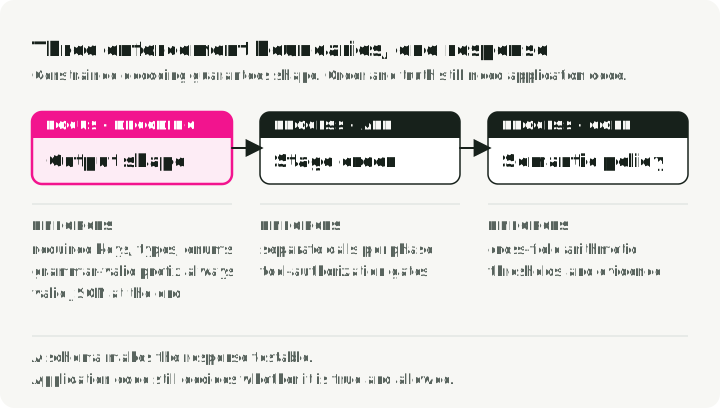
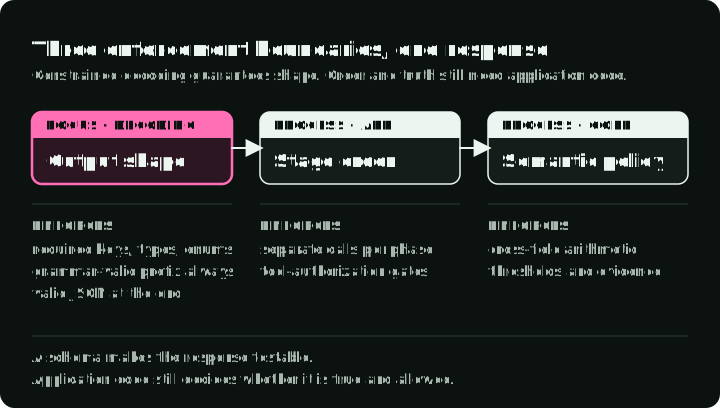
Think of it as a checklist of outputs to inspect, rather than proof of the model’s internal reasoning. The decoder checks the output structure; application code controls when each stage runs and whether a result is allowed to be used.
The diagram follows one pricing response through the three parts that check it: the decoder enforces the shape, the application enforces the order of stages and completion, and policy code enforces the meaning.
What the schema controls
The running example proposes a discount to retain a customer who might leave. Churn probability estimates that chance of leaving; cart value is the total before the discount. Margin is gross profit as a fraction of that total: a $200 cart with a margin of 0.20 has $40 of gross profit. Discounts use percentage points, so a proposal of 15 means 15%.
A pricing model can return valid JSON and still propose a 25% discount when the margin is only 20%. The schema records the proposal; application code must check whether the discount is allowed.
Fields such as churn_analysis, margin_math, and max_discount_percent make the intended intermediate outputs explicit. A schema constrains the returned shape. It does not, by itself, make one field depend on another or prove that the decision is correct.
That gives you:
- comparable output structure across repeated runs
- recorded intermediate outputs that reviewers can inspect
- intermediate fields you can grade against a test dataset
- smaller models may follow the format more often; measure task accuracy before relying on it
- Abdullin writes that a 5–10% accuracy boost is “not uncommon” in cases he has observed; this is a practitioner observation, not a benchmark result, so measure it on your own workload
Use SGR when downstream code depends on structure. When a person reads the answer as prose, a free-form response is simpler.
Prompt guidance and decoder constraints
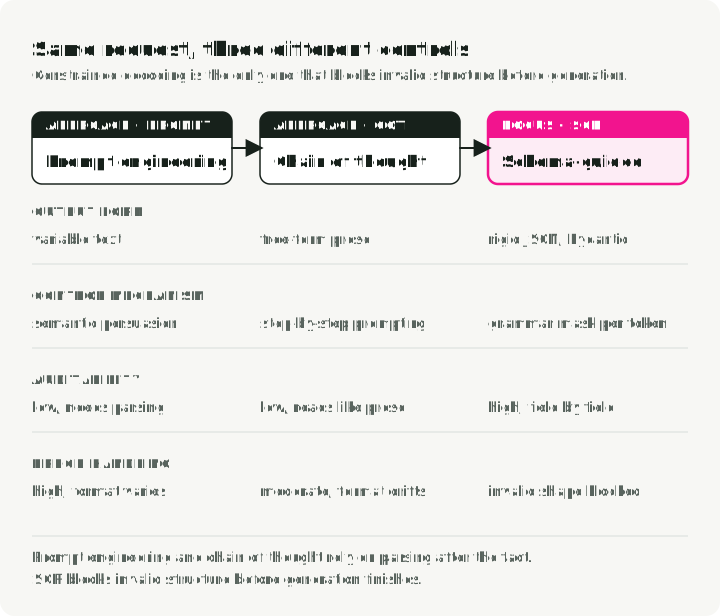
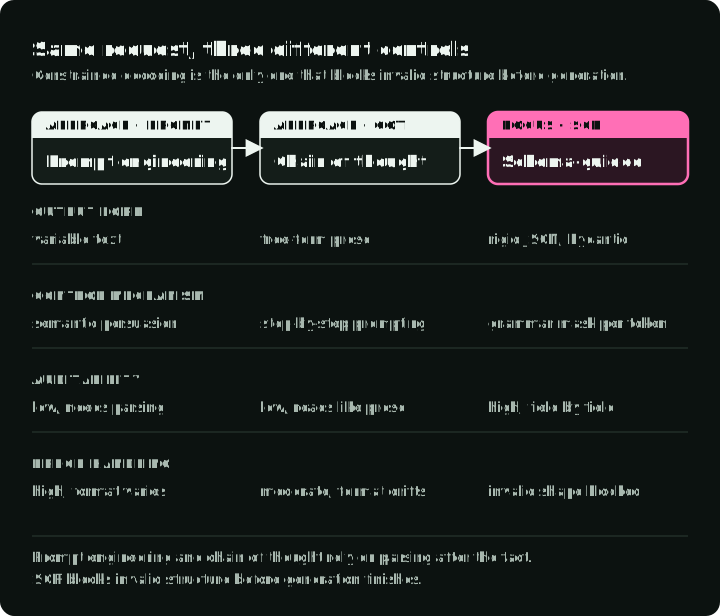
Prompt guidance and constrained decoding can be combined. This comparison shows when each path checks the requested format: only after generation, or also at every token.
Prompt engineering: asking for the format
This prompt asks the model to format the discount proposal as JSON:
Please analyze the customer data and output your response as valid JSON
with the following structure: {"discount": <number>, "reason": <string>}
Be careful with the formatting!
You are hoping the model’s understanding of “output JSON” outweighs its tendency to be conversational. A model update, a temperature change, or a different few-shot example can break your parser.
Chain of Thought: useful reasoning trace, same structure problem
A chain-of-thought (CoT) prompt asks for intermediate analysis. The response might look like this:
Let's think step by step:
1. First, I'll analyze the customer's churn risk...
2. Then I'll calculate the margin...
3. Therefore, I recommend a 15% discount.
CoT can improve task accuracy when the prompt, model, task, and evaluation support it, but it leaves the result as prose that is hard to parse reliably. You may end up making a second LLM call just to extract structured data.
SGR: structured chain of thought
SGR turns the chain-of-thought steps into named fields you can inspect and grade:
class PricingLogic(BaseModel):
    # 1. Recorded analysis
    churn_analysis: str = Field(..., description="Analyze churn_probability")
    financial_analysis: str = Field(..., description="Analyze cart_value and margin")

    # 2. Proposed calculation, checked by application code
    margin_math: str = Field(..., description="Calculate: 'Cart $X * Y% = $Z'")

    # 3. Proposed decision, not bounded by the analysis fields
    max_discount_percent: float = Field(..., description="Max allowed discount")
The schema lists these fields in that order. Use separate calls when a later field must depend on a checked earlier result.
The table compares the three approaches side by side:
| Feature | Prompt engineering | Chain of Thought | Schema-Guided Reasoning |
|---|---|---|---|
| Output structure | Variable text | Free-form prose | JSON that matches a Pydantic schema |
| Control mechanism | Instruction (“output JSON”) | Instruction (“think step by step”) | Prompt plus constrained decoding |
| Who sets the steps | Developer can name them in the prompt | Developer can give steps or examples | Developer defines schema fields |
| Inspection | Parse the text first | Read the prose | Read each field |
| Integration | JSON/Pydantic parsing if JSON is valid | JSON/Pydantic parsing if JSON is valid; extract prose otherwise | model_validate_json, then application checks |
SGR patterns
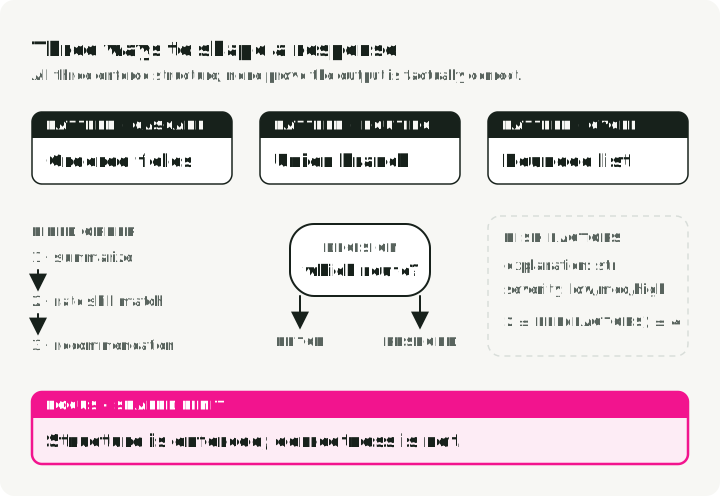
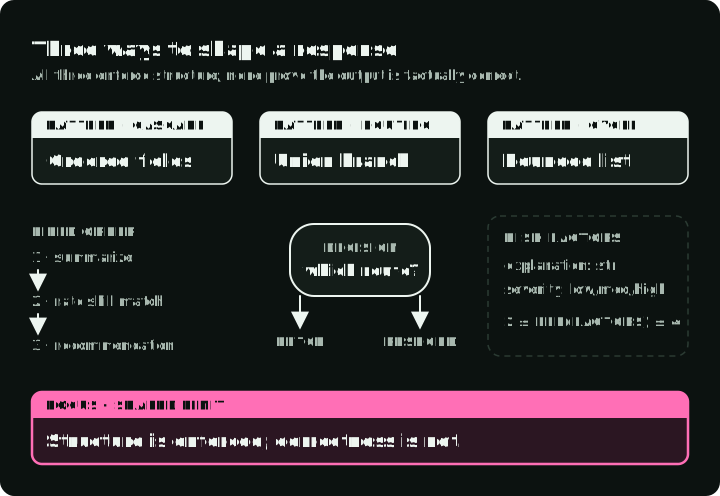
SGR has three core patterns that compose into bigger workflows. The diagram shows the shape each one gives a response, using the field names from the examples below, and marks the limit each schema sets.
1. Cascade: sequential reasoning steps
Cascade represents a reasoning order in one structured response. Here, a document classifier records a summary, a topic-match score, and a proposed category.
from pydantic import BaseModel
from typing import Literal, Annotated
from annotated_types import Ge, Le

class DocumentEvaluation(BaseModel):
    """Record a document summary, score, and proposed category."""

    # Step 1: Record a summary
    brief_document_summary: str

    # Step 2: Rate (bounded integer)
    rate_topic_match: Annotated[int, Ge(1), Le(10)]

    # Step 3: Decide (constrained choices)
    final_recommendation: Literal["relevant", "irrelevant", "review"]
Illustrative uses: document classification and support-ticket triage.
The model is asked to return brief_document_summary, rate_topic_match, and final_recommendation in that order.
2. Routing: a semantic switch statement
Routing asks the model to select one path from a set of options, implemented with Union types. This router chooses between fetching customer data for a pricing request and returning a general response.
from pydantic import BaseModel
from typing import Literal, Union

class FeatureLookup(BaseModel):
    """Route to database lookup."""
    rationale: str
    tool_name: Literal["fetch_user_features"] = "fetch_user_features"
    user_id: str

class GeneralResponse(BaseModel):
    """Standard response for non-pricing queries."""
    tool_name: Literal["respond"] = "respond"
    content: str

class RouterSchema(BaseModel):
    """The model must pick exactly ONE branch."""
    action: Union[FeatureLookup, GeneralResponse]
Good fits: intent classification, tool selection, support triage, multi-agent dispatch.
The branch-specific Literal values let Pydantic tell the union members apart. To make Pydantic pick the branch by tool_name directly, declare a discriminated union: action: Union[FeatureLookup, GeneralResponse] = Field(discriminator="tool_name"). Test that your backend accepts the exported schema.
3. Cycle: repeated reasoning with lists
Cycle describes multiple items, with bounds on how many. This risk-assessment example requests two to four factors, each with an explanation and severity.
from pydantic import BaseModel
from typing import List, Literal, Annotated
from annotated_types import MinLen, MaxLen

class RiskFactor(BaseModel):
    explanation: str
    severity: Literal["low", "medium", "high"]

class RiskAssessment(BaseModel):
    """Generate 2-4 risk factors."""
    factors: Annotated[List[RiskFactor], MinLen(2), MaxLen(4)]
Good fits: risk assessment, issue extraction, parallel tool calls, multi-step planning.
The list bounds describe a variable batch of 2–4 items. A supported decoder can constrain that length; application validation checks it again. Combined with Routing, the list can describe proposed tool calls, which application code still authorizes.
Making SGR work: constrained decoding
The patterns above are just Pydantic schemas. Constrained decoding can enforce the supported constraints exported in their JSON Schema. Which features count as supported depends on the decoding backend. Arbitrary Python validators do not become decoder constraints; they still run in Pydantic after generation.
Constrained decoding modifies the token generation step. Instead of letting the model sample freely from its vocabulary, the engine applies a grammar mask that blocks tokens that would violate the schema. It happens at the inference engine, not in your application code.
SGR does not require a reasoning model. Instruction-tuned models also produce schema-constrained responses; compare task accuracy on the models you plan to serve.
Engines and backends
Constrained decoding needs an API or a serving engine that supports it. If you call a hosted model, use the provider’s structured-output API: OpenAI Structured Outputs, Gemini structured output, and Mistral custom structured output each accept a JSON Schema. The supported schema features and the failure behavior differ by provider, so test the schema you plan to send.
For a self-hosted model, the main engines each have a constrained-decoding backend:
| Engine | Structured-output backends | Use when |
|---|---|---|
| vLLM | auto (default), xgrammar, guidance, outlines, lm-format-enforcer; set with --structured-outputs-config.backend | You want an OpenAI-compatible server and a choice of backend; this article’s example |
| SGLang | XGrammar (default), Outlines, llguidance; set with --grammar-backend | You already serve with SGLang; XGrammar works without a flag |
| TensorRT-LLM | XGrammar or LLGuidance; set with guided_decoding_backend | You deploy on NVIDIA GPUs with TensorRT-LLM |
| Ollama | JSON Schema in the request’s format field | You test locally on a laptop without a GPU server |
Two questions decide the choice: whether code reads the result, and who runs the model. Every structured path ends with the same application checks.
This article uses vLLM with XGrammar. vLLM’s structured-output API accepts JSON Schema through an OpenAI-compatible client. That lets the example keep familiar request plumbing while configuring the decoding backend on the server.
XGrammar supplies the grammar compiler and token-mask machinery. Its technical overview explains the CPU/GPU split below; its benchmark results apply to the tested workloads, not every deployment.
How XGrammar enforces schemas
Where the masking happens
Logits are the model’s unnormalized scores for possible next tokens. XGrammar modifies those scores after the model’s forward pass and before sampling. It does not change the model itself. It filters which tokens can be selected.
A standard inference loop runs the forward pass, samples the next token from the logits, and repeats. XGrammar adds step 2:
1. Input tokens → GPU Forward Pass → Raw Logits
2. Raw Logits → XGrammar Logits Processor → Masked Logits
3. Masked Logits → Sampling → Next Token (continues the grammar-valid prefix)
4. Repeat until done
The diagram shows one step on an eight-token vocabulary: the GPU’s scores and the CPU’s bitmask meet before a token is selected. Each accepted token also updates the grammar state for the next step.
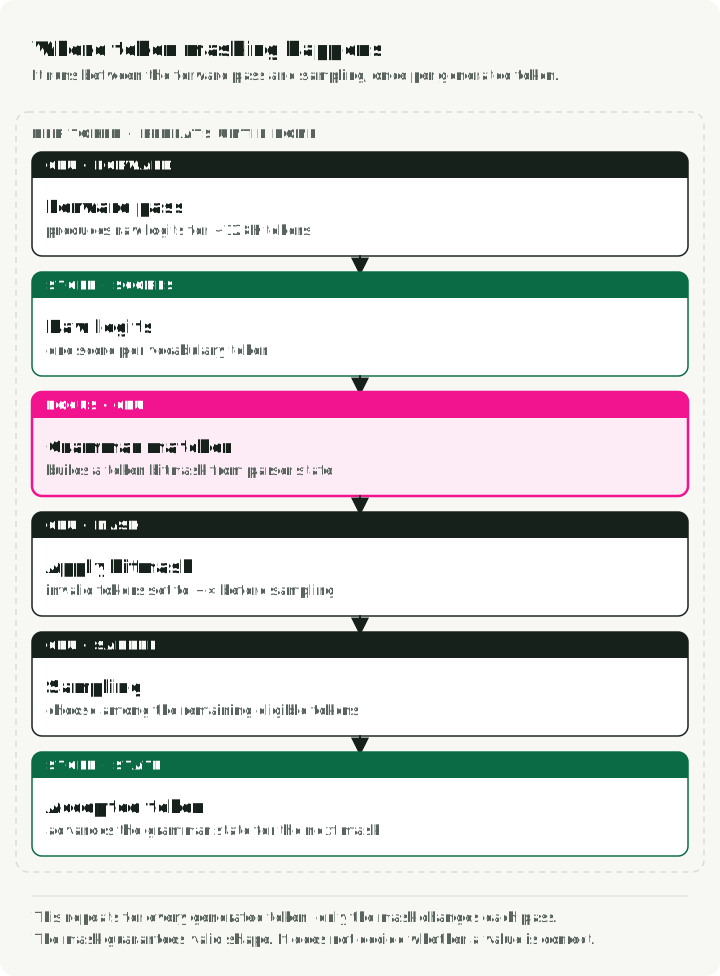
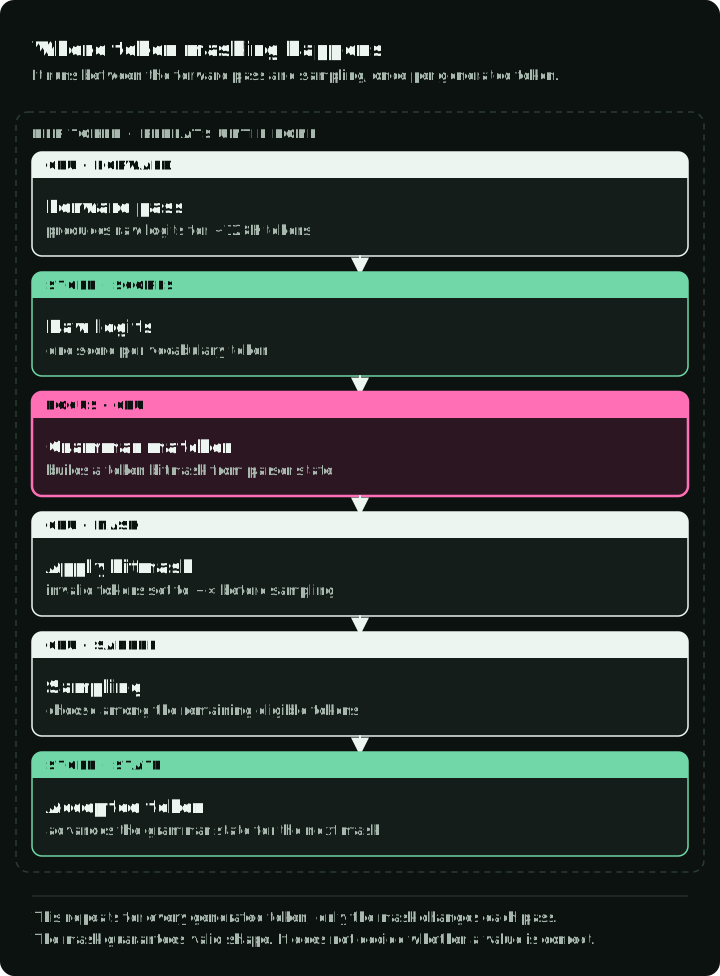
The model still computes its full probability distribution on the GPU. XGrammar’s GrammarMatcher generates the bitmask on the CPU, then the serving engine moves that bitmask to the logits’ device and applies it in place before sampling. For GPU logits, XGrammar uses a GPU kernel for that application. Invalid tokens get their logits set to -∞, which makes their probability exactly 0 after softmax.
Two phases
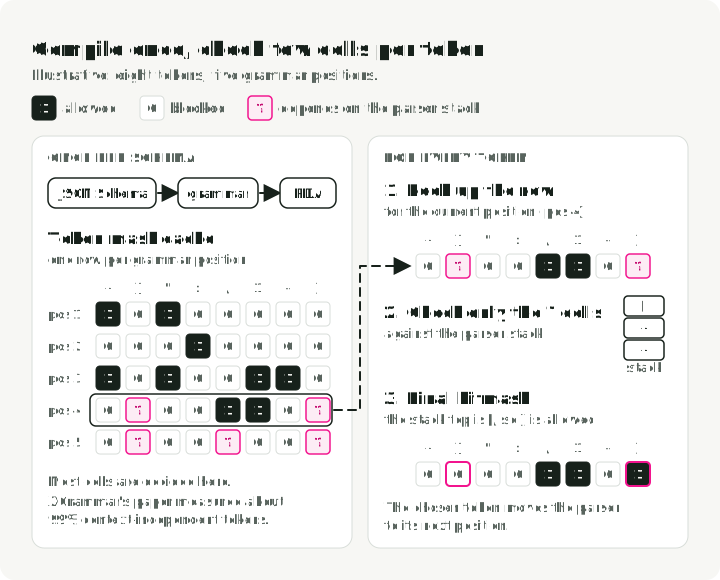
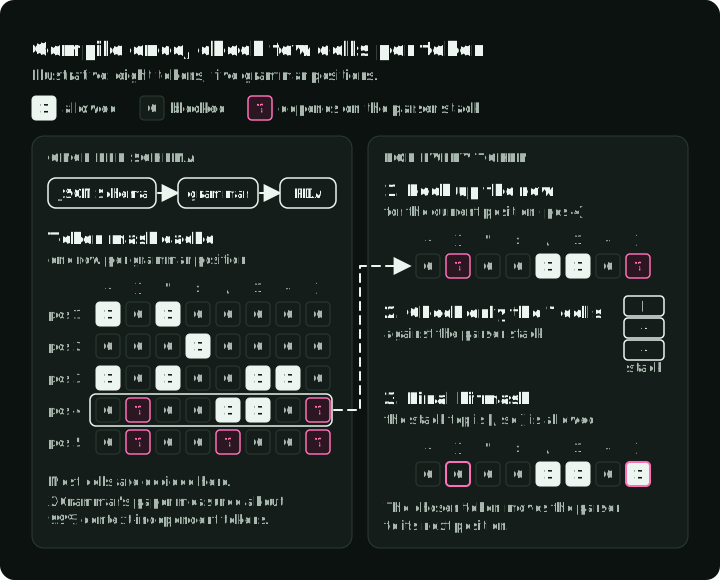
XGrammar splits the work into compile-time and runtime. This design reduces repeated grammar work. The diagram shows an illustrative cache built once per schema (left) and the work done for every generated token (right): most cells are already allowed or blocked, and only the few marked ? are checked against the parser stack. The dashed arrow marks the link: the cache built once is read at every step.
Phase 1: grammar compilation, once per schema
This excerpt builds a grammar for the schema using the model’s tokenizer. The compiled result can be reused when generating responses with that schema.
# This happens once per schema
tokenizer_info = xgr.TokenizerInfo.from_huggingface(tokenizer)
grammar_compiler = xgr.GrammarCompiler(tokenizer_info)
compiled_grammar = grammar_compiler.compile_json_schema(schema_json)
During compilation, XGrammar:
- Converts the JSON Schema to a Context-Free Grammar.
- Builds a Pushdown Automaton (PDA), which is a state machine with a stack so it can handle nested structures like
{"a": {"b": {"c": ...}}}. - Pre-computes which tokens are valid at each grammar position. The result is the “adaptive token mask cache.”
- Categorizes tokens as “context-independent” (cacheable) or “context-dependent” (must be checked at runtime against the stack state).
The XGrammar paper reports that about 99% of tokens were context-independent in its measurements (paper). Treat that number as benchmark-specific, not as a universal ratio.
Phase 2: runtime mask generation, every token
At each generation step:
- The
GrammarMatchertracks the current position in the grammar. - It looks up the pre-computed mask for context-independent tokens.
- It runs the PDA to check the remaining context-dependent tokens.
- It combines them into a final bitmask, moves it to the logits’ device, and applies it there.
Why pushdown automata and not regex?
Because of nesting. A regular expression (a finite state machine) cannot reliably match structures like:
{ "user": { "profile": { "settings": { "theme": "dark" } } } }The hard part is the closing braces }}}: you need to remember how many you opened. A Pushdown Automaton has a stack that tracks this, so it can handle arbitrary nesting depth. That is also why XGrammar can enforce Union types, nested objects, and recursive schemas, where regex-based approaches fall short.
A concrete example: generating a float field
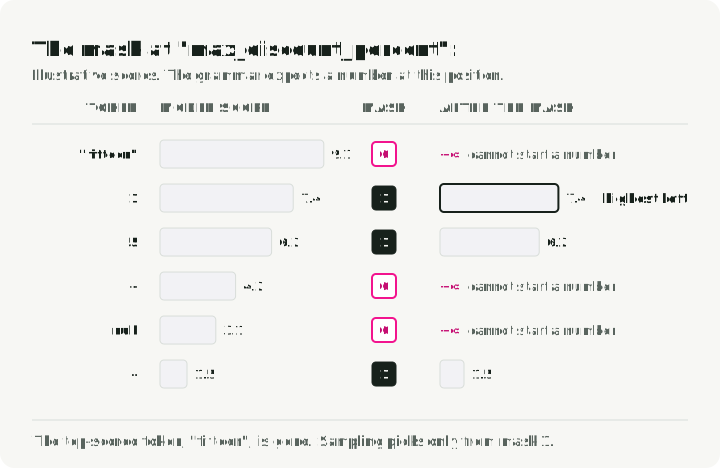
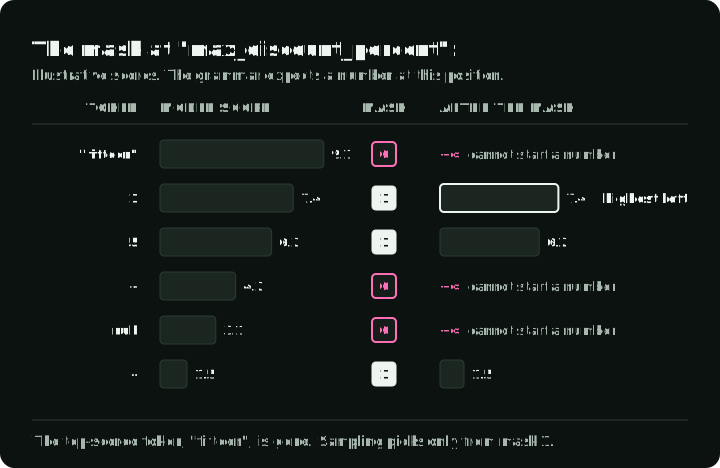
When the model is generating "max_discount_percent":, XGrammar knows from the schema that a float comes next. The valid token set depends on the parser state and tokenizer. At the start of the number, the mask can admit a digit or a minus sign; after a digit, it can admit continuations such as another digit, a decimal point, or an exponent marker.
- A quote,
{,[,true,false, ornullcannot begin this number, so the mask blocks their tokens at that state. - The forward pass might have assigned high probability to the token for
"fifteen". Because that token cannot continue this numeric field, the mask removes it and the model must choose a valid numeric continuation.
The diagram shows illustrative scores for six candidate tokens at this position, the mask bit for each, and the scores after the mask.
What affects overhead
Three things set the overhead:
- Mask generation and transfer. Mask generation on the CPU and its transfer to the logits’ device; how much this overlaps with the forward pass depends on the serving engine.
- Caching. Most of the validity work is done at compile time. Runtime is mostly cache lookups.
- C++ implementation. The hot path is C++, not Python, and the mask is applied to logits in place.
The cited benchmarks report low overhead for their tested grammars, tokenizers, hardware, and workloads. Those results do not establish a general latency or throughput guarantee.
Practical implementation with vLLM
The companion repository contains this code. uv run pytest tests the policy and completion checks without a model; the steps at the end of this section run the full agent against a vLLM server.
The excerpts below are shortened from the repository files named in their first line. They show routing → context retrieval → proposal → approval, and use Pydantic 2 and the OpenAI Python client.
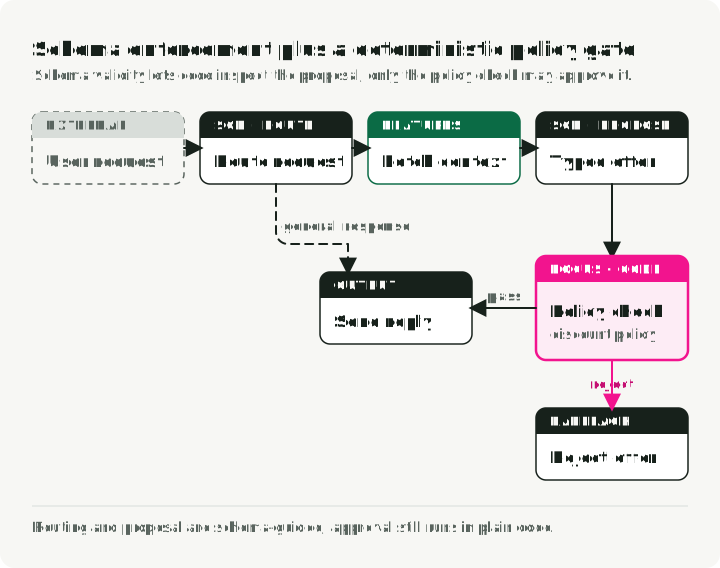
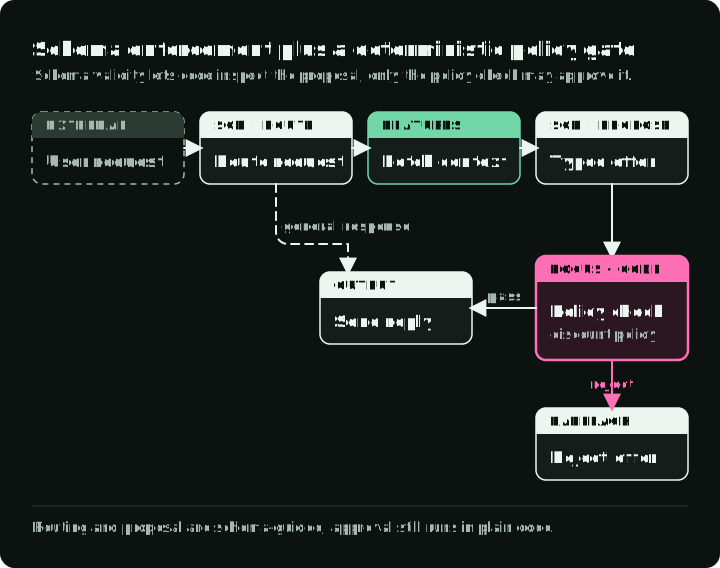
A general request can return a response immediately. A pricing request needs customer data and a model proposal, followed by an application policy check before the discount can be reported. If either model call stops before a complete answer, the request ends with an error; Step 2 shows that check. The diagram shows every path through the agent and the reply each one returns.
Step 1: define the schemas
sgr/models/schemas.py holds the two schemas shown earlier. RouterSchema is the router from the Routing section: request customer data with FeatureLookup, or return text with GeneralResponse. PricingLogic has the four fields from the SGR section. Its margin_math description gives the model a worked example of the format: 'Cart $200 * 0.20 Margin = $40'.
The router and the pricing schema are separate calls. That lets the application fetch the customer data before it asks for a proposal.
Step 2: request and validate a structured response
The client exports the Pydantic model as JSON Schema, adds it to an existing system message for prompt guidance, and sends it as a structured-output constraint. XGrammar is configured on the server; the client supplies the schema for each request.
completed_content rejects incomplete, refused, or empty responses before Pydantic validates the JSON and its fields. It rejects token-limit stops even if the returned text happens to parse. These errors propagate to the caller, which must supply an error response or retry policy; no offer is approved on those paths.
# sgr/utils/llm_client.py
import json
from typing import TypeVar

from openai import OpenAI
from pydantic import BaseModel

T = TypeVar("T", bound=BaseModel)

def completed_content(completion) -> str:
    """Reject incomplete, refused, or empty results before JSON validation."""
    if not completion.choices:
        raise ValueError("No completion returned")
    choice = completion.choices[0]
    if choice.finish_reason != "stop" or getattr(choice.message, "refusal", None):
        raise ValueError("Completion was not successful")
    content = choice.message.content
    if not isinstance(content, str) or not content.strip():
        raise ValueError("Completion has no content")
    return content

class LLMClient:
    """Wrapper for vLLM with XGrammar-enforced structured generation."""

    def __init__(self, base_url: str = "http://localhost:8000/v1"):
        # Local vLLM commonly has no authentication. EMPTY is not authentication.
        self.client = OpenAI(base_url=base_url, api_key="EMPTY")
        self.model = self._get_available_model()

    def _get_available_model(self) -> str:
        """Auto-detect the model running on vLLM server."""
        models = self.client.models.list()
        if not models.data:
            raise RuntimeError("vLLM reported no available models")
        return models.data[0].id

    def run_sgr(self, messages: list[dict], schema_class: type[T]) -> T:
        """Run inference with Schema-Guided Reasoning constraints.

        Uses vLLM structured outputs to constrain the JSON shape at generation time.
        """
        schema_dict = schema_class.model_json_schema()

        # Enhance system message with schema for model guidance
        enhanced_messages = messages.copy()
        if enhanced_messages and enhanced_messages[0]["role"] == "system":
            schema_json = json.dumps(schema_dict, indent=2)
            enhanced_messages[0] = {
                "role": "system",
                "content": (
                    enhanced_messages[0]["content"]
                    + f"\n\nRespond with JSON matching this schema:\n{schema_json}"
                ),
            }

        # vLLM v0.12+ structured outputs. Configure the backend on the server.
        completion = self.client.chat.completions.create(
            model=self.model,
            messages=enhanced_messages,
            temperature=0.1,  # Reduces sampling variation; it is not deterministic.
            extra_body={"structured_outputs": {"json": schema_dict}},
        )

        return schema_class.model_validate_json(completed_content(completion))
In vLLM v0.12 and later, structured_outputs: {"json": schema_dict} requests JSON that matches the schema. The older guided_json and guided_decoding_backend request fields were removed in v0.12.0, and the backend is now set on the server.
Step 3: orchestrate the agent
The application routes the request, fetches data for the authenticated caller, asks for a proposal, checks it, and returns the result. The feature store uses the authenticated user_id, never the ID proposed by the model. The prompt also receives user_ltv, the estimated customer lifetime value; that estimate gives the model context but does not set the discount limit.
The schema guarantees that max_discount_percent is a number. It does not guarantee that the number is allowed; approve_discount decides that. approve_discount first checks that the inputs are finite, the cart value is positive, and the margin is a fraction between 0 and 1. The demonstration policy then rejects proposed percentages outside 0–20, rounds down to hundredths of a percentage point, and rejects a final discount that costs more than the cart’s gross profit.
# sgr/agent.py
from decimal import Decimal, ROUND_DOWN

from .models.schemas import PricingLogic, RouterSchema
from .prompts.routing import build_routing_prompt
from .prompts.pricing import build_pricing_context_prompt, ASSISTANT_FETCH_MESSAGE
from .store.hybrid_store import HybridFeatureStore
from .utils.llm_client import LLMClient

def approve_discount(offer: PricingLogic, context: dict) -> Decimal:
    """Enforce the pricing policy independently of the model's explanation."""
    cart_value = Decimal(str(context["current_cart_value"]))
    margin = Decimal(str(context["cart_profit_margin"]))
    proposed = Decimal(str(offer.max_discount_percent))

    if not all(value.is_finite() for value in (cart_value, margin, proposed)):
        raise ValueError("Pricing values must be finite")
    if cart_value <= 0 or not Decimal("0") <= margin <= Decimal("1"):
        raise ValueError("Invalid pricing context")

    if not Decimal("0") <= proposed <= Decimal("20"):
        raise ValueError("Proposed discount violates pricing policy")
    # Policy rounds down to hundredths of a percentage point before approval.
    approved = proposed.quantize(Decimal("0.01"), rounding=ROUND_DOWN)
    gross_profit = cart_value * margin
    discount_cost = cart_value * approved / Decimal("100")
    policy_cap = min(margin * Decimal("100"), Decimal("20"))
    if not Decimal("0") <= approved <= policy_cap or discount_cost > gross_profit:
        raise ValueError("Proposed discount violates pricing policy")

    return approved

def pricing_agent(user_query: str, user_id: str) -> str:
    """Integrate routing, context, and pricing; user_id is caller-authenticated."""

    llm = LLMClient()
    feature_store = HybridFeatureStore()

    # Build conversation history
    history = [
        {"role": "system", "content": build_routing_prompt(user_id)},
        {"role": "user", "content": user_query},
    ]

    # --- Phase 1: Routing (Uses RouterSchema) ---
    print(f"🤖 Processing: '{user_query}' for {user_id}")
    decision = llm.run_sgr(history, RouterSchema)
    print(f"📍 Routing decision: {decision.action.tool_name}")

    if decision.action.tool_name == "respond":
        return decision.action.content

    # --- Phase 2: Context Retrieval ---
    if decision.action.tool_name == "fetch_user_features":
        print(f"🔍 Fetching features for {user_id}...")
        context = feature_store.get_user_context(user_id)

        if not context:
            return "Error: User profile not found."

        print(f"   [Data] LTV: ${context.get('user_ltv')} | "
              f"Margin: {context.get('cart_profit_margin', 0) * 100}%")

        # Inject context into conversation
        history.append({"role": "assistant", "content": ASSISTANT_FETCH_MESSAGE})
        history.append({
            "role": "user",
            "content": build_pricing_context_prompt(
                churn_prob=context.get("churn_probability", 0.5),
                cart_val=context.get("current_cart_value", 100),
                margin=context.get("cart_profit_margin", 0.2),
                user_ltv=context.get("user_ltv", 0),
            ),
        })

        # --- Phase 3: model proposal, then deterministic policy enforcement ---
        print("🧠 Proposing Offer (Schema Enforced)...")
        offer = llm.run_sgr(history, PricingLogic)
        try:
            approved_discount = approve_discount(offer, context)
        except ValueError:
            return "No discount approved: the proposal failed the pricing policy."

        # Audit log: reasoning is inspectable; pricing is application-enforced.
        print(f"   [Audit] Math: {offer.margin_math}")
        print(f"   [Audit] Approved Discount: {approved_discount}%")

        return (
            f"Illustrative approved discount: {approved_discount}%. "
            "No coupon has been issued."
        )

    return "I'm sorry, I couldn't process your request."

if __name__ == "__main__":
    response = pricing_agent("I want a discount or I'm leaving!", "user_102")
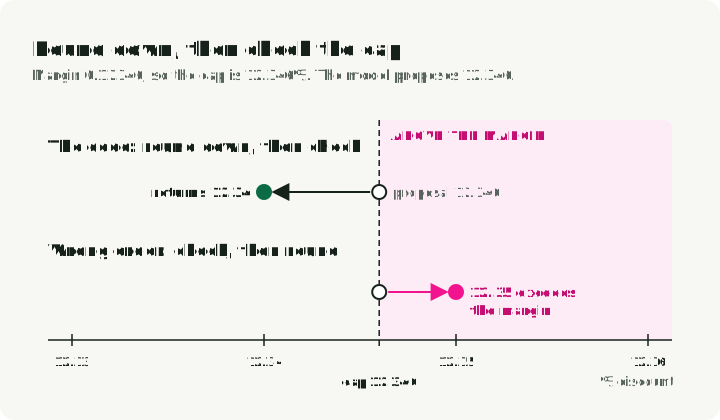
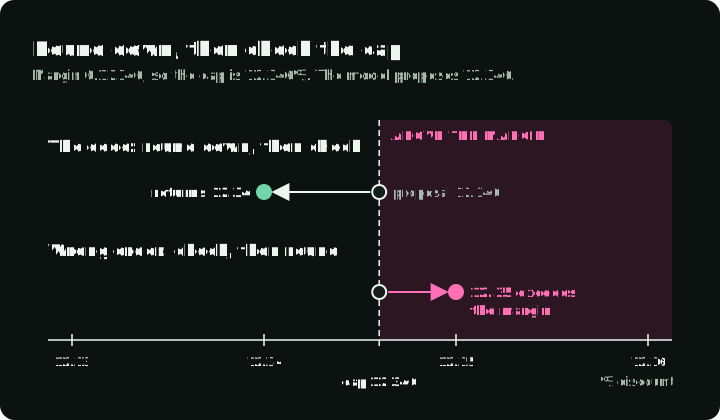
print(f"\n💬 Final Reply: {response}")A 15% proposal on a $200 cart with 20% margin returns 15.00 from the policy function. The application reports that percentage without pretending to issue a coupon. A boundary test uses a margin of 0.12346, or 12.346%. A 12.346 proposal rounds down to 12.34 before checking the final value. Rounding to 12.35 after approval would exceed the margin.
The number line shows that boundary test: where each order of rounding and checking puts the returned value relative to the cap.
approve_discount runs four checks in order:
- The inputs are valid: cart value above 0, margin between 0 and 1, no NaN or infinity.
- The proposed discount is between 0 and 20.
- Round the proposal down to 0.01 (12.346 becomes 12.34, not 12.35).
- The rounded value is at most the margin percentage (and at most 20), and its cost is at most gross profit.
Any failed check raises ValueError and the proposal gets no discount. Rounding comes before the cap, so the cap checks the value that is returned.
Run the demo
The repository runs the whole flow. The demo needs Python 3.13 and uv. The vLLM server needs its own environment, a supported accelerator, and enough memory for the model (installation guide); the repository README covers the install and a CPU Docker option for testing.
Install the demo, run the offline tests, and create the synthetic customer data:
git clone https://github.com/slavadubrov/sgr-discount-manager
cd sgr-discount-manager
uv sync
uv run pytest
uv run python -m scripts.setup_data
Start the server with XGrammar as the structured-output backend:
vllm serve Qwen/Qwen2.5-7B-Instruct \
    --port 8000 \
    --structured-outputs-config.backend xgrammar
The positional model argument and backend option follow the vLLM serve reference. The client connects to http://localhost:8000/v1; for a server on another host, change DEFAULT_API_BASE_URL in sgr/config/constants.py.
Run the agent:
uv run python -m sgr.agentThe output has this shape. The values are illustrative; they depend on the random demo data and the model:
🤖 Processing: 'I want a discount or I'm leaving!' for user_102
📍 Routing decision: fetch_user_features
🔍 Fetching features for user_102...
   [Data] LTV: $1500.0 | Margin: 20.0%
🧠 Proposing Offer (Schema Enforced)...
   [Audit] Math: Cart $200 * 0.20 Margin = $40
   [Audit] Approved Discount: 15.00%

💬 Final Reply: Illustrative approved discount: 15.00%. No coupon has been issued.
The [Audit] Math line is the model’s recorded calculation. The Approved Discount line and the final reply come from approve_discount and application code, not from the model.
Checks before a live integration
Schema design
- Order fields by intended reasoning flow.
- Write a
Fielddescription for each field. Pydantic exports it into the JSON Schema, and the client above adds that schema to the prompt. - Constrain with
LiteralandAnnotated. UseLiteral["a", "b"]for enums andAnnotated[int, Ge(1), Le(10)]for bounds. - Keep schemas focused. One schema per reasoning phase, then compose with multiple calls.
vLLM configuration
- Use a low temperature (0.1-0.3) to reduce sampling variation. For repeatable tests, fix the model and serving configuration, use the server’s deterministic mode if it provides one, and verify the result.
- Explain the task and schema fields in the prompt, as the client does above. The prompt tells the model what each field means; the decoder only blocks invalid tokens.
- Measure token usage against the same prompt, model, schema, and task. SGR can emit more or fewer tokens than a free-form CoT response.
Production considerations
- Version your schemas the same way you version APIs.
- Record the proposal and policy decision separately for debugging, subject to your data-retention and redaction rules.
- Recompute prices, limits, permissions, and other semantic rules in application code before use; test boundary values that the schema alone cannot reject.
The next test
Start with the discount limit and an incomplete completion. The repository’s offline tests cover both, but they cannot tell you whether a model routes a real customer correctly or explains the margin accurately. For a live evaluation, hold the model, prompts, schema, and serving settings fixed. Count incomplete results, schema failures, routing mistakes, and policy rejections separately before comparing cost or task accuracy.
References
SGR Framework
- Schema-Guided Reasoning (SGR) — Rinat Abdullin’s original framework
- SGR Patterns — Cascade, Routing, Cycle patterns
xgrammar
- XGrammar: Flexible and Efficient Structured Generation Engine for Large Language Models — Yixin Dong et al., arXiv:2411.15100 (technical paper with benchmarks)
- xgrammar GitHub — Fast, flexible structured generation library
- xgrammar Documentation — Official docs with quick start guide
- xgrammar Quick Start — Getting started with xgrammar
- Achieving Efficient Structured Generation with XGrammar — MLC blog post on xgrammar internals
vLLM
- vLLM Structured Outputs — Official documentation
Demo Project
- sgr-discount-manager — Companion demo: the code in this article, offline tests, and run steps