LLM Fine-Tuning Guide: When to Fine-Tune, LoRA and QLoRA

This guide is for Python engineers deciding whether and how to fine-tune a large language model. You will learn when to choose fine-tuning over prompting or retrieval and how to choose between methods such as LoRA and QLoRA. The guide also explains how to prepare data, evaluate the trained model, and plan its deployment.
The practical section runs a companion repository that fine-tunes a 4B model for function calling.
For a shorter comparison of fine-tuning, RAG, and prompting, see Fine-Tuning vs RAG vs Prompting.
Should you fine-tune at all?
Before you spend GPU hours, decide whether fine-tuning is the right tool for the problem in front of you. The figure follows one request and shows where each of the four fixes acts, which failure to test it on first, and what it cannot fix.
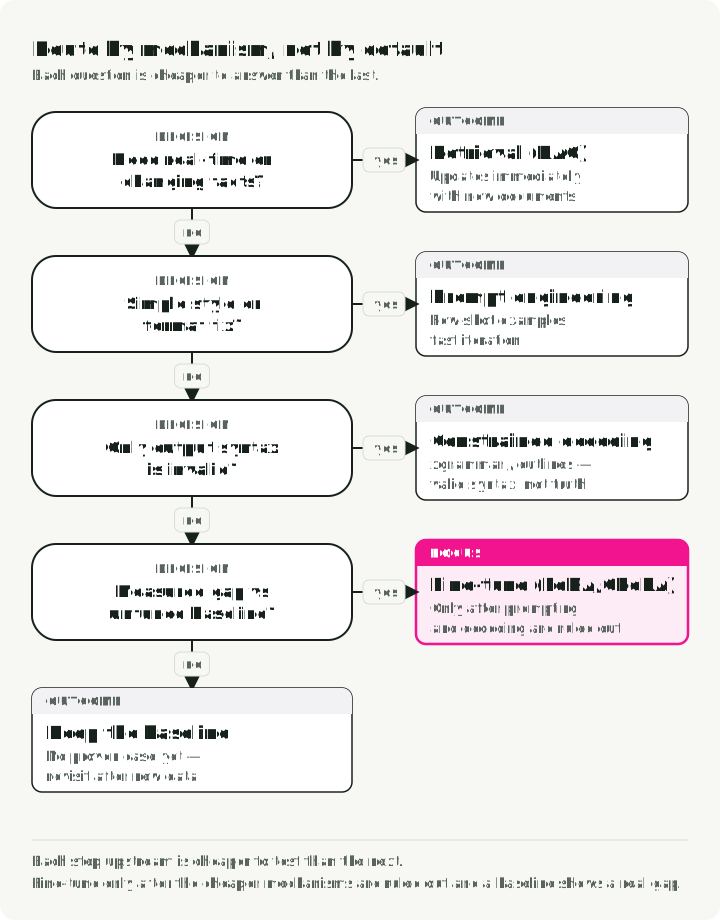
Fine-tuning changes behavior encoded in weights. Retrieval supplies evidence at inference time, so it is the better starting point for facts that change or need citations. New documents become available only after ingestion and indexing; check that freshness against your requirement.
Clear prompts and examples are cheaper to iterate on than a new training run. They may already solve a style or instruction-following problem. Fine-tuning can reduce repeated prompt tokens, but serving latency depends on the model, output length, hardware, and implementation; a weight update is not itself a speedup.
For syntax, libraries such as xgrammar and outlines mask invalid next tokens under a supported schema or grammar. A successfully completed constrained generation belongs to that language. Handle truncation and other incomplete generations separately, and validate the result before using it. The constraint cannot make a customer ID true or a tool choice appropriate. Measure its latency on your backend rather than assuming a fixed overhead.
Each of the four options changes a different step of the same request. Only fine-tuning needs a training run and a new model artifact; the other three change text, documents, or a schema around the same weights. The table compares the four options side by side:
| Option | What it changes | How you update it | Setup cost | What it cannot fix |
|---|---|---|---|---|
| Prompting | Instructions and examples | Edit the text | Low: write and test prompts | Behavior the model cannot follow from instructions |
| RAG | Evidence in the context window | Ingest and re-index documents | Medium: index, retriever, and evaluation | A model that ignores or misreads the evidence |
| Constrained decoding | Which tokens the decoder may emit | Change the schema or grammar | Low to medium: schema and backend support | Wrong values inside a valid structure |
| Fine-tuning | Model weights | Retrain and evaluate a new artifact | High: data curation, GPU time, evaluation | Facts that change after training |
Quick reference: matching problems to solutions
| Challenge | First mechanism to test | Why? |
|---|---|---|
| Missing knowledge | RAG | Retrieve cited evidence; freshness depends on ingestion and indexing |
| Wrong format/tone | Prompt Engineering | Modern models follow style instructions well via few-shot examples |
| Invalid output syntax | Constrained decoding | Enforces a supported schema or grammar during generation |
| Repeated task failure | Fine-tuning (SFT) | Learns from curated input/output examples |
| Pairwise preference mismatch | Preference optimization | Uses chosen/rejected examples after the task behavior is measurable |
| Latency/cost at scale | Distillation (SFT) | Train smaller student model on larger teacher’s outputs |
| Reduce model size | Post-training quantization | Post-training quantization reduces weight memory; speed depends on supported kernels and workload |
Make the business case measurable
Fine-tuning may reduce recurring prompt tokens or let a smaller model meet the target, but neither saving is automatic. Calculate the break-even point with your own traffic and pricing:
If the denominator is small, negative, or based on an unproven quality assumption, the project does not yet have an economic case.
A worked example with illustrative numbers: a prompted baseline sends about 2,000 tokens of instructions and examples with every request. After tuning, the same task needs about 50. At an assumed $0.50 per million input tokens for both models, the saving is 1,950 tokens, or about $0.001 per request. If training, evaluation, and deployment cost $3,000, the break-even point is about 3.1 million requests. At 100,000 requests a day, that is about a month. At 5,000 requests a day, it is more than a year. The calculation holds only if the tuned model meets the same quality thresholds as the baseline.
The hybrid setup. A common architecture is a task-adapted smaller model plus retrieval for changing facts. Treat the larger prompted model as the baseline and keep the smaller model only if it meets the same task-specific quality and safety thresholds.
Types of fine-tuning
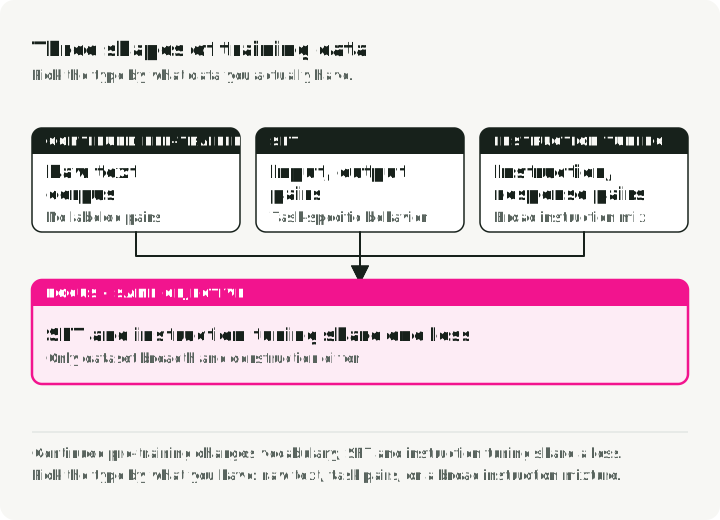
There are three main shapes fine-tuning can take. They differ in what kind of data they need and what they teach the model. The diagram shows one training row for each type.
1. Continued pre-training (self-supervised)
You train the base model on more raw text, using the next token in each sequence as the training target. That is self-supervised learning: the text supplies its own targets, just as in the original pre-training run.
When to use it:
- The domain has vocabulary the base model never saw (medical, legal, internal codebases).
- You have piles of domain text but no labeled (input, output) pairs.
- The base model fumbles domain-specific terminology.
Example: training on millions of clinical notes so the model picks up medical abbreviations, drug names, and clinical workflows.
2. Supervised fine-tuning (SFT)
SFT trains on labeled (input, output) pairs. You show the model the exact output you want for each input.
When to use it:
- You have a specific task with a clean input/output format.
- You have quality labeled data, even in small amounts.
- You need predictable behavior on a known shape of input.
Example: training on (SQL query description, SQL code) pairs for text-to-SQL. This fixed calendar interval assumes signup_date is stored in UTC:
{
    "input": "Get users who signed up in August 2026 (UTC)",
    "output": "SELECT * FROM users WHERE signup_date >= '2026-08-01' AND signup_date < '2026-09-01'"
}
3. Instruction tuning
Instruction tuning is a special case of SFT designed to make models follow a wide variety of natural-language instructions. The training data is (instruction, response) pairs across many different tasks.
When to use it:
- You want a general-purpose assistant (like ChatGPT or Claude).
- The model needs to handle varied, open-ended requests.
- You’re building a chat interface.
Example: training on thousands of diverse instructions like “Summarize this article,” “Write a poem about X,” “Explain Y in simple terms.”
Comparison
| Aspect | Continued Pre-training | SFT | Instruction Tuning |
|---|---|---|---|
| Data | Raw text | (input, output) pairs | (instruction, response) pairs |
| Labels | None (self-supervised) | Task-specific | Diverse tasks |
| Goal | Domain knowledge | Specific task behavior | Follow any instruction |
| Data Volume | Usually the largest corpus | Determined by task coverage and error diversity | Usually broader than task-specific SFT |
One objective, two datasets. SFT and instruction tuning use the same next-token objective; the distinction is the breadth and construction of the dataset. Continued pre-training is a separate experiment and should be followed by tests for both domain gains and general-capability regression.
The 7-stage fine-tuning pipeline
Fine-tuning has seven stages. Each stage has its own failure modes, and skipping one usually shows up as a bad model later. The diagram shows the stages in order, what each stage adds to the release record, and the return path from monitoring to data preparation.
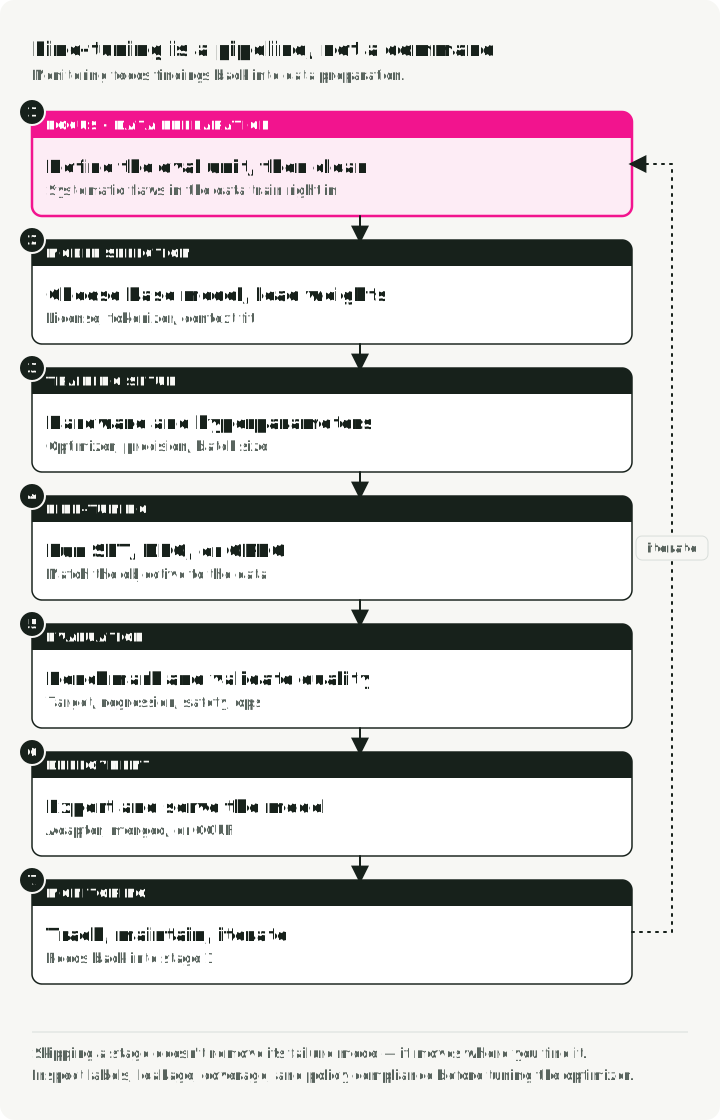
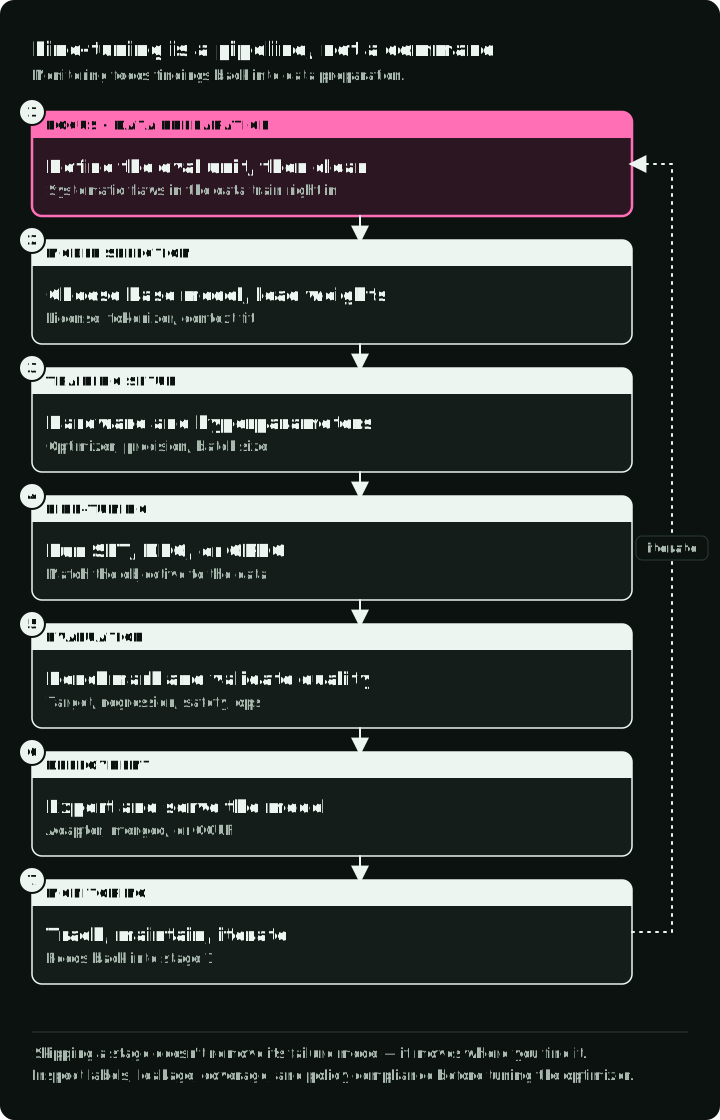
Each stage builds on the previous one:
- Data preparation — Define the unit of evaluation, split the data, then clean and format it
- Model selection — Choose the right base model and load weights
- Training setup — Check serialization and loss targets, then choose the method (LoRA, QLoRA, DoRA) and its settings
- Fine-tuning — Run SFT with a framework; add DPO or ORPO only if needed
- Evaluation — Benchmark performance and validate quality
- Deployment — Export and serve your model
- Monitoring — Track performance, maintain, and iterate
Data is the foundation. Training reproduces systematic flaws in the examples. Inspect labels, leakage, coverage, and policy compliance before spending time on optimizer sweeps.
Stage 1: Data preparation
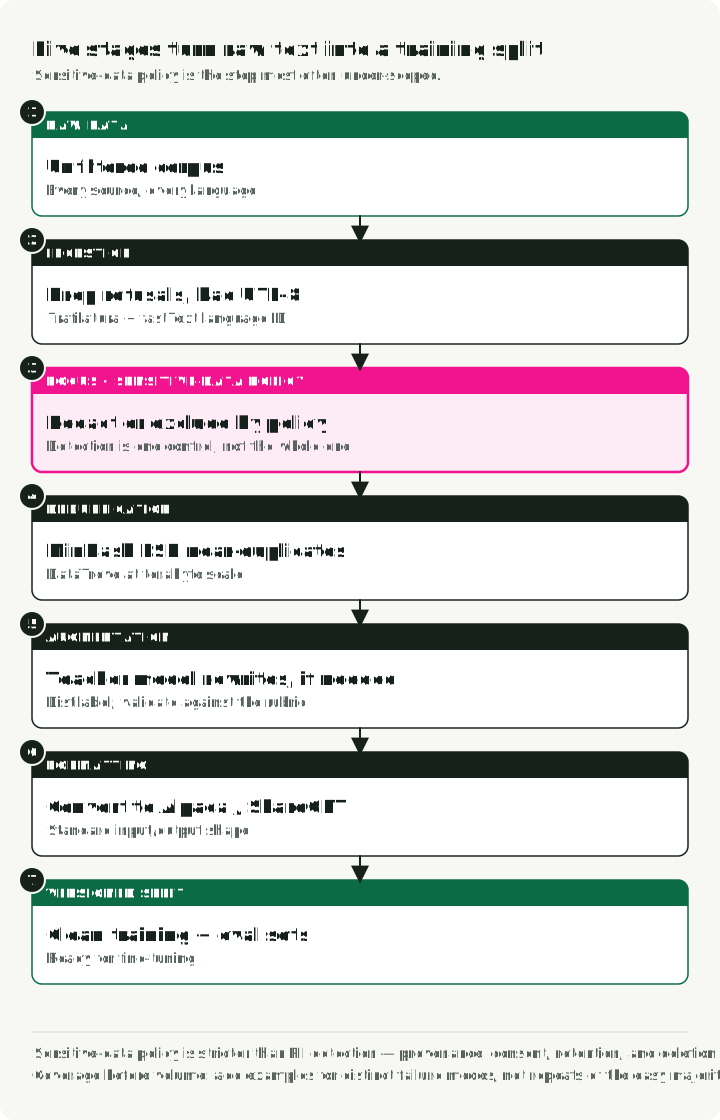
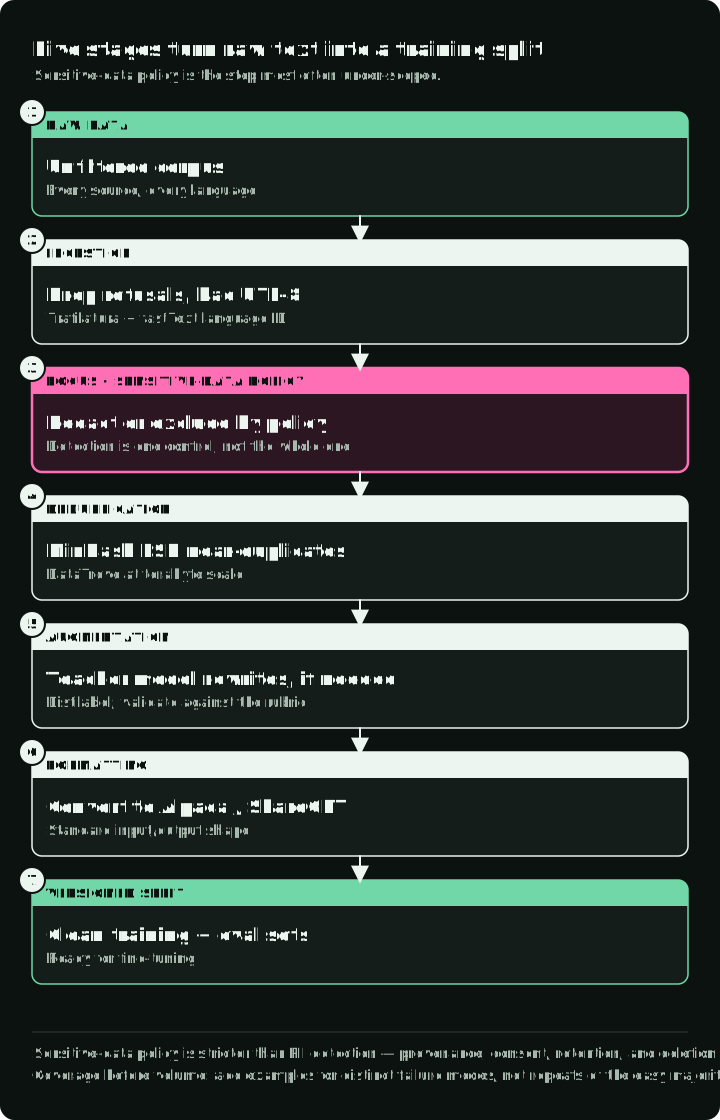
Problems in the data reach the trained model, so this stage gets the most care. The diagram follows example tickets through that order: split by source first, then five transformations inside each split.
Five transformations after the source split
Assign source groups to train or evaluation before transforming rows. A support ticket and every rewrite of that ticket keep the same partition. Cluster known near-duplicates before assigning groups, then check again across partitions after cleaning. Freeze the evaluation set; augment only training data.
List the errors your examples should teach the model to correct, then define each row’s required fields and labels. Choose processing tools for those steps. DataTrove runs filtering and deduplication as distributed jobs for large corpora; Distilabel generates and labels synthetic rows with a teacher model.
1. Ingestion and filtering
- Action: remove broken UTF-8 and off-task content. Label refusals by policy: retain correct refusals as training targets and evaluation cases; exclude only invalid or off-task refusals.
- Tools: Trafilatura when the source is web pages; skip it for data that is already text. fastText’s language-identification models for language ID.
2. Sensitive-data policy
- Action: decide what the model is allowed to learn, then redact, tokenize, or exclude personal and confidential fields as required.
- Tools: Microsoft Presidio when you need configurable recognizers, several languages, or reversible anonymization; scrubadub for a smaller pure-Python pipeline that removes common personal data from text.
- Why: a detector is only one control; provenance, consent, retention, access, and deletion requirements still apply.
3. Deduplication (MinHash LSH)
- Action: remove near-duplicates to reduce repetition and leakage risk; this does not prevent memorization.
- Tools: DataTrove when the corpus needs distributed processing.
4. Synthetic augmentation, if needed
- Action: use a suitable teacher model to rewrite training examples into instruction-response pairs, retaining their source IDs. Do not augment the held-out partition.
- Tools: Distilabel.
- Validation: sample teacher outputs, check them against the same rubric as human labels, and report results separately for synthetic and human-written examples. Such an evaluation subset is called a slice; other useful slices include language and task type.
5. Formatting
- Action: convert to a standard format (Alpaca or ShareGPT).
Data format examples
Alpaca format (instruction-following):
{
    "instruction": "Summarize the following text.",
    "input": "The text to be summarized...",
    "output": "This is the summary."
}
ShareGPT-style storage (conversational):
{
    "conversations": [
        { "from": "user", "value": "Hello, who are you?" },
        { "from": "assistant", "value": "I am a helpful AI assistant." }
    ]
}
Dataset checks
- Coverage before volume. Add examples that represent distinct failure modes, not repetitions of the easy majority case.
- Cleanliness. Drop irrelevant text, normalize whitespace, keep formatting consistent.
- Balance. Preserve important rare cases and report performance per slice.
- Separation. Split by source, user, document, or time when random row splits would leak near-duplicates.
- Provenance. Record the source, license or permission, transformation history, and deletion path for every dataset version.
Stage 2: Model selection and hardware
The base model and its minimum GPU memory requirement determine what you can train.
Start with the smallest base model that already clears the non-negotiable baseline checks. Confirm:
- license and redistribution terms for the intended product;
- language, domain, tool-use, and safety behavior before adaptation;
- tokenizer and chat-template compatibility with the dataset;
- maximum context and truncation behavior needed by real examples;
- support in both the training framework and target serving engine.
Fine-tuning is an adaptation step, not a repair for an unsuitable base. If the model fails capabilities the dataset does not cover, choose another base before running more epochs.
Estimate memory for your run
There is no durable “model size → GPU” table. Peak memory changes with weight precision, optimizer, trainable parameter count, sequence length, micro-batch size, activation checkpointing, attention implementation, and framework overhead. Start with a memory estimate, then run a short maximum-length smoke test on the exact stack.
| Memory component | Full fine-tuning | LoRA | QLoRA |
|---|---|---|---|
| Base weights | Training precision | Frozen, usually BF16/FP16 | Frozen, typically 4-bit NF4 |
| Gradients | All trainable weights | Adapter weights | Adapter weights |
| Optimizer states | All trainable weights | Adapter weights | Adapter weights |
| Activations | Depends on batch and sequence length in every method | Same dependency | Same dependency |
The chart applies the table to the demo’s base model, Nemotron-Nano-4B with 4.51 billion parameters. It splits the approximate memory of each method into weights and trainable state; activations come on top.
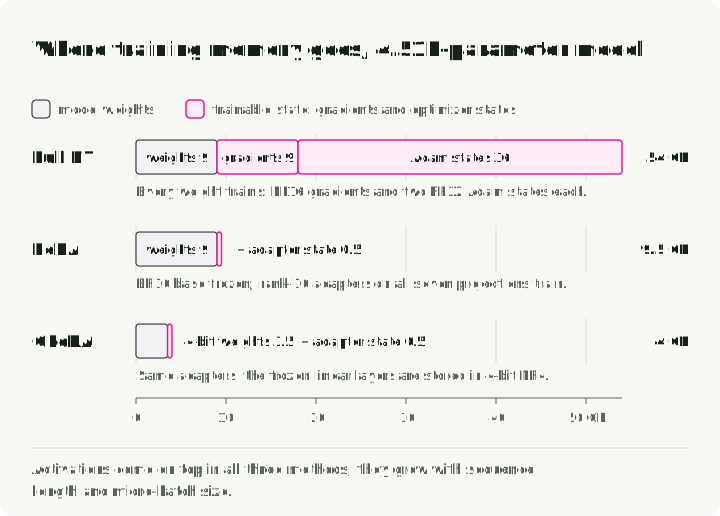
The original QLoRA paper fit a 65B LLaMA model on one 48 GB GPU in its specific setup. That result is a useful bound, not a promise that every current 70B architecture, context length, kernel, or trainer will fit the same device.
Memory math
For a model with parameters, weights alone require approximately bytes in BF16/FP16 or bytes at four bits, before quantization metadata and runtime buffers. Full Adam-style training adds gradients, optimizer states, and often higher-precision master weights. LoRA avoids most trainable-state memory; QLoRA additionally reduces the frozen base-weight footprint. Activations can still dominate at long sequence lengths.
Use this workflow:
- Choose the longest sequence and micro-batch you must support.
- Estimate weights and trainable state, leaving headroom for activations and kernels.
- Run one forward/backward step at maximum length.
- Record peak allocated and reserved memory.
- Only then scale batch size, rank, sequence length, or GPU count.
Stage 3: Training setup and methods
Stage 3 has two parts. First check that each stored row becomes the training text you expect. Then choose the training method and its settings.
From stored rows to training targets
ShareGPT is a dataset shape; ChatML is one serialization convention. Convert from/value to the roles and fields the trainer accepts, then use the selected model’s chat template. Do not substitute ChatML tokens just because the data is conversational.
A row goes through five steps:
- ShareGPT row:
from/valuepairs. messagesandtools: the roles the trainer accepts.apply_chat_templatewith the selected model’s template. Inference must use the same template.- Token IDs and labels, where
-100means no loss. - Train.
Print the rendered text from step 3 before training.
For the greeting row above, the normalized messages are:
messages = [
    {"role": "user", "content": "Hello, who are you?"},
    {"role": "assistant", "content": "I am a helpful AI assistant."},
]
# Inspection step after loading the selected model's tokenizer:
rendered = tokenizer.apply_chat_template(
    messages, tokenize=False, add_generation_prompt=False,
)
print(rendered)
Inspect the actual serialized row before training: role delimiters, end-of-turn tokens, and tool schemas must match inference. For a tool-use row, preserve tool definitions, assistant tool calls, and tool results as distinct fields. Check that truncation does not remove the supervised response or cut a tool argument in half.
Loss masking chooses which tokens the model is rewarded for predicting. In full-sequence training, user, system, tool, and assistant text can all contribute. In assistant-only training, those context tokens remain visible to attention but their labels are ignored (commonly -100); only the assistant spans contribute. For this greeting, the answer should be a target and the user’s question should not, if assistant-only behavior is the intent.
The diagram shows both settings for one tool-use conversation.
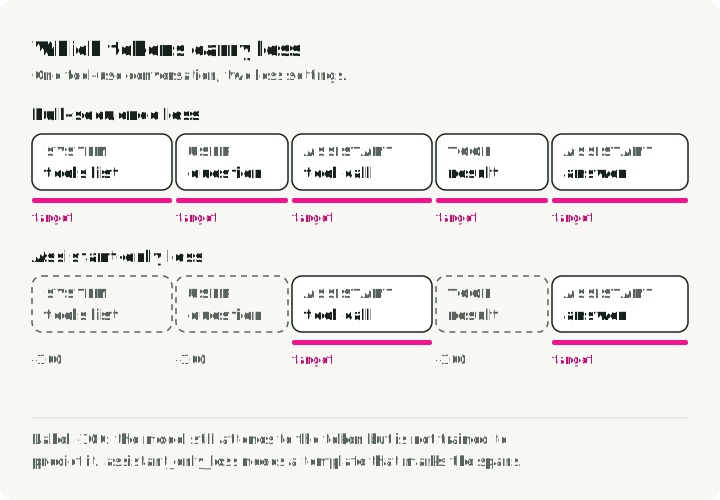
TRL’s SFT documentation supports assistant_only_loss=True for conversational datasets whose templates expose generation spans. A template without those spans cannot supply that mask. Prompt/completion datasets have a separate completion_only_loss option. Before enabling either, inspect one tokenized batch and decode the tokens with non-ignored labels. Then repeat with a tool conversation and a maximum-length example. The demo later in this guide uses full-sequence loss, because the Nemotron template has no generation spans.
Choose a sequence length from the data distribution and run the maximum-length memory check from Stage 2. Packing places several shorter examples into one training sequence. Start without it so row boundaries are easy to inspect. Benchmark packing only after the serialized rows and labels are correct.
Full fine-tuning vs PEFT
Full fine-tuning (FFT) updates every weight, so gradients and optimizer state scale with the whole model. The peak cannot be inferred from parameter count alone, but it is far above the memory needed to load the weights for inference.
Parameter-efficient fine-tuning (PEFT) trains only a small subset of parameters and freezes the rest, so gradients and optimizer states cover only that subset.
LoRA: the starting point
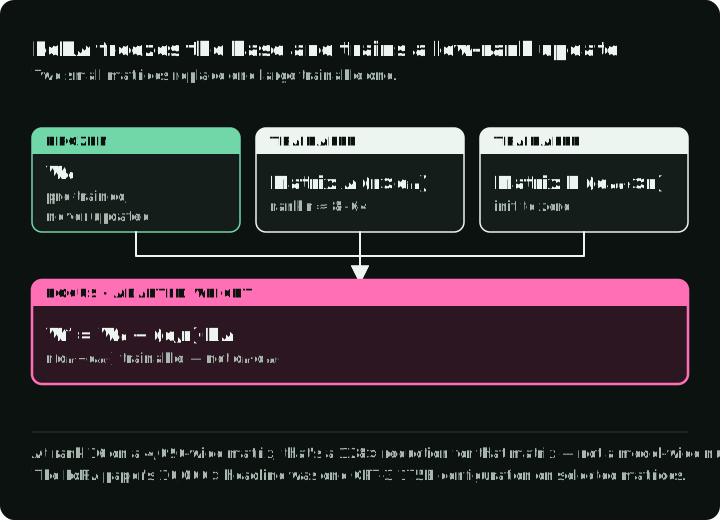
LoRA (Low-Rank Adaptation) freezes a pre-trained matrix and represents its learned update with two smaller matrices. The original paper motivates this with the hypothesis that useful adaptation updates have low intrinsic rank.
Here, is the layer’s input width and its output width. The rank is the smaller shared dimension of the two trainable matrices: a smaller rank uses fewer trainable parameters. The setting controls the update’s scale through the ratio .
The diagram shows the frozen matrix, the two trainable matrices, and how their scaled product is added, with the parameter counts for one 4,096-wide matrix at rank 16.
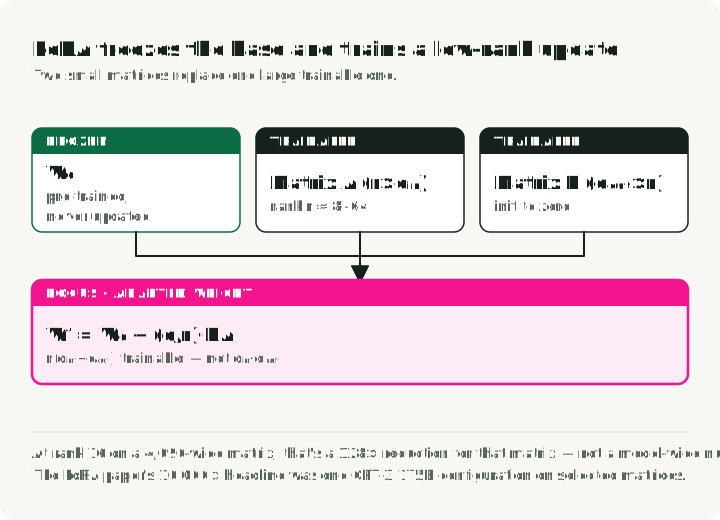
For a frozen matrix , LoRA learns:
The adapted layer is:
The adapter has trainable parameters instead of for that matrix. For a square 4,096-wide matrix at rank 16, that is a 128× reduction in trainable parameters for this matrix. Whole-model savings depend on which matrices receive adapters.
PEFT methods compared
| Method | What changes | Choose it when |
|---|---|---|
| LoRA | Frozen base plus low-rank trainable updates | The base model fits comfortably and you want small task artifacts |
| QLoRA | LoRA with the frozen base stored in 4-bit form | Base-weight memory is the limiting factor |
| DoRA | Separates weight magnitude from a LoRA-updated direction | A measured LoRA baseline leaves a quality gap worth extra complexity |
| Full fine-tuning | All model weights | PEFT misses the target and the quality gain justifies distributed training and full checkpoints |
DoRA: weight-decomposed LoRA
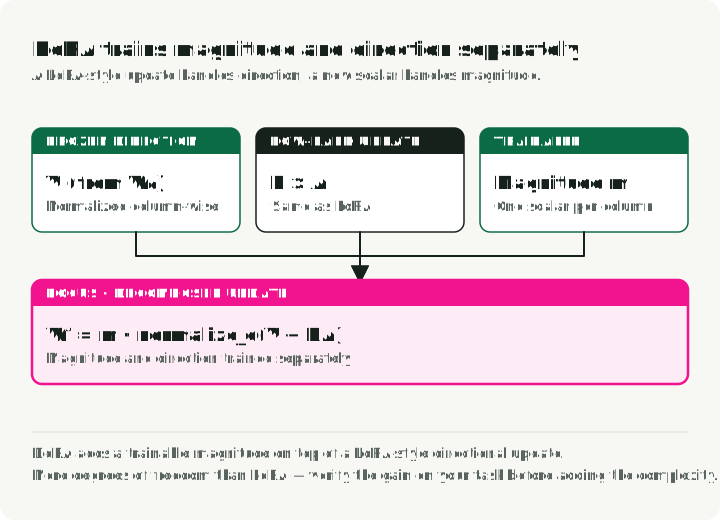
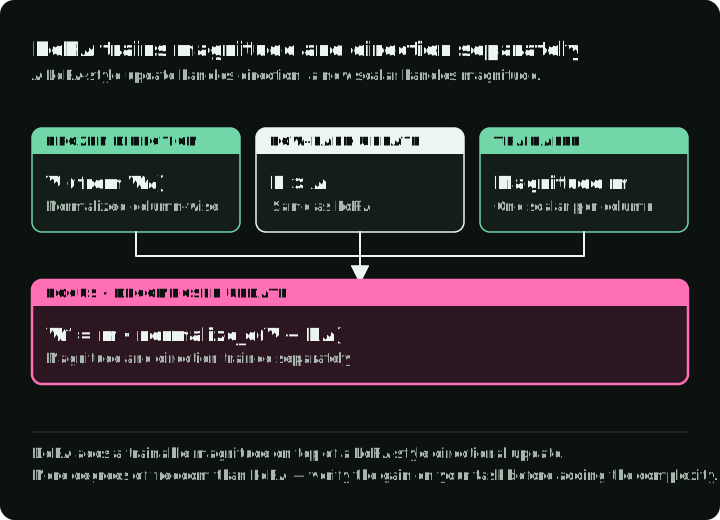
DoRA (Weight-Decomposed Low-Rank Adaptation) separates the magnitude of each weight vector from its direction. The DoRA paper applies a LoRA update to the directional component while learning the magnitude separately. The diagram draws one weight column as an arrow: B·A turns its direction, and a trained magnitude m sets its length.
How it works:
Instead of treating weights as a single entity, DoRA breaks pre-trained weights into two components:
- Magnitude — a trainable value per weight vector.
- Direction — a normalized vector updated through low-rank matrices.
In compact column-wise notation:
where:
m= magnitude (trainable)- = the frozen initial matrix; normalize after adding
- = the learned low-rank directional update
- = column-wise normalization
Effects of the decomposition:
- More degrees of freedom than standard LoRA because magnitude can change independently.
- Better results than LoRA in several configurations reported by the proposing paper.
- Extra parameters and computation, so the gain should be verified on your task and serving path.
Adapter merging for multi-task learning
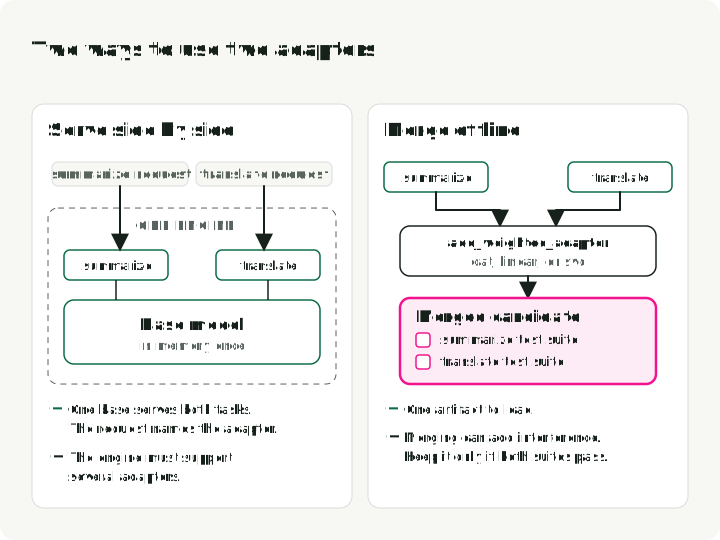
Separate adapters let one frozen base support several tasks. You can route requests to an adapter, serve multiple adapters from one engine when supported, or create an offline merged candidate. Merging can introduce interference, so evaluate the merged artifact rather than assuming the source adapters compose cleanly.
The figure compares the two options for two adapters on one base. Keep the merged model only if it passes both test suites.
Common merging methods:
- Concatenation — combine adapter parameters and grow the effective rank. Fast and simple.
- Linear combination — weighted sum of adapters. The weights set how much each task contributes.
- SVD — matrix decomposition for merging. More flexible, but slower.
PEFT’s add_weighted_adapter implements these as combination_type="cat", "linear", and "svd"; the PEFT model-merging guide covers them and newer methods.
Example: one adapter for summarization, another for translation, merged into a single multi-task model.
Stage 4: Preference alignment (optional)
SFT is the main training run, and the framework sections after this stage run it. This stage covers what you can add after SFT, if the errors call for it.
SFT learns demonstrations. Preference optimization instead learns from comparisons such as “chosen response A is better than rejected response B”. Use it only when pairwise preference is the right label for the error; factual correctness and policy compliance often need stronger evaluators than a global preference.
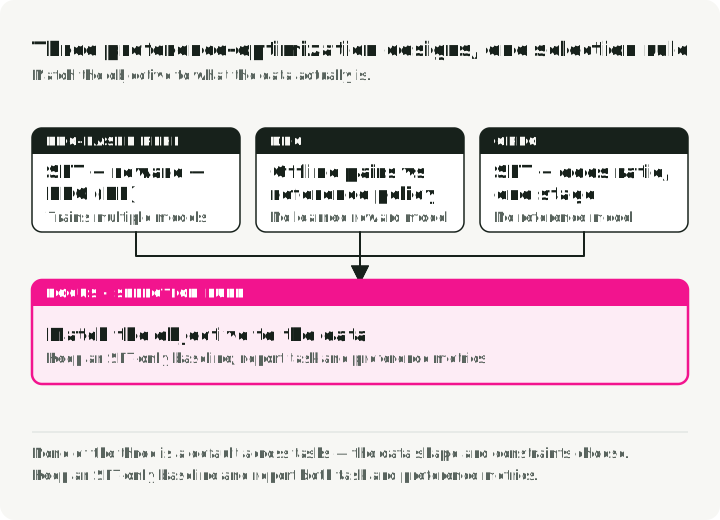
The diagram shows the stages of each method, the models it loads, and what one training step does.
PPO-based RLHF
RLHF means reinforcement learning from human feedback. The policy is the language model that generates responses; a reward model scores those responses using preferences learned from human comparisons. A PPO-based recipe has three stages:
- SFT — learn the task.
- Reward model — train on human preferences (chosen vs rejected).
- PPO (Proximal Policy Optimization) — generate responses and update the language model to increase their reward scores.
The operational cost comes from the moving parts:
- Complicated to implement and maintain.
- Expensive — you train multiple models.
- Sampling from the model being trained requires checks for unstable updates and responses that exploit the reward model without satisfying the task.
DPO
DPO (Direct Preference Optimization) drops the separate reward model and reinforcement-learning loop. It favors chosen responses while discouraging large changes from a fixed starting model, called the reference model. The DPO paper derives this objective by limiting how far response probabilities can move from that reference; the mathematical limit is a KL-divergence constraint.
A preference pair contains the same prompt and two candidate responses. This abbreviated row shows its fields; real labels need complete responses and a reason to prefer one:
{
    "prompt": "Explain quantum computing",
    "chosen": "Quantum computing uses qubits...",   # Preferred response
    "rejected": "Well, it's complicated..."        # Non-preferred response
}
What changes operationally:
- Simpler code path (no separate reward model, no RL loop).
- Training on saved preference pairs rather than generating new responses for reward scoring during each update.
- A fixed reference model, or its saved log probabilities for the training responses, in the standard formulation.
DPO is easier to prototype than a full PPO pipeline, but it is not an automatic quality upgrade. Results depend on the starting policy, pair quality, loss settings, length effects, and evaluation protocol. Compare it with an SFT checkpoint on the same held-out preference and task suites.
ORPO
ORPO (Odds-Ratio Preference Optimization) combines the SFT negative-log-likelihood loss with an odds-ratio penalty on rejected responses. It removes the separate reference model and can combine task learning and preference optimization in one run.
How it works: ORPO uses a combined loss that does two things at once:
- Maximizes the likelihood of the chosen response (learning the task).
- Penalizes the rejected response with an odds-ratio term (learning preferences).
TRL now ships ORPO as ORPOConfig in trl.experimental.orpo (TRL ORPO trainer). Two settings are worth knowing:
learning_rate: the paper used low rates such as8e-6; tune against your model, batch, and data rather than copying one value as a rule.beta: controls the preference term relative to the SFT term.
The trade-off:
- One training stage instead of two.
- No reward model.
- No reference-model forward pass.
- A coupled run: if task learning or preference behavior regresses, there is no intermediate SFT checkpoint from the same pipeline to inspect.
Choose through the data and evaluation design:
- Use DPO when you already have a satisfactory SFT checkpoint and want a simpler offline preference experiment.
- Test ORPO when a reference-free, single-stage objective fits your data and operational constraints.
- Use PPO-based RLHF when online sampling against an explicit learned reward is part of the requirement and you can monitor reward exploitation.
None is a default across tasks. Keep an SFT-only baseline and report both task metrics and preference metrics.
Fine-tuning frameworks
Stages 3 and 4 chose the method. The next two sections choose a framework and run SFT with it.
Frameworks overlap and change quickly. Pick by the execution path you must support, pin versions, and keep the training configuration portable enough to reproduce outside a notebook.
Unsloth — speed and memory efficiency
Unsloth integrates with Hugging Face trl and transformers and provides optimized kernels, checkpointing, and quantized fine-tuning paths for supported models.
- Custom Triton GPU kernels for attention, RoPE, and cross-entropy that skip PyTorch overhead.
- Memory-efficient backprop that recomputes activations during the backward pass instead of holding them in memory.
- Fused operations that collapse multiple steps (layer norm + linear, and similar) into single GPU calls.
- 4-bit quantization integrated directly into the QLoRA path with optimized dequantization.
Import order matters. Follow the import order in the Unsloth example for the version you pin. Unsloth applies patches during import, so importing it before trl and transformers avoids missing optimizations or version-specific errors.
# Correct order
from unsloth import FastLanguageModel  # Must be first!
from trl import SFTConfig, SFTTrainer

# Avoid this order with Unsloth's patched path
from trl import SFTTrainer
from unsloth import FastLanguageModel
Best for: single-GPU training, prototyping, and Colab notebooks.
Published speed and memory numbers vary by model, sequence length, batch, precision, and hardware. Benchmark tokens per second and peak memory on your own run instead of treating a headline ratio as a framework property.
Axolotl — config-driven training
For config-first and distributed setups, Axolotl keeps the whole run in one YAML file. These keys select a 4-bit base, a QLoRA adapter, and an Alpaca-format dataset:
# axolotl_config.yaml (excerpt)
base_model: meta-llama/Meta-Llama-3-8B
load_in_4bit: true
adapter: qlora
lora_r: 32
lora_alpha: 16 # alpha/r = 0.5 here; the demo uses 2. Sweep it with the learning rate.
datasets:
    - path: data/training_data.jsonl
      type: alpaca
Target modules, sequence length, packing, batch size, learning rate, and epochs go in the same file; the config reference lists every key. Run training:
axolotl train axolotl_config.yamlFramework comparison
| Tool | Useful when | Verify before committing |
|---|---|---|
| Unsloth | You want an optimized supported-model path with concise examples | Model, GPU, quantization, and distributed-support matrix |
| Axolotl | You want declarative configs and built-in distributed recipes | Exact config schema and launcher for the pinned release |
| TRL | You want direct access to Hugging Face SFT and preference trainers | Dataset format, chat template, loss masking, and PEFT integration |
| Torchtune | You already run torchtune recipes; it is no longer actively maintained (since 2025) | Model recipe coverage and export compatibility |
Practical demo: fine-tuning with Unsloth
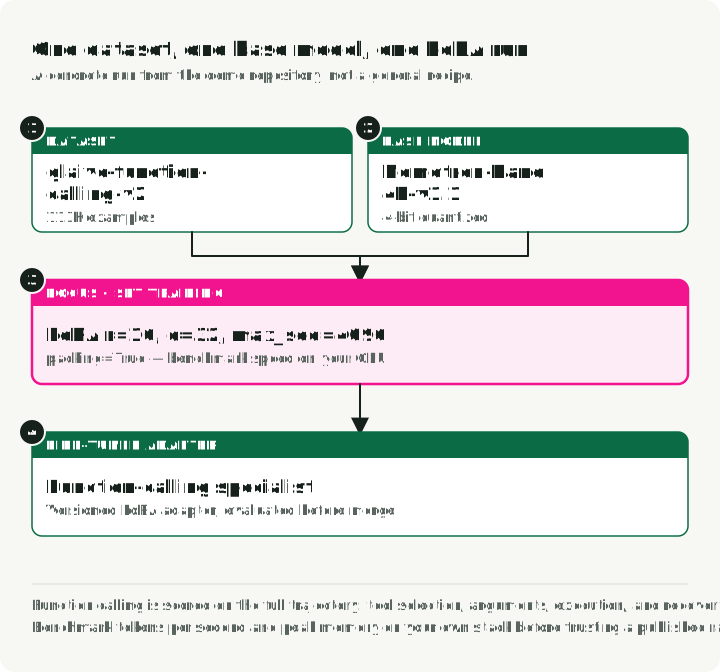
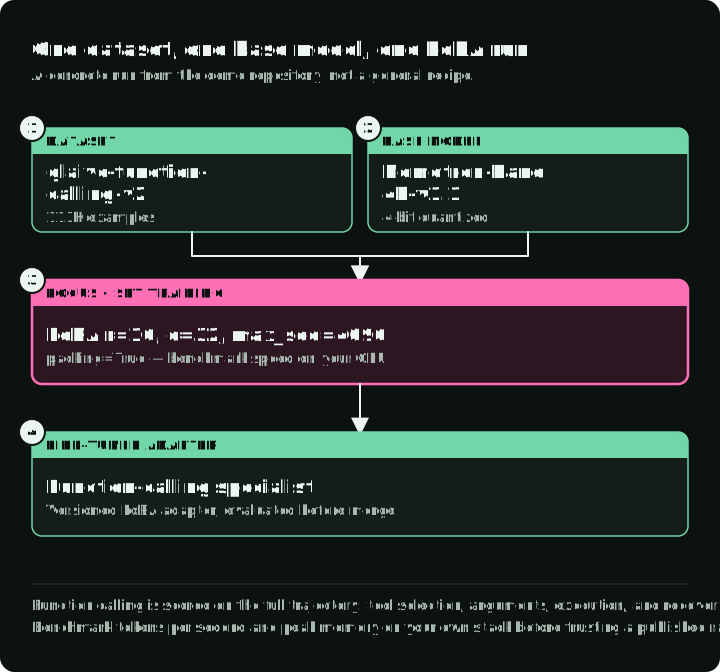
This demo teaches a model to select a function and supply its arguments. My unsloth-finetune-demo fine-tunes Llama-3.1-Nemotron-Nano-4B-v1.1 on the glaive-function-calling-v2 dataset. This repository’s CUDA training path needs Linux or WSL2 and an NVIDIA GPU. Unsloth also has a separate Intel GPU training path, which this demo does not implement. Pin the commit you run; the lock file pins the dependencies, including TRL 0.24.0.
The diagram shows the whole run with its real values: how a glaive row becomes training text that keeps the tool definitions, the split, the training settings, the three output directories, and the first check.
Run it
git clone https://github.com/slavadubrov/unsloth-finetune-demo.git
cd unsloth-finetune-demo
uv sync

# Train on 1,000 random rows, then also save a merged model and a GGUF file
uv run finetune --max-samples 1000 --merge --gguf q4_k_m
Every finetune run trains. --merge and --gguf add exports after training; there is no export-only command. The run writes three directories:
outputs/unsloth-nemotron-function-calling/— the LoRA adapteroutputs/unsloth-nemotron-function-calling-merged/— the merged 16-bit model (--merge)outputs/unsloth-nemotron-function-calling-gguf/— the GGUF file (--gguf q4_k_m)
Before training starts, the run prints the first training row as the model sees it. Read it: the tool definitions appear inside <AVAILABLE_TOOLS>, and each call appears inside <TOOLCALL>.
Data preparation
Each glaive row has two strings. The system column holds every function definition; the chat column holds the conversation, with calls written as <functioncall> {...}. Training on chat alone teaches the model to call tools whose schemas it never sees. The demo’s data.py converts each row into messages and a separate tools list, renders both with the model’s own chat template, and holds out 5% of the rows as an evaluation split:
def to_text(example: dict, tokenizer) -> dict:
    """Render one glaive row with the model's chat template. Empty text marks a dropped row."""
    try:
        messages, tools = to_messages(example)
    except (ValueError, KeyError):  # bad JSON in a tool definition or call
        return {"text": ""}
    if not messages:
        return {"text": ""}
    text = tokenizer.apply_chat_template(messages, tools=tools or None, tokenize=False)
    # The trainer tokenizes this text with special tokens on, which adds BOS again.
    return {"text": text.removeprefix(tokenizer.bos_token or "")}
On the full dataset this keeps 112,811 of 112,960 rows; 149 rows have malformed JSON and are dropped. With this tokenizer the longest rendered row is 4,076 tokens, so a 4,096-token limit truncates none of them.
The model card’s chat template has one defect for training. It renders a past tool call without the closing brace after arguments, so the text inside <TOOLCALL> is not valid JSON. A model trained on that text learns to emit it, and the serving parser cannot read the call. The repository ships the template with the brace added and uses it in training and serving. Its CPU-only test renders tool conversations and checks that every <TOOLCALL> parses.
Demo configuration
The demo’s config.py sets the LoRA values:
LORA_R = 16        # Adapter capacity; tune against held-out results
LORA_ALPHA = 32    # Update scale alpha/r = 2
LORA_DROPOUT = 0.05
MAX_SEQ_LENGTH = 4096
LORA_TARGET_MODULES lists all seven attention and MLP projections of this Llama-family model, q_proj through down_proj.
The alpha-to-rank ratio. alpha/r scales the classic LoRA update. alpha = 2r is a common starting heuristic in some tool documentation, not a stability guarantee. Sweep rank, alpha, learning rate, and target modules only after the data and baseline are fixed.
Model loading
The demo’s model.py loads the base in 4-bit form, replaces the chat template with the corrected one, and adds the LoRA adapters:
from unsloth import FastLanguageModel

model, tokenizer = FastLanguageModel.from_pretrained(
    model_name=MODEL_NAME,
    max_seq_length=MAX_SEQ_LENGTH,
    load_in_4bit=True,  # QLoRA: the frozen base is stored in 4-bit form
    trust_remote_code=True,
)
# Training rows, the saved tokenizer, and vLLM all use this one template.
tokenizer.chat_template = CHAT_TEMPLATE_PATH.read_text()

model = FastLanguageModel.get_peft_model(
    model,
    r=LORA_R,
    lora_alpha=LORA_ALPHA,
    lora_dropout=LORA_DROPOUT,
    target_modules=LORA_TARGET_MODULES,
    use_gradient_checkpointing="unsloth",  # Lower activation memory; extra compute
)
Training configuration
The demo’s training.py passes the rendered rows to TRL’s SFTTrainer. It evaluates held-out token loss once per epoch. That loss is a diagnostic, not tool-call accuracy; Stage 5 still requires separate task evaluation.
trainer = SFTTrainer(
    model=model,  # 4-bit base with LoRA adapters from FastLanguageModel
    processing_class=tokenizer,
    train_dataset=train_dataset,
    eval_dataset=eval_dataset,
    args=SFTConfig(
        output_dir="outputs/unsloth-nemotron-function-calling",
        dataset_text_field="text",
        max_length=4096,
        packing=False,  # One row per sequence, so row boundaries are easy to inspect
        assistant_only_loss=False,  # The Nemotron template has no generation spans
        eval_strategy="epoch",
        per_device_train_batch_size=2,
        gradient_accumulation_steps=4,
        learning_rate=2e-4,
        num_train_epochs=3,
        bf16=True,  # The repository falls back to FP16 on GPUs without BF16
        optim="adamw_8bit",
    ),
)
trainer.train()
First check
uv run infer --prompt "Book a flight to Tokyo"infer loads the adapter and sends the prompt with one tool, book_flight(destination), rendered with the same template as the training rows. A trained adapter should answer with <TOOLCALL>[{"name": "book_flight", "arguments": {"destination": "Tokyo"}}]</TOOLCALL>. If it answers in plain text, inspect the printed training row before training longer.
Stage 5: Evaluation
Fix the test cases, scoring rules, and passing thresholds before the first run. At minimum, compare the tuned checkpoint with the exact untuned base under the same prompt, decoding settings, and tool environment. Report aggregate quality only after checking the failure slices the project was meant to improve.
Track four groups:
- Target task: exact match, execution success, human rubric, or another outcome tied to the use case.
- Regression: general abilities and previously supported task slices that adaptation could damage.
- Safety and policy: refusals, data leakage, prompt injection, or domain-specific constraints.
- Operations: latency, throughput, memory, artifact size, and cost at the intended serving configuration.
Automated benchmarks
Use lm-evaluation-harness to check relevant standardized tasks alongside your product tests. This command requires a merged Hugging Face checkpoint, which the demo writes with --merge:
lm_eval --model hf \
    --model_args pretrained=./outputs/unsloth-nemotron-function-calling-merged \
    --tasks hellaswag,arc_easy,mmlu \
    --batch_size 8
LLM-as-judge
For subjective quality, a larger model can assist with scoring, but calibrate it against human-reviewed examples and keep the candidate identity hidden. Give the judge the model output, the expected answer, and a rubric that defines each score for each criterion, such as relevance, accuracy, and formatting.
Domain-specific evaluation
Hold out real examples by source, user, document, or time so near-duplicates cannot leak across the split. For function calling, validate the full trajectory: tool selection, arguments, execution result, recovery, and final response. Report confidence intervals or paired win/loss counts when the sample is small, and inspect every regression in a critical slice.
Check each trajectory in four steps:
- The right tool is selected.
- The arguments are valid and correct.
- The execution result is as expected.
- The model recovers from a tool error.
Count each failure by check and by slice. A correct final answer can hide a wrong argument or a skipped recovery.
The Berkeley Function Calling Leaderboard (BFCL) evaluation code scores function selection and arguments against reference calls. Use it as a regression check next to your own held-out conversations.
Stage 6: Deployment and output formats
Choose the artifact based on the serving engine and rollback plan, not only file size. Export every format from the same evaluated model and tokenizer objects, so all artifacts carry the same trained weights. The diagram compares the three artifacts: what each file holds, what loads it, and its trade-off.
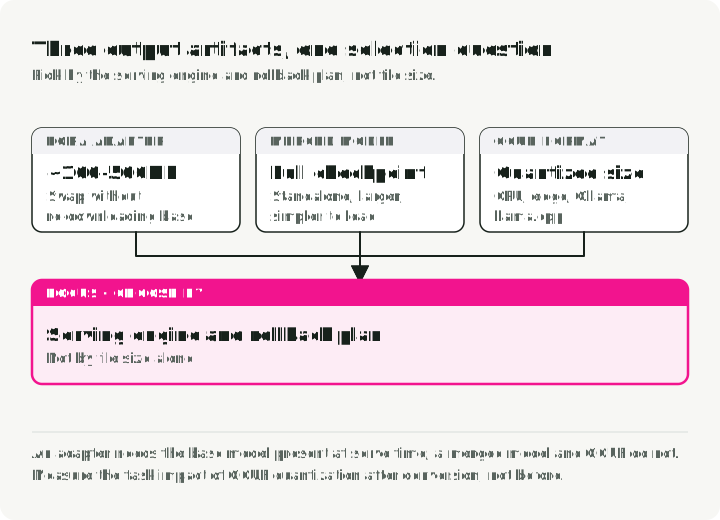
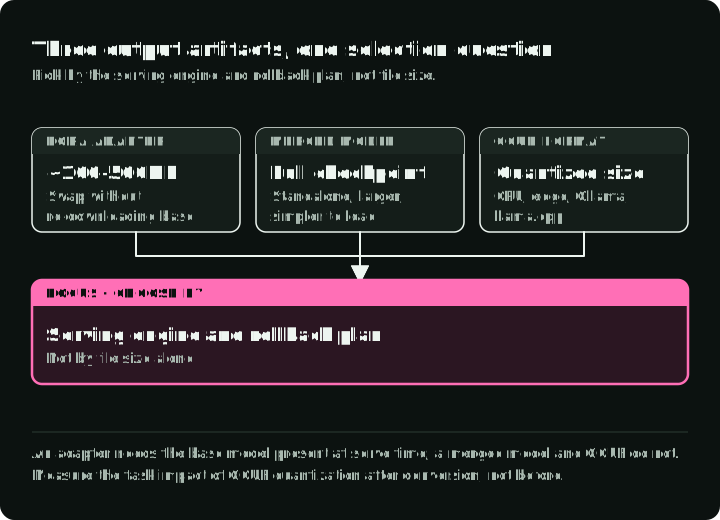
In the demo, uv run finetune always saves the adapter, --merge adds the merged model, and --gguf q4_k_m adds the GGUF file, all in one training run. The Python calls below show what each flag does.
1. LoRA adapter
model.save_pretrained("outputs/unsloth-nemotron-function-calling")
tokenizer.save_pretrained("outputs/unsloth-nemotron-function-calling")- Size: proportional to targeted modules, rank, layers, and dtype; often far smaller than the base.
- Best for: development, versioned task adapters, and engines that support LoRA directly.
- Bonus: you can swap adapters without re-downloading the base model.
2. Merged model
# What --merge runs: merge the adapter into the base weights and save a standalone model
model.save_pretrained_merged(
    "outputs/unsloth-nemotron-function-calling-merged", tokenizer, save_method="merged_16bit"
)- Size: approximately the full base checkpoint at the chosen output precision.
- Best for: engines or distribution paths that do not support the adapter separately.
- Trade-off: larger artifact and slower rollout; simpler single-model loading.
3. GGUF format
# What --gguf q4_k_m runs; file size and name depend on the Unsloth version
model.save_pretrained_gguf(
    "outputs/unsloth-nemotron-function-calling-gguf", tokenizer, quantization_method="q4_k_m"
)- Size: model-dependent; roughly four-bit weights plus metadata for Q4 variants.
- Best for: CPU inference, Ollama, llama.cpp, edge deployment.
- Options:
q4_k_m(smaller),q5_k_m(more weight fidelity),q8_0(larger and higher fidelity). Measure the task impact after conversion.
Stage 7: Serving and monitoring
With vLLM
This command serves the demo adapter on top of the base model. Serve with the parser and chat template from the model card; they must match the template used in training. The model card registers the llama_nemotron_json parser through the plugin file llama_nemotron_nano_toolcall_parser.py. The demo repository provides the corrected template.
Use a separate Python 3.12 environment with vLLM 0.12.0: the pinned parser imports this release’s tool-parser API, which changed in later releases. The command pins the base model and parser to the same model-card revision; use that base revision for training too. Source compatibility and a CPU parser check do not establish GPU serving acceptance. Verify model loading and the intended tool call on your GPU. Run from the repository root:
uv venv --python 3.12 .venv-vllm
uv pip install --python .venv-vllm/bin/python "vllm==0.12.0" "huggingface-hub==0.36.0"
source .venv-vllm/bin/activate

hf download nvidia/Llama-3.1-Nemotron-Nano-4B-v1.1 \
    llama_nemotron_nano_toolcall_parser.py \
    --revision d552708a9d575fa8d4a690b988fd870d65279f98 --local-dir serving

vllm serve nvidia/Llama-3.1-Nemotron-Nano-4B-v1.1 \
    --revision d552708a9d575fa8d4a690b988fd870d65279f98 \
    --trust-remote-code \
    --enable-lora \
    --lora-modules function-calling=./outputs/unsloth-nemotron-function-calling \
    --enable-auto-tool-choice \
    --tool-parser-plugin ./serving/llama_nemotron_nano_toolcall_parser.py \
    --tool-call-parser llama_nemotron_json \
    --chat-template ./src/unsloth_demo/chat_template.jinja \
    --host 127.0.0.1 \
    --port 8000 \
    --max-model-len 4096
The demo’s uv run --with openai infer-vllm tests argument generation through the OpenAI-compatible API. It sends one minimal tool, book_flight with a required destination string, and asks for a proposed call; it does not execute a booking. The request in cli/inference.py is:
client = OpenAI(base_url="http://localhost:8000/v1", api_key="dummy")
response = client.chat.completions.create(
    model="function-calling",  # the --lora-modules name, not the base model
    messages=[{"role": "user", "content": "Book a flight to Tokyo"}],
    tools=[DEMO_TOOL],  # book_flight(destination), defined in config.py
    tool_choice="auto",
)
print(response.choices[0].message.tool_calls)
For this input, the intended result is book_flight with {"destination": "Tokyo"}. Because tool choice is automatic, also check whether the model returned a call at all. The tool uses the same shape as the glaive tool definitions the model trained on. vLLM’s parser reads the call from the generated text, so a malformed call comes back as plain content with no tool_calls. vLLM can also constrain a function’s arguments to its schema when the function is marked strict: true; the tool-calling guide describes the server settings and which parsers support it.
With Ollama (local)
List the outputs/unsloth-nemotron-function-calling-gguf directory and substitute the emitted filename for MODEL_FILE.gguf below; Unsloth versions can name files differently. A GGUF file alone does not establish correct chat/tool formatting in Ollama or llama.cpp. Match the trained template and test the imported artifact.
# Create Modelfile
echo 'FROM ./outputs/unsloth-nemotron-function-calling-gguf/MODEL_FILE.gguf' > Modelfile

# Import to Ollama
ollama create my-function-model -f Modelfile

# Run
ollama run my-function-model
With llama.cpp (CPU)
Using the same GGUF export and filename substitution, this command checks a plain-text response. It does not test a complete tool call:
llama-cli -m ./outputs/unsloth-nemotron-function-calling-gguf/MODEL_FILE.gguf \
    -p "What's the weather in Tokyo?" \
    --ctx-size 4096
Monitor the released model
The lifecycle does not stop at a healthy training loss. Record the base-model revision, tokenizer and chat template, adapter hash, dataset version, training configuration, and evaluation report as one release unit. In production, monitor task success, invalid outputs, policy failures, latency, and input drift by the same slices used offline. Keep the previous artifact loadable and define a rollback threshold before launch.
In short:
- Release unit: base-model revision, tokenizer and chat template, adapter hash, dataset version, training configuration, and evaluation report.
- Monitor task success, invalid outputs, policy failures, latency, and input drift by the same slices as offline.
- If a metric falls below the rollback threshold set before launch, load the previous artifact.
Your next test
Before a full run, inspect one serialized conversation and its loss targets, then complete a maximum-length forward/backward step. Save that configuration with the dataset split and baseline report. If a tool schema is missing, preserve it in the training row. If an answer is truncated, adjust the sequence length and formatting so the full answer survives. Resolve those problems before adding epochs.
References
Papers and research
- LoRA: Low-Rank Adaptation of Large Language Models
- QLoRA: Efficient Finetuning of Quantized LLMs
- DoRA: Weight-Decomposed Low-Rank Adaptation
- DPO: Direct Preference Optimization
- ORPO: Odds Ratio Preference Optimization
- PPO: Proximal Policy Optimization Algorithms — OpenAI, 2017
Data processing tools
- DataTrove — Hugging Face data processing at scale
- Distilabel — Synthetic data generation (Argilla)
- Trafilatura — Web text extraction and crawling
- fastText language identification — pretrained language-ID models
- Microsoft Presidio — PII detection and anonymization
- scrubadub — Python library for PII removal
Constrained decoding
Training frameworks
- Unsloth — Optimized fine-tuning framework
- Axolotl — Config-driven training and distributed launchers
- TRL — Hugging Face SFT and preference-training library
- PEFT model merging —
add_weighted_adapterand merging methods - Torchtune — PyTorch-native fine-tuning library, no longer actively maintained
Inference and deployment
- vLLM LoRA adapters — Serve one or more adapters with the base model
- vLLM tool calling — Match auto tool choice, parser, chat template, and request schema to the model
- Llama-3.1-Nemotron-Nano-4B-v1.1 model card — Tool-call parser plugin and chat template for vLLM
- Ollama — Local LLM runner for Mac/Windows/Linux
- llama.cpp — CPU/GPU inference with GGUF format
Evaluation
- lm-evaluation-harness — EleutherAI standardized LLM benchmarking
- Berkeley Function Calling Leaderboard — Function-calling evaluation code
Guides and resources
- Demo Repository — Practical fine-tuning example
- Accelerate n-D Parallelism Guide — Hugging Face multi-GPU training strategies