Data Processing Engines: Polars, DataFusion, Ray, and Spark

This guide helps Python and data engineers choose a processing engine for tabular data and image, audio, or text pipelines. It explains how Polars, DataFusion, Daft, Ray Data, and Spark execute work, which workloads suit them, and how to compare them on your own data.
Modern pipelines also process images, audio, and video. In these workloads, CPU decoding can starve GPU inference. Native operators, columnar data exchange, and overlapping CPU/GPU work address different costs; choosing an engine means finding which cost limits your pipeline.
To compare the options, I benchmarked Pandas, Polars, DataFusion, Daft, and native Rust on two real datasets: NYC taxi trips represent tabular work, and Food-101 images represent a multimodal pipeline. Spark and Ray are covered in separate distributed notebooks.
The engine-comparison-demo repository contains the code.
Data processing workload types
Engines specialize, so first decide what kind of workload you have. The biggest split is structured vs. multimodal. The diagram shows how the amount of data changes in each: a tabular job shrinks it at every step, while a multimodal job expands it.
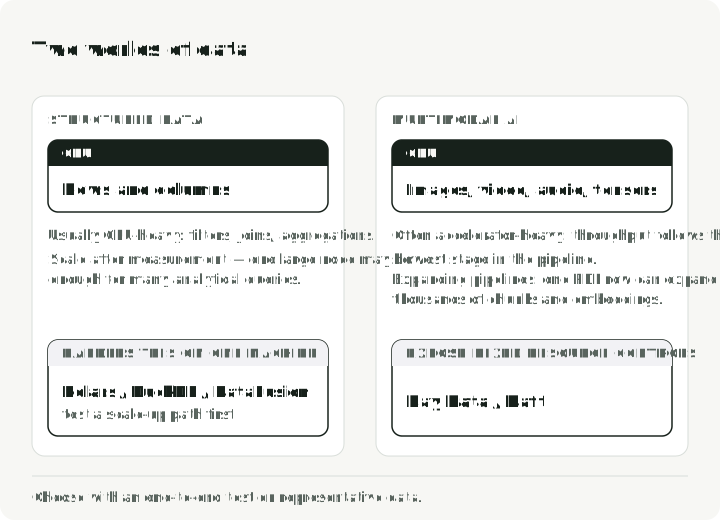
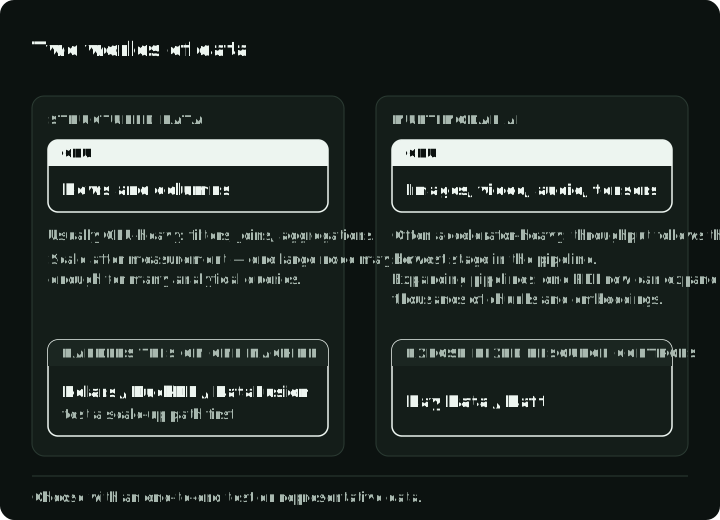
Structured or tabular data involves filtering, aggregation, and joins. It is usually CPU-bound and often fits in memory. Many such queries can run on one modern machine, but memory, I/O, concurrency, recovery, and workload shape still determine whether a cluster is appropriate.
Multimodal AI processes images, audio, or video. Inference may run on a GPU while CPU decoding, remote reads, or batching limits the pipeline. Which stage limits throughput changes with the instance type and the operators, so measure utilization across the full path instead of sizing the GPU in isolation.
The newer engines target different parts of this space. Native execution can reduce Python overhead, Arrow-compatible interfaces can make data exchange cheaper, and streaming execution can bound memory on datasets larger than RAM. None of those benefits is automatic for every operator or conversion.
Part 1: single-node processing
Pandas favors an eager programming model: it executes each operation immediately, usually keeping the data in memory. A lazy model instead plans several operations together before running them. In Pandas, many common operations create intermediate tables, and parallel execution is not coordinated through a query optimizer. That trade-off keeps exploratory code direct, but it can become expensive on larger analytical scans.
The diagram shows what each model reads from the Parquet file for the taxi query used below: the eager path reads all 19 columns before it filters, while the lazy plan lets the optimizer push the filter and the 3 used columns into the scan.
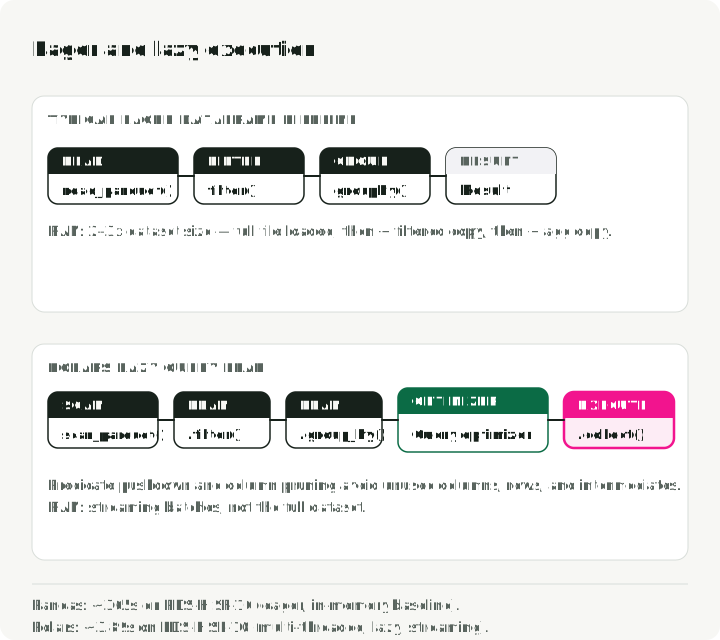
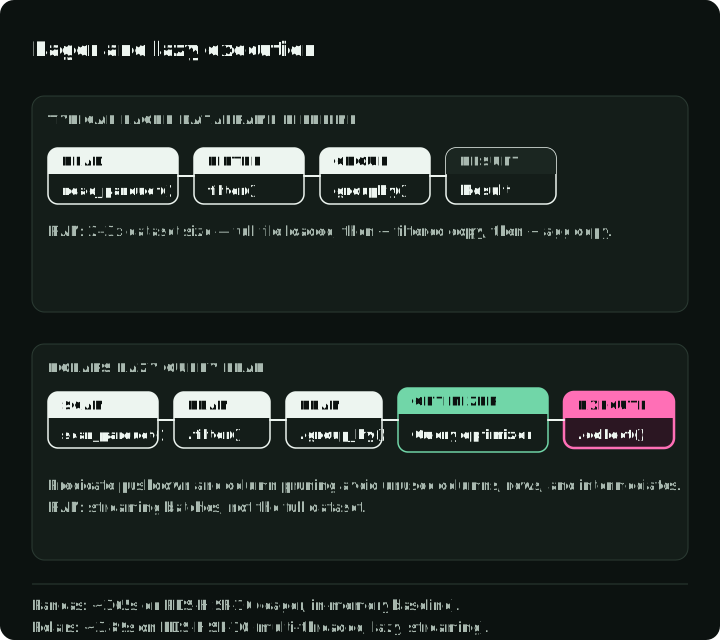
In Polars’s May 2025 PDS-H benchmark at scale factor 10, Pandas took about 365 seconds for the suite while Polars’s streaming engine took 3.89 seconds. The roughly 94x result describes that benchmark and configuration; it is not a general Pandas-to-Polars conversion factor.
Polars for local tabular pipelines
Polars is a practical default when a local DataFrame pipeline has outgrown eager, single-process execution. Its lazy API builds a query plan before execution. That lets it filter rows as early as possible (predicate pushdown) and read only the needed columns (projection pruning). The engine can then run operators in parallel and, where supported, in streaming batches.
At scale factor 100 (~100 GB of CSV), Polars’s streaming engine was about 6x faster than its in-memory engine on the same machine. The source attributes this gap mainly to fewer CPU-cache misses and better core utilization; this is not evidence of input larger than RAM.
The query below reads taxi trips from Parquet, selects trips longer than five miles with a total amount above $30, and calculates counts and averages by payment type. The companion engine_comparison_examples.ipynb has related API and setup examples; tabular.py downloads the taxi data and runs the different timed job described below:
import polars as pl

# Build a lazy scan; query execution happens at collect()
q = (
    pl.scan_parquet("yellow_tripdata_2024-01.parquet")
    .filter(
        (pl.col("trip_distance") > 5.0)
        & (pl.col("total_amount") > 30.0)
    )
    .group_by("payment_type")
    .agg(
        pl.col("total_amount").mean().alias("avg_fare"),
        pl.col("trip_distance").mean().alias("avg_distance"),
        pl.len().alias("trip_count"),
    )
)

# The entire plan is optimized and executed here, in parallel
result = q.collect(engine="streaming")
The important difference is the execution model. In the lazy query above, Polars can push the filter and column selection into the Parquet scan. That may skip row groups and avoid reading unused columns. Streaming is explicit here; collect still materializes the final result, and unsupported operations may fall back to in-memory execution. A typical eager Pandas pipeline has no whole-query plan to optimize, although careful use of Parquet filters, selected columns, and alternative backends can recover part of the gap.
DataFusion for embedded query engines
Where Polars is a library you use directly, DataFusion is the engine you build other engines on top of. It powers InfluxDB 3.0, GreptimeDB, and Apache DataFusion Comet, a Spark accelerator first built at Apple.
In a November 2024 ClickBench run published by the DataFusion project, DataFusion led the tested single-node Parquet configurations. The Embucket team later published a TPC-H scale-factor-1000 run on one large node, with two queries rewritten to finish. These results show what scale-up can achieve under specific conditions; they do not prove that every 1 TB workload should avoid a cluster.
Here is the same taxi summary in DataFusion SQL, with payment types sorted by trip count. The companion engine_comparison_examples.ipynb has related SQL and setup examples:
from datafusion import SessionContext

ctx = SessionContext()
ctx.register_parquet("taxi", "yellow_tripdata_2024-01.parquet")

# Plan SQL against the registered Parquet source
df = ctx.sql("""
    SELECT payment_type,
           COUNT(*)           AS trip_count,
           AVG(trip_distance) AS avg_distance,
           AVG(total_amount)  AS avg_fare
    FROM taxi
    WHERE trip_distance > 5.0 AND total_amount > 30.0
    GROUP BY payment_type
    ORDER BY trip_count DESC
""")
result = df.to_pandas()
DataFusion’s strength is its modularity. The extension APIs cover custom catalogs, table providers, optimizer rules, and execution plans. That is why it shows up whenever someone is building a custom data platform or embedding a query engine in their own product.
If your team writes SQL over local Parquet files and does not need to embed the engine, DuckDB is an in-process SQL database that fills the same role as Polars.
Daft for multimodal data
Daft makes images, audio, video, and embeddings part of the DataFrame workflow. It provides native expressions for operations such as image decoding and URL downloads, so common preprocessing paths do not require a row-by-row Python loop. That integration is the main reason to consider it over a general tabular engine.
For tabular work, Daft’s API looks like the engines above. This example runs the same taxi summary; the companion engine_comparison_examples.ipynb has related Daft API and setup examples:
import daft

df = daft.read_parquet("yellow_tripdata_2024-01.parquet")

result = (
    df.where(
        (daft.col("trip_distance") > 5.0)
        & (daft.col("total_amount") > 30.0)
    )
    .groupby("payment_type")
    .agg(
        daft.col("total_amount").mean().alias("avg_fare"),
        daft.col("trip_distance").mean().alias("avg_distance"),
        daft.col("trip_distance").count().alias("trip_count"),
    )
    .collect()
)
The API will feel familiar if you know Pandas, but the engine is the same Rust + Arrow stack you find in Polars and DataFusion. Where Daft pays off is when the “rows” in your DataFrame are images, PDFs, or tensors.
Daft reads, decodes, and resizes images with native expressions, without a Python loop over rows. This is the image path from multimodal.py:
import daft
from daft import col

df = (
    daft.from_glob_path("food101_images/*.jpg")
    .with_column("image", col("path").download().decode_image(mode="RGB"))
    .with_column("resized", col("image").resize(224, 224))
)
df.collect()
Single-node benchmark
I ran Pandas, Polars, DataFusion, and Daft, plus native Rust via Polars-rs, on ~41M NYC yellow taxi trips for full year 2024. The timed job filters trips with a fare above $10, joins the taxi zone table, sums revenue by borough and zone, and returns the top 20 rows. It is a different query from the examples above. Spark and Ray appear in the distributed examples, not this single-node benchmark.
Each engine reads the files inside the timed function; the script reports the median of three runs. Its result checker compares the 20 rows across Python engines on borough, zone, trip count, and revenue rounded to cents; it does not compare avg_tip. Pandas is given the four trip columns the query uses, because it has no optimizer to find them. The chart shows the result on an Apple M5 Max with 18 cores and 64 GB of RAM. Full results are in the demo repo:
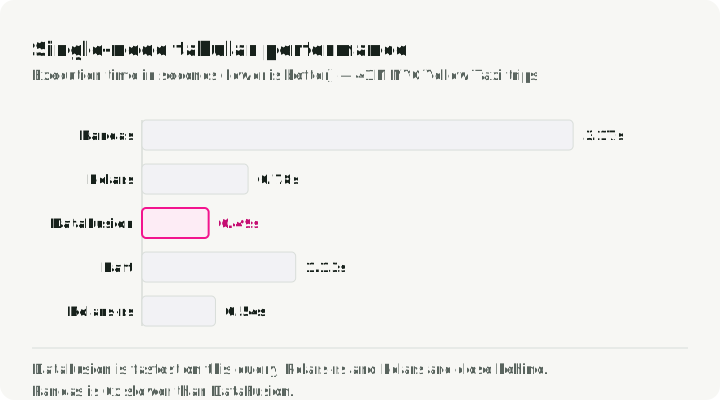
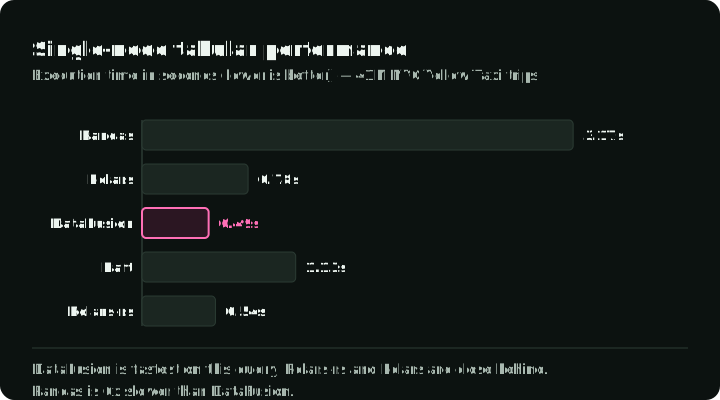
Pandas took 4.67 seconds. The four newer engines finished in 0.40 to 0.74 seconds, with DataFusion fastest and Polars about 7x faster than Pandas. The 94x Polars-to-Pandas figure above comes from PDS-H; this job produced a smaller gap. The times also moved between invocations: across four runs of the script on a machine doing other work, Pandas ranged from 2.6 to 4.8 seconds. DataFusion was the fastest Python engine every time, and Polars and Daft changed places. When engines land this close together, API fit and repeated measurements on representative data should make the decision.
Part 2: multimodal data
Tabular ETL usually shrinks data: filter, aggregate, write less than you read. Multimodal AI pipelines do the opposite. A single document path might fan out into dozens of text chunks and embedding vectors.
In a conventional PySpark pipeline, images and audio often enter as binary data and move into Python libraries for decoding or transformation. Crossing the JVM/Python boundary and serializing results can become a large part of wall-clock time. Spark can use Arrow-based paths, vectorized UDFs, and accelerator integrations, but those choices need explicit design and measurement.
Pipelined execution and GPU utilization
Spark schedules work in stages separated by shuffle boundaries. A straightforward implementation may place download, decode, and inference in a sequence that leaves either CPU or GPU capacity waiting. Spark supports GPU resource scheduling and plugins, so idle time is not inevitable. Keeping stages busy also requires backpressure: slowing earlier stages when later stages cannot keep up. Neither that control nor overlapping CPU and GPU work happens automatically in an ordinary PySpark DataFrame job.
Pipelined execution is the alternative. Instead of running stages back-to-back, the engine overlaps I/O, CPU work, and GPU inference. When stages and buffers are balanced, that overlap can reduce idle time and improve throughput; startup and drain, backpressure, or a slower stage can still leave resources waiting.
The diagram shows two batches crossing three stages. Run one after the other, they take six steps. Pipelined, batch 2 is read and decoded while batch 1 is still in progress, and the same work takes four steps.
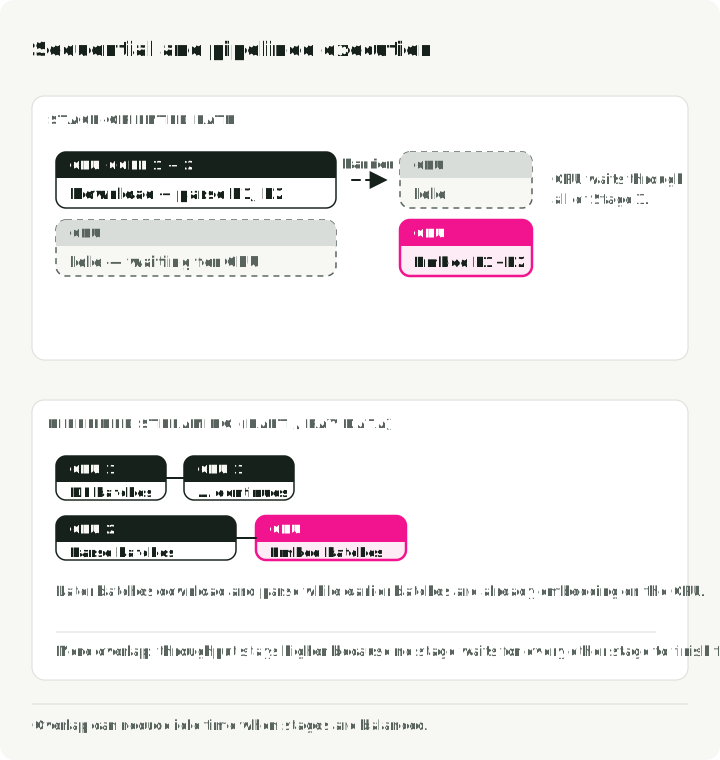
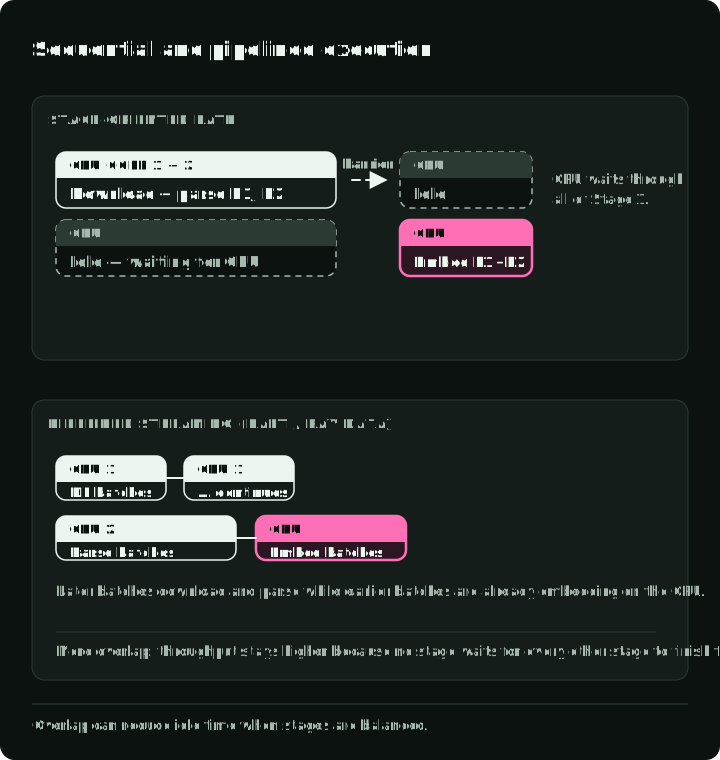
Image-processing benchmark
I benchmarked image processing on 500 real photographs from the Food-101 dataset. Each engine reads the same 500 JPEGs, decodes them to RGB, and resizes them to 224×224 with a bilinear filter inside the timed function. The script checks that each engine produced 500 images and reports the median of three runs. The chart shows the result on the same machine:
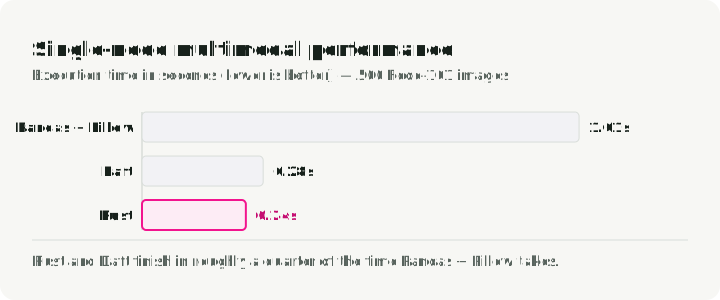
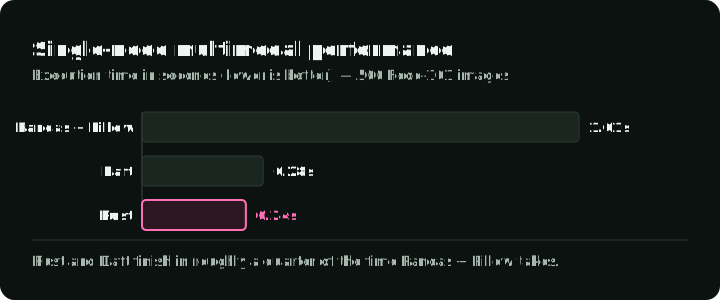
Polars and DataFusion are absent because they have no native image operations. The recorded Python results and Rust results show 0.55 seconds for Pandas + Pillow, 0.34 for Daft, and 0.10 for the Rust image crate. Pandas processes one image at a time through apply(); Daft and the Rust version spread the work across cores. Across four invocations, Pandas ranged from 0.55 to 1.21 seconds. Five hundred images are too few to predict production throughput, and the job stops before any GPU work, so measure your own pipeline end to end.
Part 3: distributed processing
Once a single machine isn’t enough, you have to pick how to spread the work. Dask spreads existing Pandas and NumPy code across cores or a cluster with few API changes; it suits Python teams that do not want a JVM or a new DataFrame API. The rest of this part covers Spark, Ray Data, and Daft.
Apache Spark
Spark is a mature option for large tabular ETL, shuffle-heavy joins, and organizations already operating its ecosystem. Its lineage-based recovery and broad platform support matter when reliability and operational familiarity outweigh local speed. Mixed CPU/GPU pipelines require more deliberate resource configuration and pipeline design than the SQL path, which is where Ray Data and Daft offer a more focused abstraction.
This Spark query joins longer taxi trips with pickup-zone information, then summarizes total revenue and average fares by borough. For cluster ETL setup, see distributed_spark.ipynb or spark_etl.py:
from pyspark.sql import SparkSession
from pyspark.sql import functions as F

spark = SparkSession.builder \
    .appName("TaxiETL") \
    .config("spark.sql.adaptive.enabled", "true") \
    .getOrCreate()

orders = spark.read.parquet("s3a://lake/taxi/*.parquet")
zones = spark.read.csv("s3a://lake/taxi_zones.csv", header=True)

# Spark excels at this: joining massive tables with a shuffle
result = (
    orders
    .filter(F.col("trip_distance") > 5.0)
    .join(zones, orders.PULocationID == zones.LocationID, "inner")
    .groupBy("Borough")
    .agg(
        F.sum("total_amount").alias("total_revenue"),
        F.avg("total_amount").alias("avg_fare"),
    )
    .orderBy(F.desc("total_revenue"))
)

# Spark is lazy: the write runs the query
result.write.mode("overwrite").parquet("s3a://warehouse/report/")
Ray Data for heterogeneous compute
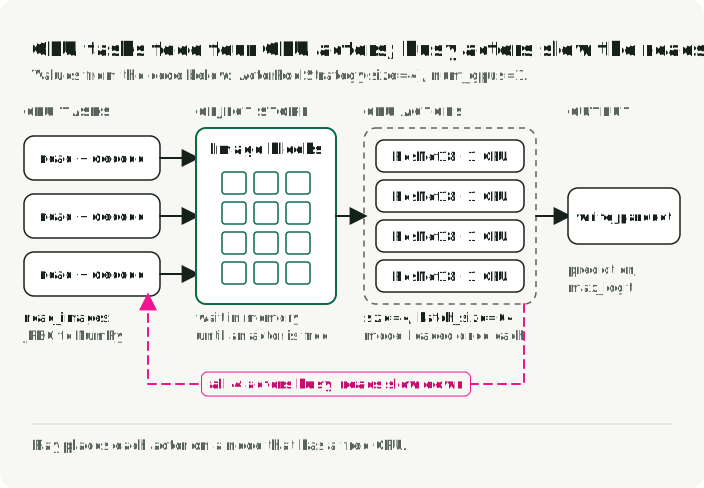
Ray Data was designed around AI workloads. Instead of Spark’s stage barriers, it uses a streaming model that sends batches to GPU workers while later batches are still being read. A Ray actor is a persistent worker that can keep a model loaded between batches. The feature that matters most for AI pipelines is mixed resource scheduling: you can declare that one actor wants “1 GPU, 4 CPUs” and another wants only CPUs, and Ray places each actor on a node that has those resources.
Amazon reported 82% better cost efficiency per GiB of S3 input after moving selected internal workloads from Spark to Ray. The scale is notable, but this is a migration case study for specific workloads rather than an expected saving for a typical Ray adoption.
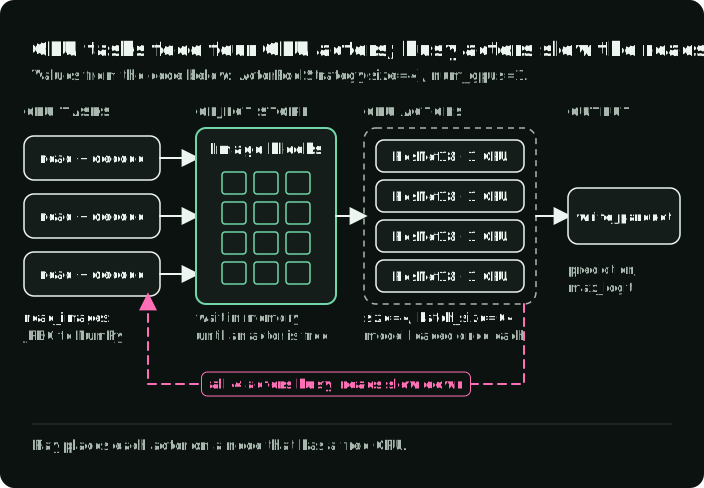
The example below reads images, classifies them with ResNet18 on GPU workers, and writes predictions to Parquet. The diagram shows the pipeline it builds: CPU tasks read and decode images into Ray’s object store, a pool of four GPU actors runs the model, and backpressure slows the reads when the GPU actors are full.
For the image-inference setup, see distributed_ray.ipynb or ray_inference.py:
import ray

ray.init()

ds = ray.data.read_images("s3://my-bucket/food101/", mode="RGB")

class ImageClassifier:
    def __init__(self):
        import torch
        from torchvision.models import resnet18, ResNet18_Weights
        self.model = resnet18(weights=ResNet18_Weights.DEFAULT).cuda()
        self.model.eval()
        self.preprocess = ResNet18_Weights.DEFAULT.transforms()

    def __call__(self, batch):
        import torch
        from PIL import Image
        tensors = torch.stack([
            self.preprocess(Image.fromarray(img)) for img in batch["image"]
        ]).cuda()
        with torch.no_grad():
            preds = self.model(tensors)
        return {
            "prediction": preds.argmax(dim=1).cpu().numpy(),
            "max_logit": preds.max(dim=1).values.cpu().numpy(),
        }

# ActorPoolStrategy creates persistent GPU workers
predictions = ds.map_batches(
    ImageClassifier,
    compute=ray.data.ActorPoolStrategy(size=4),
    num_gpus=1,
    batch_size=64,
)
predictions.write_parquet("s3://output/predictions/")
This sketch reserves four one-GPU actors and requires four available CUDA GPUs, Torchvision weights, and S3 access. Ray reads images as NumPy arrays; converting RGB arrays to PIL gives the ResNet18 preprocessing transform an accepted input. max_logit is the largest raw model score, not a confidence probability.
In Anyscale’s benchmarks, Ray Data’s image classification ran about 4x faster (456 to 111 seconds) when the instance went from 4 CPUs per GPU to 32 CPUs per GPU. Anyscale attributes the improvement to reduced CPU starvation; GPU utilization remained low in absolute terms. Daft improved from 4 to 16 CPUs per GPU, then stayed near 195 seconds at both 16 and 32.
Distributed Daft
Daft scales out through its Flotilla engine: one Swordfish worker per node, with Flotilla on top doing cluster-wide scheduling. Swordfish handles local Rust execution and pipelines I/O with compute through small-batch streaming, so each node stays busy without waiting on the next stage.
In benchmarks published by Daft, Flotilla ran 4–18x faster than the tested Spark implementations across four multimodal workloads. The largest gap was a video-object-detection case. Treat the result as evidence that the execution design can change throughput by that much on these pipelines, then compare it with the competing Anyscale results below and with a local test.
Anyscale, the company behind Ray, published a competing benchmark in which Ray Data closed or reversed the gap on high-CPU instances after tuning. Together, the two vendor studies are a reason to test representative operators and CPU-to-GPU ratios, not to infer a durable league table.
The next example uses Daft’s Ray runner; it does not reproduce the Flotilla benchmark above. It reads a table of image URLs, downloads the images, embeds them with CLIP on GPU workers, and writes the vectors to Parquet. It adapts daft_pipeline.py for Ray GPU workers. With the companion’s pinned Transformers 5.0.0 API, the projected image features are in .pooler_output. The related notebook is distributed_daft.ipynb:
import io

import daft
import numpy as np
from daft import col

# Connect to an existing Ray cluster before building the query
daft.set_runner_ray(address="auto")

# Define a GPU class UDF: the model loads once per instance
@daft.cls(gpus=1)
class ImageEmbedder:
    def __init__(self):
        import torch
        from transformers import CLIPModel, CLIPProcessor

        self.device = "cuda" if torch.cuda.is_available() else "cpu"
        self.model = CLIPModel.from_pretrained(
            "openai/clip-vit-base-patch32"
        ).to(self.device)
        self.processor = CLIPProcessor.from_pretrained(
            "openai/clip-vit-base-patch32"
        )
        self.model.eval()

    @daft.method.batch(
        return_dtype=daft.DataType.fixed_size_list(daft.DataType.float32(), 512)
    )
    def __call__(self, image_bytes_col):
        import torch
        from PIL import Image

        embeddings = []
        for img_bytes in image_bytes_col.to_pylist():
            img = Image.open(io.BytesIO(img_bytes)).convert("RGB")
            inputs = self.processor(images=img, return_tensors="pt").to(self.device)
            with torch.no_grad():
                features = self.model.get_image_features(**inputs).pooler_output
            embeddings.append(features[0].cpu().numpy())
        return np.array(embeddings, dtype=np.float32)

embedder = ImageEmbedder()

df = (
    daft.read_parquet("s3://bucket/image_metadata.parquet")
    # Native Rust I/O downloads the images; no Python requests loop
    .with_column("image_bytes", col("image_url").download())
    .with_column("embedding", embedder(col("image_bytes")))
    .exclude("image_bytes")
)
df.write_parquet("s3://bucket/embeddings/")
Daft’s Ray runner connects to an existing cluster; the default native runner uses the local machine. Install Daft with Ray support and provide GPU workers, Transformers 5.0.0, the CLIP weights, and S3 credentials on that cluster. The class and batch-method API keeps the model between batches, and gpus=1 asks the runner for one GPU per instance; the linked repository revision uses plain @daft.cls and one partition, because it targets a single local GPU. Downloads can overlap GPU inference, subject to partitioning and backpressure.
That companion revision substitutes a zero vector for missing images or any processing failure, including its embedding-shape check. It indexes the CLIP output object without selecting .pooler_output, so Transformers 5.0.0 causes that check to fail and valid images can also become zero vectors. Use the projected-feature extraction shown here; this sketch lets processing errors fail the job.
Distributed comparison
| Feature | Spark | Ray Data | Daft (Flotilla) |
|---|---|---|---|
| Execution model | Task-per-core, partition-based | Streaming tasks and actors | Swordfish-per-node, streaming batches |
| Strengths | Massive SQL/ETL, fault tolerance | Heterogeneous compute, GPU saturation | Multimodal pipelining, bounded memory |
| GPU controls | Resource scheduling plus ecosystem plugins | Explicit task and actor resources | Integrated CPU/GPU pipeline scheduling |
| Typical tuning | Executors, memory, partitions, accelerators | Batches, actors, object store | Batches, resources, I/O concurrency |
| Good evaluation case | Large SQL/ETL and shuffle-heavy jobs | Training or inference with mixed resources | Multimodal ingestion and transformation |
Part 4: the role of Rust and Arrow
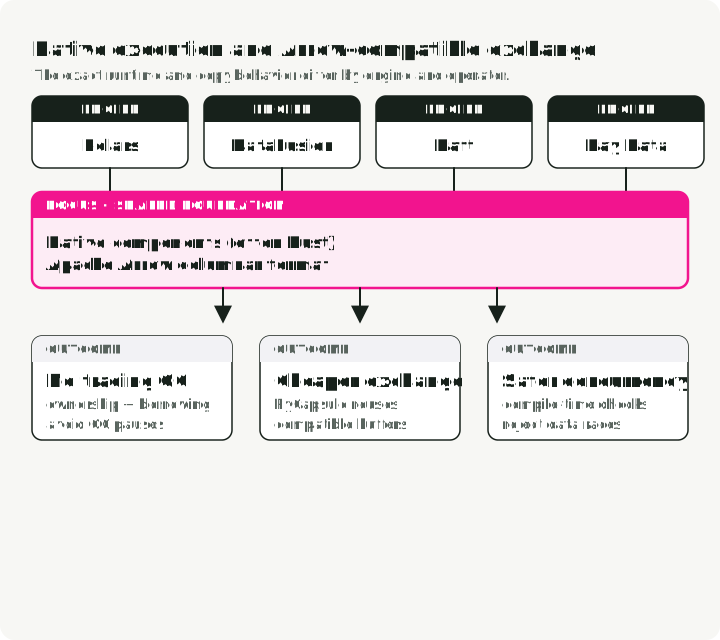
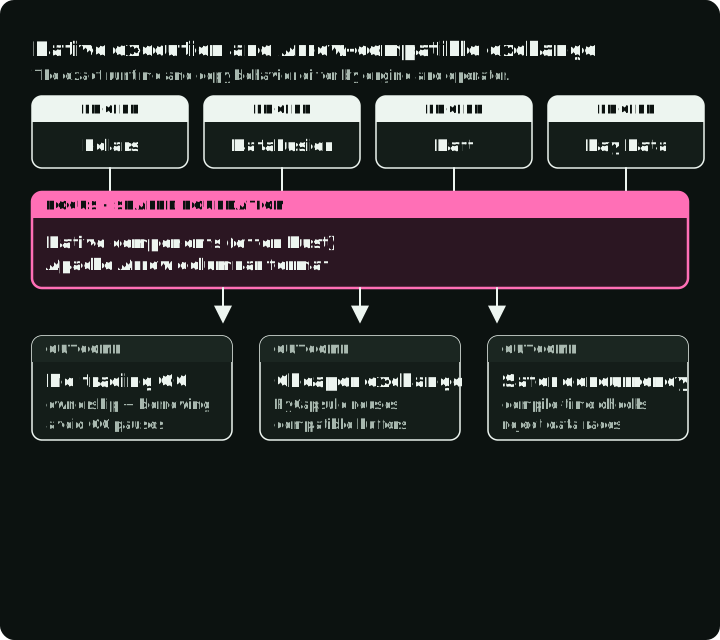
Polars, Daft, and DataFusion use Rust extensively, while Ray includes native components alongside its Python APIs. All can exchange data through parts of the Apache Arrow ecosystem.
The Arrow PyCapsule Interface (__arrow_c_stream__ protocol) gives compatible libraries a standard way to exchange Arrow streams. Transfers can avoid row-wise serialization and may reuse buffers when schemas and memory layouts are compatible. Materialization, rechunking, type conversion, or device transfer can still copy data, so verify the handoff with profiling rather than assuming it is free.
The next example demonstrates an Arrow handoff: DataFusion counts purchases for users with more than five purchases, and Polars ranks those counts. The diagram uses Polars 1.37.1, pinned by the companion: rechunk=False keeps compatible buffers, while its rechunk=True default copies multiple batches into one chunk per column. Defaults can differ in other versions. The example assumes events.parquet already exists. The companion engine_comparison_examples.ipynb creates a synthetic .data/events.parquet in its setup cells before the Arrow example.
from datafusion import SessionContext
import polars as pl

# Compute in DataFusion (Rust-native execution)
ctx = SessionContext()
ctx.register_parquet("events", "events.parquet")
df = ctx.sql("""
    SELECT user_id, COUNT(*) as event_count
    FROM events WHERE event_type = 'purchase'
    GROUP BY user_id HAVING COUNT(*) > 5
""")

# Convert through Arrow; compatible buffers may be reused
arrow_table = df.to_arrow_table()
df_polars = pl.from_arrow(arrow_table)

# Continue analysis in Polars
result = df_polars.with_columns(
    pl.col("event_count").rank().alias("rank")
).sort("rank")Daft can also hand a DataFrame to PyTorch with df.to_torch_iter_dataset(), which covers the last step of a multimodal training pipeline.
Why do these newer engines use Rust for native execution?
-
No tracing garbage collector in Rust code. Ownership gives native operators more direct control over allocation and deallocation. That can reduce GC-related latency, but it does not prevent memory pressure or out-of-memory failures.
-
Compact native representations. Rust structures do not carry Java object headers. The practical benefit depends on the engine’s layout: columnar JVM systems also avoid representing every value as an individual object.
-
Stronger concurrency checks. Safe Rust rules out many data races at compile time. Engine code can still contain unsafe blocks and logical concurrency bugs.
Combined with Arrow’s columnar memory layout, these choices can reduce allocation and serialization overhead. They do not remove it at every boundary; Python objects, network transport, incompatible schemas, and device movement still matter.
Part 5: adopting multiple engines
You do not have to force the whole platform through one engine. Composition is useful when the handoff between engines costs less than making one system handle every workload. The diagram shows one such relay: the engines meet at Parquet files, and every write or read across that boundary costs I/O and conversion.
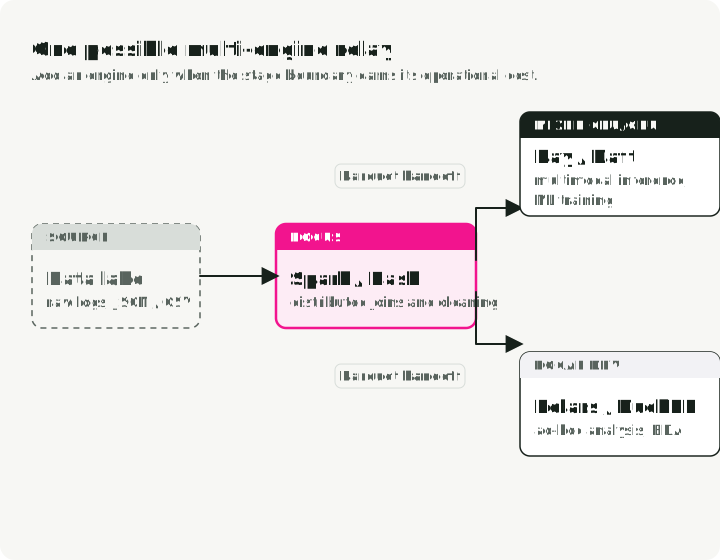
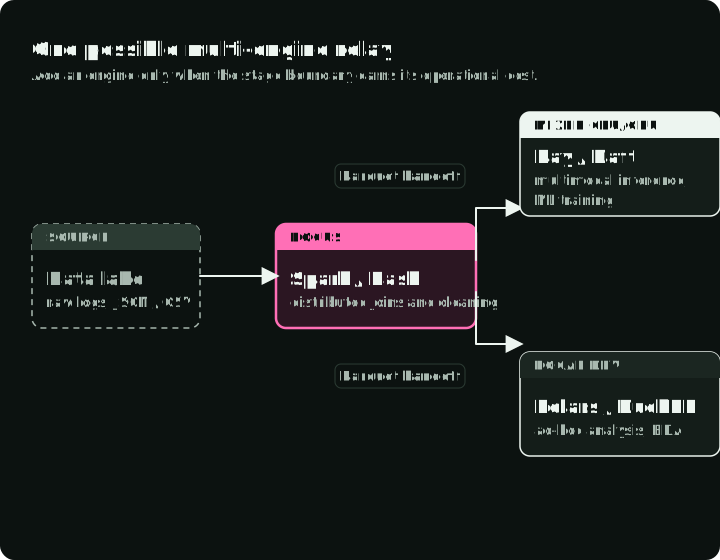
One possible relay uses Spark for established lakehouse joins, writes an open table or file format, and hands the result to Ray Data or Daft for GPU inference or multimodal transforms. Polars or DuckDB can serve local analysis over the same files. A smaller team may need only one of these engines; add another when a measured bottleneck justifies the operational boundary.
What makes this composition possible is interoperability. Parquet is the common file handoff in these examples, while Arrow can provide in-memory interchange. Delta and Iceberg support depends on the engine and connector, so verify each boundary. A file handoff also has I/O and conversion costs; it is not automatically free.
Engine selection by evaluation case
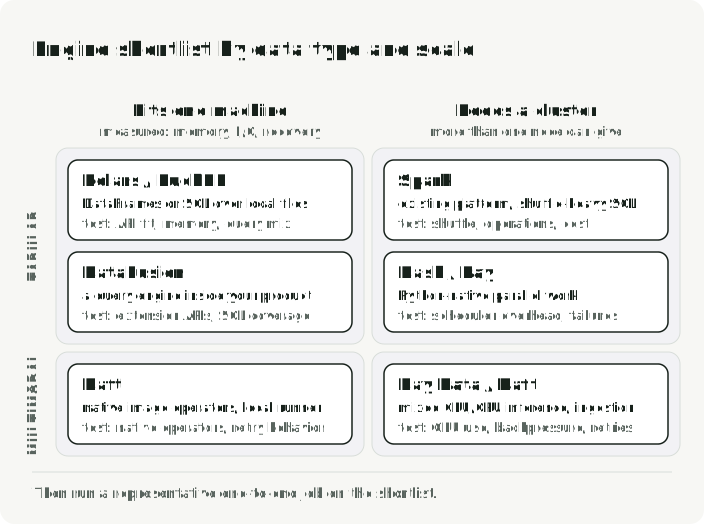
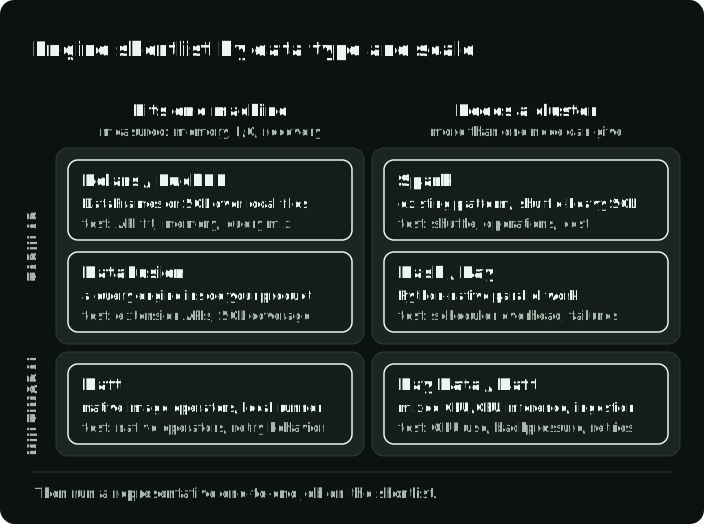
The table maps each workload to a shortlist and to what you should test before choosing.
| Evaluation case | Shortlist | Validate |
|---|---|---|
| Local analytical DataFrames | Polars / DuckDB | API fit, memory, query mix |
| Existing distributed SQL/ETL | Apache Spark | Shuffle behavior, operations, cost |
| Python-native parallel work | Dask / Ray | Scheduler overhead, failure model |
| Mixed CPU/GPU training or inference | Ray Data / Daft | Accelerator utilization, backpressure |
| Multimodal ingestion | Daft / Ray Data | Native operators, retry behavior |
| Embedded query engine | DataFusion | Extension APIs, SQL coverage |
The diagram places the same shortlist on two questions: whether the data is tabular or multimodal, and whether the job fits one machine.
Diagonal scaling
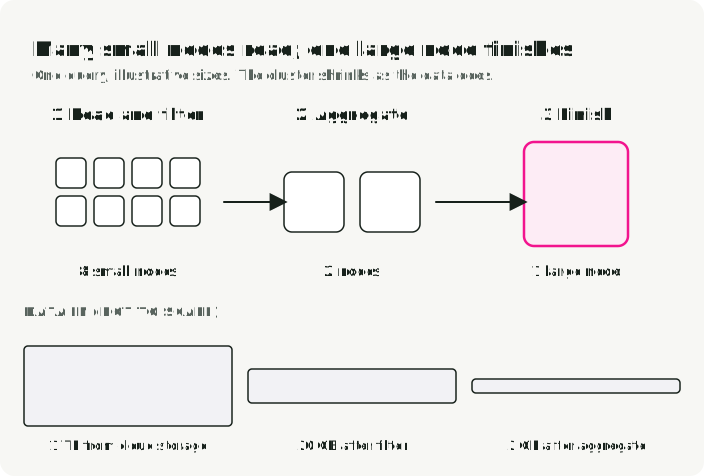
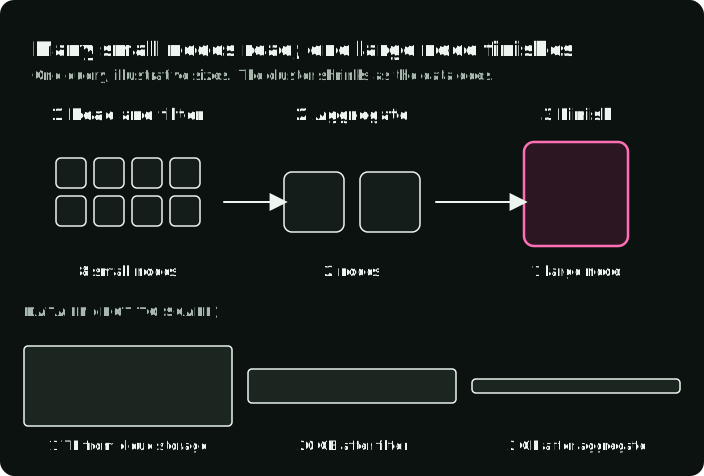
For a long time the choice was scale up (a bigger machine) or scale out (more machines). Polars Cloud describes a query-dependent approach called diagonal scaling. Scale horizontally while reading from cloud storage to max out I/O, then collapse to a single big node once filters and aggregations have shrunk the data. Early reduction can limit data transfer and let the remaining work finish on one node. Whether a distributed shuffle occurs depends on the physical query plan. The diagram follows one query with made-up sizes: eight small nodes read and filter 1 TB, two nodes aggregate what is left, and one large node finishes on 2 GB.
Compare cost per successful job, not hourly instance price. A larger node can be cheaper when the runtime reduction outweighs its higher rate, but the result depends on I/O, memory pressure, and the amount of work eliminated before a shuffle.
Reproduce the comparison
The companion demo repository contains the scripts, notebooks, and environment used for the comparisons. The tabular command uses the repository’s default full-year 2024 taxi dataset, matching the run above. The first run downloads about 660 MB of taxi data and the Food-101 images; the Rust benchmark needs a Rust toolchain.
# Install dependencies
uv sync

# Run the tabular benchmark (~41M NYC taxi trips from full-year 2024)
uv run python -m engine_comparison.benchmarks.tabular

# Run the multimodal benchmark (500 real food photos)
uv run python -m engine_comparison.benchmarks.multimodal

# Run native Rust benchmarks (Polars-rs + image crate)
cd rust_benchmark && cargo run --release && cd ..
./scripts/run_benchmarks.sh runs all three and writes benchmarks/*.json and the combined charts. The Python scripts take --runs 5 for more timing runs, and the image script takes --images 1000 for a larger image set. The distributed notebooks need uv sync --extra distributed --extra notebook. The repo also has Docker Compose setups for local distributed runs of Spark, Ray, and Daft.
Key takeaways
-
Prove that one machine is insufficient. Scale-up results show that some large analytical scans fit on a single node. Measure memory, I/O, spill, and recovery requirements before accepting cluster overhead.
-
Lazy planning explains more of the speed gap than API syntax. Pushdown, streaming, and parallel operators account for much of the difference between an eager DataFrame script and an analytical engine.
-
Measure the whole accelerator pipeline. Decode, network I/O, batching, serialization, and backpressure determine whether a GPU stays busy. Ray Data and Daft make this overlap a central abstraction; Spark can support it with additional design and tooling.
-
Shortlist by workload, then benchmark. Use ecosystem fit to narrow the field and a representative end-to-end job to choose. Re-run a vendor’s benchmark claim on your own job before relying on it.
-
Open formats keep the choice reversible. Arrow-compatible interfaces, Parquet, and open table formats can reduce handoff costs. Confirm whether a particular conversion reuses buffers or copies them.
References
Benchmarks and performance data
- Polars PDS-H Benchmarks - Polars streaming vs. Pandas at SF-10 (94x) and SF-100 (about 6x over in-memory)
- DataFusion ClickBench Results (Nov 2024) - Project-published single-node Parquet results
- Embucket: TPC-H SF-1000 on DataFusion - Vendor case study on one large node; two queries were rewritten to finish
- Amazon Spark-to-Ray Migration - 82% better production cost efficiency per GiB of S3 input
- Daft Flotilla Benchmarks - 4–18x faster than Spark on multimodal workloads
- Anyscale Ray vs. Daft Benchmarks - Competing vendor benchmark for multimodal workloads
Engines and frameworks
- Polars - Rust DataFrame library with lazy execution
- Apache DataFusion - Embeddable Rust query engine (GitHub)
- Daft - Multimodal-native distributed DataFrame
- Ray - Distributed compute framework for AI (Data Internals)
- Apache Spark - Distributed ETL and SQL engine
- DuckDB - In-process analytical SQL engine
- Dask - Python-native parallel computing
Architecture and ecosystem
- Polars Cloud: Diagonal Scaling - Dynamic vertical/horizontal scaling
- Daft Flotilla Architecture - Swordfish + Flotilla distributed engine
- Apache DataFusion Comet - Spark accelerator originally developed at Apple
- Apache Arrow - Columnar in-memory format (Flight RPC, PyCapsule Interface)
- InfluxDB 3.0 + DataFusion - Time-series database built on DataFusion
- GreptimeDB - Observability database using DataFusion
Demo repository
- engine-comparison-demo - Companion code for this article: benchmarks, notebooks, and Docker Compose for Spark/Ray/Daft
Datasets
- NYC Taxi Trip Records - NYC TLC yellow taxi data (Parquet, ~2.9M rows/month)
- Food-101 Dataset - 101K food images from ETH Zurich (Bossard et al., ECCV 2014)