OCR in 2026: Classical Pipelines, VLMs, and Document AI

This guide is for engineers choosing OCR and document extraction for search, retrieval-augmented generation (RAG), or AI agents. It explains how traditional engines and vision-language models differ, how to evaluate text, tables, and fields, and how to route difficult documents to another model or human review.
Vision-language models (VLMs) can handle layout, handwriting, tables, and degraded images that break a plain text-recognition pipeline. Traditional engines remain competitive on clean print, especially when CPU latency and operating cost matter. The dated snapshot below includes PaddleOCR-VL 1.6 and dots.mocr, with different hardware, privacy, and output trade-offs. Check each project before making a current choice.
For the compact model-selection version, see Best OCR Models in 2026: Classical OCR, PaddleOCR-VL, VLMs.
OCR now sets downstream quality
OCR has long powered archives, postal systems, accessibility tools, and document management. RAG and document agents made its failure modes visible to a wider group of engineers: a downstream model cannot recover text or table structure that extraction discarded.
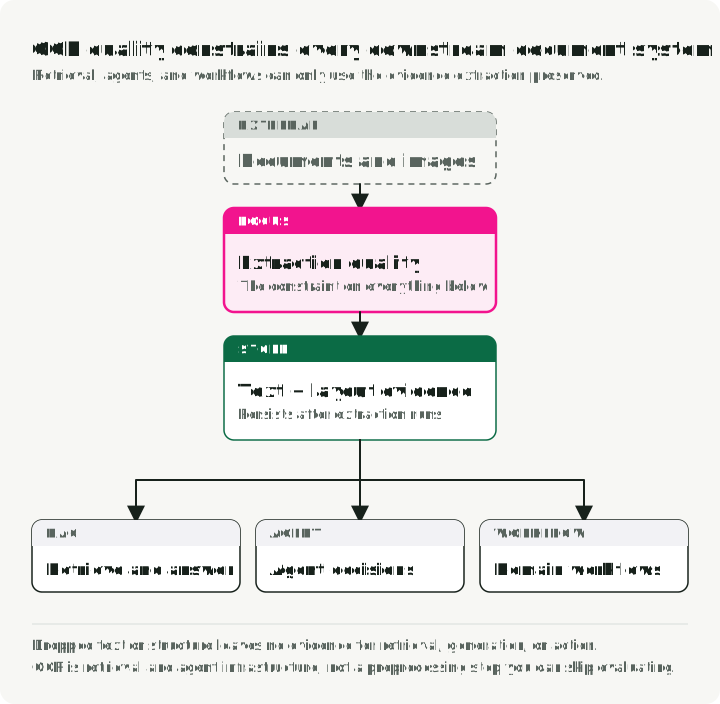
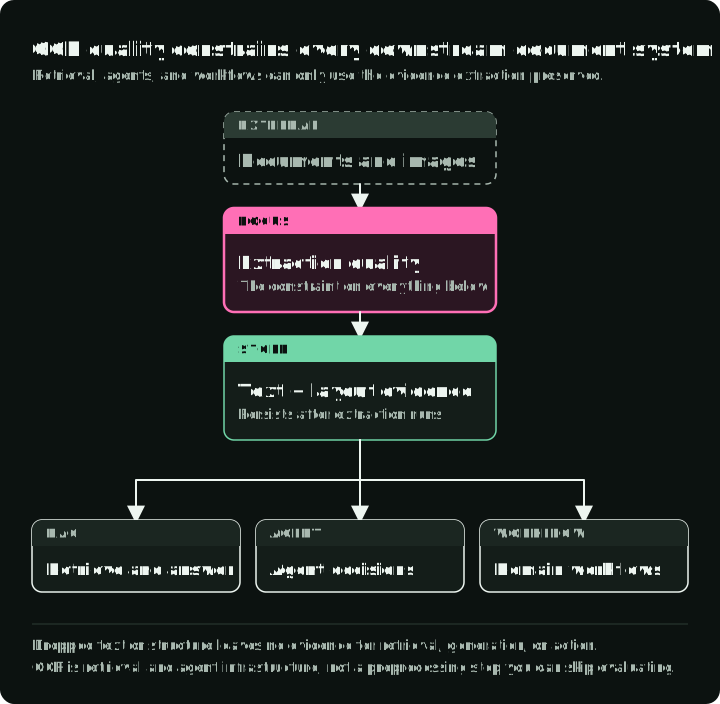
A RAG system cannot retrieve text that OCR dropped or misread. If extraction garbles a table, misreads a date, or drops a paragraph, later chunking and embedding changes cannot recover the missing information. Those errors can hide a contract clause, change an invoice total, or corrupt a medical record.
OCR is therefore part of retrieval and agent infrastructure, alongside parsing, chunking, embedding, and indexing. Its errors need their own evaluation rather than being absorbed into a single end-to-end score.
What OCR means in the age of foundation models
OCR converts text in an image into machine-readable characters. Document AI is the broader system around it: layout analysis, table and formula parsing, field extraction, semantic reasoning, provenance, and validation. The GOT-OCR 2.0 authors call modular detection-recognition pipelines “OCR-1.0” and end-to-end models “OCR-2.0”. That label should not erase the distinction between recognition and document understanding.
The figure compares the two paths and how each one fails: the three serial stages on the left never recover a line that detection missed, the single model pass on the right writes a plausible total that is not on the page, and rasterizing and parsing stay outside the model in both.
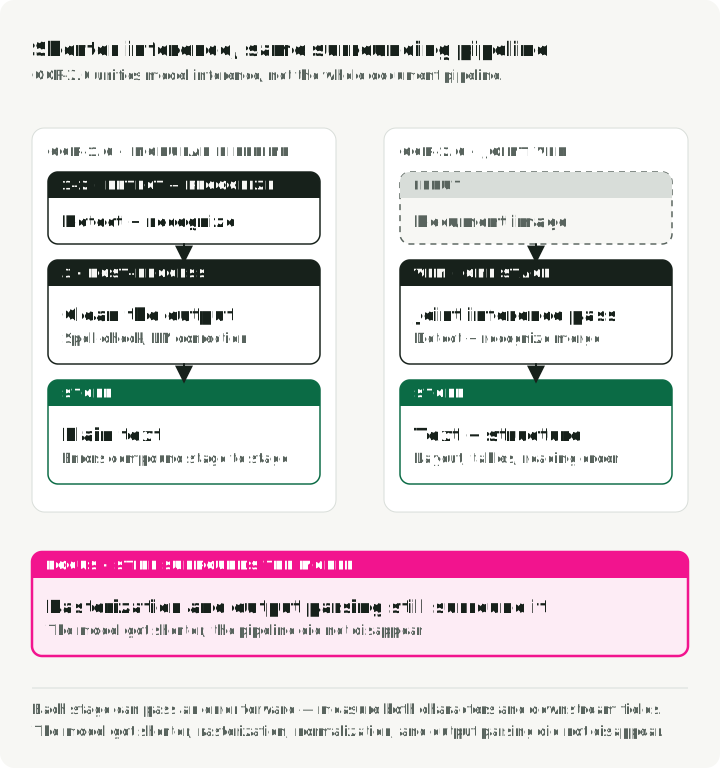
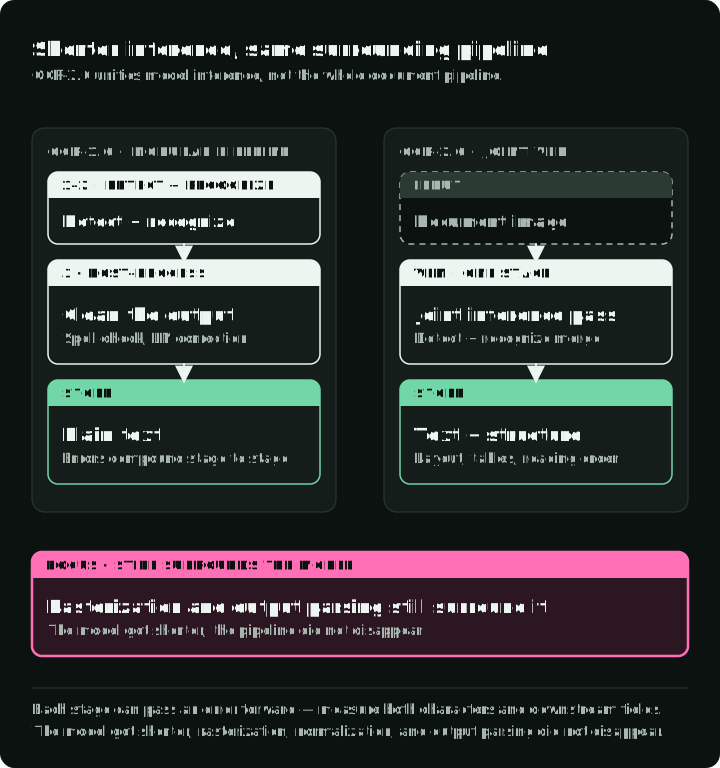
The traditional OCR pipeline has three core stages:
- Text detection: locate regions containing text (e.g., CRAFT, DBNet).
- Text recognition: convert detected regions into character sequences (e.g., CRNN).
- Post-processing: spell-checking and language-model correction.
This works well for clean documents, but detection, recognition, and post-processing errors can compound. Measure both character accuracy and downstream field accuracy so a readable page does not hide a wrong total or identifier.
Some end-to-end VLM paths collapse more of that pipeline into a vision encoder plus language decoder. Models such as GOT-OCR 2.0 can emit text and structure together, while general VLMs can also map fields to a requested schema. For example, a general VLM can read “MFG: 10/24” on a label as a manufacturing date rather than an expiry date. The trade-offs are workload-specific latency, GPU or API cost, and the risk of plausible text that is absent from the image.
A practical caveat: an image-only model needs rasterized pages, while a service accepting PDF may handle conversion internally. Deskewing, rescaling and cleanup are pipeline-specific experiments, not mandatory improvements. AWS Textract advises preserving supported inputs rather than indiscriminately converting or downsampling them. Output parsing and validation still belong to the application.
Metrics: measuring what matters
Every comparison later in this guide uses one of these metrics. Pick the one that matches the output type:
- CER and WER for plain text. Character and Word Error Rate depend on normalization choices such as case, whitespace, and punctuation, so fix the comparison protocol before comparing models.
- Field exact match and Field F1 for forms and receipts. Exact match is binary for one field; its rate is the fraction of evaluated fields that pass. Report document-level all-fields correctness separately. For Field F1, define key/value matching, normalization, duplicate and missing fields, and aggregation; a correct amount assigned to the wrong row is an error.
- TEDS for tables. Tree-Edit-Distance-based Similarity compares predicted and reference HTML trees, catching structural and cell-content errors that CER hides.
- Reading-order comparison when the consumer needs one linear sequence. Compare ordered blocks or spans directly, or use an order-aware metric; OmniDocBench evaluates reading order separately. Correct characters and table cells do not establish the order of a multi-column page.
- ANLS for document VQA. Average Normalized Levenshtein Similarity scores answers against accepted references. The original ST-VQA definition assigns
1 − normalized_distanceonly when the distance is strictly below 0.5, otherwise zero; it takes the best accepted-reference score and averages across questions. DocVQA adopts ANLS. Pin the evaluator’s case, whitespace and distance normalization when reproducing a score.
CER/WER count substitutions, deletions and insertions divided by reference characters or words. They can exceed one when insertions dominate. State whether aggregation sums corpus errors and reference lengths or averages document scores. Retain page, block, bounding box, original text, and normalization history so a wrong field can be traced back to the image.
For text detection, intersection over union (IoU) divides the overlap area of a predicted and reference box by the total area covered by either box. The IoU threshold decides whether a detected box matches the reference before computing F1.
The table maps each task to its metric and the mistake that most often makes a score misleading:
| Task | Metric | Mistake to avoid |
|---|---|---|
| Plain text extraction | CER, WER | Comparing scores computed under different normalization |
| Handwriting | CER | Using printed-text CER targets for handwritten pages |
| Text detection | F1 at an IoU threshold | Reporting F1 without the IoU threshold it used |
| Forms and receipts | Field exact match, Field F1 | Counting a right value in the wrong field or row as right |
| Tables | TEDS | Judging tables by CER, which ignores cell structure |
| Document VQA | ANLS | Changing the 0.5 cutoff or the answer normalization |
| Full-page conversion | Edit distance + reading order | Reporting text accuracy without checking block order |
Languages change the choice too. Chinese and Japanese text has no spaces between words, so WER depends on a word segmenter; use CER for these scripts. Include mixed-script pages in the labeled test set when they occur in your workload. A model card that lists 100 languages does not show the quality for any one of them, so put each target language in the labeled test set.
For implementations: jiwer handles CER/WER out of the box, and TEDS implementations live in the OmniDocBench repo.
What OCR benchmarks measure and miss
Public datasets apply these metrics to specific document types. Dataset sizes and metrics describe the named dataset version; use each project’s current leaderboard for model scores. The “Tests” column says which of your documents each dataset resembles.
| Dataset | Tests | Test size | Languages | Primary metric |
|---|---|---|---|---|
| FUNSD | Key-value linking on noisy scanned forms | 50 docs | English | F1 |
| SROIE | Four receipt fields (company, date, address, total) | 400 test images | English | F1 |
| CORD | Receipt line items with hierarchical labels | 100 receipts | Indonesian | F1 |
| IAM | Handwritten English lines | Split-dependent | English | CER |
| OCRBench v2 | VLM text reading and reasoning across 23 tasks | 10,000 QA pairs | EN + CN | Score /100 |
| OmniDocBench v1.6 | Full-page parsing: text, tables, formulas, reading order | 1,651 pages | EN + CN | Composite |
IAM line counts depend on the chosen writer split and recognition protocol; no single test-line count is assumed here.
OmniDocBench v1.6 snapshot
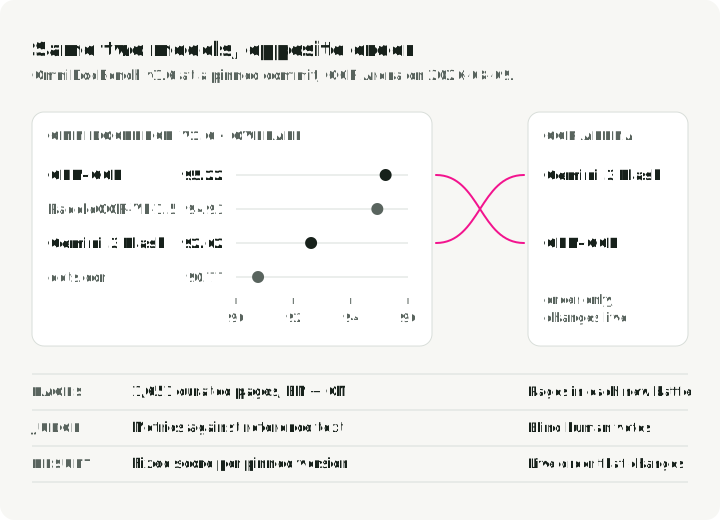
The table below is one versioned snapshot: OmniDocBench v1.6_full, official README at commit 09ba2b606662695b16aafe5f5e36b7ef020e11a8, accessed 2026-08-09.
| Model | Size | Overall ↑ | Text Edit ↓ | Table TEDS ↑ |
|---|---|---|---|---|
| GLM-OCR | 0.9B | 95.22 | 0.044 | 92.83 |
| PaddleOCR-VL-1.5 | 0.9B | 94.93 | 0.038 | 91.67 |
| Gemini 3 Flash | — | 92.62 | 0.066 | 89.29 |
| dots.ocr | 3B | 90.77 | 0.048 | 87.18 |
The pinned README lists PaddleOCR-VL 1.5. PaddleOCR reports 96.3 for version 1.6 on the same benchmark version; that figure is the vendor’s own run, not part of this table.
The conclusion is limited to this OmniDocBench version: model size alone does not predict document-parsing score. Later evaluator versions change matching, so compare scores only under one pinned evaluator. The composite includes text edit distance, table TEDS and formula Character Detection Matching (CDM). CDM renders predicted and reference formulas, matches their characters, and checks their relative positions before scoring the matches with F1. It compares rendered formulas rather than raw LaTeX strings. Reading order needs its separate result.
The “benchmark vs. arena” gap
Automated benchmark rankings can conflict with human preference.
In the OCR Arena, users vote blindly on head-to-head outputs. On 2026-08-09, OCR Arena ranked Gemini 3 Flash above GLM-OCR, while the OmniDocBench table above scores GLM-OCR higher (95.22 against 92.62). The Arena’s live ordering changes as new battles arrive, so it is not a reproducible historical benchmark snapshot. Do not combine the two leaderboards into one score.
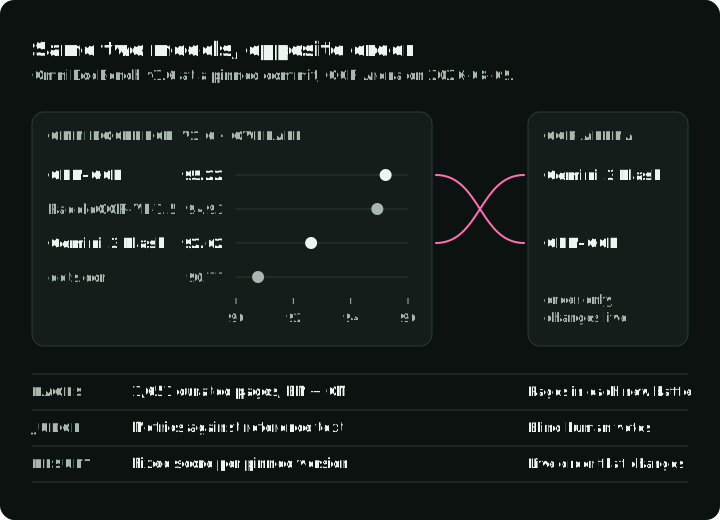
The figure shows the disagreement: GLM-OCR and Gemini 3 Flash swap places between the two rankings. Below it are the pages each one uses, who judges, and what you get.
The likely drivers include document mix, output formatting, language coverage, and judge criteria. Published numbers are useful for screening, but final selection needs a held-out set from the target workload.
Traditional OCR engines: still relevant
Traditional engines are useful baselines because they can run locally on CPU. Their latency and accuracy depend on the selected model, page resolution, language, preprocessing, and hardware, so benchmark them on the same labeled pages used for VLM evaluation.
| Engine | Deployment | Useful baseline for |
|---|---|---|
| Tesseract 5.5 | Local CPU | Clean printed text and established scripts |
| EasyOCR | Local PyTorch on CPU or GPU | Prototypes and scene text |
| PaddleOCR 3.x | Local CPU, GPU, and mobile variants | Multilingual OCR and deployment toolchains |
Tesseract for clean print
Tesseract (v5.5.x, Apache 2.0) is a mature, primarily CPU engine with 100+ language packs. Clean-print accuracy can be high after appropriate rasterization and preprocessing, but handwriting, scene text, and complex layouts need separate testing. Its main advantage is a small, local CPU deployment.
Set the page segmentation mode (--psm) per document type; a wrong mode drops columns or merges lines. The snippet requires pip install pytesseract pillow, the Tesseract binary with English language data, and a local receipt.jpg.
import pytesseract
from PIL import Image

# --psm 6: treat the image as one uniform block of text, which suits a receipt
text = pytesseract.image_to_string(Image.open("receipt.jpg"), lang="eng", config="--psm 6")
EasyOCR
EasyOCR pairs a CRAFT detector with a CRNN recognizer. With full PyTorch GPU acceleration, it’s a fast option for quick prototyping and scene text. It returns lines and boxes only, with no layout or table structure.
The snippet requires pip install easyocr, PyTorch, EasyOCR’s downloaded model weights, and a local receipt.jpg.
import easyocr

# Three lines for complete OCR
reader = easyocr.Reader(["en"])
result = reader.readtext("receipt.jpg")
# Returns: [(bbox, text, confidence), ...]
PaddleOCR 3
PaddleOCR 3 packages maintained OCR, document parsing, and deployment pipelines. The current quick start uses the predict() API and explicit orientation settings. Pin the paddleocr package and selected pipeline because 2.x examples using .ocr(..., cls=True) do not match the 3.x API.
It needs the PaddlePaddle runtime, which adds a second framework to a PyTorch stack. PaddleOCR text recognition is a different pipeline from PaddleOCR-VL, the document parser in the next section.
The snippet requires pip install "paddleocr>=3,<4", a compatible PaddlePaddle runtime, downloaded model weights, and a local receipt.jpg.
from paddleocr import PaddleOCR

ocr = PaddleOCR(
    use_doc_orientation_classify=False,
    use_doc_unwarping=False,
    use_textline_orientation=False,
)

for result in ocr.predict("receipt.jpg"):
    result.print()
    result.save_to_json("output")
Each result holds rec_texts, rec_scores, and rec_boxes. The routing section uses the last two to score a page.
Specialized and general VLM options
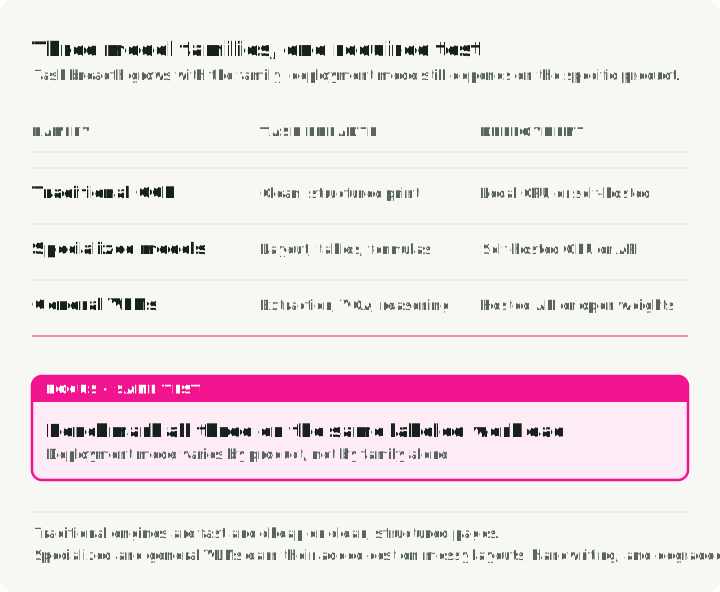
Crooked receipts, skewed product labels, handwriting, and dense layouts are where specialized or general VLMs become worth testing against traditional engines.
The figure shows what each model family returns for the same page, its main trade-off, and where it can run. Deployment mode depends on the product, so the figure lists it separately from task breadth.
Specialized document models
The models in this section were checked on 2026-10-02. The list is not a current ranking; it says which document problem each model is worth trying on.
| Model | Output | Where it runs | Try it when |
|---|---|---|---|
| PaddleOCR-VL 1.6 | Layout analysis, then a 0.9B VLM reads each region | Self-hosted | Multilingual pages with layout; the vendor reports 109 languages |
| GOT-OCR 2.0 | Plain text, Markdown, LaTeX | Self-hosted, 580M parameters | Formulas and mixed text on one page |
| dots.mocr | Layout and text; charts and figures as SVG code | Self-hosted, 3B parameters | Pages with charts or diagrams you need as structure |
| DeepSeek-OCR2 | Markdown with grounding boxes | Self-hosted, vLLM or Transformers | Long documents at high volume; a page uses 256 to 1,120 vision tokens |
| Mistral OCR 4.1 | Markdown, paragraph boxes, block labels, block confidence | Hosted API (mistral-ocr-4-1) | You want an API and a confidence score per block |
| Granite-Docling 258M | DocTags, converted to a DoclingDocument | Self-hosted, inside Docling | A small local model for Docling conversions |
| olmOCR | Plain text or Markdown in reading order | Self-hosted, 7B VLM on a GPU | Linearizing PDFs into text for RAG or training data |
Treat throughput and memory figures as hardware- and dataset-specific; measure peak memory with your runtime, precision, image size, and output limit. Calibrate Mistral’s block confidence against field correctness before accepting values automatically. Pin an explicit model version for comparisons, because a latest alias can change.
Frontier VLMs
General VLMs are another option when the task combines extraction with visual or semantic reasoning. These candidates were checked on 2026-10-02 and are used in the gateway example below. They are a starting shortlist, not an OCR ranking:
- Gemini 3.8 Flash (Google): A generally available multimodal model with image input and structured outputs. Use its stable ID when starting a new comparison.
- Claude Sonnet 5 (Anthropic): A Sonnet generation released on 2026-06-30, for a hosted comparison. Test transcription fidelity and field extraction on your own documents; general reasoning improvements do not establish OCR accuracy.
- Qwen3.8-27B (Alibaba): An open-weight vision-language model under Apache 2.0 that can be tested through a gateway or self-hosted. Its 27B size makes it a different deployment choice from the earlier Qwen3-VL 8B, which remains a useful smaller baseline when memory is constrained.
Add a new release to the test set. Use it in production only after it passes the same comparison: field correctness, abstention, latency, and cost per accepted document under the same protocol.
Document conversion frameworks
A RAG pipeline usually needs a whole document converted to Markdown or JSON, not raw OCR lines. Document converters do this. They parse the file, run a layout model, and call an OCR engine for the text inside each region. Some can instead send each page to a VLM that reads layout and text together.
| Framework | What it outputs | Use it when |
|---|---|---|
| Docling | Markdown, HTML, or lossless JSON with tables and coordinates, from PDF, DOCX, PPTX, XLSX, HTML, and images | You need one converter for mixed formats and want to choose the OCR engine inside it |
| Marker | Markdown, JSON, HTML, or chunks, from PDF, images, and Office files | You want high-quality Markdown from PDFs |
| MinerU | Markdown and structured JSON, from PDF, images, and Office files | Scientific and technical papers with formulas and tables |
Check the licenses before you ship one in a product. Docling is MIT. Marker’s code is Apache 2.0, but its model weights use a modified OpenRAIL-M license with limits on commercial use. MinerU’s license adds conditions to Apache 2.0: a separate commercial license above set user and revenue thresholds, and attribution for online services.
The figure shows what a converter wraps. Docling keeps the input and output the same, and its pipeline options choose how the text is read: its layout model with Tesseract or EasyOCR, or the Granite-Docling VLM end to end.
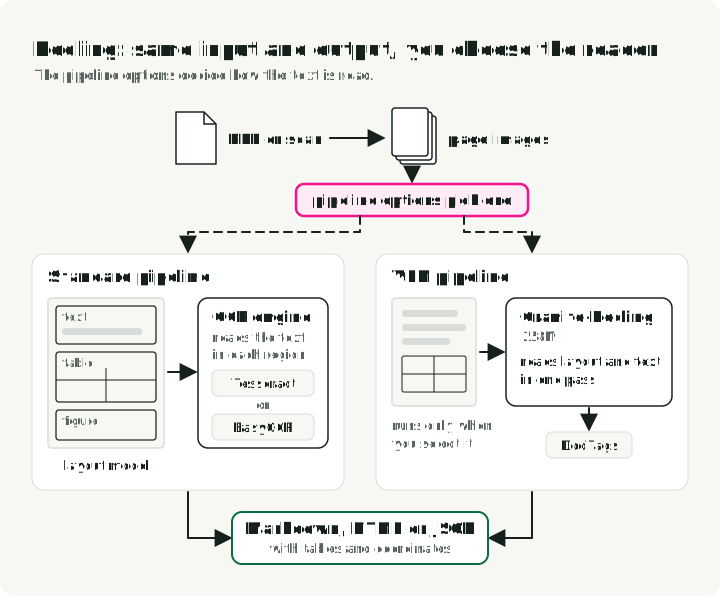
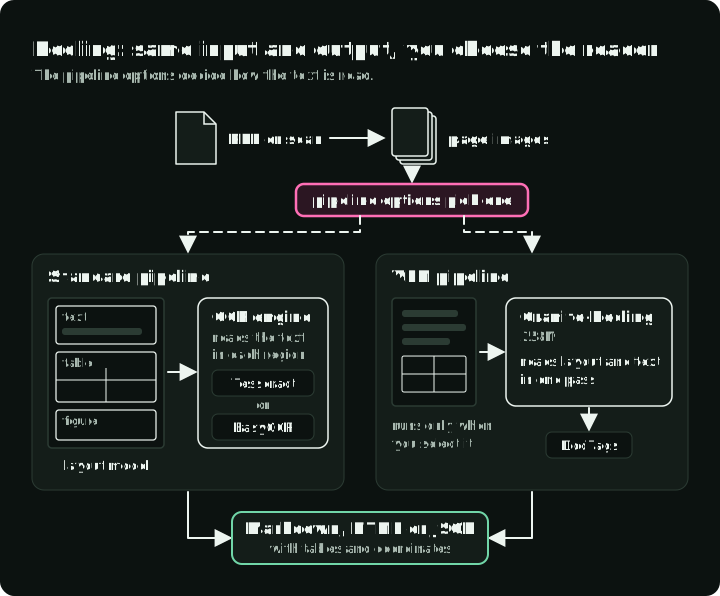
Docling’s conversion speed and quality therefore depend on the pipeline you select. Docling’s VLM pipeline must be selected explicitly; a default converter is not evidence that Granite-Docling ran. Retry policy still belongs in the surrounding application or service, and routing still needs its own quality labels and thresholds.
Choosing an extraction path
The decision map puts the previous sections in order: each question sends a document to the cheapest path that can produce what you need.
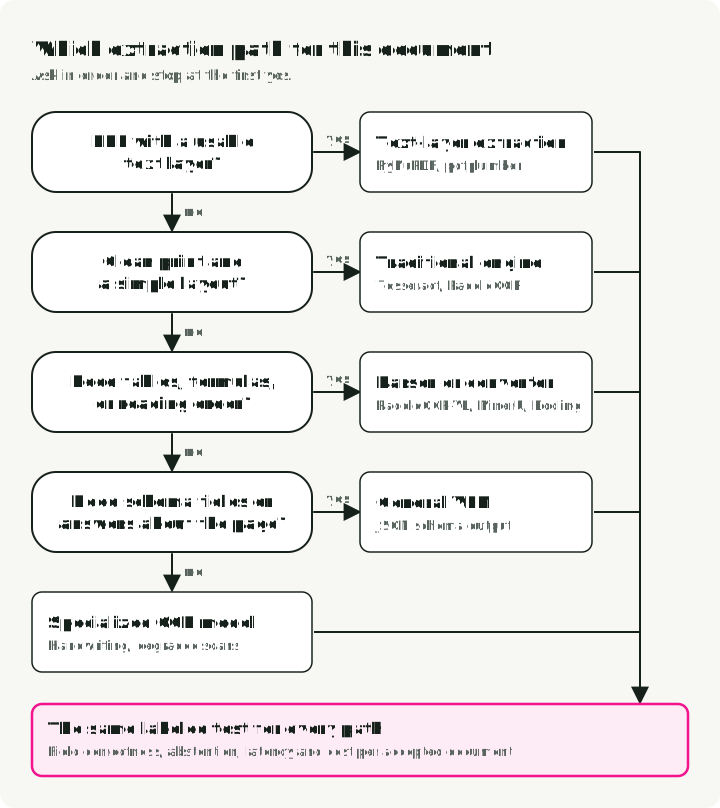
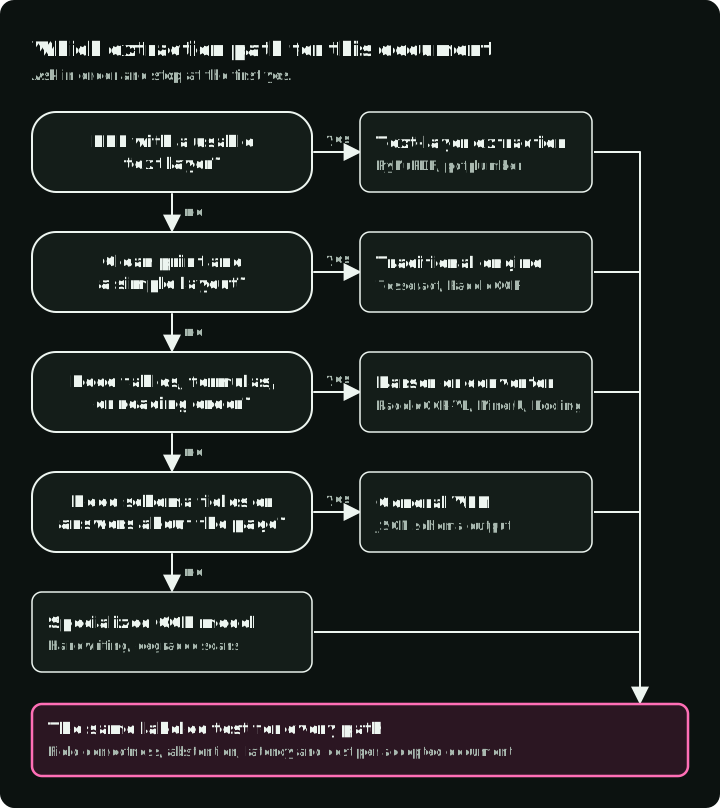
Every leaf still goes through the same labeled test. The map gives you a first candidate, not a final choice.
Testing VLMs with OpenRouter
OpenRouter provides an OpenAI-compatible gateway to models from several providers. Model IDs and supported request features change, so verify them against the gateway’s current catalog before running the example.
The snippet requires pip install openai, an OPENROUTER_API_KEY, network access, a local receipt.jpg, and model IDs still supported by OpenRouter.
import base64
import os
from openai import OpenAI

client = OpenAI(
    base_url="https://openrouter.ai/api/v1",
    api_key=os.environ["OPENROUTER_API_KEY"],
)

def extract_text(
    image_path: str,
    model: str,
    prompt: str = "Extract all text from this image, preserving layout as markdown.",
    **request_args,
) -> str:
    with open(image_path, "rb") as f:
        image_b64 = base64.b64encode(f.read()).decode()

    response = client.chat.completions.create(
        model=model,
        messages=[{
            "role": "user",
            "content": [
                {"type": "text", "text": prompt},
                {"type": "image_url", "image_url": {"url": f"data:image/jpeg;base64,{image_b64}"}},
            ],
        }],
        max_tokens=4096,
        **request_args,
    )
    choice = response.choices[0]
    if choice.finish_reason != "stop":
        raise RuntimeError(f"{model} did not finish: {choice.finish_reason}")
    if not choice.message.content:
        raise RuntimeError(f"{model} returned no text (finish_reason={choice.finish_reason})")
    return choice.message.content

# Compare models by changing one string
models = [
    "google/gemini-3.8-flash",
    "anthropic/claude-sonnet-5",
    "qwen/qwen3.8-27b",
]
for model in models:
    print(f"\n--- {model} ---\n{extract_text('receipt.jpg', model)[:200]}...")
The OpenRouter model catalog listed google/gemini-3.8-flash, anthropic/claude-sonnet-5, and qwen/qwen3.8-27b with image input and structured-output parameters on 2026-10-02. Catalog support does not prove that this exact request succeeds at every routed endpoint.
For structured extraction, use response_format with a JSON schema when the selected model and gateway support it. This can make the response parseable; it does not validate extracted values against the image. With OpenRouter, provider.require_parameters makes the request fail when no routed endpoint supports every requested parameter, instead of falling back to an endpoint that cannot honor the schema.
The snippet reuses extract_text from the previous block and passes the schema through its extra request arguments. It needs a model that supports JSON Schema.
import json

nullable = {"type": ["string", "null"]}
receipt_schema = {
    "type": "object",
    "properties": {
        "vendor": nullable,
        "date": nullable,
        "items": {
            "type": ["array", "null"],
            "items": {
                "type": "object",
                "properties": {"description": nullable, "amount": nullable},
                "required": ["description", "amount"],
                "additionalProperties": False,
            },
        },
        "total": nullable,
    },
    "required": ["vendor", "date", "items", "total"],
    "additionalProperties": False,
}
prompt = (
    "Extract only visible receipt fields. Copy amounts as source strings. "
    "Use null for absent or unreadable values; do not infer them. "
    "Use null for an unreadable item list, and [] only when no items are present."
)

receipt = json.loads(extract_text(
    "receipt.jpg",
    "google/gemini-3.8-flash",
    prompt=prompt,
    response_format={
        "type": "json_schema",
        "json_schema": {"name": "receipt", "strict": True, "schema": receipt_schema},
    },
    extra_body={"provider": {"require_parameters": True}},
))
OpenAI-style strict mode requires every property in required and additionalProperties: false, so a value that may be missing is typed as nullable rather than left out. The prompt and the nullable types together let the model return null instead of inventing a value.
Keep the copied amount strings alongside normalized values. Parse money downstream with decimal or integer minor-unit arithmetic under an explicit currency and locale; schema validity does not validate a payment total. Route null critical fields to review.
Deploying OCR in production
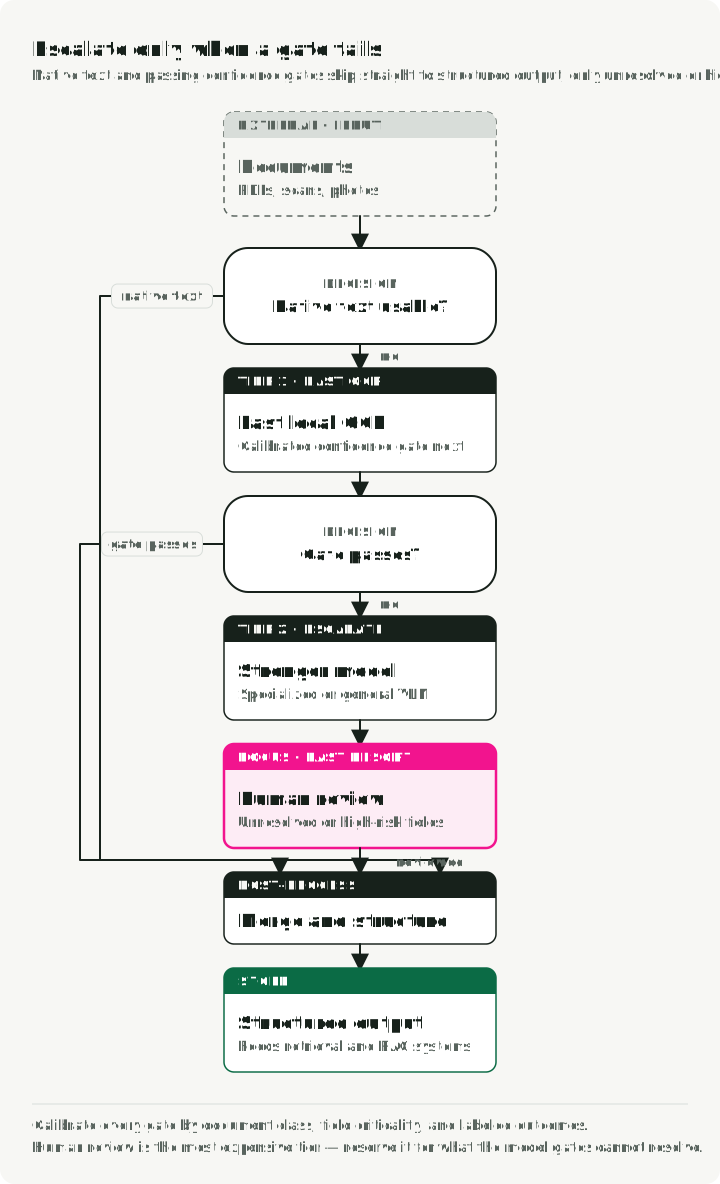
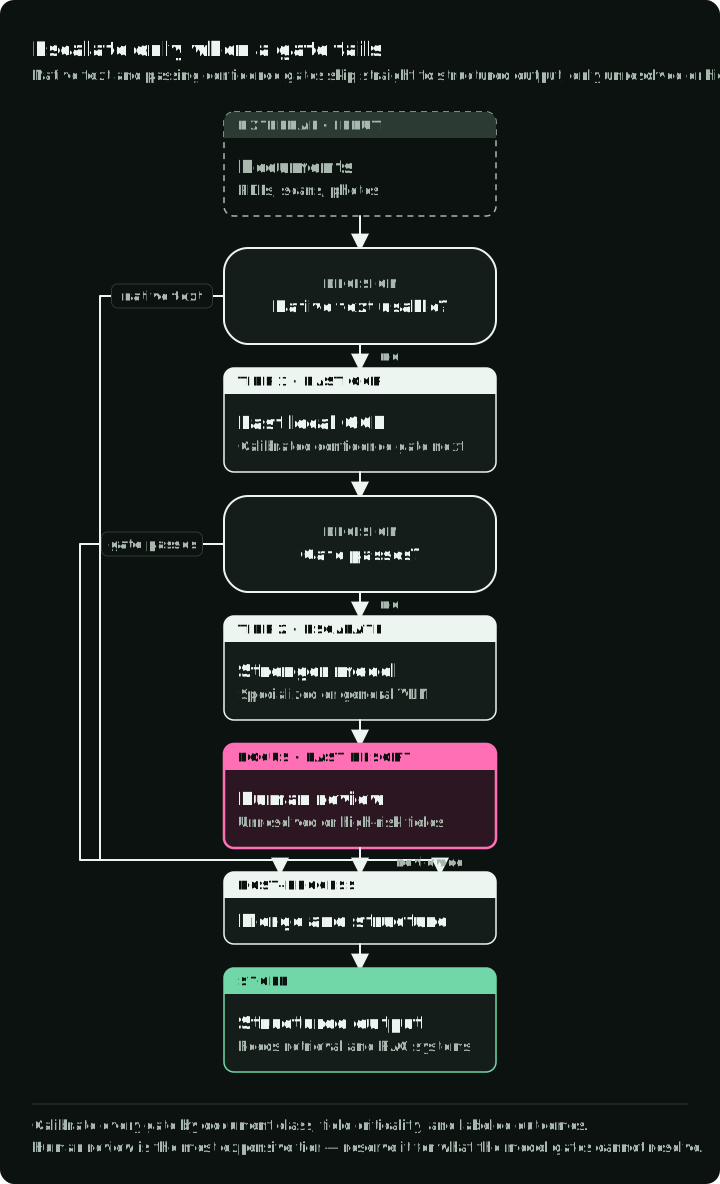
A tiered architecture can separate CPU preprocessing from GPU or API inference and reserve expensive paths for documents that need them. The figure shows the tiers in order of cost, the check that accepts a page at each tier, and the failure that sends it to the next one.
The tiered fallback pattern
Start with the cheapest path that meets the quality target, then calibrate routing on labeled pages:
- Check for embedded text (Tier 0). For PDFs, inspect the text layer with
PyMuPDForpdfplumberbefore rasterizing, but validate that the layer is complete.
- Attempt with a fast model. Use a traditional engine for document classes on which it meets the target.
- Evaluate calibrated confidence. Combine model confidence with document class, field criticality, and validation rules.
- Escalate to a stronger model. Route uncertain pages to a specialized or general VLM.
- Escalate high-risk failures to a human. Human review is a separate tier for values whose cost of error exceeds the automation benefit.
Note on confidence: Raw character probabilities are not automatically calibrated to field correctness. The area-weighted function below is a baseline for page-level aggregation, not a universal router. Calibrate it against labeled pages, and give critical fields their own rules because a page average can hide a wrong ID or total.
def area_weighted_confidence(page):
    """Compute area-weighted confidence from one PaddleOCR 3.x result."""
    total_area, weighted_sum = 0, 0
    for (x_min, y_min, x_max, y_max), score in zip(
        page["rec_boxes"], page["rec_scores"]
    ):
        width = int(x_max) - int(x_min)
        height = int(y_max) - int(y_min)
        area = width * height
        weighted_sum += score * area
        total_area += area
    return weighted_sum / total_area if total_area > 0 else 0

assert area_weighted_confidence({
    "rec_boxes": [[0, 0, 300, 300]], "rec_scores": [0.5]
}) == 0.5
To set the threshold, label a set of pages from one document class and record whether all critical fields on each page are correct. Pick the lowest confidence threshold at which the accepted pages meet your critical-field error target, and route pages below it to the next tier. The function below does this for one document class.
def pick_threshold(scores, correct, max_error):
    """Lowest threshold whose accepted pages meet the error target, or None."""
    for threshold in sorted(set(scores)):
        accepted = [ok for s, ok in zip(scores, correct) if s >= threshold]
        if accepted and accepted.count(False) / len(accepted) <= max_error:
            return threshold
    return None  # no threshold meets the target: send every page to the next tier

scores = [0.95, 0.91, 0.88, 0.80, 0.72, 0.60]
correct = [True, True, True, False, True, False]  # all critical fields right?
assert pick_threshold(scores, correct, max_error=0.0) == 0.88
assert pick_threshold(scores, correct, max_error=0.25) == 0.72
The figure places the six labeled pages from the asserts on the confidence scale and marks the threshold each error target picks.
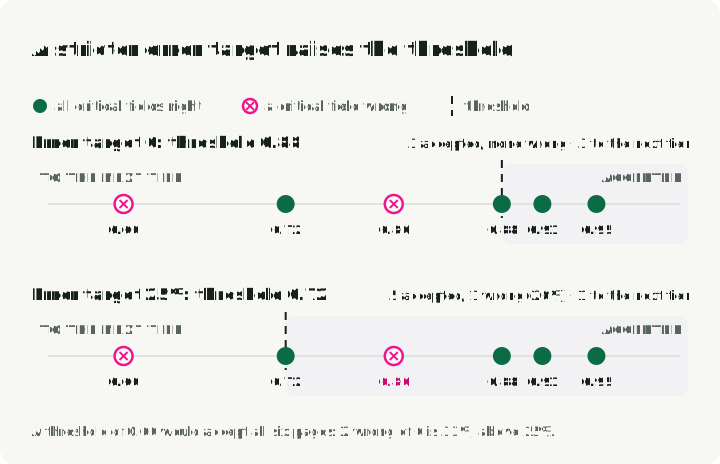
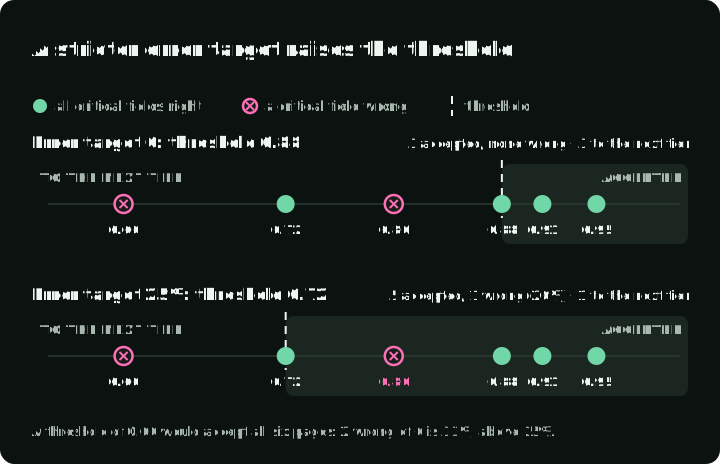
A stricter error target raises the threshold and sends more pages to the stronger model. Repeat the calibration for each document class, because the same score can mean different accuracy on receipts and on contracts.
Serving patterns
How you run each tier depends on how pages arrive:
- Batch jobs (archive conversion, monthly reports): read pages from a queue and run them on GPU workers that scale to zero between jobs.
- Interactive requests: keep a GPU warm or use a hosted API, because a cold model start adds its load time to the user’s wait.
- Rasterization and image cleanup: run them on CPU workers that scale separately from GPU inference.
- Open-weight VLMs: serve them with vLLM or SGLang, which batch concurrent requests on one GPU.
Measuring the results
For each planned engine/document pair, retain a result with success, error or skipped status. Failed, empty and truncated outputs remain in the attempted-document denominator, along with their spent cost. Report completion rate, critical-field errors among automatic acceptances, review fraction, p50/p95 end-to-end latency, and cost per successfully processed document. Measure page latency with the actual resolution, batch size, hardware or provider region, and output length. Keep preprocessing and retries in the total; a model-only timing cannot price a successful page. Reuse converter objects for warm timings and record initialization separately. The OCR Gauntlet repository records results in this format; the last section shows how to run it.
Cost analysis at scale
There is no universal page-volume break-even between an API and self-hosting. Build the comparison from the same workload:
| Cost component | API path | Self-hosted path |
|---|---|---|
| Inference | Current page- or token-based price | GPU-hours at measured pages/hour |
| Idle capacity | Usually absorbed by provider | Utilization and capacity slack |
| Engineering | Integration and provider monitoring | Deployment, upgrades, observability, and on-call |
| Data handling | Transfer, retention, and region terms | Storage, network, and compliance controls |
| Quality failures | Retries and human review | Retries and human review |
Use a shared formula: monthly pages × cost per successful page + review cost + fixed operating cost. A “successful page” must meet the same text, table, and field criteria on both paths. Provider prices and GPU rentals change too quickly to embed as a durable procurement estimate.
Error handling: the hallucination problem
VLM errors can be contextually plausible and factually wrong. A receipt total of “$42.50” can come back as “$42.80”: a valid amount that no spell-checker flags.
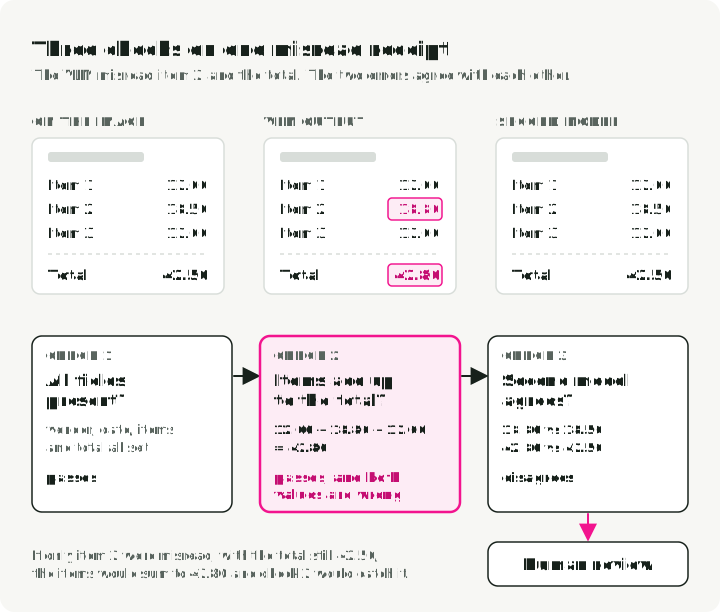
Synthetic failure example: A receipt image shows three line items, 12.00, 18.50, and 12.00, and a total of 42.50. A VLM reads the second item as 18.80 and the total as 42.80. The items still add up to the total, so internal arithmetic passes, and both values are wrong. This is why validation needs image-grounded labels or an independent review path, not only consistency checks.
The figure runs the three checks on this receipt: the schema check and the sum check pass, and only the second model catches the two misreads.
A few practical mitigations:
- Arithmetic reconciliation. When the schema exposes them, verify
subtotal + tax + fees + shipping - discounts, within the currency’s rounding tolerance, against the stated total. Route missing components or mismatches to review. - Date, phone, and currency checks. Parse dates with a date parser and reject impossible values. Check phone-number digit counts and currency formats with patterns.
- Second extraction path. Run critical fields through a different model or OCR engine and flag disagreements. Agreement raises confidence only when the two paths have sufficiently different failure modes; it is not proof of correctness.
The reconciliation check takes the copied amount strings and uses Decimal, so no float rounding enters the comparison. The asserts replay the receipt example above.
from decimal import Decimal

def reconcile(subtotal, tax, fees, shipping, discounts, total, tolerance="0.01"):
    """True when the stated total matches its components within tolerance."""
    parts = [subtotal, tax, fees, shipping, discounts, total]
    if any(p is None for p in parts):
        return False  # a missing component goes to review
    s, t, f, sh, d, tot = (Decimal(p) for p in parts)
    return abs(s + t + f + sh - d - tot) <= Decimal(tolerance)

items = ["12.00", "18.80", "12.00"]  # the image shows 18.50
subtotal = str(sum(Decimal(i) for i in items))
assert reconcile(subtotal, "0", "0", "0", "0", "42.80")  # passes, and both values are wrong
assert not reconcile(subtotal, "0", "0", "0", "0", "42.50")  # one misread value is caught
assert not reconcile(subtotal, None, "0", "0", "0", "42.80")  # missing tax goes to review
Reconciliation catches a single misread amount. It cannot catch two misreads that agree with each other, so critical fields still need the second extraction path.
Run the comparison on your own pages
The OCR Gauntlet repository runs several OCR engines on the same pages and writes one result row per engine and page, including failures. It compares image pages; it does not cover the Tier 0 text-layer check.
The runner works in four steps:
- The manifest lists the pages and the hashes of their reference text.
- The runner sends every page to every engine.
- It writes one JSONL row per engine and page, marked success, error, or skipped, with raw output, timing, and cost.
- The summary reports completion rate, CER on reviewed pages, and cost per successful page. Failed and skipped pairs stay in the completion-rate denominator.
The first run uses generated pages and Tesseract, so it needs Python 3.12, uv, and a system Tesseract install, but no API keys:
uv sync --locked --extra tesseract --extra notebooks
uv run python scripts/make_fixture.py data/demo
uv run ocr-gauntlet data/demo/manifest.json --engines tesseract --output results/demo.jsonl
The generated pages only check that the pipeline runs; they do not measure OCR quality. For a real receipt test, import CORD samples with uv run python scripts/download_samples.py --dataset cord --count 2 --output data/cord and prepare a reviewed reference as the repository README describes. Add other engines with --engines; hosted engines also need --allow-remote, because they upload your pages.
In the summary, read the completion rate first: an engine that fails on a third of the pages is not a candidate, whatever its CER. Then compare CER on the reviewed pages, and then cost per successful page, which includes the spend on failed attempts.
Key takeaways
- Match the model tier to a labeled document class. Traditional engines can be sufficient for clean text; specialized and general VLMs should earn their added cost on harder pages.
- Do not merge unlike leaderboards. OmniDocBench metrics and OCR Arena preferences answer different questions.
- Calibrate routing. Confidence thresholds, document classes, field criticality, and human-review policy belong in one evaluation.
- Validate plausible output. Schema conformance and internal arithmetic cannot prove that a value appears in the image.
- Price successful pages. Include retries, review, fixed operations, and quality checks when comparing APIs with self-hosting.
References
- OCR Arena Leaderboard - Crowdsourced, head-to-head model battles
- The OCR Gauntlet repo - Runnable comparison of OCR engines on the same pages, with Docling backends and cost per successful page
- OmniDocBench - End-to-end document parsing eval
- dots.ocr - About 3B total parameters, including a 1.7B language model
- PaddleOCR - Traditional OCR toolkit and models
- OpenRouter - Unified access gateway for A/B testing models