Long-Running AI Agent Runtime: Sessions and Checkpoints

A long-running agent runtime lets a tool-using run outlive the worker that started it. This article is for engineers moving an agent from a request handler to background work. You will learn which state must survive a restart, why a checkpoint cannot make an external action safe to retry, and how those requirements determine the deployment shape. It then compares concrete options: a queue and worker, Temporal, sandbox providers, Cloud Run, Lambda, Fargate, Kubernetes, and hosted agent platforms, with the observability to debug a run after it fails.
The model still proposes the next action. The harness in Part 6 supplies context, authorizes tools, and checks completion. The runtime gives that loop durable state and a place to execute. Part 4 covers the permission decision; here we follow an approved action through a crash and recovery.
State a restart must not erase
Suppose a research agent gathers sources, drafts a report, waits for approval, and publishes the approved file. The run might take minutes or days because approval has no fixed arrival time. A deploy could replace its worker while the agent is drafting, while it waits, or just after the publishing service accepts the file.
The worker’s memory is expendable. The approved report and the fact that publication may already have happened are not. Before choosing a framework, write down what another worker needs to answer:
| Question after a restart | Durable record to keep |
|---|---|
| Which run is this, and may it continue? | Run ID, status, deadline, budget, owner or lease |
| What should the agent do next? | Checkpoint of the loop or graph state |
| Which report was approved? | Immutable artifact version or content hash and the approval decision |
| Did publication already happen? | Pending operation ID, arguments, outcome, and external lookup result |
| Why did this run fail or spend its budget? | Correlated events and traces |
These records need not be five separate products. A database can hold run rows, checkpoints, and operation events in separate tables. An object store can hold report files. A trace backend can hold timings. Keep the records apart because each proves something different. Anthropic’s long-running agent account describes the same basic problem from the model’s side: a new context does not remember the preceding work unless the application gives it durable progress to read. OpenAI’s Codex team reports single runs that work on one task for more than six hours, so this is not a rare case.
Call one accepted task a run. It may use several model sessions as contexts are replaced, and one conversation may contain several runs. Frameworks use “session” and “thread” differently. In LangGraph, thread_id keys checkpoint history; choose explicitly whether one of those threads maps to one run or spans several. Keep an application-owned run ID for the operation log either way. The OpenAI Agents SDK’s session backends hold mutable conversation history that can be edited, cleared, and compacted, so do not treat one as the append-only recovery log.
The workspace is another piece of state. For a coding agent, a commit can identify the files to restore; for the report example, an immutable object key and hash can identify the approved file. A paused sandbox may preserve a convenient filesystem, but its continued existence should not be the only way to recover the result. Git worktrees separate checkouts; they are not execution sandboxes.
Five components to place
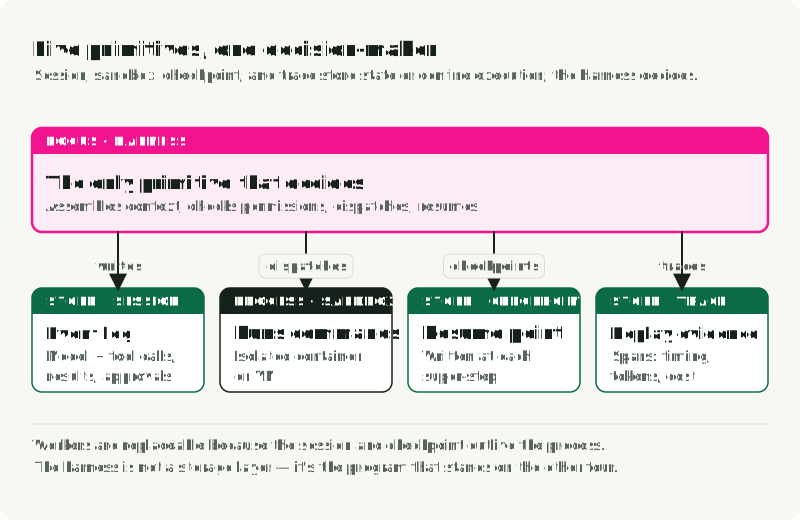
Anthropic’s Scaling Managed Agents write-up separates session, harness, and sandbox. This article also separates checkpoints and traces, giving five runtime responsibilities to place. An implementation can merge them, but each one needs an owner and a known failure boundary. The figure places them in a queue-and-worker setup and labels what passes between them.
| Component | Job | Common implementation |
|---|---|---|
| Session | Append-only log of calls, results, and approvals | Event table in PostgreSQL, keyed by run ID |
| Harness | Drive model and tool turns until the task ends | LangGraph graph, OpenAI Agents SDK runner, custom loop |
| Sandbox | Run commands with file, network, process limits | Hardened container, microVM, browser sandbox |
| Checkpoint | Resume without replaying the whole run | LangGraph PostgreSQL or Redis saver, workflow engine state |
| Trace | Debug a run after it ends | OpenTelemetry spans to Tempo, Jaeger, Honeycomb, LangSmith |
The harness is the only one that makes decisions; the other four store state or restrict execution. LangGraph’s compiled graph, LangChain’s Deep Agents, and Claude Code are harnesses in this sense. The OpenAI Agents SDK’s sandbox guide draws the same line: approvals, tracing, handoffs, and resume state belong to the outer runtime, while commands, file changes, and environment isolation belong to the sandbox session.
Sandboxes differ in how long they live. A fresh ephemeral sandbox exists for one task and pays the start-up cost every time. A persistent paused sandbox keeps its filesystem and a memory snapshot between runs, so the next resume can avoid a full boot. A snapshot or fork sandbox branches a copy-on-write image from a prepared parent, so many tasks share installed dependencies without sharing their writable state.
Two concerns cross all five components. Permission enforcement runs before each tool call. Deep Agents’ filesystem permissions scope only its built-in filesystem tools, so shell commands, custom tools, and MCP calls need enforcement in the sandbox policy or behind a tool proxy. Secrets should reach neither the model nor, usually, the sandbox. Anthropic’s Managed Agents clones repositories with a token during sandbox set-up and routes MCP calls through a proxy that holds OAuth tokens, so the harness never sees the credentials.
Check the placement by writing down each component and what implements it. PostgreSQL might hold the session and checkpoints, the worker container runs the harness, a provider such as Daytona, Modal, or E2B supplies the sandbox, and Tempo or LangSmith stores traces. Then look for coupled failures: two components in one process fail together, and a shared credential crosses both boundaries if it leaks.
A checkpoint, an event log, and an external record answer different questions
A checkpoint says where execution can resume: the messages or graph values already produced, the step that finished, and the step waiting to run. LangGraph saves graph state at super-step boundaries. Its checkpointer can also retain successful node writes when another node in the same step fails. That is useful fault tolerance, but a checkpoint of graph values does not prove whether a service outside the graph committed a request.
graph.get_state() returns a StateSnapshot whose .values hold the last known graph state, which is useful in a debug bundle. Neither it nor the checkpoint can reconstruct events the harness never logged.
An operation event log says what the application attempted and what it learned: publish_requested, publish_pending, publish_succeeded, or needs_human, all tied to one run and operation ID. It can live in the same database as checkpoints, provided the application actually writes the events. A graph’s checkpoint history is not automatically this log. A chat transcript is different again: it helps the model continue, but it need not contain every approval, tool argument, or side effect.
The external service owns the authoritative result of publication. It may offer an idempotency key, a status lookup by operation ID, or a query for an object with the expected hash. If it offers none of these, the runtime cannot infer success from a missing response. A trace can show that a request was sent and how long it took, but a span ending in a timeout cannot settle whether the remote service committed it.
The difference shows up when you replay old state. LangGraph’s checkpoint replay re-executes steps after the selected checkpoint, including API requests in those steps. It is a debugging and control-flow feature, not an exactly-once guarantee for external effects. The same rule applies to a fresh worker resuming after a crash.
Follow one uncertain publication
The report is approved and stored under a stable artifact ID. Now the harness asks the runtime to publish it. Assume the publishing service might complete the request even if the worker loses the response.
- Record the intent. Before the request leaves the worker, persist an application-owned operation ID, the approved artifact hash, destination, and
pendingstatus. Bind that ID to those arguments. A model-generated tool-call ID may change after replanning; it is not the identity of the business action. - Dispatch the action. Send the same operation ID to the publishing service if its API supports idempotency. If it does not, use a stable object key or another provider-supported way to look up the result. The worker must not assume that a timeout means the service did nothing.
- Record the outcome. On a confirmed response, store the external result ID and mark the operation complete before continuing the run. The next checkpoint can then refer to that result.
- Recover the gap. Suppose the service accepted the report but the worker crashed before step 3. A new worker sees
pending. It asks the service whether that same operation or artifact exists. If it does, it records the recovered outcome and continues without publishing a second copy. If a retry is supported, it uses the same operation ID and unchanged arguments. - Stop on uncertainty. If the service cannot answer and does not promise idempotent retries, leave the operation unresolved for review. Generating a new key and sending the request again would be a new action, with a duplicate-publication risk.
The sequence below follows the crash in step 4, between external success and local outcome storage.
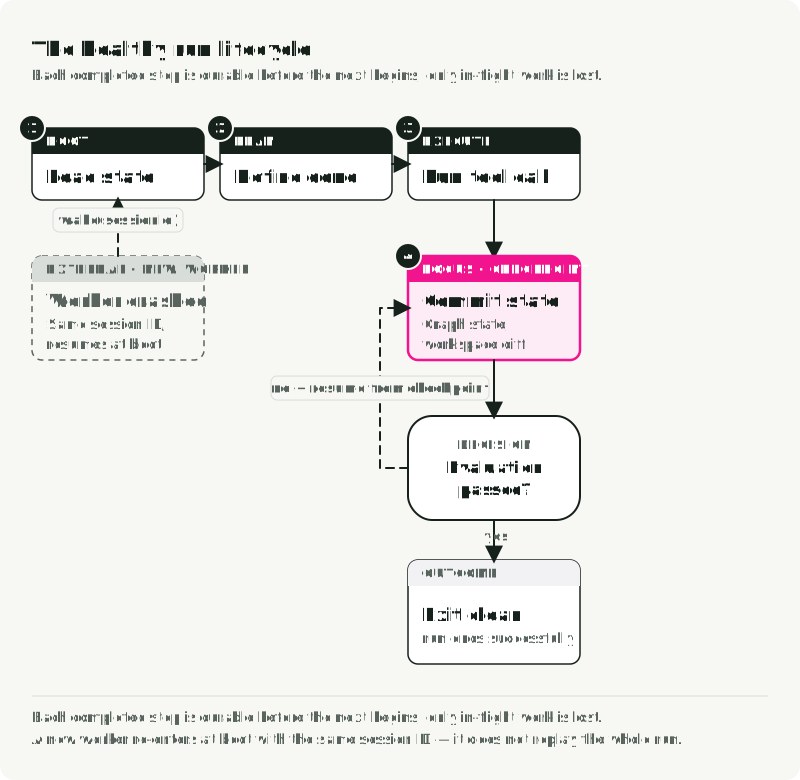
The diagram’s workspace diff is a recoverable file version or reference; the graph checkpoint need not contain the files themselves.
The case to design for is a crash between external success and local outcome storage. No database transaction can atomically commit a write to an unrelated service without cooperation from that service. AWS’s account of idempotent APIs explains why a caller-provided request ID represents intent: two identical requests can be two desired actions, while two retries of one ID should represent one. The receiving service must honor that contract and detect a changed payload under the same ID. Check its deduplication period; an expired key is not a permanent promise. Stripe, for example, returns the first result for a repeated idempotency key and may prune keys after at least 24 hours.
The same protocol applies to sending an email, charging an account, opening a pull request, or changing a database owned by another service. The reconciliation method differs. For example, a provider may support idempotency keys, a unique resource constraint, a read-after-write lookup, or no reliable query at all. Design the retry policy from that contract, not from the fact that the agent framework can repeat a node.
Make the rest of the run recoverable
The uncertain external call is the hardest case. The surrounding run still needs a few explicit rules:
- One active writer. A queue may redeliver work after a lease expires. Use a run lease with fencing or conditional status updates so a stale worker cannot advance the run. Retain idempotency protection for calls already in flight. Acknowledge a job only after the state it represents is durable. Recovery starts by inspecting pending operations, not by blindly restarting the model. Decide what new user input means during a run: reject it, queue it, interrupt, or roll back; LangChain’s Deep Agents runtime account describes these choices.
- A durable wait. If publication requires approval, persist the proposed action and its exact arguments. Resume with the approval decision and recheck it if the proposed action changes. Do not hold a worker process open just to wait for a person.
- A bounded run. Persist the deadline, call or tool limits, and spending allowance. Reserve budget before concurrent dispatch so two calls cannot both spend the same remainder; reconcile actual usage afterward. Cancellation stops new calls and records the request, but it cannot undo an in-flight external effect. A metrics alert or a provider-side budget, such as Anthropic’s beta task budgets, is a second signal; the model can exceed an advisory budget, so keep the dispatch ledger either way.
- Restorable work. Store a reference to the approved artifact, its hash, and the workspace version that produced it. A restored process should be able to validate the file before publishing. Large files belong in an artifact store, not inside every graph checkpoint.
- An execution boundary. If a tool runs generated code, installs packages, or browses untrusted pages, run it in an environment with the required file, network, and process restrictions. Keep long-lived credentials outside model-visible context; enforce permissions where the action executes. A container or per-worktree checkout alone does not establish the isolation your threat model may require.
For LangGraph, choose checkpoint durability deliberately. Its "sync" mode persists each checkpoint before the next step starts; "async" can lose a recent checkpoint on a process crash, and "exit" does not save intermediate progress against a mid-run crash. Even "sync" does not close the external-effect gap above. The event log and reconciliation logic remain application work.
Failures that long runs add
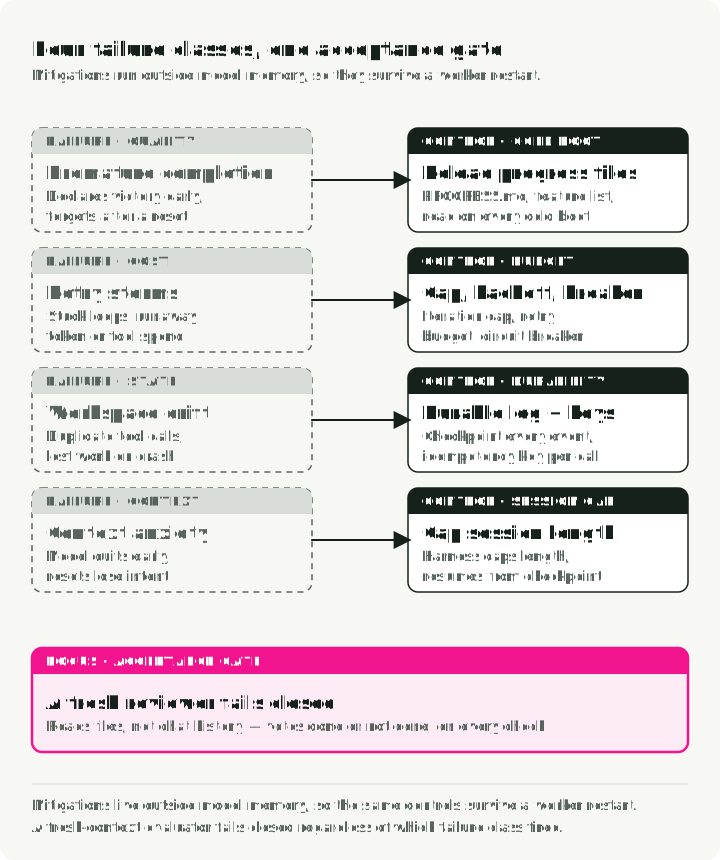
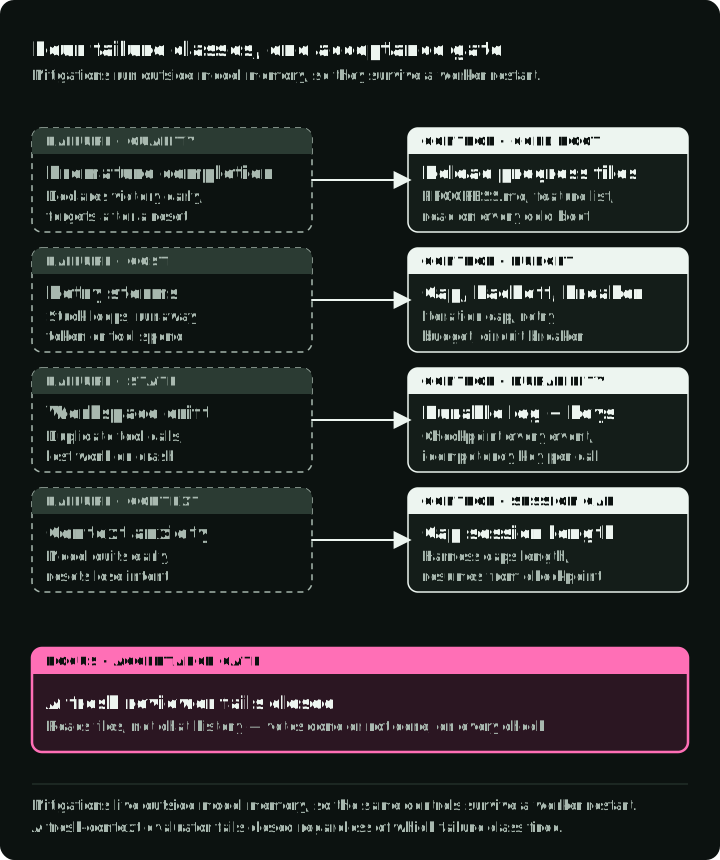
As runs cross workers and context windows, failures move toward state, duplicate side effects, workspace drift, and cost. Each needs a control outside model memory, so it still works after a restart. The figure places each control at the step of the run loop where it runs; the table adds where it is implemented.
| Failure | Control | Where it runs |
|---|---|---|
| Agent declares the task done too early | Acceptance checks on artifacts; optional fresh-context evaluator without write tools | Harness completion step; evaluator in its own sandbox session |
| Agent forgets finished work after a context reset | Progress files such as PROGRESS.md and feature-list.json, read before the first model call | Boot hook of each model session |
| Model summarizes and stops early near its limit | Cap the session and start a fresh one from the handoff and checkpoint | Harness session length limit |
| Stuck loops and retry storms | Iteration cap, exponential backoff, circuit breaker on tool error rate, hard tool-call budget | Tool-execution node; RetryPolicy on Temporal Activities |
| Agent edits files that belong to another run | Per-run workspace, Git commits as recovery points, sandbox or tool-proxy file policy | Sandbox policy; Deep Agents permissions for its built-in file tools |
| Token or tool spend runs away | Reserve budget before dispatch, bound output, reconcile usage | Dispatch-path budget ledger; Prometheus alerts as a second signal |
| A tool call runs twice after a crash | Persist pending and an idempotency key before dispatch; query or retry with the same key on resume | Event store plus the provider’s idempotency or lookup API |
| Work is lost when a worker or sandbox dies | Durable event log, checkpoint after each super-step, reconcile pending effects before continuing | PostgresSaver plus an event table, or a Temporal Workflow |
Anthropic’s cwc-long-running-agents quick-start includes the evaluator and progress-file patterns. Early stopping near the context limit is model-specific, so re-test any workaround when the model changes. As Anthropic puts it, every harness component encodes an assumption about what the model cannot do, and that assumption can go out of date when the model changes.
Transport failures the loop has to absorb
A stream can close mid-reply. The connection can drop after half an answer, or half a tool call, has arrived. Tool arguments arrive as fragments of JSON that only parse once the block completes, so a partially assembled call must never reach dispatch; executing a truncated command is exactly what the permission layer exists to prevent. Treat a broken stream as a failed request: discard the fragment, never append it as something the model said, and retry the whole call. That is affordable because the prefix you already sent is a cache read on the retry. Keep the retry below the agent loop, at the call wrapper, so a retried request never re-runs a tool that already ran.
Streaming also stops being optional as requests grow. Providers enforce timeouts on non-streaming requests and require streaming above certain output sizes, and SDKs may stream under the hood for long calls, so a production runtime tends to stream everything and accumulate the result even when no interface wants the fragments. Arriving tokens then double as a liveness signal: while they keep coming the call is alive, so a stream that goes quiet for a minute is evidence of a stall. A non-streaming request tells you nothing until it returns.
Rate limits are metered in tokens, not requests. Providers meter input and output tokens per minute, so an agent carrying a large request exhausts a limit at a request rate that looks trivially low. Context growth therefore shows up as 429s rather than as a latency problem, and parallel fan-out multiplies the pressure by the size of each request rather than by the number of workers. Cap concurrency and share one token budget in the component that spawns parallel work; backoff inside each worker only spreads the same demand out. Count 429s and the endpoint used per run, so a provider limit is not mistaken for a property of the configuration under test.
The runtime also needs evidence to diagnose a run. Emit a run ID and operation ID with model and tool spans, status, duration, and token use. OpenTelemetry’s GenAI conventions give these fields common names, though the conventions are still developing. Prompt text, tool arguments, and results may contain sensitive data; decide whether they belong in telemetry before capturing them. A trace helps explain a failure. The event log and external lookup decide whether continuing is safe. The observability section below turns this into a stack.
Choose the deployment shape from the wait and failure rules
The platform name is a late choice. First ask whether the caller needs the final result in the same request, whether the run may wait, and who will operate its durable state.
| Need | Starting shape | What it still needs |
|---|---|---|
| Short task completed inside one request | Agent loop in the request handler | A separate execution boundary for untrusted tools; durable state if retry or continuation matters |
| Background work that may outlive one worker | Queue, replaceable worker, durable state | Run leases, checkpoints, operation log, artifact store as needed |
| Many approvals, timers, callbacks, or retries across deploys | Durable workflow engine with workers for model and tool calls | Replay-safe workflow changes and idempotent external activities |
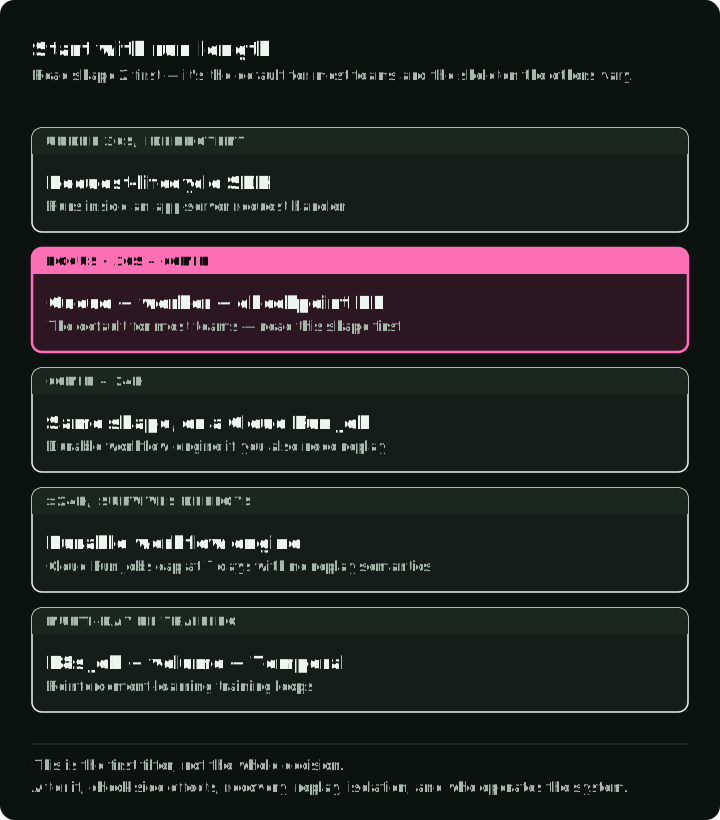
Run length is a useful first filter, though it does not decide the whole design. The figure puts each starting shape on a log scale of run length, above the time limits of common platforms:
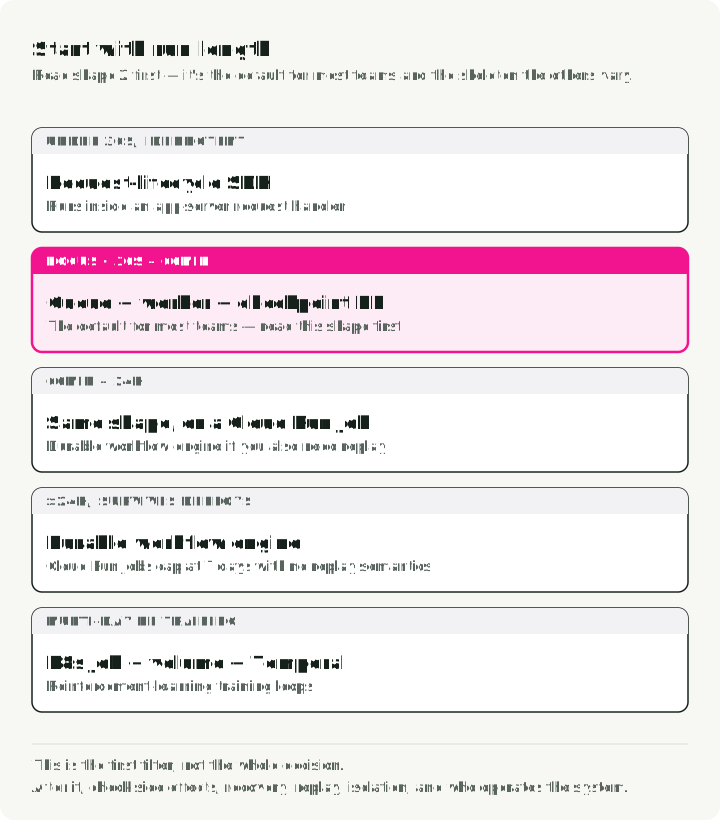
- Under 30 seconds, idempotent: the agent SDK inside an app-server request handler.
- 30 seconds to 60 minutes: queue, worker, and checkpoint database.
- 60 minutes to 24 hours: the same queue and worker, or a Cloud Run Job for one-shot work; a workflow engine if you also need versioning and replay.
- More than 24 hours, surviving deploys: a durable workflow engine such as Temporal.
- Multi-day reinforcement-learning training loops: a Kubernetes Job with a volume, plus Temporal.
After that filter, check side effects, recovery, replay, isolation, data location, and the team that will operate the system.
I would start the report example with a queue and worker. The API returns a run ID; the worker advances the harness; a durable store records checkpoints and pending operations; an artifact store holds the report. That design handles the specific restart and approval requirements without assuming a particular cloud. If the waiting and retry rules become a workflow of their own, Temporal can persist execution history and replay workflow decisions. Its Activities still execute external calls and can be retried, so they need the same idempotency or reconciliation design.
Cloud services implement these shapes; their timeouts do not define the architecture. A Cloud Run service request has a deadline and may continue processing after the connection closes, so an HTTP timeout is especially poor evidence that an action stopped. A Cloud Run Job, an ECS task, or a Kubernetes Job can host a background worker, but a long task limit alone does not give it durable progress. An ordinary AWS Lambda invocation has a 15-minute cap; a workflow can span bounded invocations. Verify the selected service’s current limits and retry behavior before deployment.
A hosted agent platform can operate the loop and some of its state for you. Evaluate it against the same failure drill: how do you export run state, find a pending side effect, bind approval to an action, inspect data sent to the control plane, and resume after a deployment? Keep the platform’s sandbox contract separate from its harness contract. Hosting the harness does not automatically make its tools safe, and hosting the sandbox does not automatically make the run durable.
What each shape gives you
The matrix names the component that provides each responsibility in each shape, marks the cells a hosted provider runs, and highlights the cells that are not enough on their own. The notes after it give the limits that decide between them, checked in September 2026.
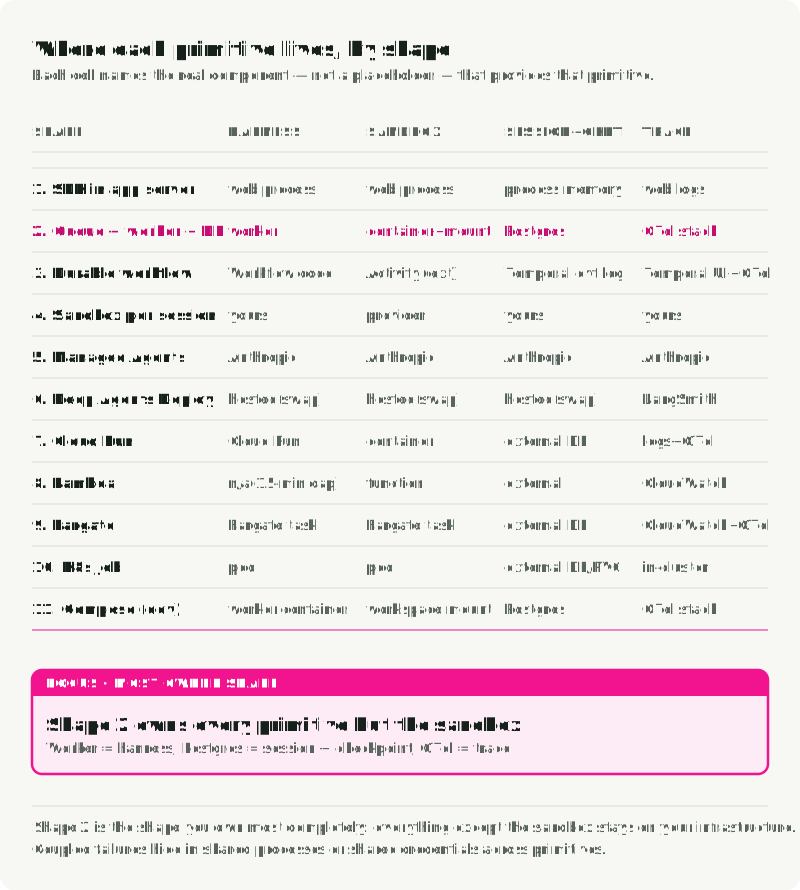
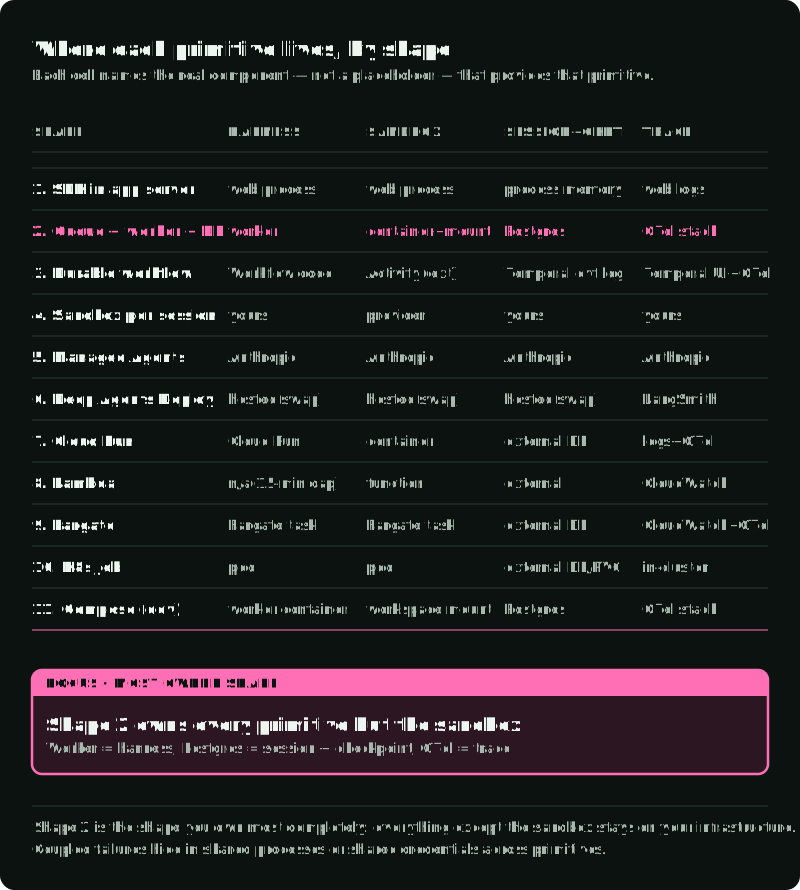
1. SDK inside an app server. The agent runs in a request handler. It suits tasks under about 30 seconds, demos, and internal tools. A web-tier crash loses in-memory work. A client disconnect may cancel the work or leave it running, depending on the server and application; it does not establish the outcome of an external action. Persist state if continuation matters, and do not use a request handler for multi-hour work.
2. Queue, worker, and checkpoint database. The default I recommend for most teams: a Python worker with a PostgreSQL checkpointer and Redis Streams or RabbitMQ for inbound jobs. The Market Analyst Agent demonstrates this shape with a separately started queue worker. In the production design, the app creates a run row, pushes a job, and returns the run ID; the worker runs the harness, writes events and checkpoints, and stores artifacts. Queue depth gives backpressure, and spot or preemptible compute works if durable writes finish before the worker acknowledges the job. The worker is the harness; untrusted code still needs a hardened sandbox.
3. Durable workflow engine. Agent orchestration runs inside a Temporal Workflow, and model and tool calls run as Activities. Workflow state lives in an event history backed by Cassandra, MySQL, or PostgreSQL, so it replays across failures, and an idle workflow uses no compute. A human approval becomes a durable wait instead of a polling loop. Code changes that overlap a running execution need replay-safe Worker Versioning or patches. Temporal’s OpenAI Agents SDK integration runs agent tools as Activities; check its list of unsupported agent features before relying on it.
4. A sandbox provider per run. Each run gets its own microVM or container from a provider, while the harness, session, checkpoint, and trace stay on your side, usually in shape 2. Use it when the agent runs untrusted code, browser automation, tests, or package installs; the cost is higher spend and provider coupling.
| Provider | Isolation | Session and persistence limits |
|---|---|---|
| E2B | Firecracker microVM | 1 h Hobby, 24 h Pro continuous sessions; pause and resume separately |
| Vercel Sandbox | Firecracker microVM | 45 min Hobby, 24 h Pro and Enterprise; snapshots expire 30 days after last use by default |
| Daytona | Provider-configured sandbox | Configurable stop and archive lifecycle; forks record their parent |
| Modal | gVisor | 5 min default, 24 h maximum; volumes and snapshots have separate persistence rules |
| Runloop | microVMs, per its Marketplace listing | Suspend and resume; disk snapshots and branches |
Provider start-up figures measure different intervals, so they are not a speed ranking. Modal’s roughly one-second container boot, for example, excludes application start-up. Measure time from API request to first successful command and to an application-ready state, at the p95 and p99 you need, and check account concurrency limits before load testing.
5. Anthropic Managed Agents. A hosted session, harness, sandbox, and vault-backed MCP proxy, in public beta since April 8, 2026. It bills standard token rates plus $0.08 per session-hour while a session is running; idle time is free, and sessions have no batch mode. A session that runs continuously costs about $58 a month before tokens. It is not available through Bedrock or Vertex AI. With self-hosted sandboxes you operate execution and egress, but tool inputs and results still reach Anthropic’s control plane. Moving off it later means re-platforming.
6. LangChain Deep Agents Deploy. deepagents deploy packages a deepagents.toml into a LangSmith Deployment with durable execution, memory, human-in-the-loop, sandboxed code, and scheduled runs, in cloud, hybrid, or self-hosted modes. The sandbox provider (LangSmith Sandboxes, Daytona, Modal, Runloop, or custom) is one config value. The harness is MIT-licensed and uses the open AGENTS.md format, so lock-in is lower than shape 5.
7. Google Cloud Run. A service handles HTTP and scales to zero; its request timeout defaults to 300 seconds with a 60-minute maximum. A job runs to completion without HTTP; tasks default to 10 minutes with a 168-hour (7-day) maximum, or 1 hour with GPUs. Use a service for synchronous runs up to 60 minutes and a job for longer one-shot work. Neither keeps state across runs or replays across deploys, so sessions and checkpoints go to PostgreSQL, Spanner, or a similar store.
8. AWS Lambda. A function times out after 15 minutes. Behind API Gateway, a synchronous request gets about 30 seconds unless a Regional or private REST API raises its limit. Lambda durable functions, launched in December 2025, add checkpoints, steps, and waits across executions lasting up to one year, while each invocation stays bounded.
9. AWS ECS or Fargate, one task per run. Fargate has no documented runtime cap and gives each task its own network interface in awsvpc mode, which suits VPC-internal data access. It does not support GPUs; use EC2-backed ECS for those. Fargate Spot adds interruption risk, and durability is your job. Also compare Amazon Bedrock AgentCore Runtime, which hosts agent code with managed sessions for up to 8 hours on serverless microVMs, or 14 days on its Instances compute type, which supports GPUs.
10. Kubernetes Job per run. One Job per run with activeDeadlineSeconds, a PersistentVolumeClaim for the workspace, and an MCP sidecar. It fits teams that already operate Kubernetes; cold starts rule it out for sub-second start-up, and crash recovery is yours to build. Strong isolation still depends on runtime class, network policy, and pod security. GPU execution needs GPU nodes, drivers, and a device plugin.
11. Local Docker Compose, for development only. The companion starts a Gradio app and the stores used by shape 2, with a workspace volume and no hardened sandbox. Its queue worker starts separately. The reference stack below distinguishes these processes.
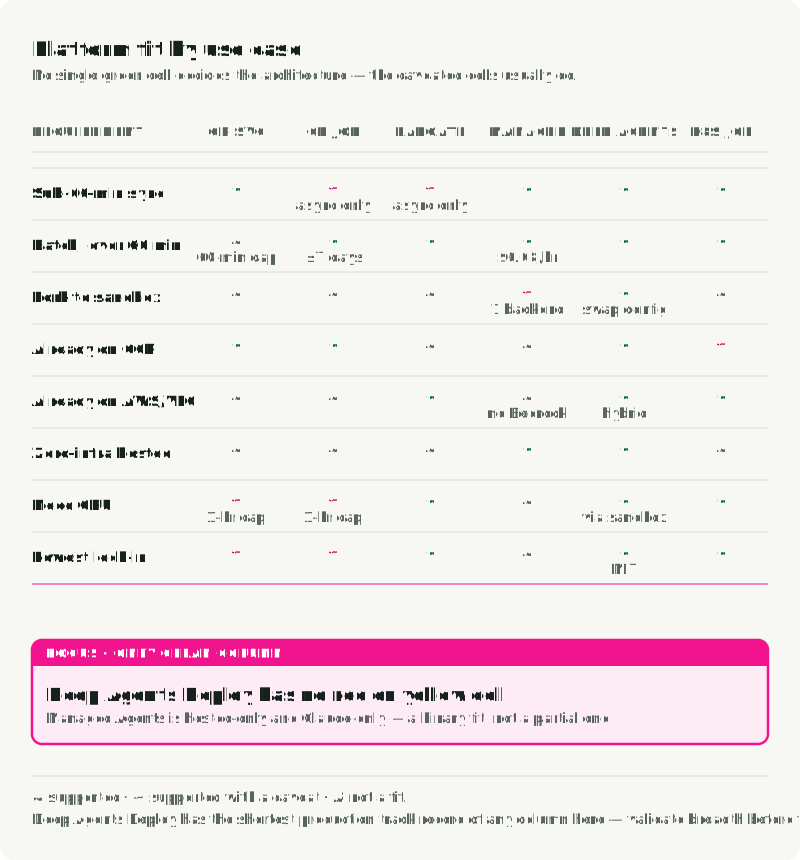
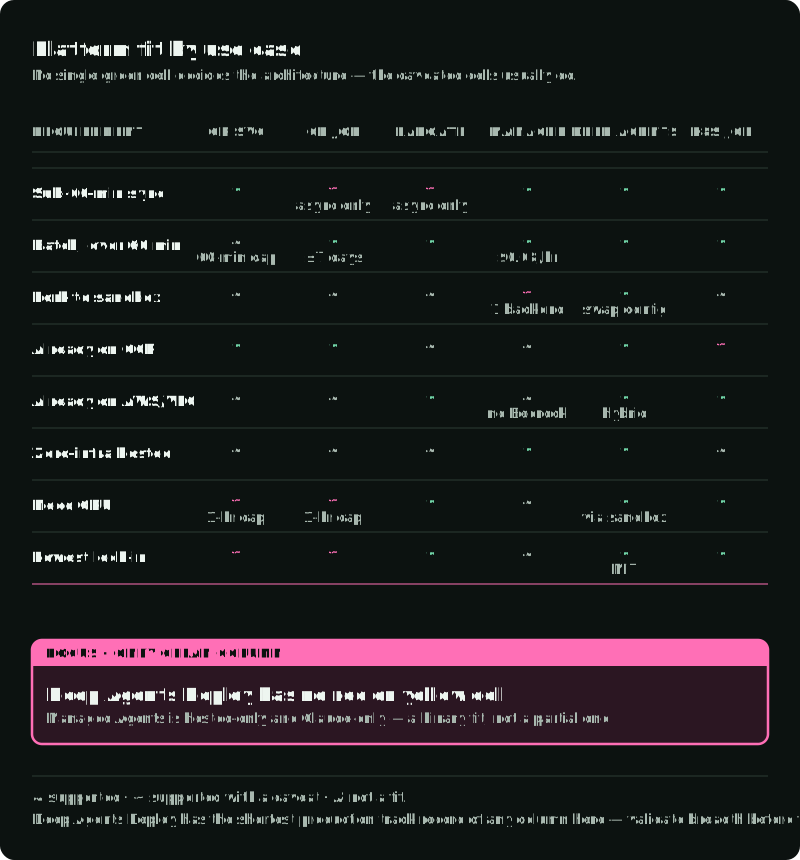
In the matrix, the cells marked with a caveat usually decide the choice, not the checkmarks. Broad coverage does not show data residency, replay semantics, provider dependence, or the cost of moving state later.
Hosted or owned harness. Hosted means the vendor runs the loop and you call an API; owned means you run the loop, even if the code came from a vendor. LangChain is on both sides: LangGraph is a library you run yourself, and Deep Agents Deploy runs a harness for you in its cloud mode. Choose hosted when its model support, data boundary, recovery behavior, and extension points already fit. Choose owned when you expect those requirements to change, and test the exit path before production data depends on it.
Hosted sandbox or your own execution environment. Pick a hosted sandbox when its isolation, pause and resume, or fork behavior matches the threat model and start-up budget. Docker or Fargate can fit trusted internal work that needs VPC access or strict data residency, but a standard container is not enough for hostile code; Part 4 covers the isolation options.
Put the state boundary into a LangGraph application
The following excerpt shows only the graph-state part of the queue-and-worker shape. It assumes builder is an existing StateGraph, run_id is the durable run identifier, and task is the new request. The worker has a PostgreSQL connection in DATABASE_URL and permission to create checkpointer tables. This is illustrative wiring, not a complete publishing worker.
import os

from langgraph.checkpoint.postgres import PostgresSaver

with PostgresSaver.from_conn_string(os.environ["DATABASE_URL"]) as checkpointer:
    checkpointer.setup()  # once during setup or migration
    graph = builder.compile(checkpointer=checkpointer)
    graph.invoke(
        {"messages": [{"role": "user", "content": task}]},
        {"configurable": {"thread_id": run_id}},
        durability="sync",
    )
The thread_id is LangGraph’s checkpoint lookup key, not an operation ID and not proof that publication happened. The application still has to persist the run row, approved artifact, pending operation and outcome. It also has to reclaim interrupted jobs and decide what new input means while a run is active. Do not resume an uncertain publish node by simply invoking it again. Reconcile first, then give the recovered result to the graph.
Git, the checkpoint database, and object storage
Long runs usually use three stores at once, because each holds a different artifact.
- Git holds the workspace: code, documents, and progress files. Use it when the work is code-shaped or file history matters. Create a run branch, make an initializer commit, and commit after set-up, after each feature, and after tests pass. Store the latest commit SHA next to the checkpoint. On resume, the next worker checks out the branch, reads
git log --oneline -8, inspectsgit statusand the latest diff, then reads the handoff file. Git cannot say which graph node runs next, which call waits for approval, or which retry used its idempotency key. Skip it when the product is a single answer. - The checkpoint database holds graph state: what was decided, which nodes ran, and what runs next. Use
PostgresSaver-style checkpointing when intermediate state between nodes matters, such as planner, researcher, writer, and verifier. - An object store such as S3 or GCS holds large outputs: PDFs, Parquet files, screenshots. Use it when the output is too large for the checkpoint database, when consumers need a URL without going through the agent, or when the deliverable and the run have different retention. You might delete run logs after 30 days and keep the final report for years. Key objects by
(thread_id, checkpoint_id, artifact_name)so the producing run stays traceable.
The reference stack in Docker Compose
The Market Analyst Agent is the learning companion for this series. From its repository root, with Docker Compose available and .env prepared from .env.example, make docker-up uses docker/docker-compose.yml to start PostgreSQL, Qdrant, Redis, and the app. The default app command runs the Gradio UI, which calls the harness synchronously. make worker starts the Redis queue consumer separately; it requires uv and Python 3.13+, installs the project dependencies, and starts the databases. Configure the provider keys in .env before running a live analysis. make mcp-up and make observability-up enable the optional MCP and observability profiles.
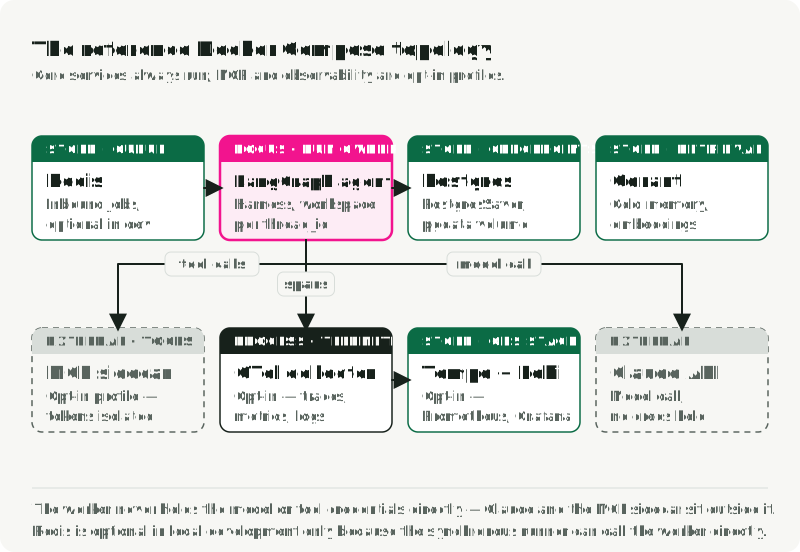
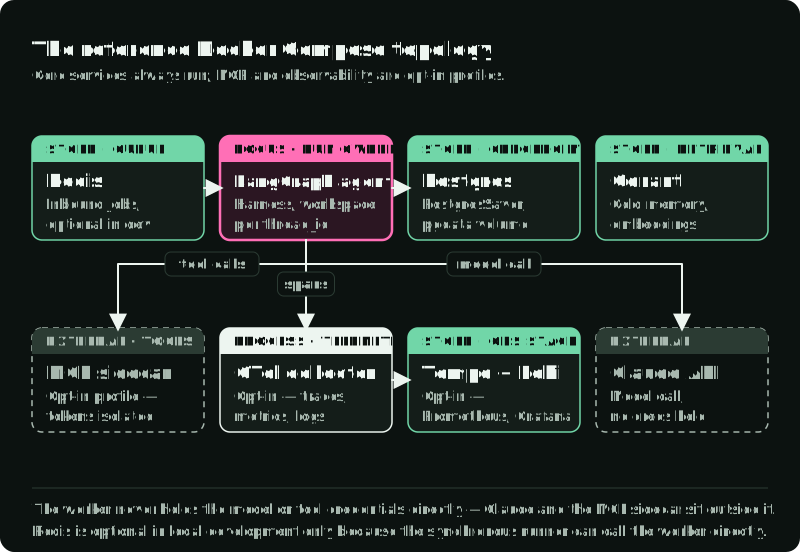
The configured observability routes are incomplete. The Collector has only a traces pipeline to Tempo. Its strict include filter compares gen_ai.operation.name with the literal .+, so ordinary values such as chat and execute_tool do not match and are excluded; Collector 0.117.0’s matcher confirms the equality comparison. Prometheus directly scrapes app:9464 and Collector self-metrics; app metrics require METRICS_ENABLED=true. App trace export also requires an OTLP endpoint. Loki has a backend and Grafana datasource but no configured log input. Correct the trace filter and add log ingestion before expecting populated traces and logs; a container startup is not evidence that the dashboards work.
For a worker container, add an explicit worker service and give concurrent writers the same workspace volume; the default Compose app is not a queue consumer. In production, add an event table for tool intents and outcomes next to the checkpoints, and test reconciliation for your own external actions.
Read the run after it ends
When a six-hour run fails, the event that caused it may have happened hours earlier, and the worker that produced it has been replaced. You debug from records written while the run was alive. Two are read after the run: a queryable event log of every step, and traces of where time and tokens went. Two are read during the run: a live view of workspace changes, and a per-worktree observability stack the agent itself can query.
Neither of the records read after the run necessarily holds the request as it finally left the process, after instruction assembly, retrieval, compaction, and any middleware. An event log entry and a span describe that a model call happened and what it cost. When the question is what the model received, that needs its own capture, taken at the last point before the call leaves and stored where you will later go to answer that question.
Event log. Every model call, tool call, result, error, and approval, keyed by run ID and timestamp, queryable like any table. Addy Osmani states the test: if you cannot reconstruct what the agent did in the last 24 hours from durable storage, you have a shell script that calls a model, not a long-running agent.
OpenTelemetry GenAI traces. Spans carry the standard gen_ai.* attributes: model, provider, token counts, conversation ID, and workflow name. The conventions moved to their own repository in 2026 and are still at Development stability, so pin the revision you validated. On backends that support them, you can switch destinations without re-instrumenting the code.
Workspace changes during the run. Anthropic’s quick-start watches the workspace. watch -n 5 'git log --oneline -8' shows the latest commits every five seconds, and a screenshot folder sorted by time shows what the agent last saw. Treat both as signs of activity and compare them with test results before concluding that the run is making progress.
A per-worktree stack for the agent. In OpenAI’s harness write-up, each Codex worktree gets its own short-lived logs, metrics, and traces, which the agent queries while it works. That turns a requirement such as “no span in these four user journeys exceeds two seconds” into something the agent can check.
A minimal self-hosted stack for an agent like the Market Analyst Agent:
- OpenTelemetry Collector, which receives spans and can filter
gen_ai.*fields before export. - Tempo or Jaeger for traces, keyed by
gen_ai.conversation.idorthread_id. - Loki for event-log entries.
- Prometheus for the GenAI token and latency metrics.
- Grafana dashboards keyed on
gen_ai.agent.nameandgen_ai.request.model.
If you prefer a hosted service, pick one: LangSmith for LangGraph and Deep Agents Deploy, Braintrust when evaluation suites come first, Arize Phoenix for open-source OTLP with OpenInference, OpenAI’s tracing dashboard for the Agents SDK, or Anthropic’s tracing for Managed Agents.
Set the standard attributes on each model span, at least the operation, provider, model, conversation ID, agent name, and token counts. Three dashboard panels cover most debugging: output tokens per agent per hour, p95 model latency per model, and tool calls that took longer than 30 seconds.
When a run fails, have the worker write a debug bundle to /workspaces/${THREAD_ID}/_debug/:
events.jsonl: the exported event log, with intents, outcomes, approvals, and errors.checkpoints.jsonl: graph-state history fromcheckpointer.list({"configurable": {"thread_id": ...}}), labelled as checkpoints.last_state.json:StateSnapshot.valuesfrom the last successful super-step.trace.json: the run’s exported spans, following the content-capture policy.tool_calls.csv:(ts, tool, input_hash, latency_ms, status, error).workspace.tar.zst: the workspace plusgit diffagainst the initializer commit.screenshots/*.png,PROGRESS.md,feature-list.json, and other progress files.env.txt: image tags, model version, and harness commit SHA.
With it, a report can say “run s_123 spent 71 percent of its tokens repeating three commands after npm install failed” instead of “the agent got stuck”.
Crash-point tests
A successful uninterrupted run tells little about recovery. For the report example, inject a stop at three points: before the pending operation is committed, after the publishing service accepts the request but before the outcome is stored, and while the run waits for approval. Restart with a fresh worker and verify the published artifact count, the recorded approval, and the final operation status. The middle case is the one that exposes duplicate side effects.
Also test two workers claiming the same run, cancellation while a call is in flight, and a provider that cannot confirm a timed-out action. The correct result of that last case may be needs_human, not another request. Inspect the event log and trace to explain each outcome. A recovery test is complete only when the external state agrees with the run’s recorded state.
Before a long-running agent ships, answer these in infrastructure terms:
- Which store owns run events and checkpoints?
- What happens if the worker dies halfway through a tool call?
- Can one run corrupt another run’s workspace?
- Which actions require approval?
- Can the model or sandbox read raw credentials?
- Which tool calls can safely retry?
- Where is the per-run cost cap enforced?
- Which deterministic evidence decides completion, and which criteria need a reviewer?
- Where do final outputs live after the sandbox is gone?
- Can we explain a failed run tomorrow without re-running it?
If an answer is “the prompt tells the agent to be careful”, the system is still a demo.
This is Part 5 of Engineering the Agentic Stack. Part 6, Harness Engineering for AI Agents follows the loop inside this runtime: how to authorize a proposed action, hand work to a fresh context, and decide from independent evidence that the task is done.
References
Engineering write-ups
- OpenAI, Harness engineering: leveraging Codex in an agent-first world.
- Anthropic Engineering, Effective harnesses for long-running agents.
- Anthropic Engineering, Harness design for long-running application development.
- Anthropic Engineering, Scaling Managed Agents: Decoupling the brain from the hands, April 8, 2026.
- Addy Osmani, Long-running Agents.
Frameworks and SDKs
- LangGraph, Checkpointers and
langgraph-checkpoint-postgres. - LangChain, Deep Agents overview, permissions, and The runtime behind production Deep Agents.
- OpenAI Agents SDK, Sessions and Sandbox guide.
- Temporal, OpenAI Agents SDK integration and agentic sandboxes.
anthropics/cwc-long-running-agents: evaluator and progress-file patterns.
Platforms and limits
- Anthropic, Claude platform pricing for Managed Agents session-hours.
- Sandbox providers: E2B, Vercel Sandbox, Daytona, Modal, Runloop.
- Google Cloud Run, service request timeout and job task timeout.
- AWS, Lambda timeout, Lambda durable functions, and Bedrock AgentCore Runtime.
Observability
- OpenTelemetry, Semantic conventions for generative AI, attribute registry, and metrics.