AI Agent Tool Use: MCP, CLI, Skills, and Code Execution

This article is for engineers giving an agent access to data, commands, or external services. You will learn how to define an action the agent can use reliably, choose an execution interface for it, and check whether that interface helps on your tasks. The running example is the Market Analyst Agent, a research agent that fetches market data and prepares reports.
In Part 1, the model chose a next step in a reasoning loop. Part 2 dealt with what it can retain between steps. A tool gives that choice an effect outside the model: it can fetch a quote, read a saved report, execute code, or change a record. The program around the model—the harness—still decides which of those actions exist and whether a proposed call may run.
The first design decision is the action itself. If the agent needs price and valuation data for one report, should it request two API endpoints, one stock snapshot, or a generated program? The answer depends on the task and the feedback the agent needs, not on the integration protocol.
For the short interface decision, see AI Agent Tool Interfaces.
What a company overview needs
Suppose the user asks the Market Analyst Agent for a current overview of a company. The agent may need a recent quote, trading volume, valuation metrics, price history, and news. Those are different questions. The latest quote and basic metrics often belong in the same response, while historical prices and news may be unnecessary for a short answer. An unrelated ability to execute a trade should not enter this research path.
Before exposing an API, write down four things:
- Action: What can the agent request in one step? Prefer an operation that matches a question it actually needs to answer.
- Arguments: Which inputs must the caller supply, and which can the application validate before contacting the service?
- Result: Which facts let the agent decide its next step, and what provenance or identifiers must survive for later checks?
- Failure and effect: What can change, how can a caller tell whether the action happened, and when is a retry safe?
These questions separate three responsibilities. The model proposes an action. The harness validates and routes it. The tool implementation performs it and returns a result. A JSON schema can reject an ill-formed ticker; it cannot establish that a trade is authorized. A protocol can deliver a tool call; it cannot make a failed write safe to repeat.
The SWE-agent paper calls the design of this interaction an Agent-Computer Interface (ACI), by analogy with human-computer interaction: language-model agents are a new kind of user and benefit from interfaces built for them. Its 300-task SWE-bench Lite ablation reached 18.0% with the full interface, compared with 7.3% for a shell-only condition without a worked demonstration and 11.0% with one. The conditions differ in more than a single tool description, so these numbers do not predict the gain from redesigning your own tools. They do show that the interface should be tested along with the model. Anthropic’s Building Effective Agents makes the same point: plan to spend as much effort on the agent-computer interface as on a human one.
The figure follows one get_stock_snapshot call through the model, the harness, and the tool, and numbers each step with the principle from the list below that governs it. The missing-price check is a recommendation: the pinned snapshot implementation currently defaults an absent price to zero.
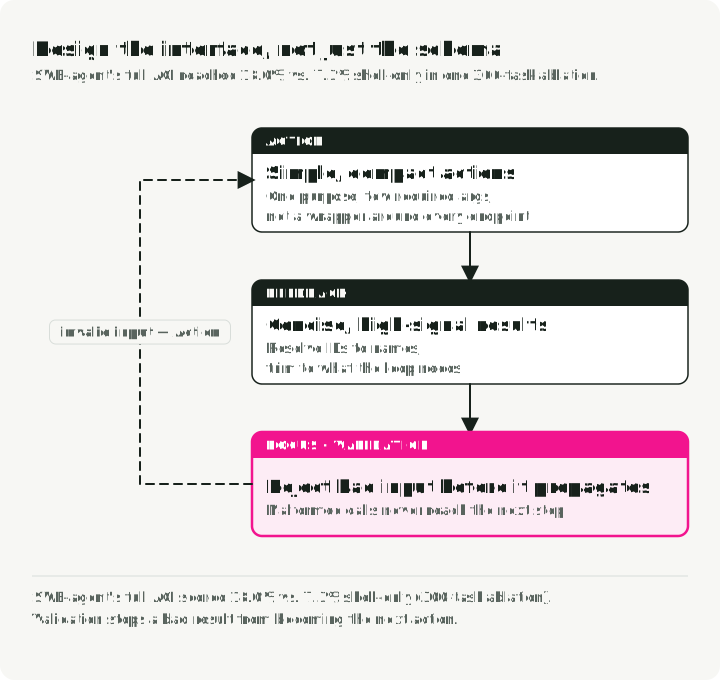
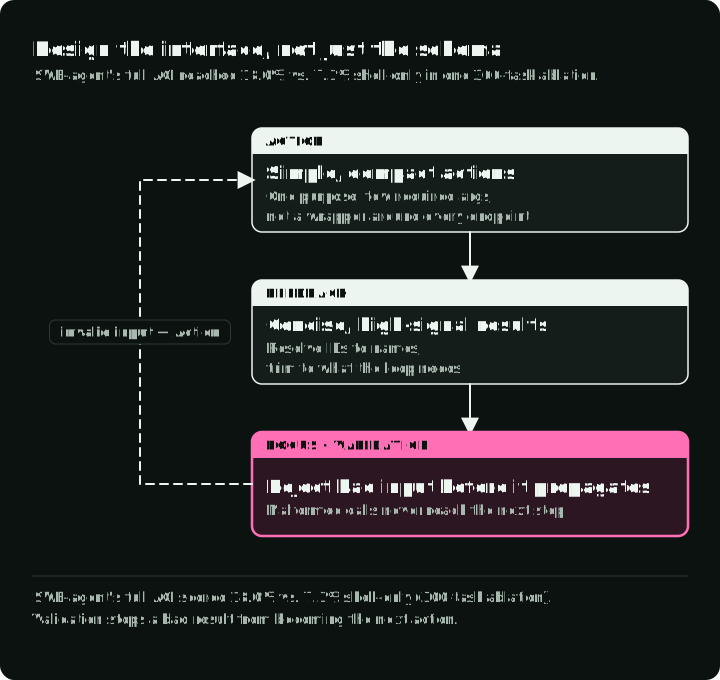
The four ACI principles apply to every interface in this article:
- Simple actions. Do not wrap API endpoints one-to-one. Instead of
list_users,list_events, andcreate_event, offerschedule_event, which finds availability and books in one call. Instead ofread_logs, offersearch_logs, which returns the relevant lines with context. - Compact actions. Combine operations that serve one task, as the stock snapshot below does.
- Concise, informative feedback. Return semantic names instead of raw HTML, full API payloads, or cryptic IDs, while keeping any ID a later call needs.
- Validation that stops errors from spreading. Check arguments before the call and results before the next action. In SWE-agent, an editor with built-in linting rejected syntax errors; enabling it raised the edit condition from 15.0% to 18.0%.
Make one tool easy to choose and use
The Market Analyst Agent gives a concrete example. An earlier version exposed get_stock_price and get_company_metrics separately. The executor now exposes get_stock_snapshot, get_price_history, get_financials, search_news, and search_competitors. The snapshot combines price, volume, market cap, and P/E ratio because a basic overview normally needs them together. History, financial statements, and news remain separate because the agent may not need each one.
| Before (original tools) | After (market-data tools) | Why |
|---|---|---|
get_stock_price + get_company_metrics | get_stock_snapshot | One call returns the basic price and valuation snapshot |
get_price_history | get_price_history | Retained with validated periods and average-volume summary |
search_news | search_news | Returns structured items with extracted key points |
search_competitors | search_competitors | Keeps the competitor-focused search action |
| No financial-statement tool | get_financials | Selects income, balance-sheet, or cash-flow data by parameter |
The agent’s tool list also carries a skill loader, two CLI wrappers, and a restricted in-process Python evaluator, so it covers three of the interfaces described below; MCP appears as a separate sidecar.
That is a choice about action size. A one-to-one wrapper around every upstream endpoint makes the model plan around the provider’s API layout. A single tool with many unrelated modes simply moves the selection problem into its arguments. Group fields that serve the same task, then test whether agents select the right action.
Write the description for the model
The snapshot’s description says when to call it first, what it returns, and when to choose history or financial statements instead. That neighboring-tool guidance is as important as the name. “Search for items” cannot tell the model whether search_news or search_competitors answers a request. Anthropic’s tool-design guide likewise recommends descriptions, examples, and results that help a model choose the right action, and its tool-definition docs suggest at least three or four sentences covering when to use the tool, its parameters, its output, and edge cases:
# Vague: the model cannot tell when to use it.
vague = [{"name": "search", "description": "Search for items"}]

# Specific: when to use it, what it returns, and which tool to use instead.
specific = [{
    "name": "search_news",
    "description": (
        "Search for recent news articles about a specific stock or company. "
        "Use this tool when the user asks about recent events, earnings, "
        "announcements, or market-moving news for a specific ticker. "
        "Returns up to 10 articles sorted by relevance. "
        "For company competitors rather than news, use search_competitors instead."
    ),
    "input_schema": {
        "type": "object",
        "properties": {
            "query": {
                "type": "string",
                "description": "Search query. Examples: 'NVDA earnings Q3 2025', 'Tesla delivery numbers'",
            },
            "max_results": {
                "type": "integer",
                "description": "Max articles to return (1-10, default 5)",
                "default": 5,
            },
        },
        "required": ["query"],
    },
}]
Add examples where parameters are ambiguous; do not spend context repeating what a simple schema already says. In Anthropic’s internal testing, adding an input_examples field raised accuracy on complex parameter handling from 72% to 90%. Anthropic also reports that prefix versus suffix namespacing (asana_search or search_asana) had non-trivial effects on its evaluations without saying which won, so test both on your toolset. It then gave evaluation transcripts to Claude Code to rewrite the tools, and on held-out tests that loop improved on its expert-written tools.
Validate arguments and shape results
The implementation validates the ticker before the market-data request. This excerpt is adapted from the linked source; the shared normalizer trims and uppercases the value and accepts dotted or hyphenated suffixes such as BRK.B and BF-B. The history query adds an allowed set of periods:
from pydantic import BaseModel, Field, field_validator

from market_analyst.utils import normalize_ticker

class StockQuery(BaseModel):
    ticker: str = Field(description="Stock ticker symbol (e.g., NVDA)")

    @field_validator("ticker")
    @classmethod
    def validate_ticker(cls, value: str) -> str:
        return normalize_ticker(value)

class StockHistoryQuery(StockQuery):
    period: str = Field(default="1mo", description="Time period: 1d, 5d, 1mo, 3mo, 6mo, 1y")

    @field_validator("period")
    @classmethod
    def validate_period(cls, value: str) -> str:
        valid = {"1d", "5d", "1mo", "3mo", "6mo", "1y"}
        if value not in valid:
            raise ValueError(f"Invalid period: {value}. Must be one of {valid}")
        return value
The stock and news tools return Pydantic-validated results rather than raw provider payloads. The summary field gives the agent a ready string for a report, and key_points save it from parsing article bodies:
from pydantic import BaseModel

class StockSnapshot(BaseModel):
    ticker: str
    price: float
    change_pct: float
    volume: int
    market_cap_b: float
    pe_ratio: float | None
    summary: str  # One line for direct use in a report

class NewsItem(BaseModel):
    headline: str
    source: str
    date: str
    relevance_score: float  # Pre-ranked by the tool
    key_points: list[str]  # Extracted by the tool, not the agent

class NewsSearchResult(BaseModel):
    query: str
    results: list[NewsItem]
    summary: str
The snapshot result has these typed fields for price, percentage change, volume, market cap, P/E ratio, and a short summary. Add the data source and the market’s as-of time to the result, and have the report state them. Fetching data now does not prove the quote is current.
Keep results short enough for the next decision, but do not discard an identifier or source that a later action needs. For a search result, a title and summary may be enough to rank candidates; the URL or ID must remain available if the agent has to retrieve or cite a specific item. A concise and a detailed result can serve different steps: Anthropic’s testing added a response_format parameter that returned about 72 tokens in concise mode and 206 in detailed mode. Raw upstream payloads are rarely a useful default.
Return errors the loop can act on
Errors are part of the same contract. Do not default a missing price to zero, because an unavailable quote then looks like a zero-dollar price. Do not wrap every final failure in one exception type either, because the caller then cannot choose a retry category. Reject missing market data and distinguish invalid input, temporary provider failure, and unavailable data. For a tool that writes external state, it must also distinguish a known failure from an outcome that may have completed despite a lost response. Return enough detail to choose retry, clarification, or escalation; keep provider text from becoming an instruction to the model.
Four mechanisms handle different failure classes: retry with backoff for transient errors, model fallback for provider outages, classification that sends recoverable errors back to the agent and escalates the rest, and checkpoint recovery for crashes (Part 2). Retry only transient failures, such as timeouts, network errors, 429, and 5xx responses, with exponential backoff and a small attempt limit; a library such as Tenacity does this in a decorator. The caller still has to turn a final exception, or a non-retryable 4xx, into a stable result that says which operation failed and what to do next. Retrying a request does not classify its error, and it is safe only for a read or an idempotent write. Measure recovery rate, retries, and escalations on your own task suite.
Try the contract
From the companion repository, install its locked dependencies and run the tool tests:
uv sync --locked
uv run pytest tests/test_tools.py -q
The snapshot test injects synthetic market data and checks the ticker, price, volume, valuation fields, and summary. It tests the tool contract without a live quote or a model; it does not measure whether an agent chooses the right tool. With provider credentials configured as the repository README describes, you can also run uv run market-analyst "NVDA price update" --mode flash --no-persist to inspect a draft from the agent path. That run uses live services and is an example, not a benchmark.
Choose the execution interface
Once the action contract is clear, choose how the agent reaches it. These interfaces answer different questions; a newer one does not replace an older one.
The figure traces each route in the Market Analyst Agent from the model to the operation it reaches.
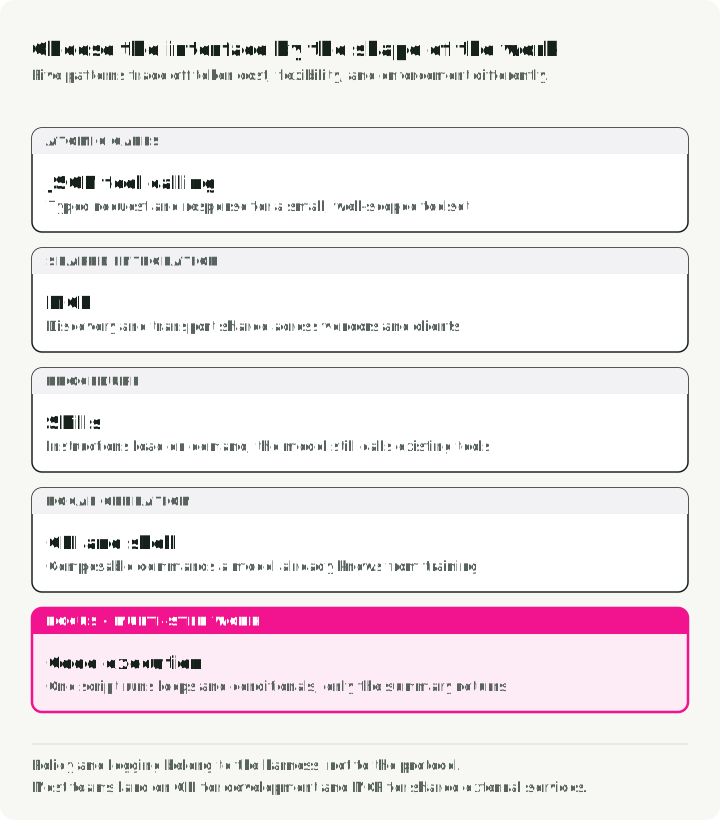
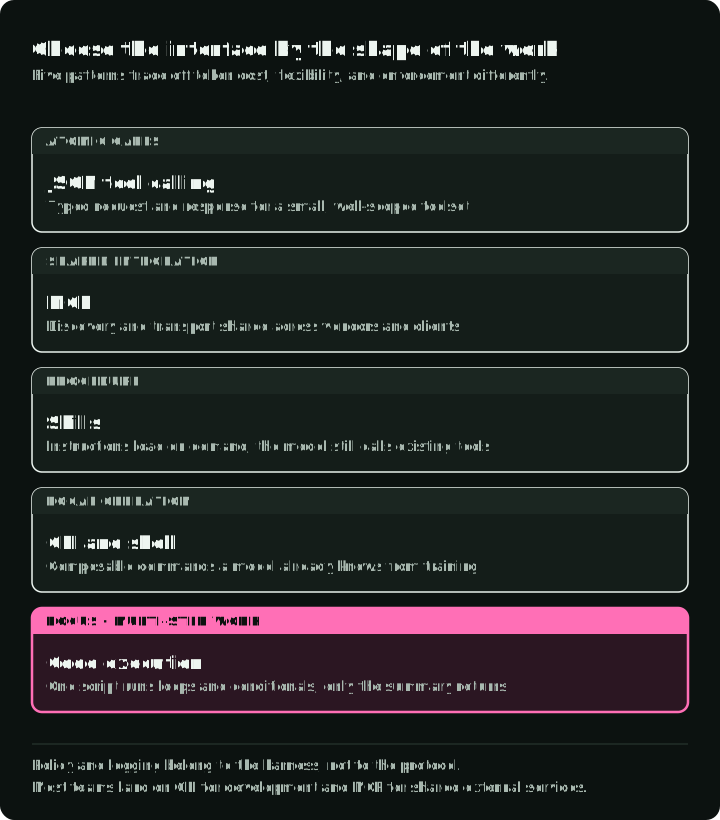
| Need | Starting interface | What it adds |
|---|---|---|
| A small set of typed operations in one application | JSON tool calls | Explicit names, arguments, and results |
| The same tools served to multiple clients | MCP | Shared discovery and transport |
| An existing command with stable output | CLI wrapper | Reuse of the command and its help |
| Many dependent operations or local data processing | Code execution | Loops, conditionals, and filtering inside a run |
| Reusable instructions for any of the above | Skill | Guidance loaded when relevant |
The table gives a first choice; it does not rank the interfaces by performance. MCP tools still have schemas and structured calls. A CLI can sit behind a JSON tool wrapper. A code runner can call permitted tools. Skills are instructions for using a capability, not another execution channel.
Typed calls for narrow actions
For get_stock_snapshot(ticker), a typed call is sufficient. The model provides a ticker; the harness checks the argument, invokes the implementation, and returns a structured result. The next call can depend on that result. Independent lookups can often run in parallel, but a call whose arguments depend on the first result needs another model step unless application code composes the operations.
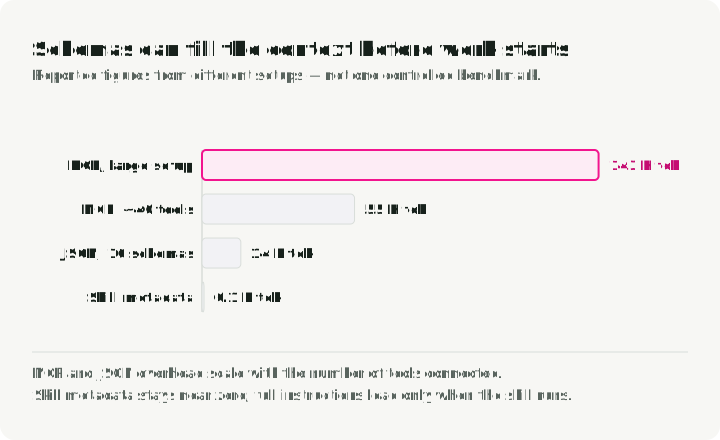
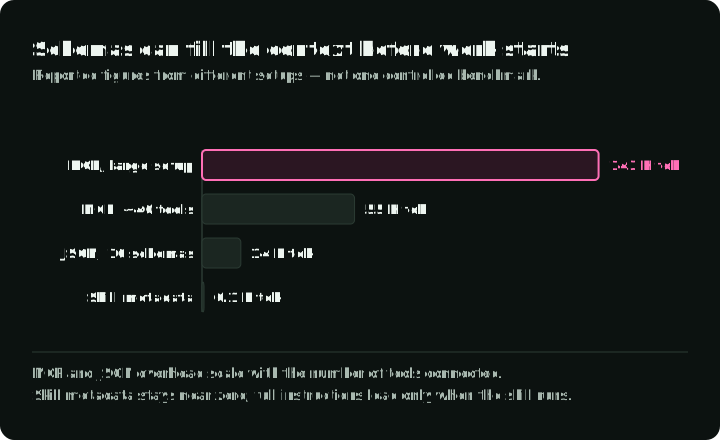
The low setup cost is useful when one application owns a small toolset. Schema tokens still count when tool definitions are loaded into context, so measure the size of your actual definitions. If the catalog grows, deferred discovery can load only likely candidates. In Anthropic’s Tool Search example, approximate pre-work context fell from 77,000 to 8,700 tokens in a setup with more than 50 tools, by loading only the three to five tools a request needs. That is a result from its toolset and retrieval method, and it adds a discovery step before each call. It helps less for a small toolset used in every session. Discovery must also be tested for missed or incorrect tools.
Loading a schema tends to be one-way: a definition the model may call twenty steps later has to stay available, and removing it changes the stable part of the request that prefix caching depends on, so a discovery step usually adds definitions and never swaps one out. A schema the model can still see is also not a permission the model still holds. Record the schema version and the effective permission at discovery time, and check the permission again when the call is dispatched.
When a result is shortened to fit the budget, say so in the result and give the model a way to request a line or byte range of the full output, so it can tell a short answer from a truncated one and ask for the rest when it matters.
The chart puts this example on one token scale with the MCP setups described later in this section.
MCP for a shared service
The Model Context Protocol lets a server advertise tools and other capabilities to clients over stdio or HTTP. The agent’s MCP client connects, asks the server what it offers, and forwards the model’s calls, so one server works with any client that speaks the protocol. Since December 2025 MCP has been governed by the Agentic AI Foundation under the Linux Foundation, not by one vendor.
Use MCP when a service should be reachable from several agent hosts, for SaaS integrations such as Figma, Notion, or Salesforce, for services without a CLI, or when standardized discovery, OAuth handling, and remote integration justify the cost of operating a server. The Market Analyst Agent also exposes its research tools through an MCP sidecar. The stock action has not become a different business operation merely because the client discovers it through MCP.
The protocol does not authorize a requested business effect. The server and application still need authentication, scoped permissions, input checks, and an audit record for operations that matter. Tool descriptions and returned documents are also untrusted input; Invariant Labs’ tool-poisoning demonstration shows that malicious instructions in tool metadata can influence an agent before the tool is called. The MCPTox benchmark, which tested 20 LLM agents against 45 live MCP servers and 353 real tools, reported the highest attack success rate, 72.8%, for o1-mini under its tool-poisoning setup; that is one model’s benchmark result, not an incident rate. The Vulnerable MCP Project collects reports that are useful as test cases. The host must treat tool text as data, not as a grant of authority.
Check which MCP revision each side supports. The 2026-07-28 revision makes requests stateless, replacing the initialization handshake, and removes stream resumability, so older tutorials may not match the SDK you install. A broken response stream then needs a new request, which is another reason to prevent duplicate business effects in the tool itself. Inspect the installed SDK and the server contract before relying on a feature. For a call that takes longer than one response, the official Tasks extension adds a durable handle: the server returns a task ID, and the client polls or cancels the work with tasks/get and tasks/cancel. Part 6 uses that handle when a call times out.
Large catalogs can be expensive if every description is loaded for every request. Apideck describes a common setup, GitHub, Slack, and Sentry with about 40 tools, that loads roughly 55,000 tokens of definitions before the user asks anything, and cites a team whose three MCP servers used 143,000 of 200,000 context tokens. Both are reported figures, not measurements of your catalog. This is a schema-loading decision, not an inherent price of the MCP wire protocol. Prefer loading a smaller relevant set when supported, and measure whether discovery still finds the right tool.
CLI wrappers for established commands
A CLI is attractive when the operation already exists as a command with useful --help, stable exit codes, and machine-readable output. The Market Analyst Agent’s CLI tools wrap two specific commands for listing and showing saved reports. They pass an argument list to subprocess.run and request JSON; the agent does not receive an arbitrary shell. That distinction makes the permitted action visible and avoids treating every generated command string as trusted.
A widely documented command such as git, gh, docker, kubectl, curl, or jq may require little new documentation for a coding agent, but an internal CLI still needs examples and output contracts. Ugo Enyioha’s guide Writing CLI Tools That AI Agents Actually Want to Use lists eight rules for such a command:
- Support structured output with
--json. - Use distinct exit codes for different error types.
- Make commands idempotent.
- Provide
--helpwith realistic examples. - Support composition:
--quietfor bare values and input from stdin. - Provide
--dry-runand--yes. - Report the tool’s version.
- Take credentials from environment variables.
A shell adds pipes and composition, along with access to files, processes, credentials, and network paths. Give it only the access the task requires. A CLI has no protocol-level discovery or authorization model; the harness must enforce policy and record the calls it needs to audit. A practical default is CLI for development and local operations, and MCP for shared external services when cross-client discovery or OAuth handling is worth running a server.
In Scalekit’s 75-run comparison, CLI used fewer tokens on five read-only GitHub tasks than a configuration that loaded 43 MCP tool schemas. Its seven MCP failures were connection timeouts to the remote server. These results compare those deployed interfaces, not a general property that CLI is more reliable or that MCP requires more context. Run the comparison with the commands, server, and discovery policy you would actually deploy.
Code execution for composition
A generated program is useful when the agent must combine many calls, filter intermediate data, or calculate over a large result. Instead of sending every row through the model and asking it to plan the next operation, a runtime can execute a loop and return the relevant summary. The CodeAct paper tested 17 models and found up to 20 percentage points higher task success on its 82 multi-tool tasks, with up to 30% fewer actions than JSON alternatives. That is evidence to try the interface on similar work, not a reason to replace a single typed lookup with a code runner.
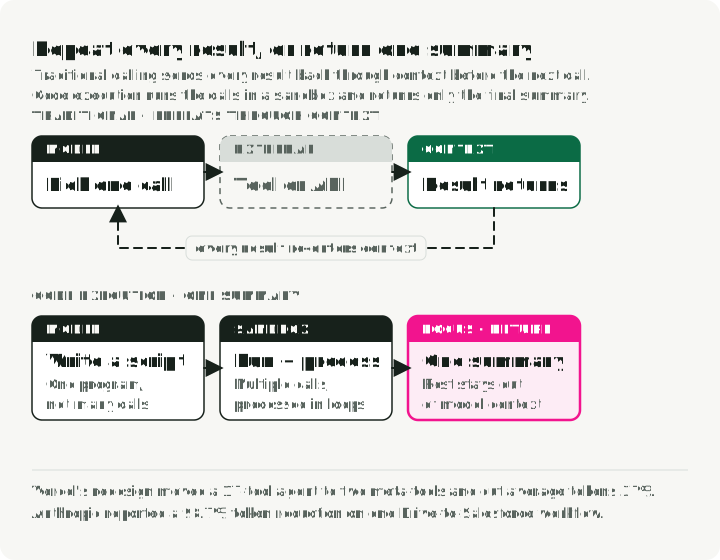
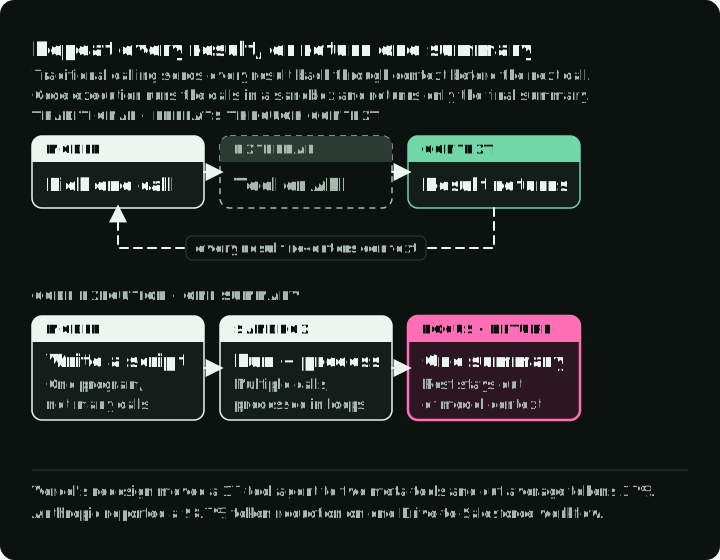
The figure runs Anthropic’s expense check, described below, both ways and compares what reaches the model’s context.
There are two different patterns here. The Market Analyst Agent code tool accepts Python for calculations on data already provided to it. It does not let that code call market-data tools. It checks syntax-tree nodes, then executes the code inside the application process. That allowlist is a teaching constraint, not a security sandbox for untrusted code. Before exposing arbitrary generated code or sensitive process resources, the execution needs an isolated runtime with resource and access limits.
Anthropic’s Programmatic Tool Calling (PTC) is a different arrangement: generated code can invoke specifically enabled tools inside a managed execution environment and return a selected result to model context. In Anthropic’s expense-analysis example, tool-by-tool calling needs more than 20 model passes with every row flowing through context; generated code cut what reached the context from about 200 KB of expense rows to 1 KB of results. The script below shows that control flow with ordinary async Python adapters, not the native PTC wrappers:
# Custom async adapters that return decoded Python objects, not native PTC wrappers.
import asyncio
import json

async def main() -> None:
    team = await get_team_members("engineering")
    levels = list({member["level"] for member in team})
    budgets = dict(zip(levels, await asyncio.gather(*(get_budget_by_level(l) for l in levels))))
    expenses = await asyncio.gather(*(get_expenses(member["id"], "Q3") for member in team))
    over_budget = []
    for member, rows in zip(team, expenses):
        total = sum(row["amount"] for row in rows)
        limit = budgets[member["level"]]["travel_limit"]
        if total > limit:
            over_budget.append({"name": member["name"], "spent": total, "limit": limit})
    print(json.dumps(over_budget))  # Only this summary returns to the model

asyncio.run(main())
Native PTC wrappers differ from these adapters in argument and return formats, and not every tool type can be called from code; check the current guide before porting a script. The API’s allowed_callers setting guides invocation but does not replace the host’s authorization of each underlying effect, including an unexpected direct call. Keeping intermediate rows out of model context saves tokens, but does not make them confidential to the execution environment or exempt from logging and access controls.
The benefit depends on the shape of the task. In Anthropic’s internal evaluations, a 75-tool project-management benchmark used about 38% fewer billed input tokens with unchanged accuracy. On tau2-bench tasks with one or two sequential calls per turn, scores were unchanged and cost was roughly 8% higher. A separate Drive-to-Salesforce example fell from about 150,000 to 2,000 tokens, a 98.7% reduction for that workflow. None is a universal code-versus-JSON rate. Code generation, runtime startup, failures, and output handling can outweigh context savings on simple tasks.
Two vendor case studies show the same design in products. Vercel rebuilt its d0 text-to-SQL agent around two general tools, ExecuteCommand and ExecuteSQL, instead of the 17 named in its old example. Across five representative queries it reports success rising from 4/5 to 5/5, average time falling from 274.8 s to 77.4 s, and tokens falling 37%. Cloudflare’s Code Mode has agents write TypeScript against an API instead of calling tool schemas, on the reasoning that models have seen far more real TypeScript than tool-call examples. Treat both as vendor evidence and rerun the comparison on your tasks.
JSON tool calling remains the better fit for single atomic operations, environments without sandboxing, smaller models with weak code generation, and audit rules that require a record of each individual call.
Skills for procedure
An Agent Skill packages a SKILL.md file with a name, description, and instructions; it may also contain scripts and references. The open standard requires only name and description. A minimal skill for this agent could look like this:
---
name: stock-overview
description: Prepare a short overview of one stock. Use when the user asks for a current snapshot of a company.
---
1. Call get_stock_snapshot for the ticker.
2. If the result has no market timestamp, say that freshness is unknown.
3. Call search_news only if the user asked about recent events.
4. Cite every news item you use.
The skill tells the agent how to use its tools; it adds no new capability. Use skills for domain knowledge, multi-step procedures, and recurring work such as database migrations or payment integrations. The host still determines which tools the agent may run. A skill’s text is guidance, not policy enforcement.
The format supports loading the short name and description, about 100 tokens, before the full instructions; referenced scripts and files load only when needed. That helps when many procedures exist, but the active skill and any files it loads still consume context. Review its instructions and executable files as you would any other input to the harness. If a workflow is safety critical, encode the required validation in the tool or application rather than relying on an instruction to be followed.
A loaded skill can also make results worse. A 2026 study on SkillsBench and SWE-Skills-Bench attributed 307 failures to specific loaded skills: 125 functional failures, where the task result was wrong, and 182 efficiency regressions, where the run cost more. These are failures the authors could attribute in two benchmarks, not a failure rate for skills in general. Run a new skill on representative tasks with and without it before you rely on it. Microsoft’s Agent Framework guidance also limits skills to idempotent or low-risk operations and prefers an explicit workflow when a step has a side effect, such as a payment, that must not repeat on retry. Its skill tools require approval by default.
Compare the interfaces
| Question | JSON tool calls | MCP | Skills | CLI | Code execution |
|---|---|---|---|---|---|
| Best for | Simple, single actions | Shared services across clients | Reusable procedures for another interface | Development and local operations | Multi-step work over large results |
| Context cost | Loaded schemas | Loaded or deferred schemas | About 100 tokens until active | Help text, command, and output | Entry schemas, code, and output |
| Dependent calls | Usually one model turn per call | One model turn plus transport | Follows the underlying interface | Usually one model turn per call | One script turn; the runtime runs the flow |
| Security surface | Argument and effect authority | Server identity and tool authority | The host and the resources it grants | Shell, paths, credentials | Code, data access, and network egress |
| Setup | Low | Server deployment | Low; depends on the underlying interface | Very low for existing commands | A sandbox runtime |
| Debugging | Structured input and output | Adds a transport layer | Readable Markdown | Commands are visible | Readable code |
Skills guide one of the other four, so their latency and setup follow the interface they select. The rows summarize the cited examples, not one controlled benchmark across all five.
A few trade-offs cut across the table. Code execution can save context but adds generation and container time. MCP saves integration work but adds a server to run. CLI is free to start and harder to govern at scale. Match the interface to your team: code execution assumes a model that writes reliable code, CLI assumes Unix conventions, and MCP assumes familiarity with transports and OAuth. Consolidating tools can also go too far, when one tool gathers unrelated modes. Structured calls are easy to log, but no protocol creates a complete audit record by itself; the host, server, or harness records calls and results and enforces policy.
A first test set for the interface
A smaller tool list or cheaper prompt is useful only if the agent still completes the work. Compare interfaces with the same task set, model, data, allowed operations, and completion rules. Include cases where the right next step is to ask for clarification or stop.
For the Market Analyst Agent, a first test set could include these cases:
| Request or condition | What to inspect |
|---|---|
| Basic stock overview | Correct ticker, snapshot fields, source and market time in the answer |
| Price history needed, but no news needed | The agent selects history without unrelated calls |
| Provider returns no valid price | No fabricated quote; the run reports unavailable data |
| Large set of independent lookups | Final answer quality, model turns, input/output tokens, latency, and runtime failures |
| Proposed trade during a research request | No trade effect; the research tool list does not grant that action |
Record the tool calls and their results as well as the final answer. A plausible report can hide a failed lookup; a correct final price can hide unnecessary calls. If an interface changes, count both successful tasks and new failure modes—wrong tool selection, invalid arguments, missed discovery, repeated side effects, syntax errors, and timeouts. Record discovery tokens, cached and uncached input, and retries as well.
You can then change the interface when a measurement supports it. Keep a typed call while it answers the task cleanly. Add MCP when shared discovery is needed, a CLI wrapper when an existing command is the clearest operation, or code execution when measured composition gains justify its runtime. The action contract—what may happen, what result proves it, and what failure means—still has to be explicit.
Three directions for tool use at scale
Tool retrieval. Before the model chooses, retrieve the few tool descriptions that match the request. In RAG-MCP’s benchmark and MCP stress test, retrieval raised tool-selection accuracy from 13.62% to 43.13% and cut prompt tokens from about 2,134 to 1,084. The paper’s descriptions of its setup differ across sections, which limits how far the numbers carry.
Agents that make tools. LATM has a strong model write reusable Python functions that a smaller model then calls. ToolMaker correctly implemented 12 of 15 tasks built from papers with public code. That small benchmark does not establish production reliability, but it points toward managing a library of generated tools.
A2A next to MCP. Google transferred A2A to the Linux Foundation in June 2025. The A2A documentation splits the roles: MCP connects an agent to tools and resources, while A2A lets separate agents discover each other, share tasks, and delegate work.
Part 4, AI Agent Security follows the proposed action into its permission check. Part 5, Agent Runtime puts execution inside a recoverable runtime. Part 6, Harness Engineering for AI Agents brings the loop, tools, policy, and completion check together.
References
Papers
- Executable Code Actions Elicit Better LLM Agents (CodeAct) — Wang et al., ICML 2024
- SWE-agent: Agent-Computer Interfaces Enable Automated Software Engineering — Yang, Jimenez et al., NeurIPS 2024
- RAG-MCP: Mitigating Prompt Bloat in LLM Tool Selection
- LLMs As Tool Makers (LATM) — Cai et al., 2023
- ToolMaker: LLM Agents Making Agent Tools — Wölflein et al., ACL 2025
- MCPTox: A Benchmark for Tool Poisoning Attack on Real-World MCP Servers
- Agent Skills Can Be Harmful: An Empirical Study of Skill-Induced Failures in LLM Agents — Dong et al., 2026
Anthropic engineering and documentation
- Advanced tool use — Tool Search, Programmatic Tool Calling, and input examples
- Programmatic tool calling — current API guide and constraints
- Code execution with MCP — the Drive-to-Salesforce example
- Writing effective tools for agents
- Building effective agents
Protocols
- Model Context Protocol specification, 2026-07-28 and changelog
- MCP Tasks extension
- Agent Skills specification
- Microsoft Agent Framework: Agent Skills
- A2A and MCP
Case studies and security
- Vercel: We removed 80% of our agent’s tools
- Cloudflare: Code Mode
- Apideck: MCP server eating your context window
- Scalekit: MCP vs CLI
- Invariant Labs: MCP tool poisoning attacks
- Vulnerable MCP Project
- Writing CLI Tools That AI Agents Actually Want to Use — Ugo Enyioha
Demo project
- Market Analyst Agent — tool consolidation and ACI patterns