AI Agent Reasoning Loops: ReAct, ReWOO, Plan-and-Execute

An agent reasoning loop is the control flow that decides when a model chooses an action, receives a tool result, and chooses again—or stops. This article is for engineers deciding how an agent should handle work whose next step may depend on what its tools find. You will learn when to use ReAct, ReWOO, or Plan-and-Execute, and how those choices appear in a LangGraph implementation.
A request for a stock’s current price has known lookup steps. An investigation of why its outlook changed may require the next search to depend on the first result. The model needs different freedom in those two tasks, and the second usually needs more model calls.
This is Part 1 of Engineering the Agentic Stack. The loop is its innermost layer; later parts cover memory, tools, security, runtime, and checks before a task is declared done. The worked example is a Market Analyst Agent built with LangGraph.
For a short comparison of the frameworks that implement these loops, see Best AI Agent Frameworks in 2026.
The decisions a model must make
List the decisions that remain once the request and its tools are defined. For a price lookup, the application can call the price tool and give its result to a model for explanation. If the user asks for a briefing from price, financials, and recent news, a planner can name those independent calls in advance. If news about an earnings restatement would require a new query, a fixed list is no longer enough: the model must see the result before choosing that query.
Three questions determine the loop:
- Can code name the calls now? Use a fixed workflow when it can. A model may still summarize the results, but it need not decide the lookup order.
- If a model must choose the calls, can it name all of them before seeing results? ReWOO can execute that plan without returning to the model between calls. Its worker can run independent calls together.
- Can a result change the next call or a later goal? ReAct gives the model another decision after each observation. Plan-and-Execute adds an upfront list of goals around such local loops; changing later goals requires a separate replanning step.
The choice also decides where a failure shows up. An incorrect ReWOO plan may run through several calls before the solver sees a problem. A ReAct loop can recover from an unexpected result, but can also wander or repeat work. An upfront plan makes a long task easier to track, but a local executor cannot silently repair a wrong overall plan. Each pattern still needs a stop rule, tool permissions, and a way to report failed calls; the loop itself supplies none of those guarantees.
What each pattern does with a result
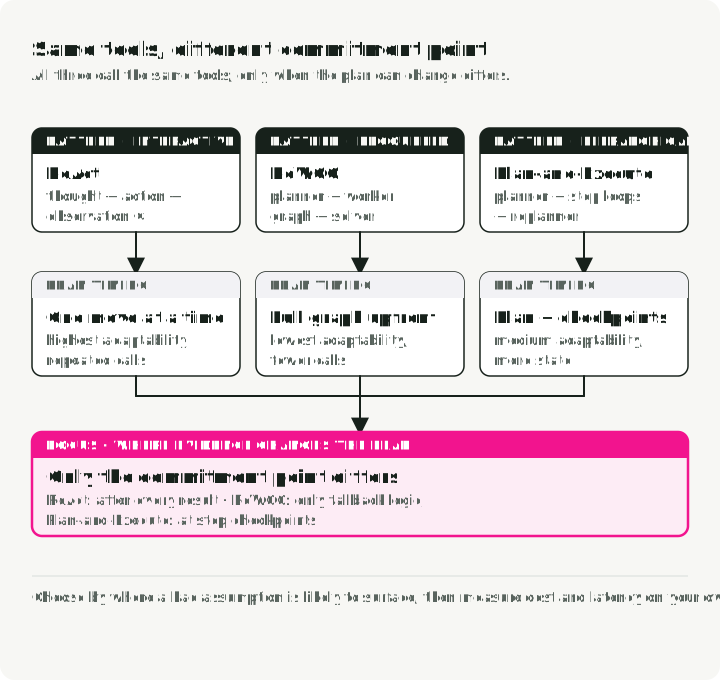
All three patterns call the same tools. They differ in when a tool result can change the plan: after every call, only after execution, or inside each planned step.
ReAct: decide after every observation
ReAct (Yao et al., 2022), short for Reason + Act, repeats one decision: the model chooses a tool call, the application executes it, and the result goes back to the model. For a request to investigate a company’s falling margin, a financial statement might point to rising costs; the next call could then look for evidence about those costs. The model does not have to choose that second call before seeing the statement.
The original paper writes this as Thought → Action → Observation. Native tool APIs expose the proposed call and tool result, but need not expose the model’s internal reasoning. Thinking between tool calls is a separate model/API capability.
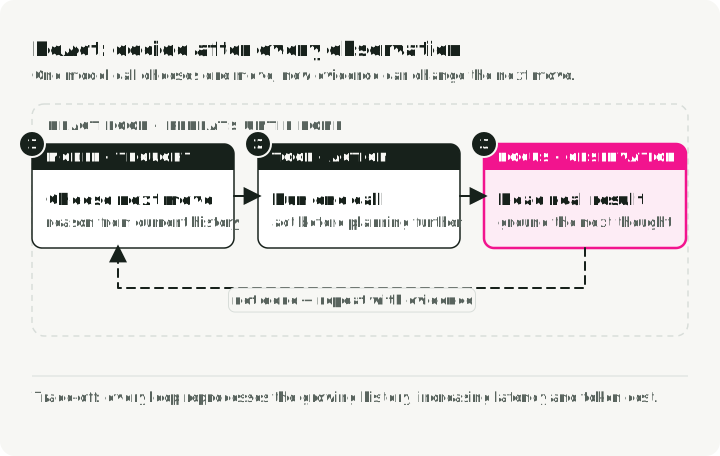
That feedback is ReAct’s advantage: a surprising observation can change the next action. The tool-call history also shows which evidence the system fetched. In the paper’s PaLM-540B HotpotQA manual sample, Wikipedia observations produced fewer hallucinated facts than chain-of-thought prompting. That finding concerns its task and model, not the accuracy of every tool-using loop.
The cost is repeated decisions. A full-history implementation sends an increasingly long conversation on each turn. Prompt caching can reduce repeated input processing and charges, but does not remove old observations from the context window. Summarizing or truncating does remove information. Limit steps and elapsed time, and test whether the agent recovers from a bad result or merely keeps searching.
Use ReAct for exploratory research, debugging, and tasks where you cannot predict the next action.
ReWOO: compile the tool graph first
ReWOO (Reasoning WithOut Observation) separates a model’s planning call from its final answer. The planner names all tool calls before any result arrives. It can refer to a future result as #E1, then put #E1 in a later call’s arguments. A non-LLM worker resolves those placeholders and executes the calls; a solver model receives the gathered results and writes the answer.
For a market snapshot, the planner can request price, financials, and recent news together. The worker in this article runs calls whose dependencies are ready in parallel. That batching is an implementation choice; the paper’s defining feature is that the worker follows a plan without asking the model what to do next.
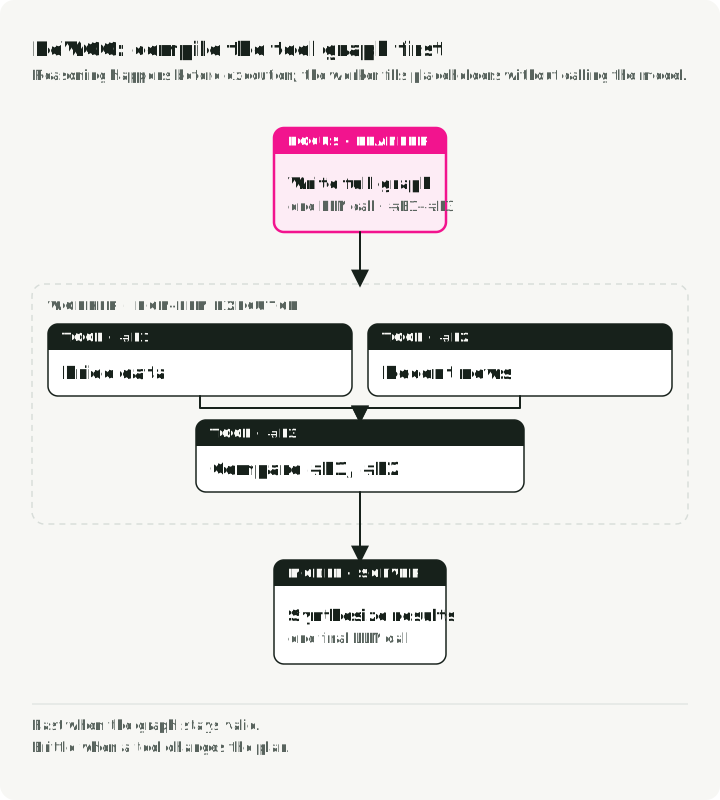
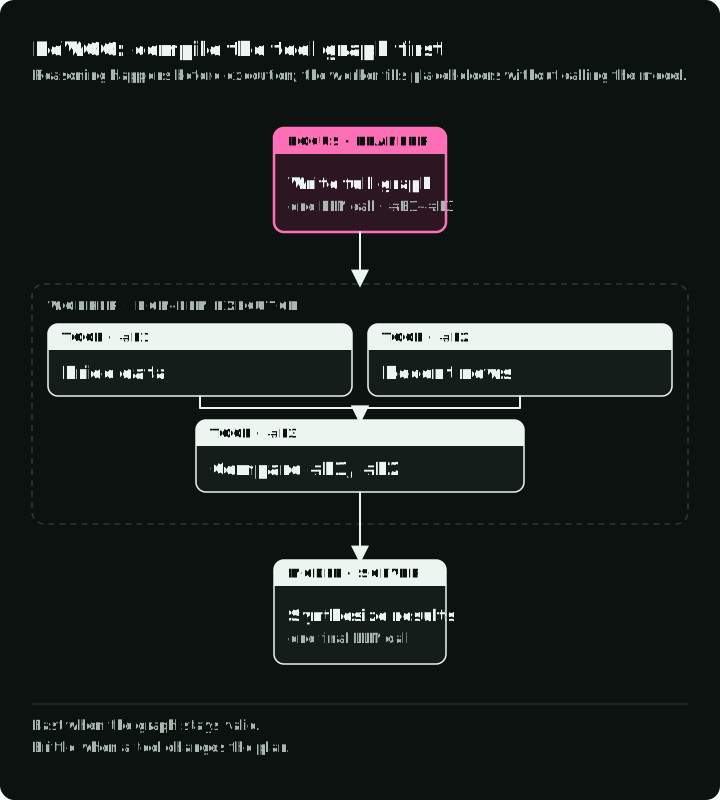
There are fewer model calls during execution, provided the initial plan remains useful. The paper’s HotpotQA stress test replaced every tool result with No evidence found; ReWOO lost less accuracy than ReAct in that test. It still did not recover the missing evidence. A worker must decide whether an error goes to the solver, gets retried, or stops execution. A wrong dependency or missing tool cannot be fixed by the solver after the calls have already run.
Because the planner never reads a tool result, it can be fine-tuned or tested on its own, without a live tool environment. Use ReWOO for quick snapshots, status checks, and dashboards whose tool behavior is predictable.
Plan-and-Execute: decompose, then react locally
Plan-and-Solve prompting first creates a plan and then solves its subtasks. The related tool-orchestration pattern, Plan-and-Execute, lets a planner list higher-level goals and an executor handle them one at a time. The Market Analyst Agent asks for research steps such as checking financial health and examining risks. Inside each step, a ReAct loop can choose tools after seeing results. The planner’s output is a list of goals, unlike ReWOO’s proposed tool calls.
The Plan-and-Solve paper studied zero-shot prompting, not this tool-using graph. Choosing different models for planning and execution is possible in an implementation; it is not a result established by that paper.
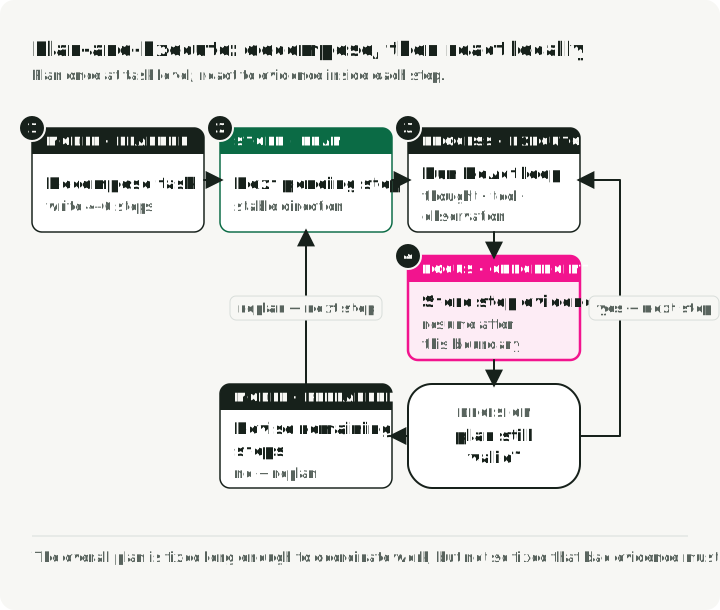
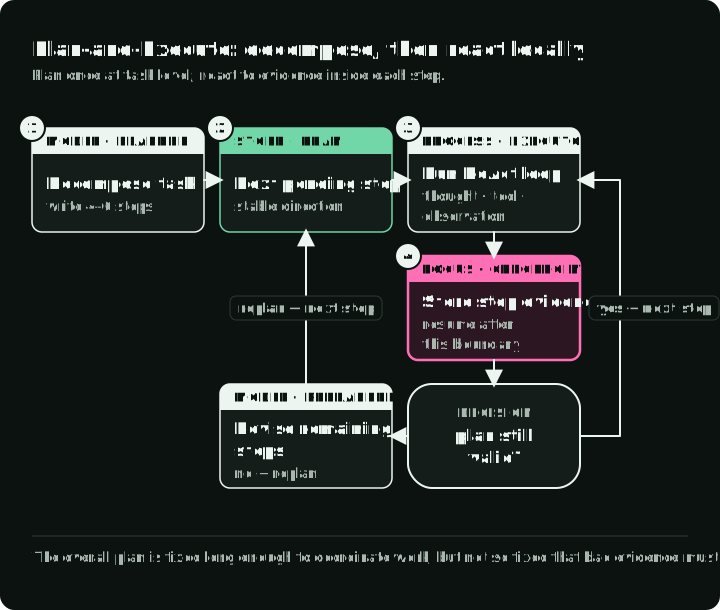
The figure includes an optional replanner. The teaching graph below has no replanning branch: results can change work inside a step, but the list of later steps remains fixed. Add replanning only when a step result must change that list.
In an implementation, the planner can run on a stronger model and the executor on a cheaper one, and with a checkpointer each completed step becomes a resume boundary. The pattern also needs more model calls and state than a single lookup, so use it only when the explicit plan helps the system complete a larger task, such as a research report that ends in a synthesis.
Choose a loop for the task, then test its failure
| Task signal | Starting control flow | Example | What to test |
|---|---|---|---|
| The lookup steps are already known | Fixed workflow | Current price for one ticker | Does the result need interpretation, or can code return it directly? |
| A model can name every call and dependency before execution | ReWOO | Price, financials, and news for one ticker; weather in five cities | What happens when a planned call fails or the plan names an invalid dependency? |
| The next call depends on the last result | ReAct | Find out why a company’s margin fell | Can it recover from a misleading result and stop within a bounded budget? |
| A long task has named goals, each needing local decisions | Plan-and-Execute | An investment thesis with risks and competitors | Can the executor complete a step, and what happens when a result invalidates later goals? |
This is a starting rule, not a performance ranking. In particular, the teaching Plan-and-Execute graph cannot revise later goals. The ReWOO worker runs dependency-ready calls in parallel, but it cannot create a new call after seeing a result. Compare the routes on the same tasks, tool behavior, and budget before choosing by model-call count.
The patterns describe decisions outside the model. A model that reasons between tool calls still needs a program to execute those calls, stop the loop, and authorize effects. When comparing loops, count billed reasoning tokens as well as calls; a model can reason without showing that text.
For a new LangChain implementation, create_agent supplies an observation-driven tool loop. The companion graph below uses LangGraph’s older create_react_agent API, so its excerpts explain the control flow rather than serving as a new-project setup guide.
If the job needs isolated subagent contexts, a file system, and automatic context management, Deep Agents packages those around the same tool loop. That is a harness choice, not a fourth reasoning pattern. Compare one agent with delegation on tasks that split into independent work, and count coordination cost and lost context in the result.
A worked example: the Market Analyst Agent
The Market Analyst Agent routes a request for a flash briefing through ReWOO: plan market-data calls, run them, then synthesize the results. A request for deeper research goes through Plan-and-Execute, with a ReAct loop inside each planned step. ReAct is an execution primitive in that route, not a third user-facing route. The routes differ in what the planner passes to the executor: exact proposed tool calls for ReWOO, or goals that still require tool choices for Plan-and-Execute.
The excerpts are abridged teaching variants of commit b4e769a, not standalone scripts.
It uses LangGraph for orchestration. A node is a Python function that returns fields to update in shared state; an edge chooses the next node. Both routes share one state schema, while their progress lives in different fields:
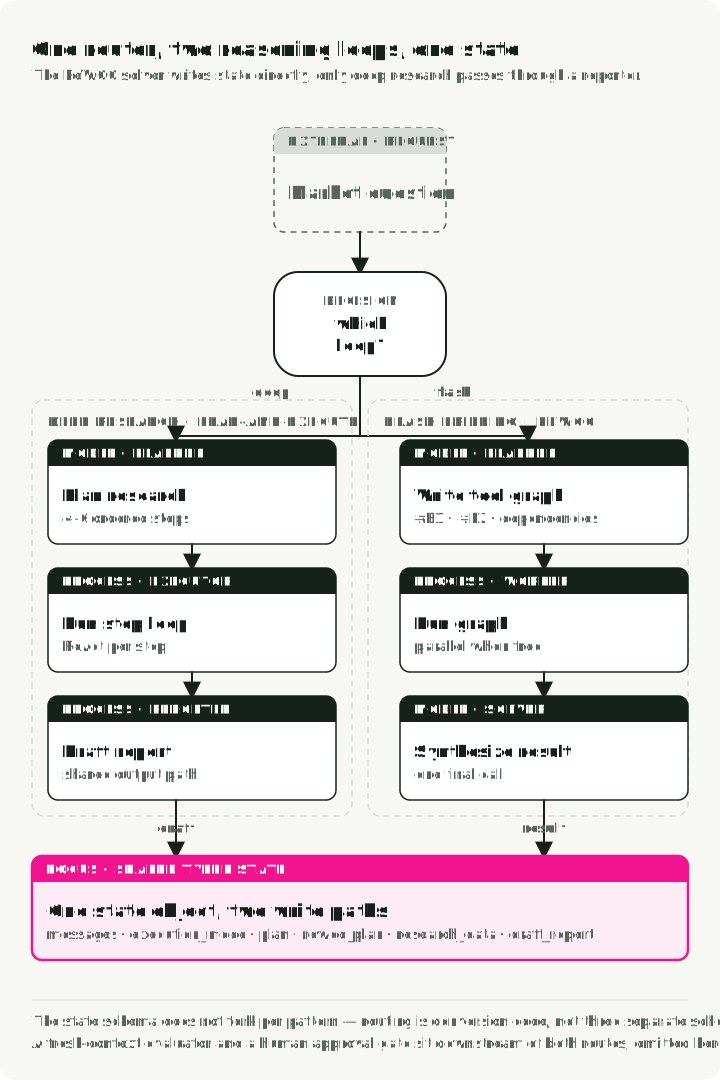
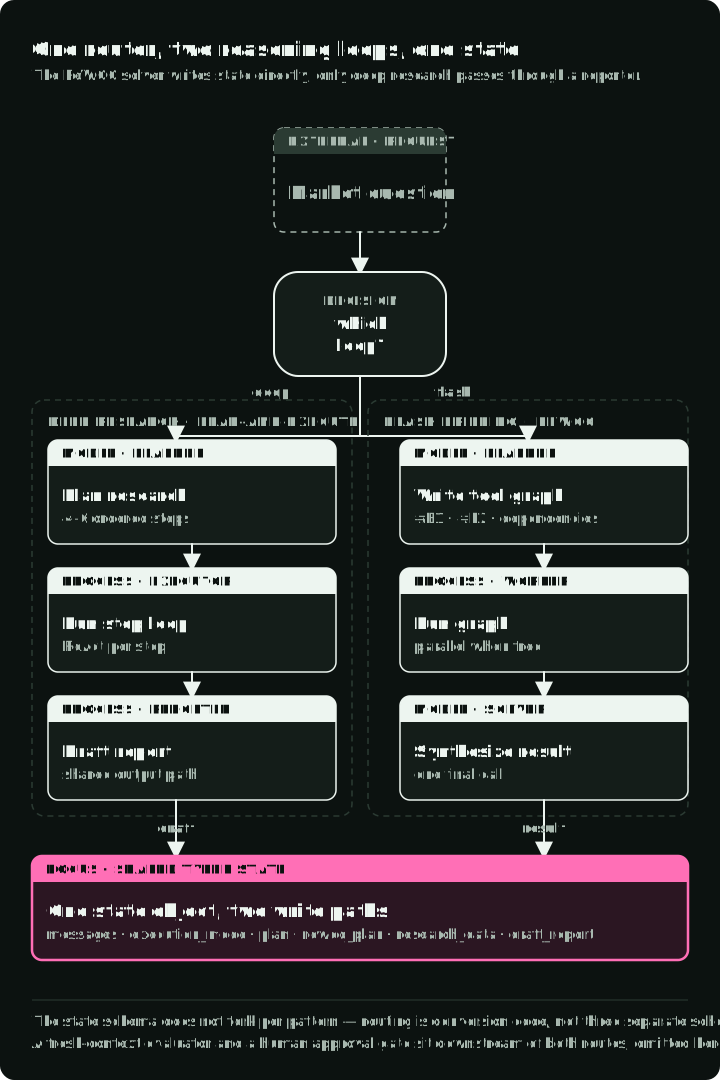
The diagram isolates routing and draft creation. It leaves out the shared evaluator and human approval before publishing, which the graph wiring below includes.
State definition
The state schema keeps route-specific progress in plan or rewoo_plan and puts either route’s final draft in draft_report. Memory and approval fields appear because both routes share the same application state; they do not decide which loop runs.
from typing import Literal

class PlanStep(BaseModel):
    """A single step in the research plan."""
    step_number: int
    description: str
    tool_hint: str | None = None
    completed: bool = False
    result: str | None = None

class UserProfile(BaseModel):
    """Structured user context loaded from long-term memory."""
    risk_tolerance: str | None = None
    investment_horizon: str | None = None

class AgentState(BaseModel):
    """Main state for the Market Analyst Agent graph."""

    # Identity and profile context for memory-backed personalization
    user_id: str
    user_profile: UserProfile = Field(default_factory=UserProfile)

    # Message history with LangGraph's add_messages reducer
    messages: Annotated[list, add_messages] = Field(default_factory=list)

    # Execution mode (set by router)
    execution_mode: ExecutionMode | None = None

    # Plan-and-Execute state
    plan: list[PlanStep] = Field(default_factory=list)
    current_step_index: int = 0

    # ReWOO state
    rewoo_plan: list[ReWOOPlanStep] = Field(default_factory=list)

    # Research results
    research_data: ResearchData | None = None

    # Final report. Both paths write this field, then the graph pauses before
    # publishing (see interrupt_before below), so a human signs off on a draft
    # a fresh-context evaluator has already voted on.
    draft_report: DraftReport | None = None
    report_approved: bool = False
    evaluator_verdict: Literal["pass", "fail", "needs_human"] | None = None
    evaluator_reasons: list[str] = Field(default_factory=list)
Pattern 1: Plan-and-Execute implementation
Plan-and-Execute fits multi-step synthesis. A planner writes the high-level steps, then a ReAct loop executes each step and reacts to tool results.
The companion excerpts retain claude-sonnet-4-5-20250929 and the older create_react_agent API so they remain comparable with the linked commit. For new code, use the current create_agent interface. Migrating this graph also requires testing its planner schemas, inner messages, routing, and resume behavior; changing the model string alone is not that migration.
The planner makes one model call and returns step descriptions. It does not call any market-data tool. Structured output checks the response shape; a separate check is still needed for a nonempty, usable plan.
# System prompt guides the LLM to think like a research analyst
# creating a strategic plan, not immediate tool calls
PLANNER_SYSTEM_PROMPT = """You are a senior investment research analyst.
Break down stock analysis requests into 4-6 research steps covering:
1. Current price and basic metrics
2. Recent news and announcements
3. Competitor analysis (if relevant)
4. Financial health assessment
5. Risk factors
6. Investment thesis synthesis

Output as JSON with step_number, description, and tool_hint."""

# Schema-Guided Reasoning: Enforce structure with Pydantic
class PlanOutput(BaseModel):
    """Structured output for the planner."""

    steps: list[PlanStep] = Field(description="Research steps to execute")
    ticker: str = Field(description="The stock ticker being analyzed")

def planner_node(state: AgentState) -> dict:
    """Generate a research plan from the user's request.

    This is Phase 1 of Plan-and-Execute: creating the high-level strategy.
    """

    # Use a powerful model for strategic planning
    llm = ChatAnthropic(model="claude-sonnet-4-5-20250929", temperature=0)

    # Ask for a typed plan and validate it before execution.
    # The API can still fail, so production code also handles that exception.
    structured_llm = llm.with_structured_output(PlanOutput)

    # Pull the request out of the message history
    human = [m for m in state.messages if isinstance(m, HumanMessage)]
    last_user_message = human[-1].content if human else "Analyze the market"

    # Context from long-term memory personalizes the plan
    profile_context = f"""
User Profile:
- Risk Tolerance: {state.user_profile.risk_tolerance}
- Investment Horizon: {state.user_profile.investment_horizon}
"""

    # Single LLM call creates the complete plan
    result: PlanOutput = structured_llm.invoke([
        SystemMessage(content=PLANNER_SYSTEM_PROMPT + profile_context),
        HumanMessage(content=f"Create a research plan for: {last_user_message}"),
    ])

    # State update: Store the plan and initialize tracking
    return {
        "plan": result.steps,           # The sequential steps to execute
        "current_step_index": 0,        # Start at step 0
        "research_data": ResearchData(ticker=result.ticker),  # Initialize data container
    }
That llm.with_structured_output(PlanOutput) line is Schema-Guided Reasoning (SGR), covered in a previous post. The schema checks field types, but not whether the steps are usable. Before execution, require a nonempty, bounded list with unique step numbers and clear descriptions.
Pattern 2: ReAct execution
Once the plan exists, executor_node gives one goal and a digest of previous results to an inner ReAct loop. The inner loop can select another tool after seeing an observation. When it finishes, the outer graph records the step’s final result and advances; it does not retain the inner transcript in plan.
# Market-data tools available to the inner loop in this excerpt. The repo's
# TOOLS list also has a skill loader, two CLI wrappers, and a restricted Python
# evaluator; Part 3 compares those interfaces, and MCP runs as a sidecar.
TOOLS = [
    get_stock_snapshot,
    get_price_history,
    search_news,
    search_competitors,
    get_financials,
]

def executor_node(state: AgentState) -> dict:
    """Execute the current step using a ReAct agent.

    This is Phase 2 of Plan-and-Execute: adaptive execution of each planned step.
    Each step runs as a mini ReAct loop until completion.
    """

    # Guard against an empty or exhausted plan before indexing it
    if state.current_step_index >= len(state.plan):
        raise ValueError("No plan step to execute; check the planner output")

    # Get the current step from the plan
    current_step = state.plan[state.current_step_index]

    # Build context from what we've learned so far
    # Each step sees a digest of earlier results
    previous_context = ""
    for step in state.plan[:state.current_step_index]:
        if step.result:
            previous_context += f"\nStep {step.step_number}: {step.result}\n"

    # Create a ReAct agent for this step. The companion pins the older
    # create_react_agent API; new code uses create_agent.
    react_agent = create_react_agent(
        model=ChatAnthropic(model="claude-sonnet-4-5-20250929"),
        tools=TOOLS,
    )

    # Invoke the ReAct loop for this single step
    # The agent will loop internally until it completes the step
    result = react_agent.invoke({
        "messages": [
            SystemMessage(content=EXECUTOR_SYSTEM_PROMPT),
            HumanMessage(content=f"""Execute Step {current_step.step_number}:
{current_step.description}

Ticker: {state.research_data.ticker}
Previous findings: {previous_context}"""),
        ]
    })

    # Extract the final answer from the ReAct agent's message history
    # The last message contains the synthesis after all tool calls
    updated_plan = list(state.plan)
    updated_plan[state.current_step_index] = PlanStep(
        step_number=current_step.step_number,
        description=current_step.description,
        completed=True,
        result=str(result["messages"][-1].text),  # Final synthesized answer
    )

    # State update: Mark step complete and advance to next
    return {
        "plan": updated_plan,
        "current_step_index": state.current_step_index + 1,
    }
Pattern 3: ReWOO for fast snapshots
For a quick briefing, the planner returns proposed tool calls instead of research goals. The worker runs dependency-ready calls without a model; the solver makes one model call over their results. These excerpts show each handoff.
Phase 1: ReWOO planner (writes a typed proposed-call plan upfront)
class ReWOOPlanStep(BaseModel):
    """A step in the ReWOO plan with variable placeholders.

    Key difference from Plan-and-Execute's PlanStep:
    - Contains actual tool_name and tool_args (not just description)
    - Uses variable references (#E1) for dependencies
    """
    step_id: str  # e.g., "#E1" - becomes a variable
    description: str
    tool_name: str     # Requested tool name; validate it against a registry in production
    tool_args: dict    # Proposed arguments; may contain refs like {"price": "#E1"}
    depends_on: list[str] = []  # Declared ordering; cross-check it against #E placeholders
    result: str | None = None

class ReWOOPlanOutput(BaseModel):
    """Structured output for ReWOO planner."""
    steps: list[ReWOOPlanStep] = Field(description="Planned tool calls with variables")

def rewoo_planner_node(state: AgentState) -> dict:
    """Generate a complete plan of tool calls upfront.

    This is the key difference from Plan-and-Execute: instead of creating
    human-readable step descriptions, it creates typed proposed tool calls.
    Production code validates them before execution; this teaching worker does not.
    """

    llm = ChatAnthropic(model="claude-sonnet-4-5-20250929", temperature=0)

    # Schema-Guided Reasoning validates the planner response shape.
    # It does not validate a tool name, its arguments, or its dependencies.
    structured_llm = llm.with_structured_output(ReWOOPlanOutput)

    ticker = state.research_data.ticker if state.research_data else "UNKNOWN"
    human = [m for m in state.messages if isinstance(m, HumanMessage)]
    query = human[-1].content if human else f"Analyze {ticker}"

    # Single LLM call to plan ALL tool executions
    result: ReWOOPlanOutput = structured_llm.invoke([
        SystemMessage(content=REWOO_PLANNER_PROMPT),
        HumanMessage(content=f"""Create a ReWOO plan for: {query}

Ticker: {ticker}

Output tool calls with:
- step_id: Variable name (#E1, #E2, etc.)
- description: What this accomplishes
- tool_name: Exact tool from the list
- tool_args: Dictionary of arguments
- depends_on: List of step_ids this depends on"""),
    ])

    # Store the typed proposed-call plan.
    # This teaching worker sends ready steps directly to execute_tool.
    return {"rewoo_plan": result.steps}
Phase 2: ReWOO worker (executes tools without LLM reasoning)
def rewoo_worker_node(state: AgentState) -> dict:
    """Execute dependency-ready tools in parallel batches (no LLM calls).

    Independent tools share a batch. Dependent tools wait until their
    prerequisites complete. The worker follows the dependency graph and
    does not add LLM calls.
    """

    results = {}        # Results keyed by step_id (e.g., "#E1": "$150.23")
    updated_steps = []  # Plan steps with their result field filled in
    pending = {step.step_id: step for step in state.rewoo_plan}

    # Keep scheduling dependency-ready batches until the graph is complete.
    # This handles chains even when the planner does not list them topologically.
    with ThreadPoolExecutor(max_workers=5) as executor:
        while pending:
            ready = [
                step for step in pending.values()
                if all(dep in results for dep in step.depends_on)
            ]
            if not ready:
                unresolved = ", ".join(pending)
                raise ValueError(f"Unresolvable ReWOO dependencies: {unresolved}")

            futures = {
                executor.submit(execute_tool, step, results): step
                for step in ready
            }
            for future in as_completed(futures):
                step = futures[future]
                results[step.step_id] = future.result()
                updated_steps.append(step.model_copy(update={"result": results[step.step_id]}))
                del pending[step.step_id]

    # State update: restore the planner's order (sorting on step_id would put
    # "#E10" before "#E2") and hand the filled-in plan to the Solver
    plan_order = {s.step_id: i for i, s in enumerate(state.rewoo_plan)}
    return {"rewoo_plan": sorted(updated_steps, key=lambda s: plan_order[s.step_id])}
Phase 3: ReWOO solver (synthesizes all results in one LLM call)
def rewoo_solver_node(state: AgentState) -> dict:
    """Synthesize all tool results into a flash briefing.

    This is the second efficiency gain: Instead of interleaving
    LLM calls with tool execution (like ReAct), we make ONE
    final synthesis call with all gathered data.
    """

    # Build context from ALL tool results at once
    tool_results = []
    for step in state.rewoo_plan:
        if step.result:
            tool_results.append(f"### {step.description}\n{step.result}")

    context = "\n\n".join(tool_results)

    # Single LLM call to synthesize everything
    llm = ChatAnthropic(model="claude-sonnet-4-5-20250929", temperature=0)
    structured_llm = llm.with_structured_output(FlashBriefingOutput)
    result = structured_llm.invoke([
        SystemMessage(content=REWOO_SOLVER_PROMPT),
        HumanMessage(content=f"Create a flash briefing from this data:\n\n{context}"),
    ])

    # FlashBriefingOutput and DraftReport carry the same fields; the state
    # schema expects DraftReport, so convert before returning.
    return {"draft_report": DraftReport(**result.model_dump())}
The planner writes proposed calls, the worker fills their placeholders, and the solver receives the results. The schema checks their shape, not whether the plan can run. The pending dictionary above silently drops duplicate IDs. If #E2 uses #E1 in its arguments but omits #E1 from depends_on, both calls may enter the same batch before the first result exists.
Before dispatch, reject empty or oversized plans, duplicate IDs, missing dependencies, and cycles. Validate tool names and arguments against a registry. Inspect placeholders inside nested values and require them to match depends_on. This teaching worker skips those checks. It sends ready calls to the companion’s execute_tool, whose caught exceptions become error strings. The solver must treat such a string as missing evidence, not a successful lookup. An unresolvable graph stops before the solver. Recovery needs a failure result, a conditional replanning edge, and a limit on attempts.
What the planner commits to
| Route in this graph | Before the first market-data call | After a tool result | Model calls in this implementation | Nodes |
|---|---|---|---|---|
| Deep research: Plan-and-Execute with ReAct steps | Planner writes goal descriptions | Inner ReAct loop can choose another call within its current goal; later goals stay fixed | One plan, a model/tool loop per step, one report | planner_node → executor_node per step → reporter_node |
| Flash briefing: ReWOO | Planner writes tool names, arguments, and dependencies | Worker follows the plan; solver sees results after execution | One plan, no model calls in the worker, one synthesis | rewoo_planner_node → rewoo_worker_node → rewoo_solver_node |
A PlanStep that says “Investigate recent earnings” leaves the tool choice to the inner agent. A ReWOOPlanStep that names search_news and supplies its query commits to that call before any result arrives. That difference, not the pattern name, decides which unexpected observations can change execution. Side by side, the two planner outputs look like this:
# Plan-and-Execute: goals; the inner ReAct loop picks the tools.
plan = [
    PlanStep(step_number=1, description="Get current price and key metrics",
             tool_hint="get_stock_snapshot"),
    PlanStep(step_number=2, description="Search for recent news and earnings",
             tool_hint="search_news"),
]

# ReWOO: exact calls, fixed before any result arrives.
rewoo_plan = [
    ReWOOPlanStep(step_id="#E1", description="Read the price and valuation snapshot",
                  tool_name="get_stock_snapshot", tool_args={"ticker": "NVDA"}),
    ReWOOPlanStep(step_id="#E2", description="Find recent NVDA earnings news",
                  tool_name="search_news",
                  tool_args={"query": "NVDA earnings", "max_results": 5}),
]
A tool_hint is advice the executor may ignore. A tool_name with tool_args is the call the worker will make.
A standalone ReAct loop may carry every earlier message into each new model call. This graph starts each inner loop with its current step and a digest of completed steps. The outer state keeps the step results, not the inner tool-call transcript. ReWOO instead fills the planned steps with results and gives the completed list to its solver. These are context-management choices in this companion, not requirements of the original papers.
Wire both routes into one graph
The graph has two user-facing routes over one AgentState: deep research uses Plan-and-Execute with a ReAct loop inside each step, while flash briefing uses ReWOO.
This implementation has no replanner: it runs the initial plan to completion. Adding replanning would require an edge from executor back to planner and a rule for when a surprising result justifies another model call.
LangGraph keeps the wiring declarative:
def create_graph(checkpointer=None):
    builder = StateGraph(AgentState)

    # Add nodes
    builder.add_node("router", router_node)
    builder.add_node("planner", planner_node)
    builder.add_node("executor", executor_node)
    builder.add_node("reporter", reporter_node)
    builder.add_node("rewoo_planner", rewoo_planner_node)
    builder.add_node("rewoo_worker", rewoo_worker_node)
    builder.add_node("rewoo_solver", rewoo_solver_node)
    builder.add_node("evaluator", evaluator_node)
    builder.add_node("publish", publish_node)

    # Define edges
    builder.add_edge(START, "router")
    builder.add_conditional_edges("router", route_after_router, {
        "planner": "planner",
        "rewoo_planner": "rewoo_planner",
    })

    # Deep Research path
    builder.add_edge("planner", "executor")
    builder.add_conditional_edges("executor", route_after_executor, {
        "executor": "executor",  # Loop back for more steps
        "reporter": "reporter",  # Done with plan
    })
    builder.add_edge("reporter", "evaluator")

    # Flash Briefing path (ReWOO)
    builder.add_edge("rewoo_planner", "rewoo_worker")
    builder.add_edge("rewoo_worker", "rewoo_solver")
    builder.add_edge("rewoo_solver", "evaluator")

    # Both paths run the same evaluator before the human approval step.
    builder.add_edge("evaluator", "publish")
    builder.add_edge("publish", END)

    return builder.compile(
        checkpointer=checkpointer,
        # Human-in-the-loop pause: the reporter (or ReWOO solver) writes a
        # draft. A separate model session reads that draft and records its
        # assessment. The graph then stops before publishing, whichever
        # assessment it produced, so a human can review both the draft and
        # assessment. Part 6 explains how the program decides a run is complete.
        interrupt_before=["publish"],
    )
Test whether the router’s model call helps
The router classifies quick snapshots, including “current price,” as ReWOO and complex requests such as an investment thesis as Plan-and-Execute. It defaults to deep research when classification is unclear. Schema-Guided Reasoning constrains the classifier’s output to one of the two modes:
class ExecutionMode(str, Enum):
    DEEP_RESEARCH = "deep_research"  # Plan-and-Execute with ReAct steps
    FLASH_BRIEFING = "flash_briefing"  # ReWOO

class RouterOutput(BaseModel):
    mode: ExecutionMode
    ticker: str
    reasoning: str

ROUTER_SYSTEM_PROMPT = """Classify the user's request:

1. deep_research: complex analysis requiring synthesis
   - Examples: "Analyze strategic risks", "investment thesis"
2. flash_briefing: quick snapshots, simple data retrieval
   - Examples: "quick snapshot", "current price"

Default to deep_research if unclear."""

llm = ChatAnthropic(model="claude-sonnet-4-5-20250929", temperature=0)
structured_llm = llm.with_structured_output(RouterOutput)
That is how this application routes requests, not evidence that every price lookup needs a planner. For a price-only request, a direct tool call would avoid the router, ReWOO planner, and solver calls. Those calls are justified only for requests that need a model to select or explain data.
A router can also send a request to the wrong loop. Compare both routes and a fixed workflow on the same tasks, tools, and budget. Record task completion, inappropriate acceptance, cached and uncached tokens, wall time, and recovery after tool errors or misleading observations. Repeat runs where model choice is stochastic and count every started attempt. A lower call count only helps if the route still completes the task within its constraints. Anthropic’s engineering account likewise recommends starting with simple composable workflows.
The full companion implementation, including the router and shared state, is at Market Analyst Agent commit b4e769a.
Try the current single-loop API
The graph above uses an older LangGraph agent factory. If you want to inspect the current create_agent API first, this small fixture avoids market-data services. It demonstrates a model/tool call and its result, not a reason to use an agent for a known lookup. In an application that only answers this question, call the lookup function directly.
Set ANTHROPIC_API_KEY and install langchain and langchain-anthropic before running the snippet. The invocation makes a paid model request.
from langchain.agents import create_agent
from langchain_anthropic import ChatAnthropic

def lookup_fixture_company(ticker: str) -> str:
    """Look up a company name in a local fixture, not live market data."""
    return {"NVDA": "NVIDIA", "AMD": "AMD"}.get(
        ticker.strip().upper(), "No company in the fixture"
    )

agent = create_agent(
    model=ChatAnthropic(model="claude-sonnet-5", max_tokens=4096),
    tools=[lookup_fixture_company],
    system_prompt="Use the fixture for company names. Do not invent market data.",
)
result = agent.invoke({
    "messages": [{"role": "user", "content": "Which company is NVDA in the fixture?"}]
})
print(result["messages"][-1].text)
If the model proposes lookup_fixture_company, the library invokes that Python function and passes its result back. The snippet does not guarantee that the model will use the tool or test a route comparison, a failure policy, or accuracy on live data.
The next layer is memory
The loop decides which call comes next; the rest of the harness has to supply context, execute and authorize calls, preserve state, and check completion. Part 2, AI Agent Memory Architecture separates resumable checkpoints from cross-session knowledge and project documents. Without durable checkpoints, a worker restart loses this graph’s in-progress state. Part 3 examines tool interfaces, Part 4 covers authorization, Part 5 covers execution and recovery, and Part 6 examines evidence of completion.
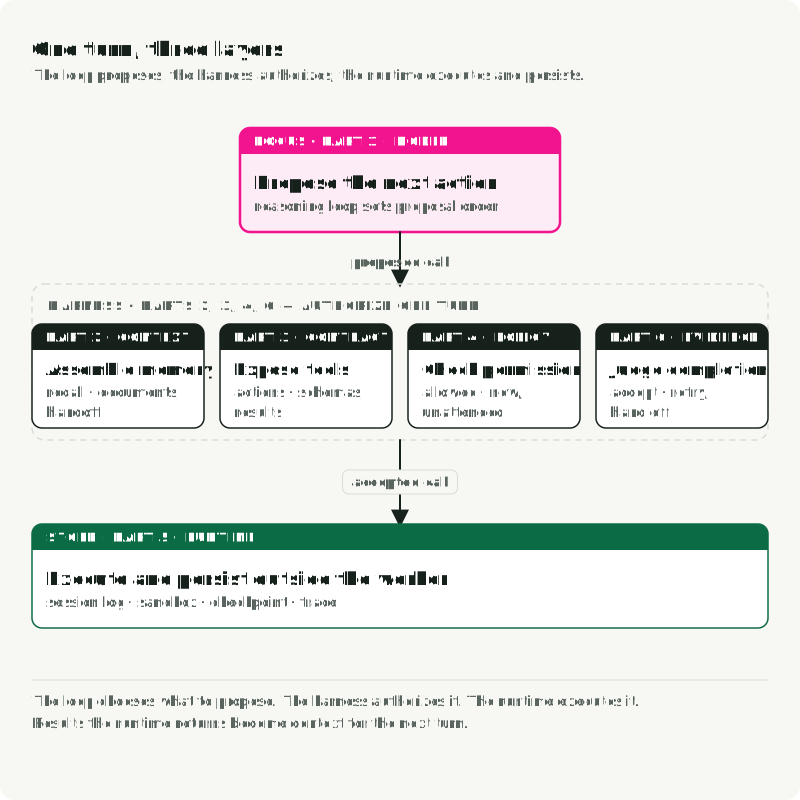
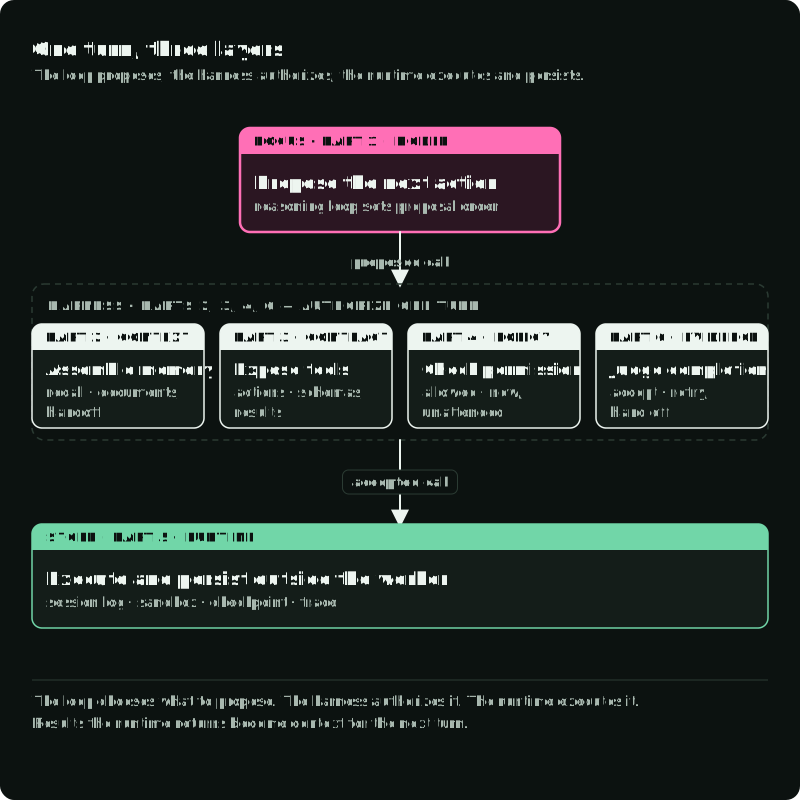
The figure places each part at the point in one turn where it acts.
References
- ReAct: Synergizing Reasoning and Acting in Language Models (Yao et al., 2022)
- ReWOO: Decoupling Reasoning from Observations for Efficient Augmented Language Models (Xu et al., 2023)
- Plan-and-Solve Prompting: Improving Zero-Shot Chain-of-Thought Reasoning by Large Language Models (Wang et al., 2023)
- Market Analyst Agent Repository