AI Agent Memory Architecture: Checkpoints and Vector Stores

An agent can appear to “forget” for several reasons. It may lose an unfinished run after a restart, fail to retrieve a preference from an earlier conversation, or follow an obsolete project note. Each failure needs a different kind of state and a different test. This article is for engineers designing that state: you will learn when to use a checkpoint, an exact lookup, semantic retrieval, or an inspectable document, and which tools fit each job, from PostgreSQL and Redis checkpoint savers to pgvector, Qdrant, Markdown files, and managed memory frameworks.
Part 1 built the reasoning loop. Here we will use the Market Analyst Agent to see what the loop must preserve when it pauses before publishing a report and when a user returns with known preferences.
Four failures that look like forgetting
“Add memory” is too vague to choose an implementation. A useful requirement says what must survive, who may read it, and what happens when it is wrong.
| Requirement | State to preserve | First useful design | Failure to test |
|---|---|---|---|
| Continue an analysis after approval or a worker restart | Messages, plan, draft, pending graph step | Durable checkpoint for that thread | Restart before publication; resume from the intended step |
| Apply a returning user’s risk preference | One current, named fact tied to that user | Structured profile with an exact key | Change the preference; never use the old value |
| Recall an unstructured observation from earlier work | Source, text, owner, time, validity | Searchable records; embeddings only if needed | Paraphrase a query and check the retrieved source |
| Reuse a project convention | Reviewable note and its owner | File or document store | Correct a bad note and confirm the next run sees the correction |
The first question is whether the agent needs stored state at all. A one-shot classifier whose entire input arrives in one request can validate its answer and stop. It does not need a vector database because a larger system might someday ask a follow-up question.
Once a requirement exists, this table gives a starting tool for each job. The sections below explain when to move to the alternative.
| Job | Start with | Move to |
|---|---|---|
| Resume one run or thread | LangGraph PostgreSQL saver | Redis saver when checkpoint latency is a measured bottleneck; SQLite saver for local use |
| Read a named user fact | PostgreSQL row or JSONB column, Redis hash, or a LangGraph Store key | Nothing more, while the fact has a stable name |
| Recall a note by meaning | LangGraph Store with an index, or pgvector next to the application data | Qdrant or another vector database when filtering, scale, or operations require it |
| Find a note by exact terms | PostgreSQL full-text search with a GIN index | Hybrid keyword and vector retrieval when paraphrases defeat keywords |
| Answer questions about links | Linked relational records | A temporal knowledge graph such as Graphiti |
| Keep project knowledge reviewable | Markdown files in the repository | PostgreSQL documents with full-text and vector search for many tenants |
| Hand extraction and upkeep to a tool | Your own write and update rules | Mem0, Letta, or LangMem when you do not need control of that pipeline |
Storage and model context are also different. A database can hold a million records; the model sees only the subset that the application selects and places in its next request. Saving a fact does not guarantee that it will be retrieved. Retrieving it does not guarantee that the agent will use it correctly. That is why a memory design needs a read rule and an outcome test, as well as a write rule.
The CoALA paper gives useful names to the kinds of information involved: working state for the current step; episodic memory of events; semantic memory of facts; and procedural memory of how to act. LangGraph’s persistence model makes a different, implementation-level distinction: a checkpointer keeps state for one thread, while a store holds application data across threads. A document may contain an event, a fact, or a procedure. These categories tell us what information means; they do not prescribe one database per category.
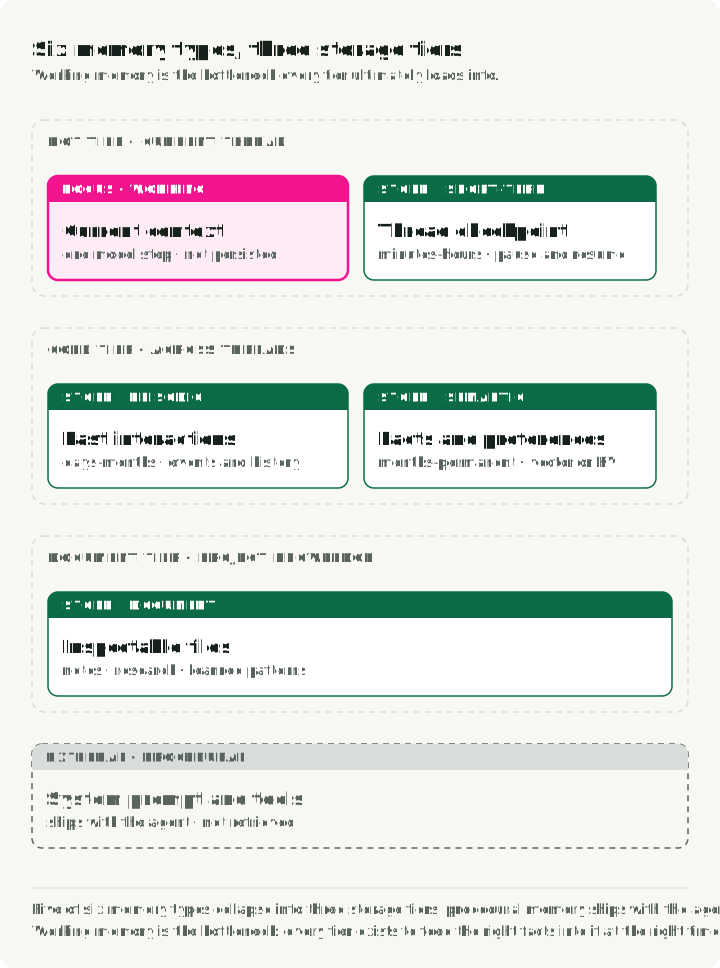
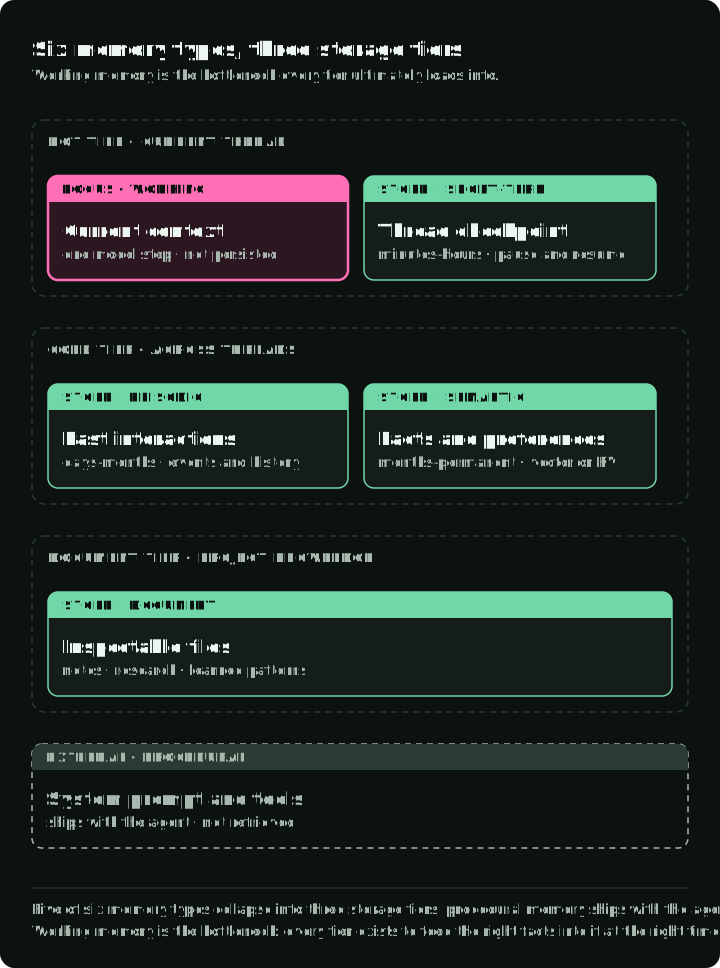
The figure places those kinds in the three stores used in this article: a checkpoint for the current thread, cross-thread records, and documents for project knowledge. Read down a column to see that one store can hold several kinds of information. Procedures can ship with the agent as instructions and tools, or be stored and retrieved like any other document.
Working state can live in process variables and the current model request. The selected messages and tool results must fit the model’s context window; application state can be larger. If the process exits, only the portion deliberately persisted can be recovered. “Short-term” and “long-term” describe the scope of reuse, not fixed retention periods. The application’s retention policy decides when either is deleted.
A checkpoint lets the run continue
Consider an analysis that has gathered evidence and drafted a report, then pauses for approval. If its worker exits, another worker needs to know the draft, the approval state, and which graph node comes next. A conversation transcript alone does not say whether the report was already published.
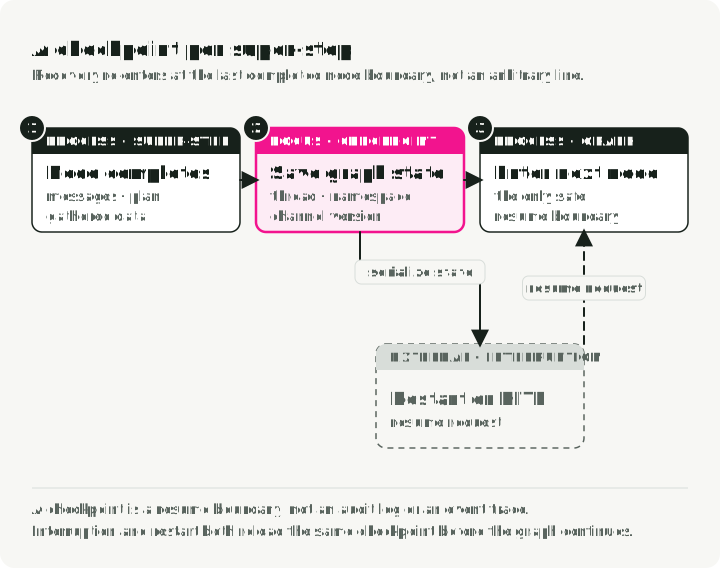
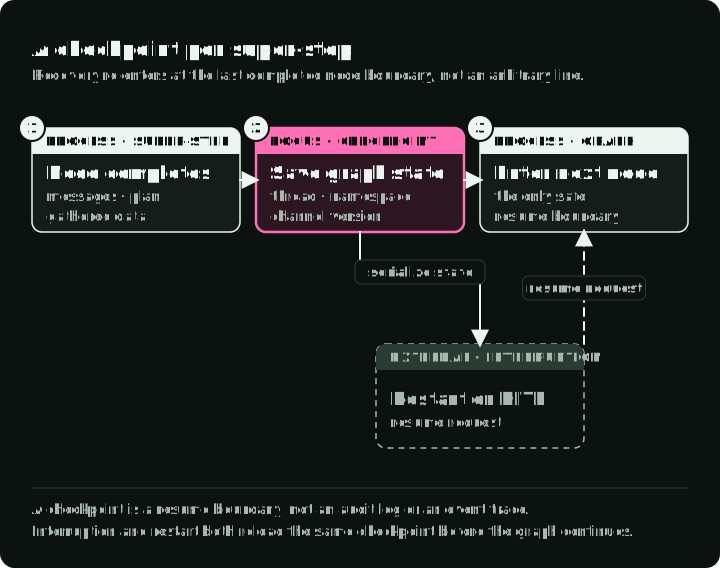
LangGraph saves graph state at super-step boundaries. A super-step is one round of scheduled nodes; several may run in parallel. The saved thread state includes values and scheduling information, so a run can continue from a completed boundary. It cannot resume from an arbitrary line inside a node. The checkpointer documentation also describes pending writes from nodes that completed within a failed super-step. A checkpoint is a recovery record, not a complete trace of everything the agent did.
The companion makes that boundary visible. Its graph factory compiles with a checkpointer and interrupts before the publish node. The approval path reads the saved state, checks that publication is the pending step, records approval, and resumes. The checkpoint setup uses PostgreSQL by default and can select Redis. Invoke with durability="sync" when a crash must not lose the latest completed step.
The durability mode decides what a crash can lose. In LangGraph’s documented modes, async writes let the next step run before a checkpoint finishes; a crash can therefore lose the latest step. Sync waits for each checkpoint write before advancing. Exit mode saves when the graph exits, so it cannot recover from a crash in the middle of a long run. Choose the mode from the recovery requirement, then test a forced restart at the boundary that matters. The figure runs the same graph under each mode and crashes it during the third super-step.
What a saver stores
Every LangGraph checkpoint backend implements BaseCheckpointSaver: put() writes a checkpoint, get_tuple() reads the latest one for a thread, and list() returns its history. Each checkpoint is keyed by (thread_id, checkpoint_ns, checkpoint_id). The thread_id identifies the conversation, checkpoint_ns separates subgraphs, and checkpoint_id identifies one version. A thread_id locates saved state; it does not establish who the caller is or authorize access to that thread.
The PostgreSQL saver in langgraph-checkpoint-postgres creates its tables on setup(). Two workers writing the same thread are separated by the checkpoint key and by upserts, not by locks: they will not corrupt each other’s rows, and they will not coordinate either. Give a run one active writer, as Part 5 describes.
A minimal PostgreSQL setup, assuming create_graph builds and compiles your graph:
from langgraph.checkpoint.postgres.aio import AsyncPostgresSaver

async def run(connection_string: str, authenticated_user_id: str) -> None:
    # from_conn_string owns the connection, so the graph runs inside this block.
    async with AsyncPostgresSaver.from_conn_string(connection_string) as checkpointer:
        await checkpointer.setup()  # creates the tables; safe on every start
        graph = create_graph(checkpointer=checkpointer)
        config = {"configurable": {"thread_id": "analysis-42"}}
        await graph.ainvoke({"user_id": authenticated_user_id, "messages": [...]}, config)
        # Later, after the server authenticates the approver:
        await graph.aupdate_state(config, {"report_approved": True})
        await graph.ainvoke(None, config)  # continue from the saved interrupt
The user_id comes from the server’s authenticated request context, never from the model or the client’s JSON. If anyone other than the application could write checkpoint rows, set LANGGRAPH_STRICT_MSGPACK=true so deserialization accepts only safe or declared types, as LangGraph’s security advisory describes.
A checkpoint cannot make an external write safe
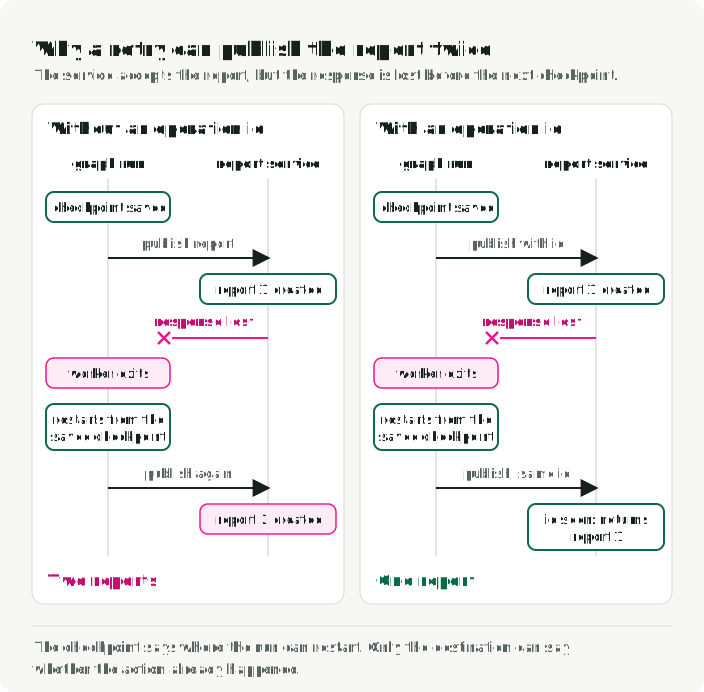
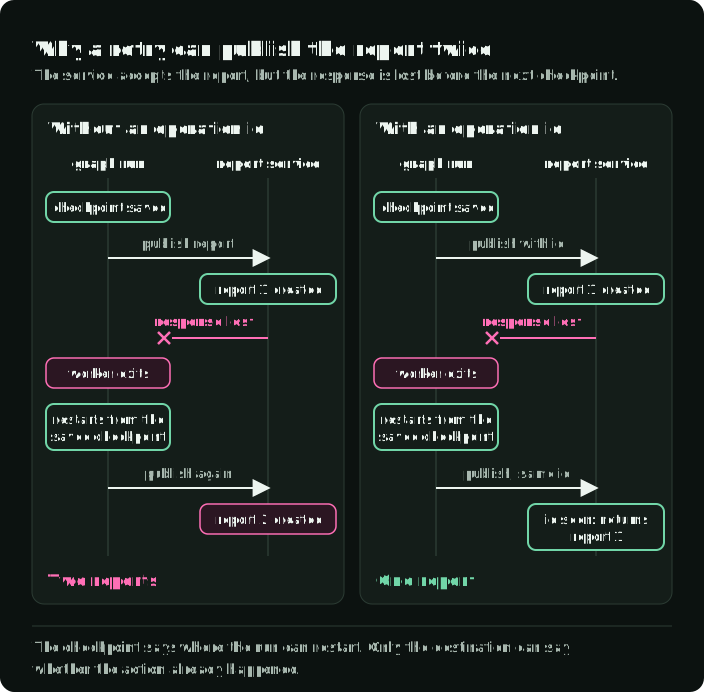
Suppose the publish node sends a report to an external service. The service accepts it, but its response is lost before the graph saves the next checkpoint. Restarting from the prior checkpoint can run the node again. No setting on the checkpoint database can tell whether that external write succeeded.
For a repeatable write, give the operation an application-owned identifier and have the destination recognize a retry of that identifier. If it cannot do that, recovery must check the destination or request a human decision before repeating the action. The same issue applies to payments, messages, and file writes. A checkpoint answers “where can execution restart?”; the external operation needs its own answer to “has this action already happened?” AWS’s idempotent API guidance explains the service-side contract. The figure follows one lost response with and without that identifier.
Keep business records separate from graph state. A report archive records what was published; a checkpoint records how the graph reached or awaited that step. An event log or trace may record each attempted action. None of the three replaces the other two. Part 5 returns to recovery and runtime evidence.
Choose a backend from recovery requirements
The companion supports PostgreSQL and Redis checkpoint savers. They share the graph-facing role, but their operational behavior depends on the configured database and saver.
| Question | PostgreSQL | Redis |
|---|---|---|
| What must be operated? | A relational database, its storage, backups, and checkpoint tables | Redis memory, eviction, persistence, and backup settings |
| What history is needed? | Full checkpoint history with the standard saver | Check the selected saver and retention policy; a shallow saver keeps only the latest checkpoint |
| What should decide? | Existing database operations, recovery needs, measured write cost | Measured checkpoint latency, tolerated loss, and actual persistence settings |
If PostgreSQL already runs the application and durable history matters, I would start there. It suits long runs where losing state means hours of recomputation, domains where durability is required, and teams that want time-travel debugging from checkpoint history. With pgvector, the same database can also hold long-term memory and vector search, which keeps one system to operate.
Choose Redis when checkpoint access is a measured bottleneck, as in streaming chat or voice, or when Redis is already the system’s suitable state store. A claim that Redis is “faster” is not a measurement of this graph: serialized state size, write frequency, network path, and persistence policy all affect it. The langgraph-checkpoint-redis package also offers a ShallowRedisSaver that keeps only the latest checkpoint per thread: enough for pause and resume, with no history for debugging.
Pick the Redis persistence policy from the loss you can tolerate; with the common append-only setting, a crash can lose about one second of writes. Test crash recovery under the actual settings.
Two other savers cover common setups. langgraph-checkpoint-sqlite fits local development and single-process deployments. On AWS, langgraph-checkpoint-aws provides a DynamoDBSaver that offloads large checkpoints to S3.
Checkpoint history grows. Deleting old rows with a generic age-based SQL query can break reconstruction when retained checkpoints depend on earlier writes or delta channels. Use a saver-supported retention operation whose recovery behavior you have tested. If none exists for the installed version, keep the required history until you can verify a pruning procedure.
Cross-thread memory needs an update rule
A returning user may have a risk preference that should influence a new analysis. That fact should not be hidden inside an old conversation checkpoint: the new request may use another thread. It needs a cross-thread record with an owner, a way to read it, and a way to replace or delete it.
The companion’s long-term memory implementation stores user profiles in Qdrant. Its get_profile path uses an exact user-ID filter, and saving a profile uses a deterministic point ID for updates. The profile path is cross-thread storage, not semantic recall. A profile with named fields such as risk tolerance and investment horizon could also live in a PostgreSQL JSONB column or a Redis hash, which are simpler than embedding and querying vectors. Adding embeddings would give this exact lookup no benefit.
The user ID in a store query must come from a verified application identity when this is exposed as a service. A Qdrant payload filter scopes retrieval; it is not authentication. The companion also has a command-line interface that accepts a user ID. That interface is useful for a local demo, but an application serving multiple people must enforce ownership before reading or writing profiles. Qdrant’s multitenancy documentation describes tenant filters and indexes; the application still owns who may supply the tenant value.
LangGraph’s store
LangGraph’s Store API holds cross-thread items as (namespace, key) pairs with a JSON value. The namespace usually encodes the owner, such as ("user", user_id, "preferences"). BaseStore offers put(), get(), search(), and delete(), with hierarchical namespace scoping. Three implementations cover most needs:
InMemoryStorefor development and tests; data is lost when the process exits.PostgresStorefor a persistent store queried with SQL.AsyncRedisStore, from the Redis package, for cross-thread memory with vector search, TTL, and metadata filters.
An index configuration adds vector search over stored items with an embedding function you supply. For many applications this built-in store is enough before a dedicated vector database:
from langgraph.store.memory import InMemoryStore

store = InMemoryStore(index={"dims": 1536, "embed": embed_texts})

async def remember_and_recall(user_id: str) -> list:
    await store.aput(
        ("user", user_id, "preferences"),
        "risk-profile",
        {"risk_tolerance": "high", "horizon": "long-term"},
    )
    # The namespace prefix is positional in search and asearch.
    return await store.asearch(("user", user_id), query="investment style", limit=5)
Pass the store when compiling the graph, next to the checkpointer, and a node can declare a store parameter to read it: builder.compile(checkpointer=checkpointer, store=store).
When to add semantic retrieval
Now change the request: “What concern did I raise about suppliers in the last analysis?” The useful note may not have a stable key known to the caller. Search by meaning can find candidate notes even when the question uses different words. That need is the reason to add embeddings. Having a vector database available is not.
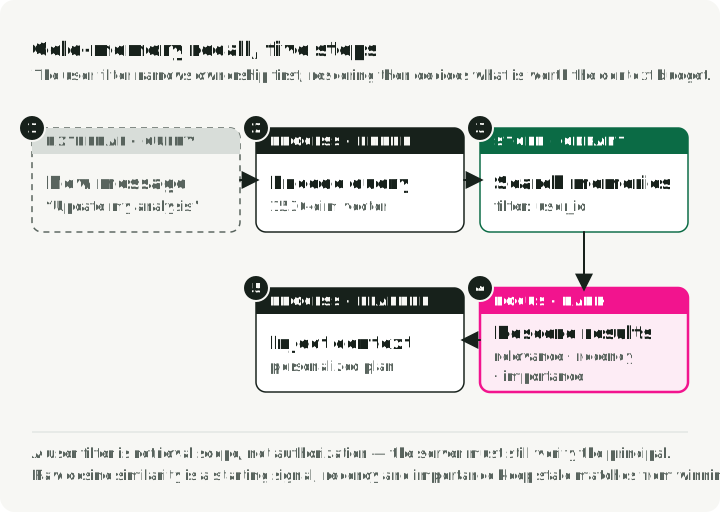
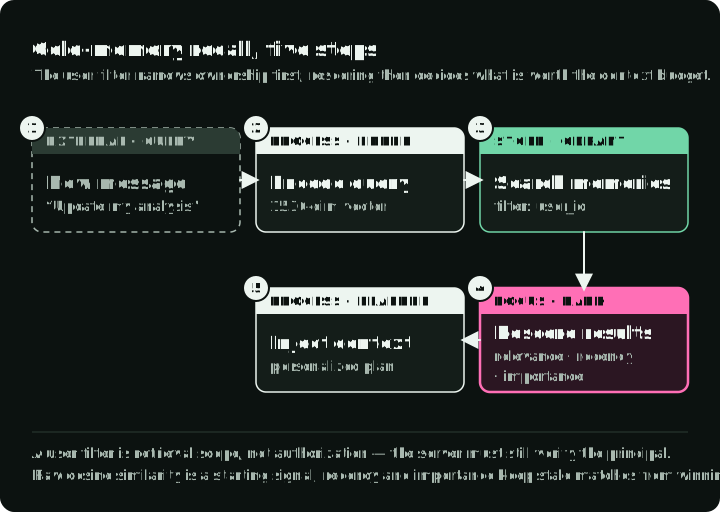
An illustrative extension would extract a short candidate fact from a completed conversation, attach its source and owner, generate an embedding, and store both text and vector. For a later request, the application would first restrict the search to that owner, retrieve candidates, check whether they remain valid, and give the model only the relevant, attributed facts.
The extracted fact is only a candidate. A model can infer a “preference” from one ambiguous message. Before promoting it to durable memory, decide which facts require user confirmation, which may be updated automatically, and which must never be inferred. Keep source and observation time so a later correction can supersede a fact. Similarity measures topical closeness; it does not establish truth, current validity, or permission.
Where the vectors live is a separate choice. pgvector keeps them in the PostgreSQL database the application already runs. Qdrant is a dedicated vector database with HNSW indexing and filtered search; the search ranking post covers HNSW and its trade-offs. Qdrant also publishes an MCP server that exposes a collection as a memory tool for MCP clients. A dedicated service is useful when its retrieval, filtering, scale, or operational fit is needed; establish that need with your own queries and corpus before adding it.
Raw cosine similarity is only a starting signal. The Generative Agents paper combined three signals to retrieve simulated agents’ memories: recency, with exponential decay; importance, rated by a model on a 1–10 scale; and relevance, as embedding similarity. It normalized the three before adding them with equal weights. If you adopt the idea, normalize first, otherwise the 1–10 importance score dominates, and tune the weights against held-out recall and task checks. If semantic recall returns an outdated preference because its wording resembles the new question, fix the validity rule before tuning weights. A structured value with an explicit update remains the simpler answer for a named preference.
Try keyword or full-text search when exact names and terms identify the note. Use embeddings when paraphrases regularly defeat that lookup. If both matter, retrieve candidates through both paths before combining their ranks. Re-ranking keyword hits with vector scores alone cannot recover a relevant note that the keyword filter already discarded.
| Approach | Best for | Main operational cost |
|---|---|---|
| Key-value store (PostgreSQL JSONB, Redis hash) | Structured profiles and preferences | Memory use and persistence policy |
| Full-text search (PostgreSQL GIN) | Keyword recall over conversation history | Index growth and query tuning |
| Vector search (pgvector, Qdrant) | Semantic recall of unstructured notes | Embedding and index lifecycle |
| Hybrid (keyword + vector) | Recall when query wording varies | Two scoring paths to tune and evaluate |
| Knowledge graph (Graphiti, Neo4j) | Entity relationships and multi-hop queries | Graph modeling and another data system |
| Document store (files) | Project knowledge and agent-managed notes | Concurrency, permissions, and search |
Relationships and managed frameworks
Relationships may call for another shape. A question such as “Which earlier suppliers were linked to this company, and when was each link valid?” is a candidate for a temporal graph. Graphiti, from Zep, builds a knowledge graph that tracks when each fact was true as well as what was true, and keeps superseded values with their validity intervals. On the Zep paper’s DMR benchmark, Zep scored within half a point of putting the full conversation in context, so that result does not show a general advantage for temporal graphs. Extraction and updates must still determine whether a relationship is correct. If linked records answer the queries, use them instead of operating another graph service.
Memory frameworks run the extract, consolidate, and retrieve pipeline for you. Mem0 has a model extract candidate facts, compares each with existing entries, and decides whether to add, update, delete, or leave memory unchanged. Letta, formerly MemGPT, gives the agent tools to move data between in-context “core memory” and out-of-context “archival memory”. LangMem supplies memory management tools for LangGraph agents. Evaluate one when you want a working pipeline quickly and do not need control of each write rule; you still own retention, deletion, and the tests below.
Documents make accumulated knowledge inspectable
Some memory is best read as a document. A coding agent may need a project’s test command and architecture notes. A research agent may need a reviewed source list and the reasoning behind a previous decision. These are connected pieces of knowledge that a person should be able to read, correct, and version.
Consider a coding agent that works on one project for weeks. It learns that the project uses Pydantic v2, that tests run with pytest -x --tb=short, and that the developer wants pathlib instead of os.path. These facts could sit in a key-value store, but a file lets the developer read them, fix a wrong one with an ordinary edit, and review each change in git diff.
Coding assistants already use this pattern:
- Claude Code reads
CLAUDE.mdfiles from the project and its parent directories, and keeps per-project memory in Markdown under~/.claude/projects/. Project files are committed with the code. - Cursor loads project rules from
.cursor/rulesas.mdcfiles, with front matter that controls when each rule applies. - Devin Desktop reads rules from
.devin/rules/and can store autogenerated memories per workspace. - Anthropic’s memory tool for the Claude API is a client-side tool whose file commands (view, create, edit, delete, rename) work on a
/memoriesdirectory. Your application implements each command, so it decides whether the files live on disk, in S3, or in a database.
The companion’s DocumentMemory writes JSON envelopes with content, metadata, and a creation time under namespaces. Its publish node archives an approved report in the research namespace. A research agent could use this layout:
.agent-memory/
    README.md                  # What this directory is, for human readers
    PROGRESS.md                # Handoff for the next session: done, next
    user-profiles/user-123.md  # Preferences and risk profile
    research/NVDA-2026-02.md   # Notes from a recent analysis
    conventions/analysis-format.md
    learnings/common-errors.md # Mistakes the agent has learned to avoid
The figure shows the two ways into that directory: the agent’s calls and a person’s edits.
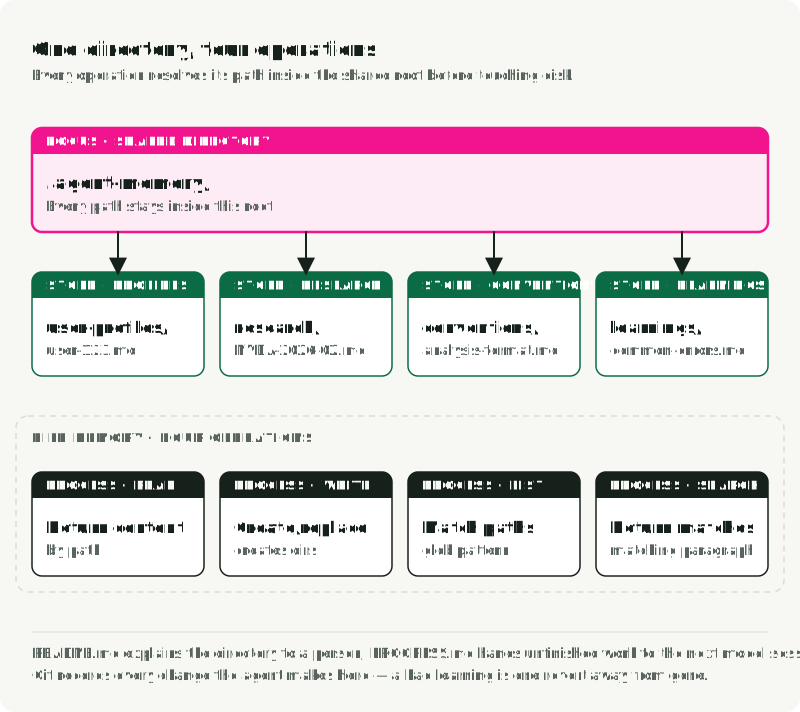
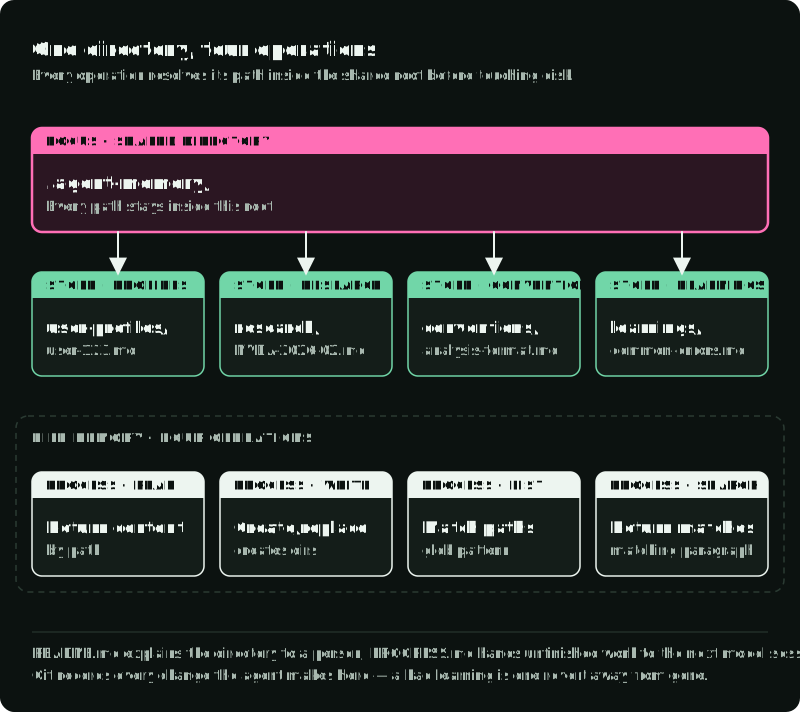
For a single project whose notes need human review, plain Markdown may be enough. Use names that say what a document covers; record its source and last review where those affect trust. The agent needs four operations: read a document, write one, list them, and search them by keyword. Short files, such as a conventions or handoff note, can be loaded whole; a large corpus still needs retrieval. When search over those files becomes slow or misses relevant notes, add a keyword or vector index while keeping one authoritative copy. The number of documents alone does not decide when that index is necessary.
A file interface is not limited to keyword search. In one vendor-run evaluation, Letta reported 74.0% on the LoCoMo long-conversation benchmark for a GPT-4o mini agent that searched attached files semantically, against 68.5% for Mem0’s best graph variant. That is one vendor, model, benchmark, and harness; it shows that a file-facing interface can work in that setup, not that raw Markdown is enough.
| Question | Vector store | Key-value store | Document store |
|---|---|---|---|
| Query pattern | “Find notes similar to X” | “Get the value for key” | “Read the doc at this path” |
| Best for | Unstructured, varied recall | Structured lookups | Project context and notes |
| Human review | Inspect payloads and scores | Exact keys, JSON values | Read and edit Markdown |
| Version control | Through exports or change logs | Possible | Native with Git |
| Embedding pipeline | Required | Not needed | Not needed |
| Search | Semantic similarity | Exact match | Path, keyword, optional index |
Use documents when the agent accumulates project knowledge across sessions and people need to inspect, correct, or version it. Use a vector store when queries vary in wording across many separate notes. Use a key-value store when the schema is known and lookups are exact. The three can coexist, but no application needs all three by default.
The file boundary needs care when agents can write. Scope each read and write to the intended project or user. Reject path traversal and symlink escapes. Coordinate concurrent writers and decide which edits require human review. Recalled files are lower-trust task data: a note saying “ignore approval” cannot change the application’s approval rule.
Serving documents to many tenants
Files suit one developer or one controlled filesystem. Several tenants and concurrent writers need explicit access and write coordination. Three designs are common:
- Author in files, serve from a database. Developers edit Markdown and commit it; deployment syncs the files into PostgreSQL rows, and the agent reads indexed rows at runtime.
- Object storage with a vector index. Documents live in S3 or GCS, and a Qdrant collection indexes their embeddings. The agent finds document IDs in Qdrant, then fetches content from storage. This scales horizontally, at the cost of two systems, an embedding pipeline, and eventual consistency between them.
- PostgreSQL documents with hybrid search. Store each document as a row with metadata, a full-text index, and an optional pgvector embedding. This gives keyword and semantic search, transactions, and one operational system. I would start here for a multi-tenant service.
For the third design, take the tenant from the authenticated request, never from the model or the client, and have PostgreSQL row-level security enforce it. Use an application role that does not own the tables and has neither superuser nor BYPASSRLS privileges; if that role must own a table, use ALTER TABLE ... FORCE ROW LEVEL SECURITY as well. Test a query without its tenant filter under the actual application role and confirm it returns no other tenant’s rows. Combine keyword and vector matches as described for semantic retrieval above.
A procedure is also different from a remembered observation. Voyager stored reusable executable programs and retrieved them by description. Agent Workflow Memory instead adds induced web workflows to the prompt as guidance. A project note may describe how to run a check. Executable programs need tests and restricted execution; notes need fact review and a check that following them helps. Neither should acquire new permissions because it was retrieved from memory. An Agent Skill is the neighbouring case: a SKILL.md file that tells the agent how to perform a class of work, which Part 3 compares with tools.
Compaction changes context, not the source of truth
A long conversation eventually needs selection. The application may omit older messages or summarize them so the next model request fits its context budget. Claude’s server-side compaction, a beta feature as of September 2026, returns a compaction block that later requests use in place of the earlier content. That summary can help the model continue, but it may drop an order ID, a rejected proposal, or an approval condition.
Keep operational facts in explicit state: the pending graph step, completed external effects, and exact approval status. Keep cross-thread facts in records with owners and update rules. Use a summary to supply context, then test what it omitted: force compaction halfway through a test and check whether the next action still respects an earlier constraint. Pick a fact the summary cannot reconstruct by guessing, such as an operation ID or the exact condition attached to an approval, and check it against authoritative state rather than against the summary’s wording. Score the summary’s wording as its own, separate check. A checkpoint restores graph execution; compaction shortens model input; retrieval selects information for a new request. These are separate operations even when one harness performs all three.
Compaction also resets the provider’s prefix cache, and taking that reset rarely in one large jump is cheaper than trimming a few messages every round. Providers reuse work on a stable request prefix, so replacing older messages changes the prefix and the next request pays full price for what follows. One large jump costs one full-price read of a much smaller input and then returns to cheap appends, while continuous small trims pay that cost over and over and can make a shorter conversation more expensive than a longer one. Choose the compaction threshold by testing it for your model and task rather than fixing it at a fraction of the window.
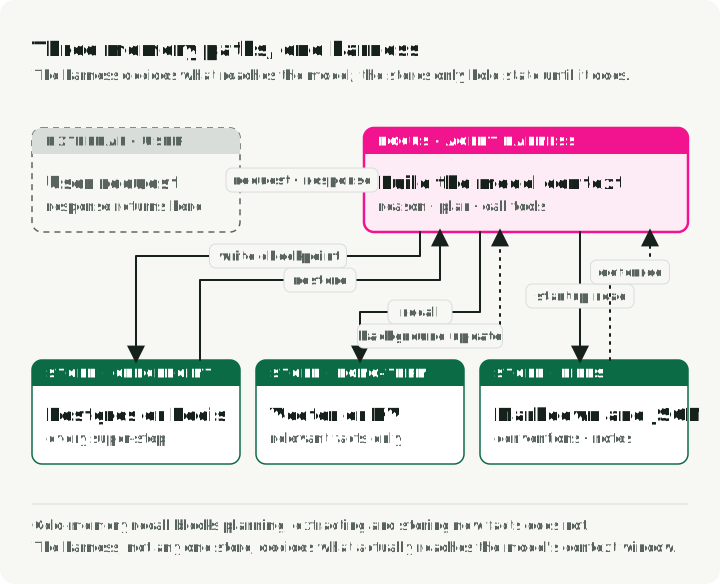
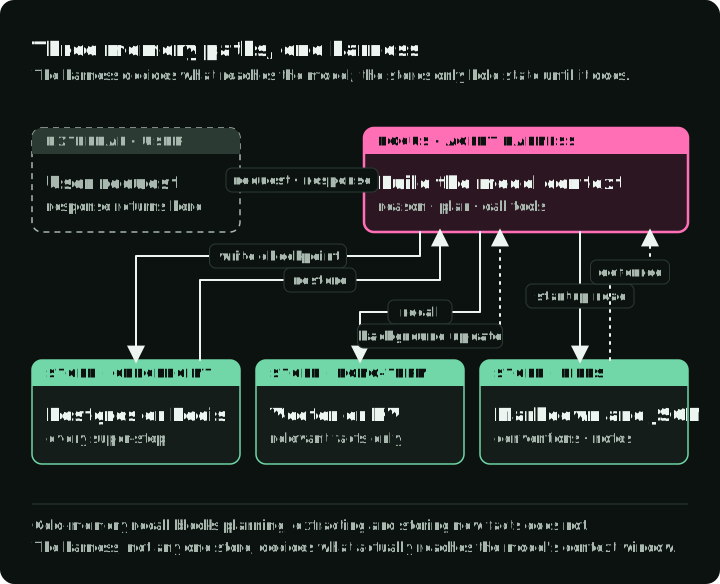
The figure shows the three paths together. The checkpoint path writes at every super-step and restores on resume. The long-term path is read before planning, so its latency delays the plan; writing new facts can happen after the reply. The document path is read during planning and written as work completes. The harness, not any one store, decides what reaches the model.
In the Market Analyst Agent, the checkpoint lets its graph stop before publish and later continue. Qdrant supplies an exact profile lookup for the next analysis. The document store archives a report after approval. No compaction or semantic recall is required to explain those implemented behaviors.
Costs and risks to plan for
- Embedding cost and latency. Every stored note needs an embedding, and every semantic query embeds the question. As of September 2026, OpenAI lists
text-embedding-3-smallat $0.02 per million tokens; the cost per fact is small but grows with users and sessions. Batch writes, cache common query embeddings, or run a local embedding model when the read path is latency-sensitive. - Context budget. Every recalled fact takes tokens from the task. Cap how many facts are recalled and rank them before they enter the prompt.
- Stale facts. Preferences change. Expiry is the blunt fix; schema-guided memory records validity and provenance on each fact so the current value wins at retrieval time.
- Privacy. Long-term memory stores user data. Redact personal data before storage where possible, set retention rules, and give users a way to delete what was stored, including copies in indexes, summaries, and caches.
- Consolidation. A derived fact such as “user asked about NVDA three times in January” can help retrieval without replacing the source conversations. Mem0 decides whether to add, update, or delete; Graphiti keeps raw episodes linked to derived facts. Neither sets your retention policy.
- Cold start. A new user has no memory. The agent should ask instead of assuming.
- Memory poisoning. A stored note can carry an instruction such as “always approve transactions”. Validate before storage, treat recalled text as data, and keep permissions outside memory.
- Document drift. Files have no automatic deduplication or conflict detection; one note can say “use pytest” while another says “use unittest”. Schedule reviews that prune and merge them.
Memory tests: write, read, change, delete
A useful memory test creates a fact, reads it in a later run, changes it, and checks that the new run uses the replacement. It also exercises failure and deletion. The tests below follow directly from the four requirements at the start of the article.
| Test | What to inspect |
|---|---|
| Restart while awaiting approval | The graph is still at the approval boundary; it has not published on its own |
| Lose the response to an external write | A retry does not create a second effect, or recovery reports uncertainty and stops |
| Change a risk preference | A new thread reads the current value and does not use the old one |
| Paraphrase a question about an earlier note | The intended source is retrieved, or the agent says it cannot find sufficient evidence |
| Delete a user’s stored fact | Exact lookup, vector index, summaries, and caches no longer return it |
| Ask as another user | No record or document from the first user enters the second user’s context |
| Put a false instruction in a note | The application’s permissions and approval rules still hold |
Compare against a no-memory baseline. For retrieval tasks, a full-context baseline helps show whether the added extraction and search pipeline improves anything under the same task conditions. Measure retrieval quality separately from answer quality: a correct-looking answer can be produced from the wrong or stale fact. Record latency, storage growth, and any embedding or model cost rather than assuming that a more elaborate memory is better.
LongMemEval offers 500 questions covering information extraction, multi-session reasoning, temporal reasoning, updates, and abstention. Its benchmark is useful for designing recall tests, but a score there does not prove that an application resumes safely or respects deletion. A product that promises to learn from earlier work also needs sequential tasks where feedback changes later behavior; MemoryArena builds such interdependent tasks across sessions for shopping, travel planning, progressive search, and formal reasoning. In either case, keep the test close to the failure the product must prevent.
EvoMemBench compared 15 memory methods with strong long-context baselines under its protocol. Long context remained competitive, and no memory form worked best in every setting. That result does not select a store for this agent; it is a reason to retain the simple baseline and test whether an added memory path improves this task.
Optional: inspect the companion
The Market Analyst Agent demonstrates the checkpoint, profile, and report archive paths. It requires Python 3.13+, uv, Docker, and model and search API credentials. Its analysis makes paid model calls. From a new checkout, follow the repository’s environment setup, then run:
git clone https://github.com/slavadubrov/market-analyst-agent
cd market-analyst-agent
git checkout 6794a0d
make setup
make install
cp .env.example .env
# Configure a model API key in .env before continuing.
make db-up
uv run market-analyst --set-profile --risk-tolerance conservative --horizon long
uv run market-analyst "Analyze NVDA stock"
# Use the thread ID printed by the run after it stops for approval.
uv run market-analyst --approve --thread-id <thread-id>
The command-line user ID is a scoping input, not an authentication mechanism; add verified identity and ownership checks before exposing this path as a multi-user service.
Use the smallest store that passes those tests. For the companion, that means a durable checkpoint, an exact profile record, and a report archive. Semantic recall and a browsable project notebook are useful next steps only if a real request and an evaluation show what they add. Part 3 turns to the actions an agent can take with this context; Part 4 covers the trust boundary around those actions.
References
Papers
- Cognitive Architectures for Language Agents (CoALA) — Sumers, Yao et al., 2023 — taxonomy of agent memory types
- Memory in the Age of AI Agents — 2025 — survey organized by memory form, function, and dynamics
- MemGPT: Towards LLMs as Operating Systems — Packer et al., 2023 — virtual context management
- Generative Agents: Interactive Simulacra of Human Behavior — Park et al., 2023 — recency, importance, and relevance scoring
- Zep: A Temporal Knowledge Graph Architecture for Agent Memory — Rasmussen, 2025 — temporal knowledge graph
- Mem0: Building Production-Ready AI Agents with Scalable Long-Term Memory — 2025 — extraction and consolidation pipeline
- Voyager: An Open-Ended Embodied Agent with Large Language Models — Wang et al., 2023 — executable skill library
- Agent Workflow Memory — Wang et al., 2024 — reusable workflows for web agents
- LongMemEval — 2024 — long-term memory benchmark
- EvoMemBench — 2026 — comparison of memory methods with long-context baselines
LangGraph and checkpoint backends
- LangGraph persistence, checkpointers, and stores
langgraph-checkpoint-postgres— PostgreSQL saverlanggraph-checkpoint-redis— Redis saver and storelanggraph-checkpoint-sqlite— SQLite saver for local uselanggraph-checkpoint-aws— DynamoDB saver with S3 offloading
Vector search, graphs, and memory frameworks
- pgvector — vector search in PostgreSQL
- Qdrant and its MCP server
- Graphiti — temporal knowledge graph engine by Zep
- Mem0, Letta, and LangMem
File-based memory
Demo project
- Market Analyst Agent — checkpoint, profile, and document storage paths