Model Quantization Guide: Foundations to Production Serving

This quantization guide is for engineers deploying language models who need to reduce memory use or improve serving speed. You will learn how to choose what to compress, match a number format to your hardware and runtime, and compare memory, latency, and output quality before deployment. It also covers the separate checks needed for diffusion image models.
Quantization reduces the bits used for weights, activations, or the KV cache. Weights are the model parameters learned during training. Activations are intermediate values computed from each input. The key-value (KV) cache keeps values from earlier tokens for reuse during generation. Compressing weights can make a model fit in GPU memory while leaving too little room for a long conversation. The target you compress and the GPU code that executes it determine which limit you relieve.
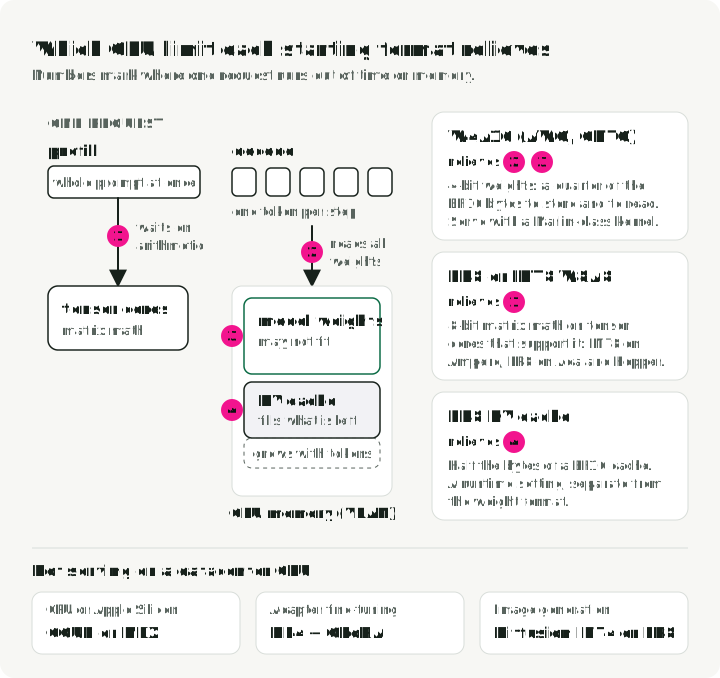
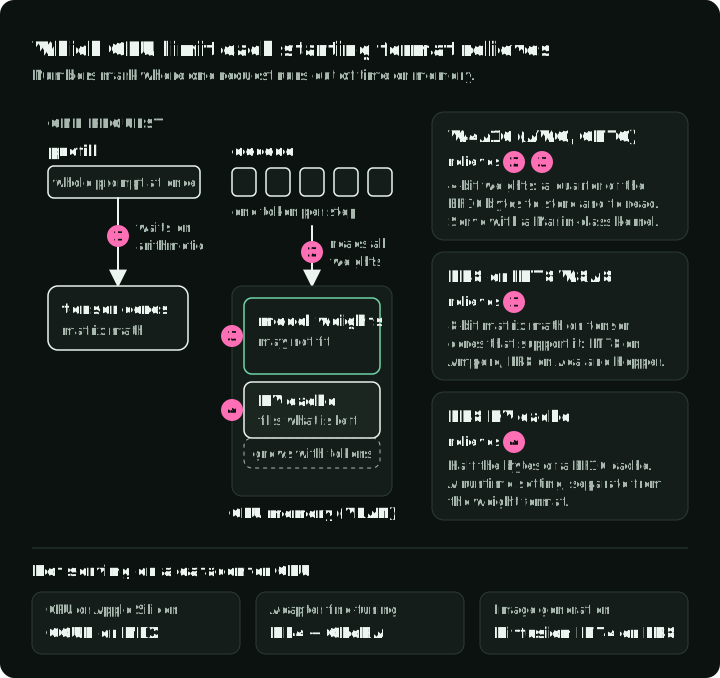
Start with what makes the request slow or too large. Processing the input prompt is called prefill; generating the answer one token at a time is decode. Prefill can be limited by GPU arithmetic, while decode can be limited by how fast weights load from memory. Model weights and the growing KV cache can also exhaust GPU memory. The first table maps these problems to possible fixes; later sections explain the arithmetic and checks needed before deployment.
A lower bit-width is only a candidate. The decision needs both task-quality results and serving measurements for the model, runtime, and traffic you will use. The benchmarks here are published results from other teams, plus one short run from the companion repository.
For the short artifact and method comparison, see LLM Quantization Formats.
1. Bottlenecks and starting formats
Ask what limits the workload before choosing a bit-width. The answer may be model weight memory, prefill compute, decode bandwidth, or the KV cache rather than numerical precision by itself.
Notation used in serving recipes
- W4A16 stores weights in 4-bit form and keeps activations in 16-bit precision. More generally, W{x}A{y} names the precision used for weights and activations in supported operations, usually matrix multiplication. W8A8 uses 8-bit weights and activations in those operations, but it does not automatically define the stored data type of every runtime tensor.
- FP8, INT8, INT4, NF4 are number formats. They decide what values can be represented.
- GPTQ, AWQ, SmoothQuant, QuaRot are algorithms. They decide how to map a trained model into a lower-precision format.
- GGUF is a file format that stores tensors and metadata for GGML and
llama.cpp-style runtimes. A GGUF file can contain unquantized tensor types such asF16,BF16, orF32, as well as quantized encodings. Presets includeQ4_K_M,Q5_K_M,Q8_0,IQ*,TQ*, andMXFP4. The tensor encoding determines the quantization choice.GGUFalone does not describe a CUDA-style FP8 W8A8 serving recipe. - KV cache is the attention cache used during generation. It stores prior keys and values so the model doesn’t recompute the whole conversation at every token.
- KV-cache quantization stores cached key/value activation tensors in a lower-precision cache format such as FP8, INT8, INT4, or INT2, depending on runtime support. This is different from prefix caching, PagedAttention, or offload, which decide whether cache entries are reused, how they are allocated, or where they live.
- GEMM means general matrix multiply. Most transformer inference time is spent doing matrix multiplication.
What gets quantized
A recipe chooses which tensors to compress. These are the usual choices:
| Tensor | Usually quantized? | Why |
|---|---|---|
| Linear-layer weights | Yes, in W4A16 and W8A8 recipes | Weights are fixed after training, so their scales can be computed offline. |
| Activations | Only in W8A8, W4A8, or W4A4 recipes | They change with every input, so they need calibrated or runtime scales. |
| KV cache | Optional, a separate runtime setting | It grows with context and batch; section 6 covers it. |
Embeddings and lm_head | Usually kept in 16-bit | LLM Compressor recipes list lm_head in ignore; section 8 lists this exclusion. |
| Diffusion VAE and text encoders | Kept in 16-bit for the first test | Section 10 tests them separately from the denoising network. |
Bottlenecks and where to start
The table maps common bottlenecks to a starting format. It uses the notation above.
| If this is the problem | Start here | Typical tools | Check before deploy |
|---|---|---|---|
| Model weights don’t fit in VRAM | W4A16 weight-only quantization | AWQ or GPTQ with llm-compressor or GPTQModel | Perplexity, coding, reasoning, instruction following |
| High-throughput serving is compute-bound | FP8 or INT8 W8A8 | FP8 PTQ, SmoothQuant, TensorRT-LLM, vLLM | Throughput, time to first token (TTFT), task accuracy |
| Long context or high concurrency fills the GPU | KV-cache quantization | vLLM, TensorRT-LLM, or Transformers QuantizedCache | Long-context retrieval, latency, safety, and quality |
| Local inference on CPU, Apple Silicon, or desktop | GGUF files with local tensor encodings | llama.cpp, Ollama, LM Studio, MLX | Prompt latency, RAM use, selected tensor encoding, and subjective output quality |
| Adapter fine-tuning must fit on one GPU | NF4 / QLoRA | bitsandbytes, peft | Fine-tuning loss and merged-model quality |
| Image generation pipeline is too large or slow | Diffusion-specific INT4 or FP8 | SVDQuant, Nunchaku, torchao, NVIDIA ModelOpt | Visual artifacts, prompt alignment, latency, VRAM |
The figure marks where one request runs out of time or memory on a serving GPU and which starting format relieves each limit. The bottom row covers the cases that are not datacenter GPU serving.
2. Quantization is controlled rounding
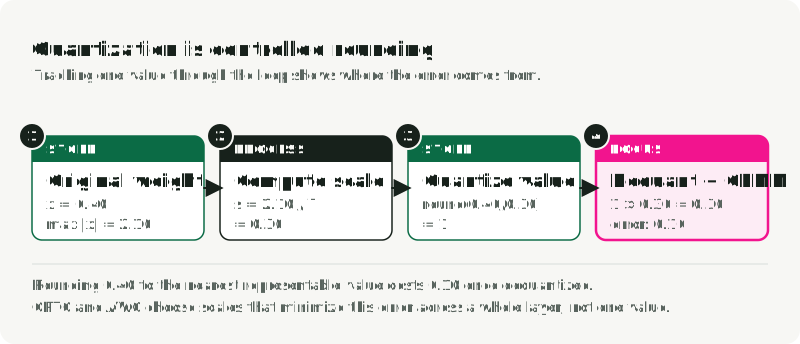
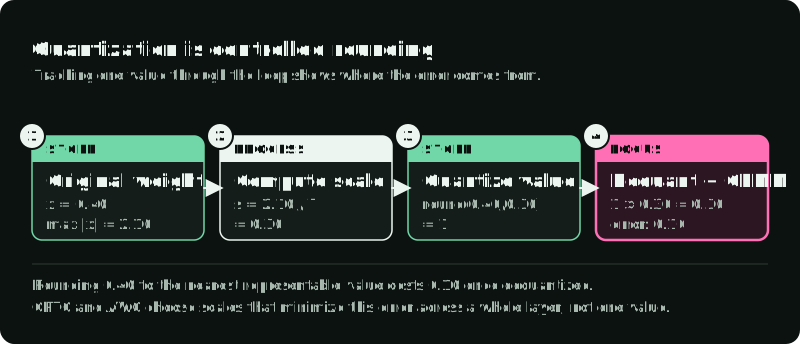
Quantization maps high-precision values into a smaller set of representable values, which is the core definition used by both Hugging Face Optimum and TensorRT-LLM. You save memory and bandwidth. You also introduce rounding error.
INT4 provides only 16 discrete values, so mapping 16-bit BF16 weights into that grid creates rounding error. Quantization methods judge rounding by how much it changes a layer’s output, not just individual weights. GPTQ estimates how rounding choices affect that output and adjusts the remaining weights to reduce the error. AWQ uses observed activations to identify important groups of weights, called channels, and rescales them before rounding. A good mapping saves memory with little quality loss. A poor one damages reasoning, instruction following, or visual fidelity.
Symmetric and asymmetric mapping
Following the affine mapping used in common quantization guides, quantization maps a continuous float value to a discrete grid.
- and are the selected lower and upper floating-point bounds.
- is the original high-precision value.
- is the quantized value.
- is the scale, or step size.
- is the zero point, the integer location that represents
0.0. - is the target integer range. This symmetric example uses , which has 15 values and represents zero exactly. Other signed INT4 formats use all 16 values, for example .
Symmetric quantization centers the grid around zero and sets :
This is hardware-friendly because runtime math doesn’t need to subtract a zero-point offset. PyTorch’s quantization stack exposes these affine scale and zero-point choices as primitive quantization parameters in torchao.
Asymmetric quantization shifts the grid to cover skewed ranges:
That shifted grid can preserve positive-only activations better, but the offset adds work unless the kernel handles it well.
The figure works through the symmetric case: a maximum magnitude of 2.10 gives a scale of 0.30, so the weight 0.40 rounds to integer 1. Dequantization multiplies that stored integer by the scale to recover an approximate value, 0.30. The difference from 0.40 is the rounding error.
Scale granularity: tensor, channel, group
The scale factor can cover a whole weight tensor, one channel, or a small group of values. vLLM’s FP8 KV-cache docs use the same distinction between per-tensor and per-attention-head scale strategies. Smaller groups usually preserve quality better, but they require more scale metadata.
| Scale granularity | What shares one scale | Effect on quality and execution |
|---|---|---|
| Per tensor | The entire weight matrix | Stores little metadata, but one outlier can stretch the grid and reduce precision across the layer. |
| Per channel | One output row | Keeps channels with narrow ranges from sharing the wider range of another channel. Many 8-bit weight paths use this granularity. |
| Per group | A block within a row, often 64 or 128 values | Confines an outlier to a small block at the cost of more scales. AutoGPTQ uses group_size=128 in its GPTQ examples. |
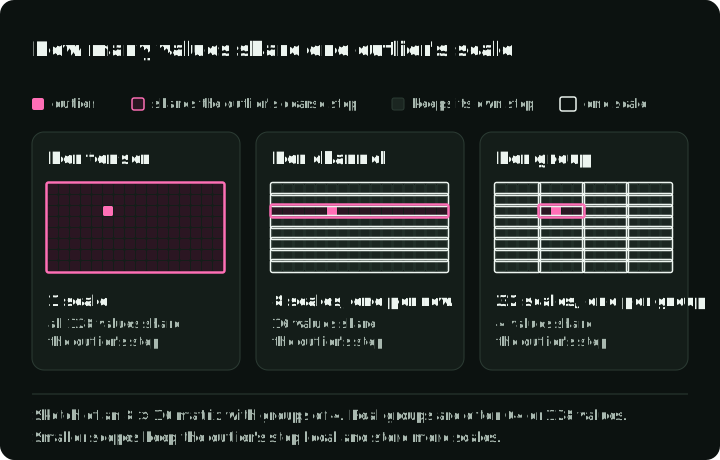
The figure puts one outlier in a small sketch matrix and counts how many values share its scale under each choice.
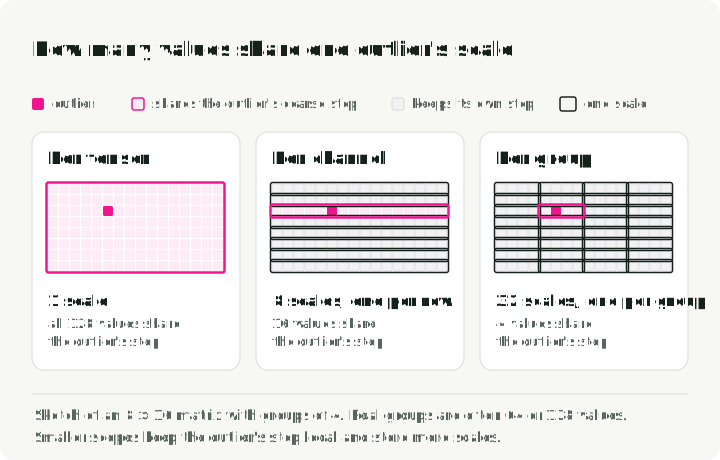
Weights are static, so their scales can be computed offline before you load the model. Activations change with every token, which makes their ranges workload-dependent.
| Activation scaling | When the runtime chooses the scale | Advantage | Failure mode or cost |
|---|---|---|---|
| Static | Offline from a calibration dataset | Avoids scale calculation during inference. | Prompts outside the calibrated length or distribution can clip activation spikes and damage output. |
| Dynamic | During each forward pass | Adapts to the current activation values and prompt mix. | Calculating ranges at every layer adds work and needs optimized kernels. |
The KV cache sits between these cases: keys and values are activations computed at runtime, then kept for later tokens, so they need their own scales. Section 6 covers how runtimes store them.
PTQ and QAT happen at different stages
Post-training quantization, or PTQ, compresses a trained model after the fact. Quantization-aware training, or QAT, exposes the model to quantization noise during training so it can adapt.
| Method | When ranges are learned | Use it when | Cost you pay |
|---|---|---|---|
| Weight-only PTQ | Offline, for static weights | The model doesn’t fit or decode is bandwidth-bound | Activations still run in 16-bit |
| Static PTQ | Offline, from calibration prompts | You want fast W8A8 serving | Calibration data must match production |
| Dynamic PTQ | Runtime, per batch or activation path | Input distributions vary a lot | Extra runtime work and narrower hardware support |
| QAT | During training | PTQ breaks quality on a sensitive model | Full training infrastructure and much more compute |
Calibration data has to look like the traffic you will serve. vLLM’s KV-cache calibration path, for example, uses a curated dataset through llm-compressor. If production prompts are long RAG traces, short Wikipedia paragraphs may miss the activation ranges those traces produce. For static activation or cache scales, calibration picks the ranges. For GPTQ and AWQ, the calibration activations also decide how each weight is rounded or rescaled, so short-text calibration can shape the stored weights. Real long-context prompts can produce different activation patterns. Long-context quantization evaluations measure this risk directly.
3. Number formats dictate hardware requirements
The number format defines what values the model can represent in memory. Efficient computation requires runtime kernels and hardware support for the same bit-width and format. TensorRT-LLM documents both the recipe list and hardware support matrix.
| Format | Storage per value | Good default for | Main watchpoint |
|---|---|---|---|
| BF16 / FP16 | 2 bytes | Baseline inference and training-compatible serving | High VRAM use and high memory-bandwidth traffic |
| FP8 | 1 byte | High-throughput W8A8 serving on Ada, Hopper, Blackwell | Needs native FP8 tensor cores and runtime support |
| INT8 | 1 byte | W8A8 serving on older or non-NVIDIA hardware | Activation outliers and static calibration sensitivity |
| INT4 | 0.5 bytes | W4A16 when weight memory is the main limit | Quality loss on smaller or reasoning-heavy models |
| FP4 / NVFP4 | ~0.5 bytes | Blackwell-era experiments and early serving paths | Hardware-specific compiler and runtime requirements |
| llama.cpp GGUF encodings / presets | Variable | Local CPU, Apple Silicon, desktop, and edge inference | GGUF is the container. The tensor encoding is the quantization choice. |
| NF4 | 0.5 bytes | QLoRA adapter training | Usually the wrong export format for production serving |
BF16 and FP16 both use 16 bits, but they distribute precision differently and therefore fail differently. BF16 keeps the 8-bit exponent range of FP32 and is harder to overflow. FP16 has more mantissa bits and a narrower exponent range, so activation spikes need more care. The Kurtic et al. evaluation explicitly uses BF16 as the baseline when comparing FP8, INT8, and INT4 serving formats.
FP8 has two common variants. E4M3 gives more precision and is usually used for forward weights and activations. E5M2 gives more dynamic range and is more useful for gradients or volatile activation paths. vLLM exposes both FP8 E4M3 and E5M2 KV-cache dtypes. In Kurtic et al.’s ACL 2025 study, “Give Me BF16 or Give Me Death,” FP8 W8A8 was effectively lossless on the Llama-3.1 family over more than 500,000 evaluations. The result covers that model family, evaluation suite, and serving setup. Each deployment needs its own quality check before release.
Blackwell adds microscaling formats such as MXFP8 and NVFP4. Instead of one scale for a whole tensor or row, microscaling uses tiny blocks. NVIDIA’s NVFP4 explainer describes 4-bit floating-point values in blocks of 16, with FP8 scale factors and a higher-level FP32 scale. This approach aims to provide a near-INT4 footprint with floating-point behavior. However, it requires a matching hardware architecture, compiler, and runtime support, which is why TensorRT-LLM lists FP4 and FP8 support by GPU generation.
4. Weight-only vs. weight-activation quantization
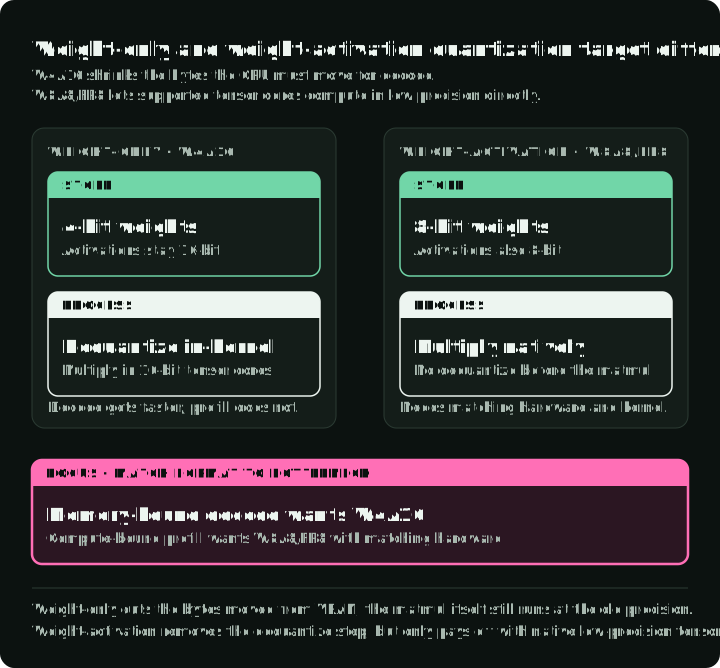
The notation WxAy describes the precision of weights and activations, which stress the GPU in different ways during inference. The figure follows the weights from VRAM through the kernel to the tensor cores for BF16, W4A16, and W8A8.
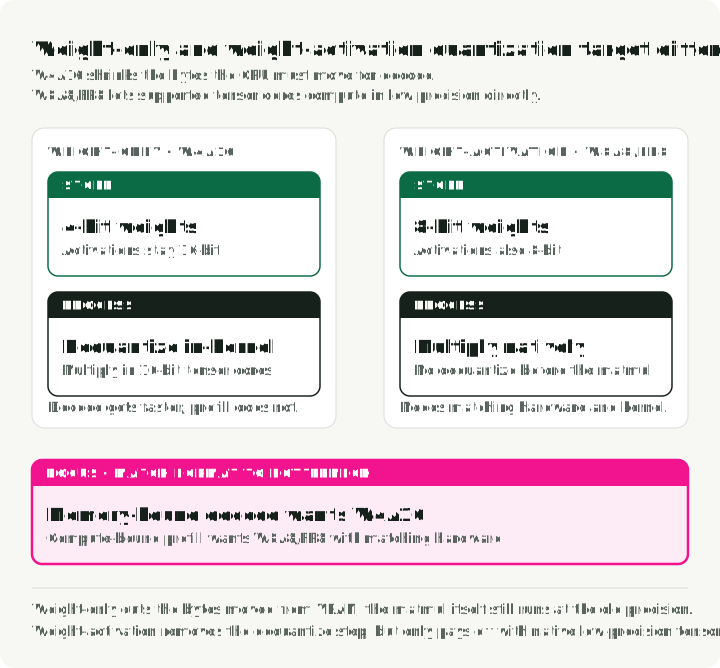
During prefill, the model processes the input prompt. This phase is usually compute-bound because the GPU is doing large matrix multiplications, which is why W8A8 FP8/INT8 recipes matter for throughput-oriented serving.
During decode, the model generates one token at a time. This phase is often memory-bandwidth-bound because the GPU keeps loading weights from VRAM to produce the next token. Weight-only papers such as GPTQ and AWQ target that pressure by reducing weight bytes.
W4A16 compresses weights and keeps activations in BF16 or FP16. The GPU loads fewer weight bytes, then dequantizes the weights back into a higher-precision form for the multiply. This helps decode and fit-to-memory problems. Compute-bound prefill may see little benefit because the matrix math still runs in 16-bit.
W8A8 compresses weights and the activation tensors used by supported matmul kernels. If the hardware has native low-precision tensor cores, the serving engine can run matrix math directly in FP8 or INT8. FP8 can therefore help high-throughput serving by reducing memory traffic and using faster arithmetic. The KV cache has its own storage setting, so check the runtime’s cache dtype or cache implementation separately.
In the companion’s checked-in run (RTX 4090, vLLM 0.23.0, one repeat of 64 generated tokens), Qwen3-8B with vLLM’s online FP8 dynamic quantization generated 122 tok/s against 85 tok/s for BF16 and loaded 8.8 GiB of weights instead of 15.3 GiB. Adding an FP8 KV cache dropped it to 49 tok/s. The run is too short to set capacity, but it shows that each setting needs its own measurement.
5. Algorithms vs. runtime kernels
Quantization algorithms (like GPTQ or AWQ) define how the model’s weights are mapped to lower precision. Runtime kernels (like Marlin or vLLM’s custom kernels) are the low-level GPU code that executes the matrix multiplication. A highly compressed model will only run fast if there is an optimized kernel for its specific quantization format.
A serving recipe names one item from each layer: an algorithm (GPTQ, AWQ), a checkpoint format (compressed-tensors, GGUF), a runtime (vLLM, llama.cpp), and a kernel (Marlin). The same AWQ checkpoint can run at very different speeds depending on the kernel.
The chart pairs each 4-bit checkpoint with and without the Marlin kernel in one published benchmark. The table below adds perplexity and TTFT.
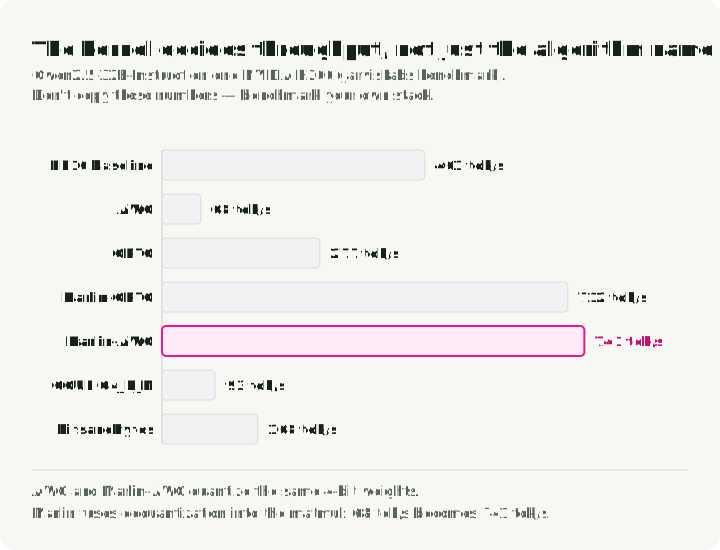
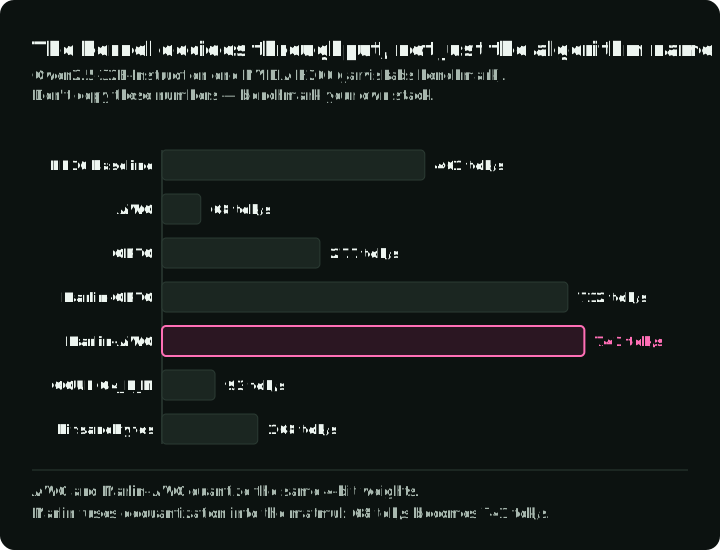
JarvisLabs’ vLLM benchmark ran Qwen2.5-32B-Instruct on an NVIDIA H200. Perplexity measures how well the model predicts the test text; lower is better. HumanEval pass@1 measures code-task success with a single generated solution. Output tokens/s measures generation throughput, while mean TTFT measures the average wait for the first output token:
| Quantization / kernel | Wikitext-2 perplexity ↓ | HumanEval pass@1 ↑ | Output tokens/s | Mean TTFT |
|---|---|---|---|---|
| FP16 baseline | 6.56 | 56.1% | 461 tok/s | 57.7 ms |
| AWQ | 6.84 | 51.8% | 68 tok/s | 277.8 ms |
| GPTQ | 6.90 | 46.3% | 277 tok/s | 107.1 ms |
| Marlin-GPTQ | 6.97 | 45.7% | 712 tok/s | 51.9 ms |
| Marlin-AWQ | 6.84 | 51.8% | 741 tok/s | 73.5 ms |
| GGUF Q4_K_M | 6.74 | 51.8% | 93 tok/s | 958.0 ms |
| bitsandbytes | 6.67 | 51.8% | 168 tok/s | 135.3 ms |
The vendor’s speed test uses 200 ShareGPT prompts, maximum concurrency 10, and seed 42. Quality comes from separate Wikitext-2 and HumanEval runs. The report does not pin the vLLM version or model revisions, so these are vendor-reported results rather than an independently reproduced comparison. They show a narrower point: the algorithm name on the checkpoint doesn’t tell you how fast serving will be.
For example, AWQ and Marlin-AWQ both use the same 4-bit weights. The Marlin implementation is much faster because its CUDA kernel fuses dequantization and matrix multiplication into a single, highly optimized GPU operation.
For your own comparison, first create or obtain a vLLM-compatible AWQ checkpoint at the path below; these commands do not quantize the model. Install a vLLM build supported by your GPU, then start the server in one terminal:
vllm serve ./outputs/Qwen2.5-32B-Instruct-AWQ-W4A16 \
  --served-model-name qwen2.5-32b-awq \
  --host 127.0.0.1 \
  --port 8000
Keep that server running. In a second terminal, use vllm bench serve with the real tokenizer separately from the API model alias:
vllm bench serve \
  --backend openai \
  --base-url http://127.0.0.1:8000 \
  --endpoint /v1/completions \
  --model qwen2.5-32b-awq \
  --tokenizer Qwen/Qwen2.5-32B-Instruct \
  --dataset-name random \
  --num-prompts 200 \
  --random-input-len 1024 \
  --random-output-len 256 \
  --random-range-ratio 0 \
  --max-concurrency 10 \
  --seed 42
This is a synthetic load test targeting 1,024 input tokens and 256 output tokens per request, not a reproduction of the ShareGPT table or a quality test. Repeat it for the baseline and each prepared checkpoint with the same tokenizer, lengths, seed, and concurrency. Record actual token counts and the installed vLLM version. These command examples require the prepared checkpoint and target GPU.
Track throughput, TTFT, inter-token latency (the delay between subsequent tokens), memory use, and task quality. When some of those move in opposite directions, that trade-off is what you need to see before shipping.
Quantization algorithms compared
These methods solve different compression problems:
| Algorithm | Common format | What it tries to preserve | Main cost |
|---|---|---|---|
| GPTQ | W4A16 | Layer output, using Hessian estimates of how weight changes affect output error | Slow calibration and more complex processing |
| AWQ | W4A16 / W4A8 | Important activation channels | Needs calibration and fused serving kernels |
| SmoothQuant | W8A8 | INT8 activation behavior by moving outlier scale into weights | Per-model scale tuning |
| QuaRot / SpinQuant | W4A4 / W4A8 | Lower activation outlier pressure through rotations | Runtime rotation complexity |
| HQQ | W4A16 / W2A16 | Fast weight-only compression without calibration | Quality needs downstream checks at very low bit-widths |
| QLoRA (NF4) | NF4 | Adapter training memory | Not a great default for serving |
| llama.cpp GGUF K-quants / IQ-quants | Mixed low-bit tensor encodings | Local inference quality per byte | Not designed for cloud batch serving |
| RTN (round-to-nearest) | W8A16 / FP8 | Nothing beyond the scale; no calibration data | Large quality loss at 4 bits; use as a baseline |
| FP8 dynamic | W8A8 FP8 | Activation range per token at runtime; no calibration data | Needs FP8 tensor cores; older GPUs may see no speedup |
AutoGPTQ was archived in April 2025, and AutoAWQ was archived and officially deprecated in May 2025. For new compressed-tensors checkpoints consumed by vLLM, start with llm-compressor. Use GPTQModel when you need the active GPTQ path with Marlin, Machete, MoE memory options, or disk offload.
Pruning and distillation also reduce serving cost through separate workflows. 2:4 structured sparsity removes weights in a pattern that NVIDIA sparse tensor cores can use. Distillation trains a smaller student model to copy a larger one, which can work well for narrow tasks. Include either path in the shortlist only when the project can support the extra pruning or training work.
6. Serving memory is more than weights
The compressed checkpoint is only part of the serving-memory footprint. Size the full runtime before deciding whether weight quantization is enough. PagedAttention identifies the KV cache as a major serving-memory term.
Offline quantization can be layer-bounded. Tools such as llm-compressor can load a transformer block, run calibration and quantization math, write the compressed block, and move on. That keeps peak GPU memory closer to the largest active layer plus calibration buffers. You still need CPU RAM and disk for the source checkpoint, but the GPU doesn’t always hold the full BF16 model.
Peak GPU memory during offline quantization can look more like this:
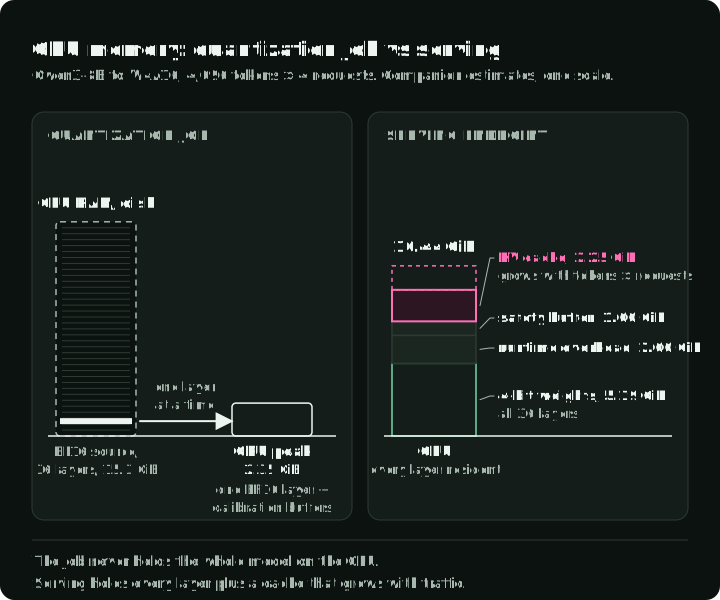
The figure draws both budgets to one scale with the companion’s Qwen3-8B W4A16 estimate from section 9. The left panel is the offline job; the right panel is what must stay on the GPU while serving.
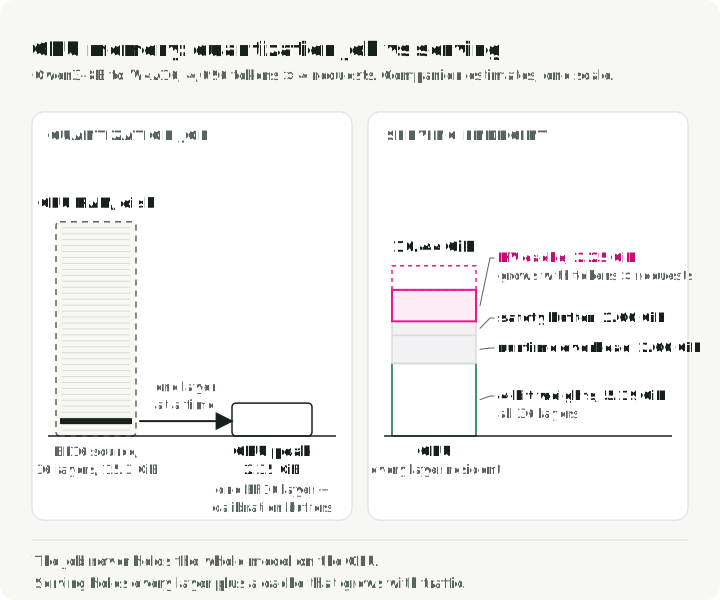
For fully GPU-resident serving, all compressed weights must fit across the serving GPUs alongside the KV cache and runtime buffers. Weight offload reduces GPU residency at the cost of transfers. The KV cache grows with context length and active batch size. For uniform attention layers and equal request lengths, its tensor payload is approximately:
This estimate excludes allocator overhead, cache-scale metadata, and shared prefixes. For requests with different lengths, replace with the sum of their cached lengths.
Where:
- is the layer count.
- is the number of key-value attention heads. Grouped-query attention reduces this by letting many query heads share fewer KV heads.
- is the dimension of each head, often 128 or 256.
- is prompt tokens plus generated tokens.
- is the active serving batch.
- is 2 for BF16 or FP16 and 1 for FP8 or INT8. vLLM’s FP8 KV-cache mode is the serving-stack example this article uses.
KV-cache quantization changes storage, while reuse changes allocation
The KV cache can be quantized during inference. Each decode step produces K and V activation tensors for the new token. A W8A8 model may already use FP8 or INT8 for supported projection math, but the cache remains a separate storage object.
Many serving stacks keep that object in the model or cache dtype. To change it, enable a KV-cache dtype, use a checkpoint with cache scales, or choose a quantized cache implementation.
When KV-cache quantization is enabled, the engine writes entries as a lower-precision representation plus scales. Later attention either dequantizes the cache inside its kernel or, on some backends, performs part of the attention operation in the quantized domain.
vLLM’s stable Quantized KV Cache docs expose this directly with kv_cache_dtype="fp8" or --kv-cache-dtype fp8. vLLM supports FP8 E4M3 and E5M2 cache formats, plus per-tensor and per-attention-head scale strategies. It can use default scales or dataset calibration through llm-compressor. With FlashAttention 3, vLLM can also run attention operations in the FP8 domain by quantizing queries in addition to keys and values. To enable the FP8 cache for a model:
vllm serve Qwen/Qwen3-8B --kv-cache-dtype fp8 --max-model-len 32768TensorRT-LLM exposes FP8 KV cache through KvCacheConfig(dtype='fp8') and lists FP8 KV cache and NVFP4 KV cache as separate quantization recipes from weight/activation quantization. Hugging Face Transformers also has a QuantizedCache path via cache_implementation="quantized", with hqq supporting int2, int4, and int8 cache formats and quanto supporting int2 and int4.
Ordinary KV caching stores prior keys and values to avoid recomputing them. Prefix caching reuses cache blocks across requests with the same prefix. PagedAttention reduces fragmentation and improves allocation, while KV offload moves cache blocks between memory tiers. These combinations are runtime-dependent. Hugging Face’s QuantizedCache does not support offloading. vLLM documents its quantized KV cache separately from prefix caching and other cache-management features. Verify each combination in the runtime you deploy.
The quality risk also differs from weight-only PTQ. KV-cache quantization injects error into the attention state read at every later decode step. Test long-context retrieval, multi-turn behavior, safety and refusals, tool-use formatting, and output latency separately. KVQuant, KIVI, and the vLLM FP8 KV-cache study all evaluate KV-cache quantization as its own problem.
A worked example shows when the cache becomes larger than the weights. Take Llama-3.1-70B (80 layers, 8 KV heads, head dimension 128) serving 8 requests of 32,768 tokens:
def kv_cache_gb(layers, kv_heads, head_dim, tokens, batch, bytes_per_value):
    return 2 * layers * kv_heads * head_dim * tokens * batch * bytes_per_value / 1e9

# Llama-3.1-70B: 80 layers, 8 KV heads, head dimension 128
for name, nbytes in [("BF16", 2), ("FP8", 1)]:
    print(name, round(kv_cache_gb(80, 8, 128, 32_768, 8, nbytes), 1), "GB")
It prints BF16 85.9 GB and FP8 42.9 GB. At this load the BF16 cache (86 GB) is larger than the INT4 weights: about 40 GB once group scales and 16-bit embeddings are counted, against the 35 GB that section 7’s table gives for the 4-bit values alone. FP8 cache saves 43 GB; BF16-to-INT4 weights save about 100 GB. Weight quantization comes first here, and the cache is the largest remaining term. The chart stacks weights and cache after each step.
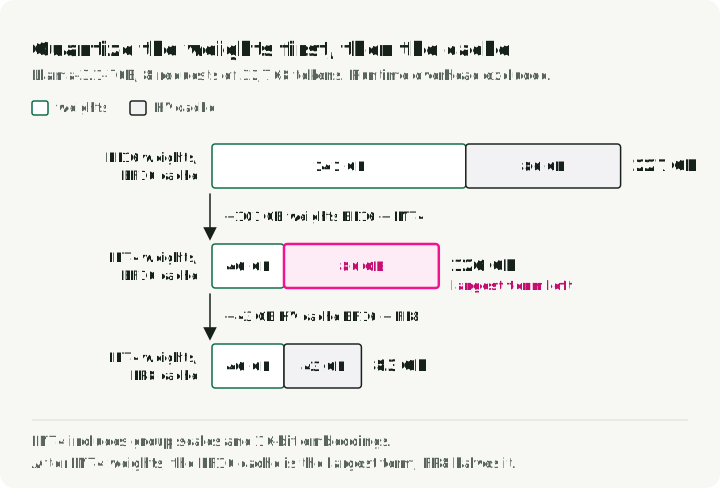
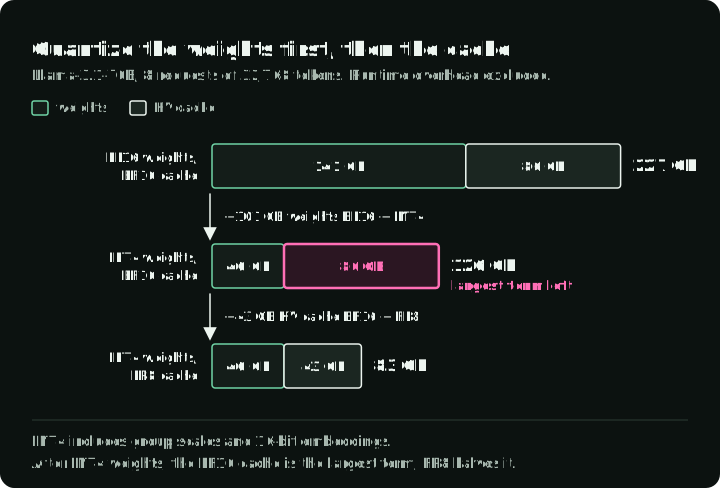
Compare how much memory each change would save for your own model. Use the cache equation above with the same batch and context length for both the current and proposed cache dtypes. Subtract the proposed size from the current size. Do the same for the two weight formats you are considering. For example, compare the saving from BF16-to-FP8 cache with the saving from BF16-to-INT4 weights. Test the option with the larger estimated saving first, provided the runtime supports it. Then measure actual memory use and quality; neither estimate includes every allocation the runtime makes.
7. Weight size and GPU support
Weight footprint is easy to estimate from parameter count and storage precision, the same sizing idea used in serving-memory discussions around KV cache:
| Model size | BF16 weights | FP8 / INT8 weights | INT4 weights |
|---|---|---|---|
| 7B / 8B | ~14-16 GB | ~7-8 GB | ~3.5-4 GB |
| 14B | ~28 GB | ~14 GB | ~7 GB |
| 32B / 34B | ~64-68 GB | ~32-34 GB | ~16-17 GB |
| 70B | ~140 GB | ~70 GB | ~35 GB |
| 109B MoE | ~218 GB total | ~109 GB | ~55 GB |
The INT4 column counts only the 4-bit values. Group scales add a few percent, and embeddings and lm_head kept in 16-bit add more. For Qwen3-8B these two matrices are about 1.2 GB each in BF16. The companion’s W4A16 estimate of 5.19 GiB keeps 12% of the parameters in 16-bit to cover them.
For a fixed memory budget, a larger model at 4-bit can beat a smaller model at 16-bit. Dettmers and Zettlemoyer found 4-bit precision almost universally optimal for zero-shot accuracy per total model bit, across BLOOM, OPT, Pythia, and GPT-2 models from 19M to 176B parameters. The study measured only zero-shot accuracy, so test your own tasks before choosing.
Mixture-of-experts models may activate fewer parameters per token, but the full set of weights still needs to live somewhere unless the runtime supports offload. TensorRT-LLM’s quantization support matrix treats MoE model families as deployment targets with their own supported recipes.
Your deployment hardware restricts which quantization formats are viable:
- CPU serving depends on vector instructions such as AVX-512 or AMX. A GGUF file loaded through
llama.cppis the practical path. - Apple Silicon uses unified memory, so local models can use a large shared RAM pool instead of dedicated VRAM. GGUF and
llama.cppremain the common local-runtime path because GGUF is built for GGML executors. MLX is the other common path:mlx_lm.convert --model <model> -qwrites a 4-bit MLX model by default, and--q-bits 8writes an 8-bit one. Compare speed and quality on the same prompts before choosing. - NVIDIA Ampere supports INT8 tensor-core serving paths but not native FP8 W8A8 tensor-core math. Common choices are W4A16 weight-only quantization or static INT8, matching the TensorRT-LLM hardware support matrix.
- NVIDIA Ada and Hopper support FP8 serving paths in TensorRT-LLM. FP8 W8A8 serving is worth testing on these GPUs.
- NVIDIA Blackwell adds NVFP4 and microscaling support, but the software path still matters. Treat early low-bit floating-point stacks as version-sensitive.
8. Calibration and evaluation before deploy
A model that loads has passed a smoke test. Deployment requires quality and serving checks for the target workload. Recent quantization evaluations report different outcomes for LLM serving, long-context tasks, and reasoning-heavy models.
The figure shows where calibration samples and held-out evaluation samples go.
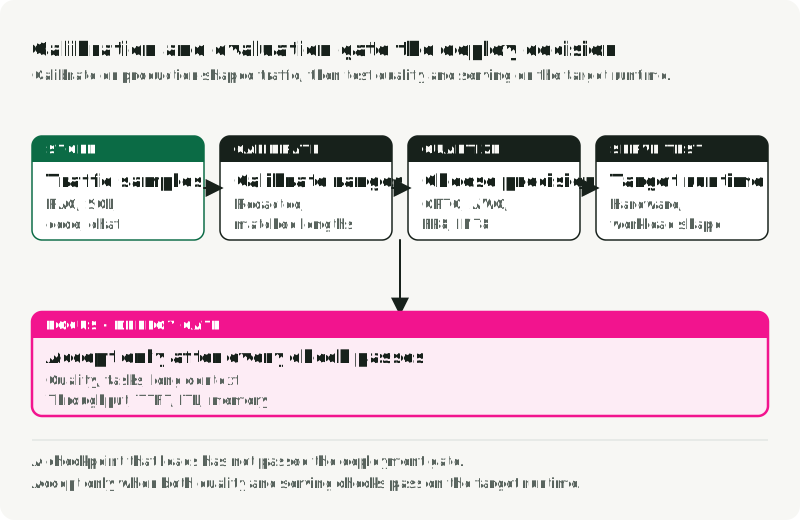
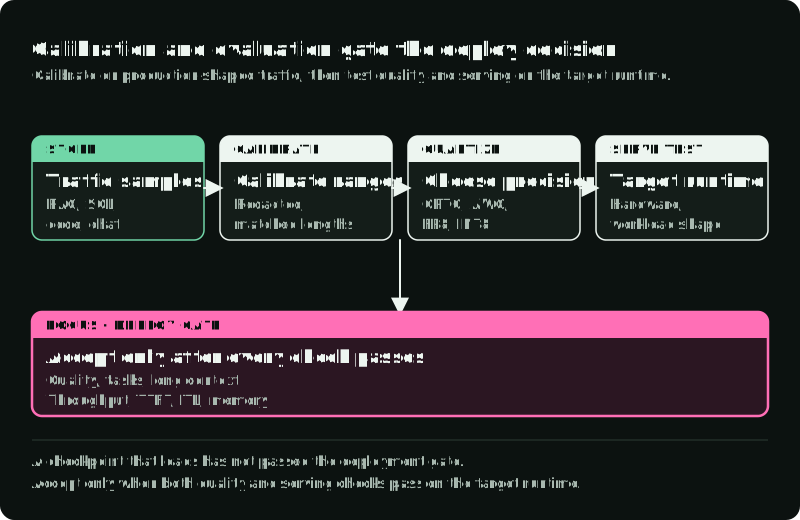
Choose the recipe first. When it requires calibration, use prompts that look like production. HQQ and FP8 dynamic, for example, need no calibration dataset, so the figure shows a path that skips calibration. Keep evaluation examples separate from calibration samples so the final comparison tests held-out behavior. For recipes that need calibration:
- Include RAG traces, SQL queries, agent histories, code tasks, tool-call payloads, and system prompts from the target workload. Static PTQ depends on calibration data matching the production distribution.
- Match sequence lengths. Short single-turn prompts won’t expose long-context activation behavior.
- Keep
embed_tokensandlm_headin higher precision if the method or runtime allows it, a common exclusion pattern in LLM Compressor recipes. - Use enough samples to stabilize activation ranges. The vLLM KV-cache example sets
NUM_CALIB_SAMPLES = 512. Treat that as one documented example, not a universal count. The right sample count depends on the method, model, sequence length, and production workload. - Redact secrets and private user data before using production logs.
For evaluation, test both language quality and serving behavior:
- Perplexity on a standard corpus catches broad language degradation, but the JarvisLabs benchmark is a useful reminder that perplexity and throughput can move differently.
- Domain tasks catch failures that perplexity hides. Use HumanEval for coding, MMLU for broad knowledge, and AIME or MATH-500 for mathematical reasoning when those domains matter.
- Format checks matter for agentic systems. Test JSON schema compliance, markdown output, tool-call shape, and refusal behavior because quantized model evaluations can miss application-level failures even when aggregate benchmark accuracy looks stable.
- Long-context tests catch KV-cache quantization damage. Needle-in-a-haystack is crude, but long-context quantization results show why those checks belong before deployment.
- Load tests should report throughput, TTFT, inter-token latency, sustainable concurrency, and peak GPU memory.
vllm bench servemeasures throughput and latency. Collect GPU memory separately with GPU/server telemetry. Sweep concurrency against stated latency and error limits to find a sustainable level; the concurrency observed in one run does not establish capacity.
For a RAG application, hold the questions and retrieved evidence fixed when comparing the baseline and quantized generator. That comparison isolates the generator change. Then run the full pipeline to check the serving result, using the RAG evaluation guide to separate retrieval failures from unsupported answers. For an agent, include whether the same tasks finish with valid tool calls and acceptable side effects. A smaller checkpoint alone answers none of those questions.
Test reasoning models on multi-step tasks. Sub-4-bit or unrotated W4A4 quantization can hurt reasoning accuracy even when baseline perplexity looks stable, which is the core warning in the quantized reasoning-model study.
9. Companion repository workflow
The companion repository, slavadubrov/model-compression-demo, makes the decision process reproducible. It uses uv and focuses on planning, recipes, dry runs, and benchmark configs grounded in the same sources used here: vLLM, LLM Compressor, TensorRT-LLM, and the algorithm papers.
Clone it and inspect the supported algorithms:
git clone https://github.com/slavadubrov/model-compression-demo.git
cd model-compression-demo
git checkout 62da4539793ac3a93e94e8551a063c7681561099
uv run python demo.py list-algorithms
These planning commands use only the Python standard library. Start with planning and sizing:
uv run python demo.py plan \
  --model-preset qwen3-8b \
  --goal fit-memory \
  --hardware ampere \
  --context 4096 \
  --concurrency 4

uv run python demo.py estimate \
  --model-preset qwen3-8b \
  --scheme w4a16 \
  --context 4096 \
  --concurrency 4
plan picks GPTQ W4A16 for this goal and prints the two budgets from section 6: a 10.44 GiB serving target and a 2.35 GiB GPU peak for the layer-by-layer quantization job. estimate breaks the serving target down:
Architecture:     Qwen3 8B (built-in preset from official Hugging Face config)
Layers/hidden/KV: 36 / 4096 / 0.250
Note:             Causal text-generation checkpoint suitable for the text-only harness.
Scheme:           w4a16
Weights:          5.19 GiB
KV cache:         2.25 GiB
Runtime overhead: 2.00 GiB
Safety buffer:    1.00 GiB
Total target:     10.44 GiB
Weights and KV cache are the first two terms of the serving-memory equation in section 6. Runtime overhead and Safety buffer are the companion’s allowance for activations and engine overhead. The KV-cache line is the cache formula with Qwen3-8B’s 36 layers, 8 KV heads, and head dimension 128 at 4,096 tokens and 4 concurrent requests.
Then print the recipe and preview quantization before spending GPU time:
uv run python demo.py recipe --algorithm gptq-w4a16

uv run python demo.py quantize \
  --algorithm gptq-w4a16 \
  --model Qwen/Qwen3-8B \
  --dry-run
The recipe command prints the llm-compressor code that the quantize step runs:
from llmcompressor import oneshot
from llmcompressor.modifiers.quantization import GPTQModifier

recipe = GPTQModifier(
    scheme="W4A16",
    targets="Linear",
    ignore=["lm_head"],
)

oneshot(
    model="Qwen/Qwen3-8B",
    dataset="wikitext",
    dataset_config_name="wikitext-2-raw-v1",
    recipe=recipe,
    output_dir="outputs/Qwen3-8B-W4A16",
    max_seq_length=4096,
    num_calibration_samples=256,
)
targets and ignore decide which layers get 4-bit weights; num_calibration_samples and max_seq_length are the calibration choices from section 8. WikiText is the smoke-test default; pass --calibration-file with production-like prompts for a real checkpoint.
The GPTQ recipe writes a compressed-tensors checkpoint. GPTQ is the algorithm, not the checkpoint format, so vLLM detects the format from the checkpoint without a --quantization flag, as in its official W4A16 example.
To quantize, run make install-compression. vLLM needs its own environment because its dependencies conflict with llm-compressor: run make install-serving, then use .venv-vllm/bin/vllm for the serve and bench commands.
Serve and benchmark each checkpoint against the RTN W8A16 baseline from the algorithm table. Run quantize without --dry-run for gptq-w4a16 and rtn-w8a16 to write outputs/Qwen3-8B-W4A16 and outputs/Qwen3-8B-W8A16. The companion’s benchmark-plan command writes a serve and a benchmark command for each checkpoint to a JSON file. To run the comparison by hand, start the W4A16 server in one terminal:
.venv-vllm/bin/vllm serve outputs/Qwen3-8B-W4A16 --host 127.0.0.1 --port 8000In a second terminal, run the same synthetic load as section 5:
.venv-vllm/bin/vllm bench serve \
  --backend openai \
  --base-url http://127.0.0.1:8000 \
  --endpoint /v1/completions \
  --model outputs/Qwen3-8B-W4A16 \
  --tokenizer Qwen/Qwen3-8B \
  --dataset-name random \
  --num-prompts 200 \
  --random-input-len 1024 \
  --random-output-len 256 \
  --random-range-ratio 0 \
  --max-concurrency 10 \
  --seed 42
Stop the server, then run both commands again with outputs/Qwen3-8B-W8A16, the RTN W8A16 baseline, in place of outputs/Qwen3-8B-W4A16.
Finally, compare the base and compressed models against explicit thresholds:
uv run python demo.py quality-eval \
  --base-model Qwen/Qwen3-8B \
  --compressed-model outputs/Qwen3-8B-W4A16 \
  --mode all \
  --lm-eval-task hellaswag \
  --lm-eval-limit 50 \
  --max-perplexity-delta-pct 5 \
  --output-json reports/qwen3-8b-w4a16-quality.json
Run the work in order: plan the target, estimate memory, dry-run the recipe, benchmark serving, then compare quality against thresholds. That sequence mirrors the separation in this article between memory sizing, runtime benchmarking, and quality evaluation.
10. Diffusion models need a separate path
Diffusion and diffusion-transformer pipelines have different activation behavior from autoregressive LLMs. SVDQuant treats diffusion quantization as a separate activation-outlier problem.
Autoregressive LLMs generate one token at a time. Diffusion models run repeated denoising steps, and their activation distributions shift during the process, as Q-Diffusion reports for the denoising network’s outputs across time steps. A standard 4-bit LLM quantization pass may save diffusion-model memory while introducing severe visual artifacts. Diffusion-focused methods such as SVDQuant / Nunchaku and NVIDIA ModelOpt diffusion quantization address that different activation pattern.
In a latent diffusion pipeline, the text encoder represents the prompt. A denoising network, such as a diffusion transformer (DiT) or U-Net, repeatedly updates a compressed image representation called a latent. The variational autoencoder (VAE) converts between those latent representations and images. These components have different jobs, so test their precision separately.
Use the following as conservative heuristics, not universal defaults. The pipeline, component, model, and runtime each need separate tests:
- Keep the VAE in 16-bit for the first comparison. Test lower precision only when the method and target pipeline validate it.
- Try the DiT or U-Net backbone first because it often holds the largest parameter share. Verify memory, latency, and image quality for the target pipeline. Diffusion quantization methods take the same component-level approach.
- Treat text encoders separately. Quantizing T5-XXL or CLIP may affect prompt alignment or text rendering in a given pipeline, so evaluate them independently rather than assuming generic transformer behavior.
- Use diffusion-aware methods such as SVDQuant when activation outliers are the main issue.
- Evaluate with images, not text metrics. Check prompt adherence, text rendering, skin tones, color balance, fine detail, latency, and VRAM. To compare with the 16-bit pipeline, measure LPIPS or PSNR between paired images (same seed), and CLIP score or ImageReward for prompt alignment, as the SVDQuant evaluation does. Then review the hard cases by eye.
If the evaluation set only contains simple or common prompts, you will miss edge-case failures. Include hard cases: small text, hands, repeated objects, structured layouts, and prompts with negative constraints, because diffusion quantization failures show up visually rather than in language-model perplexity.
11. Production defaults
The figure places the first try for each deployment type on a bit-width axis, with the next test and the condition for it. Each one still needs the checks from section 8.
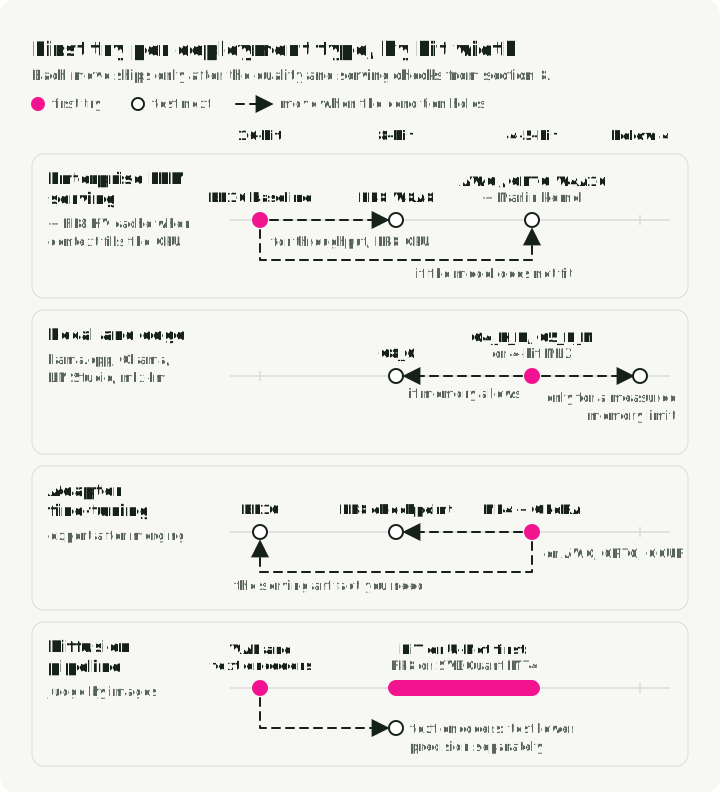
For enterprise LLM serving, start with a BF16 baseline in the exact serving engine you plan to use. If throughput is the goal and the GPU supports it, test FP8 W8A8. If the model does not fit, test AWQ or GPTQ W4A16 with Marlin-class kernels. If long context or concurrency fills the GPU, test an FP8 KV cache. Deploy the compressed version only when quality and serving checks both pass.
For local and edge inference, start with a GGUF file using Q4_K_M or Q5_K_M, or a 4-bit MLX model on a Mac. Move to Q8_0 when memory allows and compare task quality. Use encodings below 4 bits only for a measured memory limit.
For fine-tuning, use NF4 with QLoRA to train adapters with less memory. Evaluate the adapter in the application before merging. After merging, export and evaluate the serving artifact you need: a llama.cpp-compatible GGUF file, an AWQ/GPTQ/compressed-tensors checkpoint, an FP8 checkpoint, or BF16.
For diffusion, quantize the denoiser first, keep the VAE in 16-bit, and test text encoders separately, as in section 10. Compare paired images from the same seed and review hard prompts by eye.
12. Run the next comparison
Keep the BF16 baseline and compare one supported compressed candidate on the same held-out tasks and traffic. Write down the quality loss and latency you can accept before running it. Measure peak memory as well as speed: the useful result is whether the candidate removes your bottleneck within those limits.
References
- JarvisLabs vLLM Benchmarks: JarvisLabs, vLLM Quantization Complete Guide and Benchmarks, 2026. JarvisLabs.
- Hugging Face Optimum Quantization Guide: Hugging Face, Quantization conceptual guide. Docs.
- vLLM Quantization Docs: vLLM project, Quantization. Docs.
- vLLM Quantized KV Cache Docs: vLLM project, Quantized KV Cache. Docs.
- vLLM Benchmark Docs: vLLM project, vllm bench serve. Docs.
- LLM Compressor Docs: vLLM project, LLM Compressor. Docs.
- GPTQModel: ModelCloud, GPTQModel. GitHub.
- TensorRT-LLM Quantization: NVIDIA, TensorRT-LLM Quantization. Docs.
- NVIDIA NVFP4: NVIDIA, Introducing NVFP4 for Efficient and Accurate Low-Precision Inference. Blog.
- Hugging Face QuantizedCache: Hugging Face, Cache strategies: Quantized cache. Docs.
- NVIDIA Model Optimizer: NVIDIA, Model Optimizer. GitHub.
- torchao Quantization: PyTorch, torchao quantization overview. Docs.
- bitsandbytes Quantization: Hugging Face, bitsandbytes. Docs.
- HQQ: Dropbox, Half-Quadratic Quantization. GitHub.
- PEFT: Hugging Face, Parameter-Efficient Fine-Tuning. Docs.
- Ollama: Ollama local model runtime. Website.
- LM Studio: LM Studio local AI runtime. Website.
- AutoGPTQ status: AutoGPTQ repository, archived April 2025. GitHub.
- AutoAWQ status: AutoAWQ repository, archived and deprecated May 2025. GitHub.
- GPTQ: Frantar et al., GPTQ: Accurate Post-Training Quantization for Generative Pre-trained Transformers, ICLR 2023. arXiv:2210.17323.
- Marlin: Frantar et al., MARLIN: Mixed-Precision Auto-Regressive Parallel Inference on Large Language Models, arXiv:2408.11743. arXiv:2408.11743.
- AWQ: Lin et al., AWQ: Activation-aware Weight Quantization for LLM Compression and Acceleration, MLSys 2024. arXiv:2306.00978.
- SmoothQuant: Xiao et al., SmoothQuant: Accurate and Efficient Post-Training Quantization for Large Language Models, ICML 2023. arXiv:2211.10438.
- QuaRot: Ashkboos et al., QuaRot: Outlier-Free 4-Bit Inference in Rotated LLMs, NeurIPS 2024. arXiv:2404.00456.
- SpinQuant: Meta AI Research, SpinQuant: LLM Quantization with Learned Rotations, arXiv:2405.16406. arXiv:2405.16406.
- QLoRA / NF4: Dettmers et al., QLoRA: Efficient Finetuning of Quantized LLMs, NeurIPS 2023. arXiv:2305.14314.
- SVDQuant / Nunchaku: MIT HAN Lab, SVDQuant: Absorbing Outliers by Low-Rank Components for 4-Bit Diffusion Models, ICLR 2025. arXiv:2411.05007, Nunchaku.
- vLLM PagedAttention: Kwon et al., Efficient Memory Management for Large Language Model Serving with PagedAttention, SOSP 2023. arXiv:2309.06180.
- Grouped-Query Attention: Ainslie et al., GQA: Training Generalized Multi-Query Transformer Models from Multi-Head Checkpoints, EMNLP 2023. arXiv:2305.13245.
- vLLM FP8 KV Cache: Kubler, Kurtic, Wilkinson et al., The State of FP8 KV-Cache and Attention Quantization in vLLM, vLLM Blog, April 2026. vLLM Blog.
- KIVI: Liu et al., KIVI: A Tuning-Free Asymmetric 2bit Quantization for KV Cache, ICML 2024. arXiv:2402.02750.
- KVQuant: Hooper et al., KVQuant: Towards 10 Million Context Length LLM Inference with KV Cache Quantization, NeurIPS 2024. arXiv:2401.18079.
- LLM Serving Evaluation: Kurtic et al., “Give Me BF16 or Give Me Death”? Accuracy-Performance Trade-Offs in LLM Quantization, ACL 2025. arXiv:2411.02355.
- Long-context Quantization Evaluation: Mekala et al., Does quantization affect models’ performance on long-context tasks?, arXiv:2505.20276. arXiv:2505.20276.
- Reasoning Evaluation: Quantization Hurts Reasoning? An Empirical Study on Quantized Reasoning Models, arXiv:2504.04823. arXiv:2504.04823.
- 2:4 Sparsity: Mishra et al., Accelerating Sparse Deep Neural Networks, arXiv:2104.08378. arXiv:2104.08378.
- k-bit Scaling Laws: Dettmers and Zettlemoyer, The case for 4-bit precision: k-bit Inference Scaling Laws, ICML 2023. arXiv:2212.09720.
- Q-Diffusion: Li et al., Q-Diffusion: Quantizing Diffusion Models, ICCV 2023. arXiv:2302.04304.
- MLX LM: Apple ml-explore, mlx-lm. GitHub.
- HumanEval: OpenAI, HumanEval. GitHub.
- MMLU: Hendrycks et al., Measuring Massive Multitask Language Understanding. arXiv:2009.03300.
- MATH-500: Hugging Face H4, MATH-500. Dataset.
- GGUF and llama.cpp: ggml-org, GGUF file format and llama.cpp. GGUF, llama.cpp.
- Hugging Face GGUF Docs: Hugging Face, GGUF. Docs.
- Reference Repository: slavadubrov/model-compression-demo.