Open-Weight LLM Variants, Formats, and Quantization

Names such as Acme-32B-A3B-Instruct-AWQ look dense because they combine several independent decisions: family and size, architecture, training role, and quantization. A repository may package those weights as sharded Safetensors, while a community conversion of the same checkpoint appears as Q4_K_M.gguf.
Those labels do not share one category: GPTQ and AWQ are quantization methods, GGUF is a container and runtime ecosystem, and MoE is an architecture. Reading the layers separately makes the download choice easier.
This guide is for engineers choosing an open-weight model for local inference or GPU serving. You will learn to read each part of a model name, pick a runtime, and check that a file fits your memory before you benchmark it.
For the compact deployment choice, see LLM Quantization Formats.
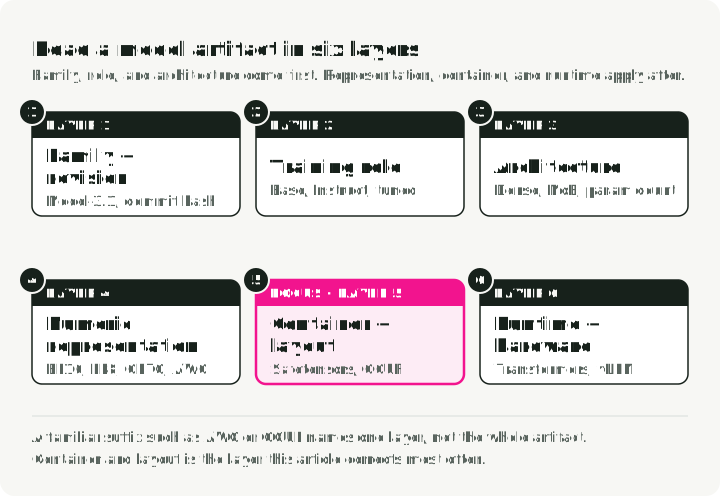
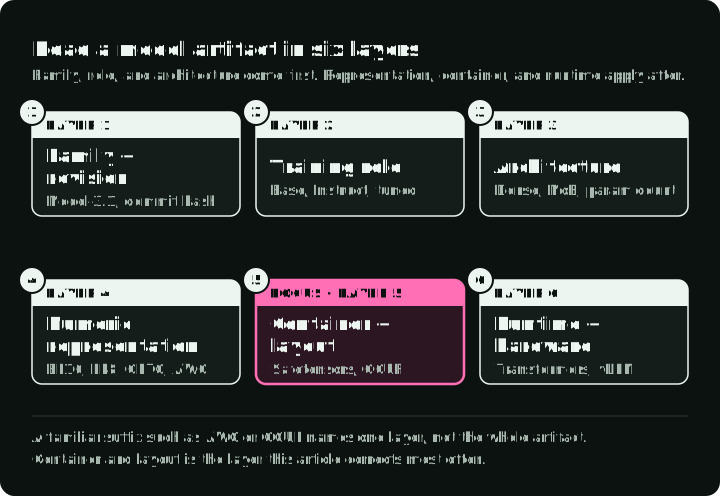
Read a model artifact in six layers
| Layer | Example | Question it answers |
|---|---|---|
| Family and revision | Model-3.1, commit hash | Which weights and tokenizer contract? |
| Training role | Base, Instruct, reasoning-tuned | What behavior was optimized? |
| Architecture | Dense, MoE, total and active parameters | Which kernels and memory layout are required? |
| Numeric representation | BF16, FP8, GPTQ 4-bit, AWQ 4-bit | How are tensors represented or quantized? |
| Container and layout | Safetensors shards, GGUF | How are tensors and metadata packaged? |
| Runtime | Transformers, vLLM, llama.cpp | Which loader and hardware path execute it? |
The figure below splits two example names into parts and puts each part under its layer. Both names give the family, the training role, the architecture, and the numeric representation. Only the GGUF file names its container, and neither names the runtime.
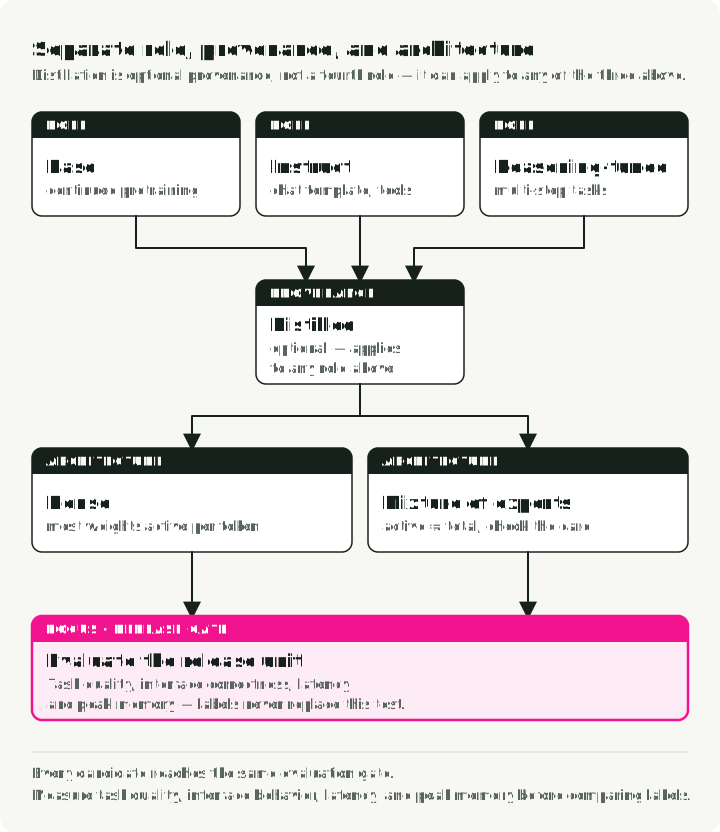
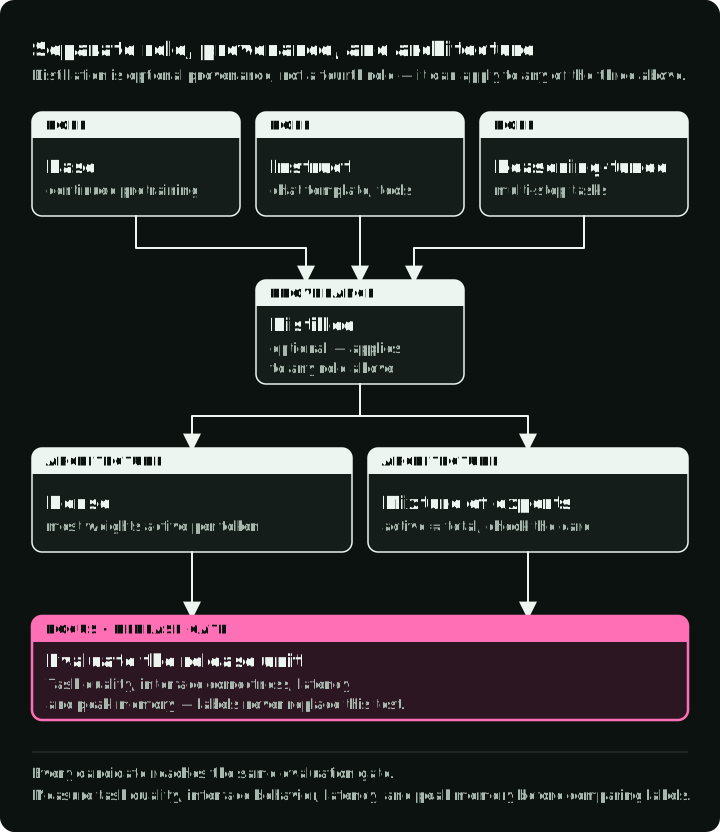
Some labels describe how the model was trained, not a part of the file. Distill (trained to copy a larger teacher model) and QAT (quantization-aware training) are two of them. A checkpoint can be distilled, instruction-tuned, reasoning-tuned, and MoE at the same time.
The “open-source” label needs its own check. If a model only publishes downloadable weights, do not assume its license meets an open-source definition or permits your use case. Read the model card and license before architecture or benchmark comparisons.
Training roles: Base, Instruct, reasoning, distilled
Base
A base checkpoint is trained primarily for next-token prediction. It is useful for continued pretraining, controlled research, or adaptation where you want to own the instruction behavior. It may complete a prompt rather than answer it. Ask it “What is the capital of France?” and it may continue with “What is the capital of Germany?”, because the prompt looks like the start of a list of questions.
Do not assume every fine-tune should start from base. An instruct checkpoint can be the better initialization when its existing behavior aligns with the target. Confirm with your evaluation that the existing behavior does not fight the new objective.
Instruct or chat
These checkpoints receive post-training intended to improve instruction following and conversation. The exact recipe may include supervised fine-tuning, preference optimization, reinforcement learning, distillation, or some combination. It is not necessarily supervised fine-tuning followed by RLHF.
Use an instruct checkpoint as the first assistant baseline. Confirm its chat template, supported tool-call format, system-message behavior, and refusal characteristics. The Transformers chat-template documentation explains why the exact message format matters. “Instruct” alone does not guarantee reliable JSON or tool use.
Reasoning-tuned
Reasoning-oriented checkpoints are optimized on tasks or trajectories that reward multi-step problem solving. Some expose reasoning text, some separate it through a serving parser, and some present only an answer. Longer generation does not guarantee faithful reasoning or fewer hallucinations.
Adopt one when it improves the hard evaluation slices after accounting for output tokens, latency, and verification. Routine extraction or classification may become slower without becoming better.
Distilled
Distillation transfers behavior from a teacher or teacher-generated data into another model. The student may be smaller, the same size, or structurally different. There is no stable “70–80% quality at half the size” rule: retained quality depends on teacher, data, objective, student capacity, and evaluation. The original knowledge-distillation paper by Hinton, Vinyals, and Dean makes no fixed quality-ratio claim either.
Treat Distill as provenance about training, then benchmark it like any other checkpoint.
The figure below sends one prompt to all three roles and shows what each one returns, what you pick it for, and what it costs. Provenance labels such as Distill and QAT can apply to any of them.
Dense and MoE models
The training role says what behavior the checkpoint has. The architecture says how the weights are organized, which decides memory and runtime support.
Dense models
Most parameters participate in each token’s forward pass. Parameter count is a rough indicator of weight storage. Runtime memory also includes KV cache, activations or workspace, allocator overhead, and sometimes duplicated or sharded state.
Mixture of Experts
An MoE layer routes each token to a subset of expert feed-forward networks. The Switch Transformer paper describes one such routing design; other families route tokens differently. Names such as A3B often mean approximately three billion parameters are active per token, but naming conventions are family-specific. Read the model card for total parameters, active parameters, expert count, and routing design.
Active parameter count describes routed compute, not weight placement. For example, vLLM expert parallelism shards expert layers across expert-parallel ranks and derives each rank’s expert allocation from the total expert count. Other runtimes may place or offload weights differently. A 30B-total, 3B-active model therefore does not automatically fit like a dense 3B model.
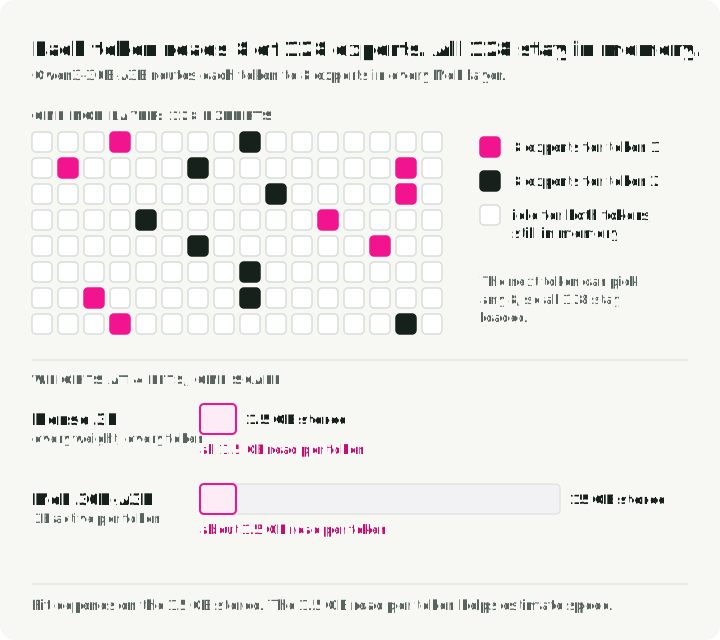
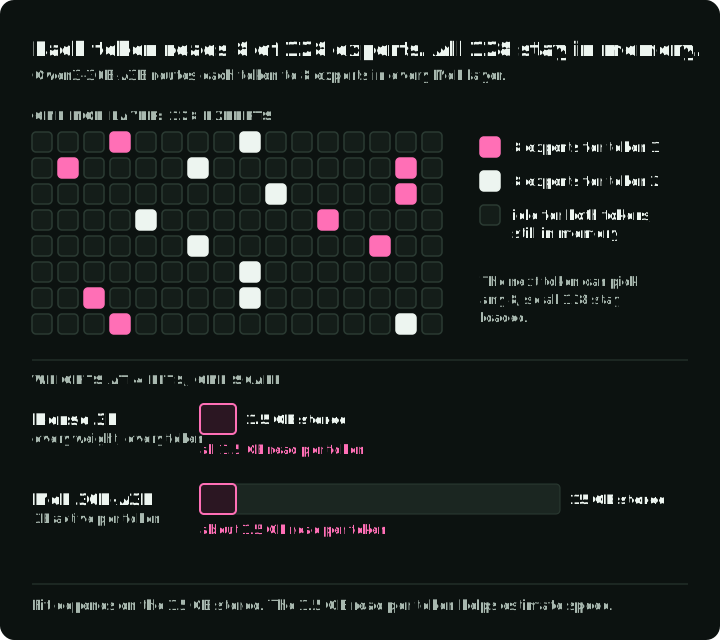
The figure below shows one MoE layer of Qwen3-30B-A3B: each token uses 8 of its 128 experts, and the next token can use any other 8, so all of them stay in memory. The bars put a dense 3B model and the 30B-A3B model on one scale at 4 bits. The MoE model stores ten times the weights, but each token reads only the 3B active parameters, about 1.5 GB.
Runtime support is also architecture-specific. Confirm model implementation, expert-parallel or tensor-parallel support, quantization kernels, and maximum context before downloading.
Containers and quantization methods
The architecture fixes which tensors exist. The container decides how those tensors are stored on disk, and the quantization method decides how many bits each one uses.
Safetensors
Safetensors is a safe tensor serialization format commonly used in Hugging Face repositories. A model may have multiple .safetensors shards plus configuration, tokenizer, and generation files. Those tensors can be BF16/FP16 or pre-quantized with a method such as GPTQ or AWQ. Transformers reads the method from a quantization_config entry and loads the matching backend, as its quantization workflow describes.
The extension alone does not tell you precision or runtime compatibility. Inspect config.json, quantization configuration, model card, tensor dtype, and runtime documentation. The “Worked name” section below shows a short script that does this.
GGUF
GGUF packages tensors and metadata for the ggml/llama.cpp ecosystem. llama.cpp loads GGUF and supports backends including Metal, CUDA, HIP, Vulkan, and CPU paths. Model architecture and conversion quality still determine compatibility.
GGUF is a container. It can hold high-precision or quantized tensors. Multimodal models may also need a separate projector or encoder file. “One GGUF file contains everything” is not a universal rule.
GPTQ and AWQ
GPTQ and AWQ are post-training weight-quantization methods, not file extensions. Their artifacts commonly use Safetensors plus method-specific configuration. Serving engines need kernels compatible with the method, bit width, group size, model architecture, and hardware.
Neither method is a universal quality winner. Calibration data, implementation, kernel path, and task matter. Runtime support changes, so verify the exact artifact against the version you pin. Check the official Transformers quantization and vLLM quantization pages next to that decision.
FP8 and QAT
Two more labels appear in repository names. FP8 is a number format, not a quantization method: each weight is stored as an 8-bit floating-point value. It runs fast only when the GPU and the runtime both support it. For example, vLLM runs FP8 weights and activations on NVIDIA Ada, Hopper, and Blackwell GPUs, and falls back to weight-only FP8 on Turing and Ampere. Check the runtime’s hardware table before you choose an -FP8 repository.
A QAT (quantization-aware training) checkpoint was trained to tolerate a target low-bit scheme, for example a -qat-q4_0 GGUF file. Start with the publisher’s intended format. Changing the quantization scheme may reduce the QAT benefit; evaluate the converted artifact again. The Model Quantization Guide covers PTQ and QAT and number formats in more depth.
Runtimes and when to use each
The runtime is the program that loads the file and runs it on your hardware. Each runtime loads a fixed set of file types, so the runtime choice also decides which file you download.
| Runtime | Files it loads | Hardware | Use it when |
|---|---|---|---|
llama.cpp | GGUF | CPU, Metal, CUDA, HIP, Vulkan | You want direct control of local inference, or a small or unusual target |
| Ollama | GGUF; supported Safetensors imports (an MLX path is in preview on Apple Silicon) | macOS, Linux, Windows | You want a managed local service with an HTTP API on a laptop or workstation |
| LM Studio | GGUF; MLX on Apple Silicon | macOS, Windows, Linux | You want a GUI to browse, download, and try models |
| MLX-LM | Safetensors converted for MLX, Apple’s array framework | Apple Silicon | You work in Python on a Mac, including LoRA fine-tuning |
| vLLM, SGLang | Safetensors in BF16, FP8, AWQ, GPTQ, and other methods | NVIDIA and AMD GPUs, other accelerators | You serve many users and need batching, throughput, and an OpenAI-style API |
| Hugging Face Transformers | Safetensors, with a quantization_config when quantized | CPU and GPU | You do research or fine-tuning, or serve at moderate load; use vLLM or SGLang for large-scale production |
Text Generation Inference (TGI) is no longer a choice for new deployments. Hugging Face put it in maintenance mode, has since archived the repository, and points users to vLLM and SGLang. For laptop tools in more detail, see Local LLMs on macOS.
Estimating memory
Once the runtime and file type are known, the next question is whether the file fits. For weight parameters at bits, raw weight storage is approximately:
A 13B model at nominal four-bit weights therefore starts near 6.5 GB. The same model in BF16 needs about 26 GB, and a 70B model in BF16 needs about 140 GB. The 6.5 GB figure is a lower bound: the model will not necessarily run in 6.5 GB. Scales, zero points, higher-precision tensors, embeddings, metadata, runtime buffers, KV cache, and fragmentation add memory.
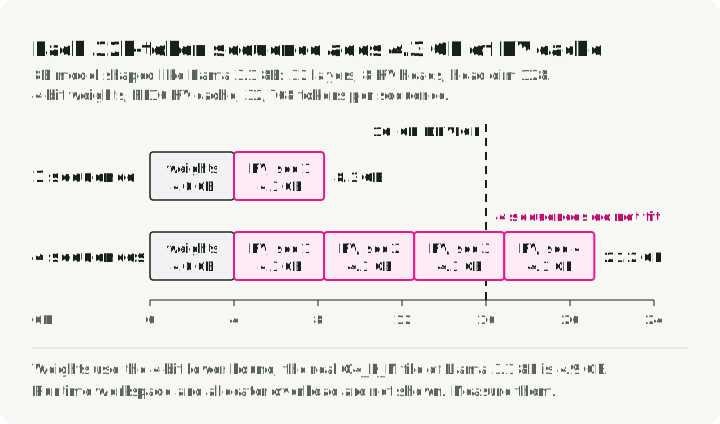
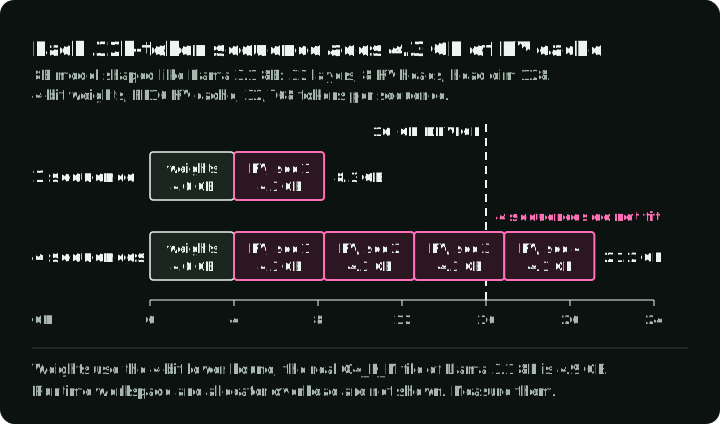
The KV cache often decides the difference between “loads” and “serves”. In a full-attention Transformer with a conventional K/V cache, it stores the attention keys and values of every token in the context, so it grows with context length and with the number of sequences served at once. An 8B model with 32 layers, 8 KV heads, and head dimension 128 (the shape of Llama 3.1 8B) stores about 4.3 GB of FP16 KV cache for one 32,768-token sequence: 2 × 32 × 8 × 128 × 32,768 × 2 bytes. At 4 bits, its weights are about 4 GB. The chart below adds the two and shows that four such sequences no longer fit a 16 GB device.
The function below estimates raw weights and conventional full-attention K/V cache, as in Llama 3.1. Take the layer count, KV-head count, and head dimension from the model’s config.json. Sliding-window and chunked-attention layers stop growing their cache at the window or chunk size. Hybrid or compressed-cache architectures also need their runtime’s own cache calculation.
def estimate_gb(params_b, bits, layers, kv_heads, head_dim, context, batch=1, kv_bytes=2):
    """Raw weights and conventional full-attention K/V cache, in GB (10**9 bytes)."""
    weights = params_b * 1e9 * bits / 8
    # Keys and values (2) for every layer, KV head, position, and sequence.
    kv_cache = 2 * layers * kv_heads * head_dim * context * batch * kv_bytes
    return round(weights / 1e9, 1), round(kv_cache / 1e9, 1)

# An 8B model shaped like Llama 3.1 8B, 4-bit weights, FP16 KV cache.
print(estimate_gb(8, 4, 32, 8, 128, 32_768))  # (4.0, 4.3)
print(estimate_gb(8, 4, 32, 8, 128, 32_768, batch=4))  # (4.0, 17.2)
These are raw weight and cache estimates, not a full runtime budget. The real Q4_K_M GGUF of Llama 3.1 8B is 4.9 GB, not 4.0 GB, because some tensors keep more bits. Runtime workspace comes on top. Measure peak memory with the real maximum sequence, batch policy, cache dtype, and parallelism. The quantization guide’s serving-memory section covers the full formula, including KV-cache quantization.
Quantization can reduce memory and sometimes improve speed, but low-bit kernels may also be slower on unsupported hardware. Compare task quality and end-to-end throughput, not file size alone.
GGUF quantization names
A GGUF repository usually offers one file per quantization level: Q3_K_M, Q4_K_M, Q5_K_M, Q6_K, Q8_0, IQ4_XS, and others. The name tells you the main type and the mix:
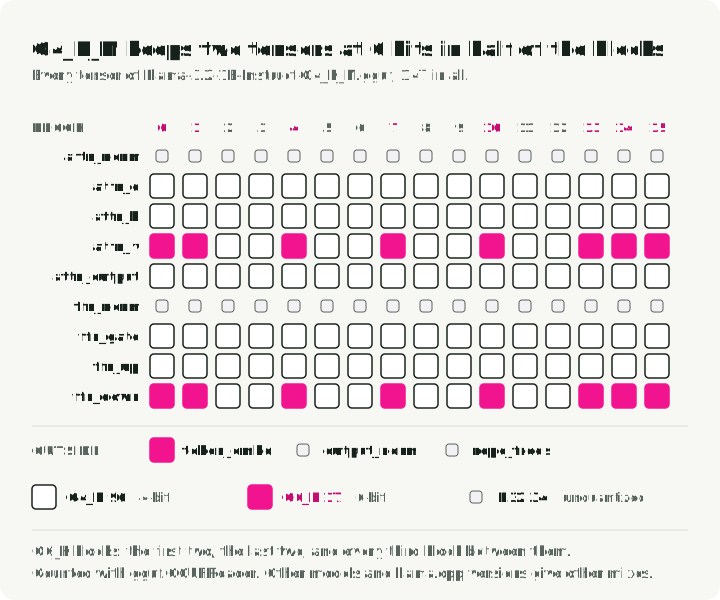
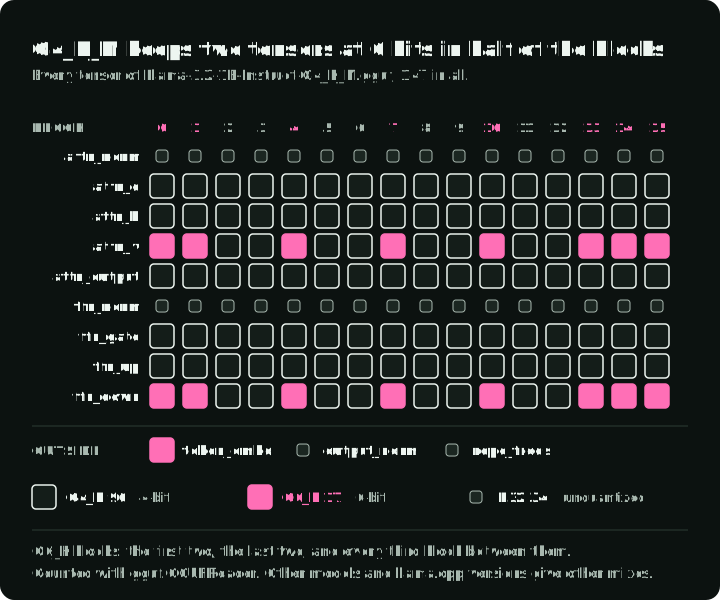
Q4is the bit width used for most tensors.Kis the K-quant block scheme.S,M, andLare small, medium, and large mixes. A larger mix keeps more tensors at a higher-precision type. InQ4_K_M, the quantizer moves the attention value (attn_v) and feed-forward output (ffn_down) weights toQ6_Kin about half of the layers.Q4_K_Sraises fewer of them, and only toQ5_K.Q8_0is a simple 8-bit type used for almost every weight matrix.IQnames, such asIQ4_XS, are i-quants. They usually rely on an importance matrix that records which weights matter most on sample text.
The grid below maps every tensor of a real file by type. Of the 147 tensors in Llama-3.2-1B-Instruct-Q4_K_M.gguf, 96 are Q4_K, 17 are Q6_K, and 34 are unquantized F32 tensors, mostly norms. Look at the attn_v and ffn_down rows to see which blocks get Q6_K.
To check a file yourself, download one quantization level and count its tensor types with the gguf package from the llama.cpp project:
hf download bartowski/Llama-3.2-1B-Instruct-GGUF Llama-3.2-1B-Instruct-Q4_K_M.gguf --local-dir .from collections import Counter
from gguf import GGUFReader
reader = GGUFReader("Llama-3.2-1B-Instruct-Q4_K_M.gguf")
print(Counter(t.tensor_type.name for t in reader.tensors))
# Counter({'Q4_K': 96, 'F32': 34, 'Q6_K': 17})
for t in reader.tensors:
if t.tensor_type.name == "Q6_K":
print(t.name) # token_embd.weight, blk.0.attn_v.weight, blk.0.ffn_down.weight, ...Mixes vary by architecture and llama.cpp version, so treat the suffix as a llama.cpp recipe name, not as a portable bit-width specification. See the llama.cpp quantization guide for the current list.
Use these as starting points, not answers:
Q4_K_Mis the common first try.Q5_K_MorQ6_Kwhen memory allows.Q3_K_Mor anIQ3file only to fit a larger model, and only after you check quality.
Avoid universal claims that Q4_K_M is indistinguishable from BF16 or that a larger Q3 model always beats a smaller Q8 model. Use a small ladder for the exact checkpoint:
- high-precision or trusted reference artifact
- one candidate near the memory limit
- one smaller candidate with more headroom
Run the same prompts, structured-output checks, long-context cases, and latency test on all three.
Selection workflow
The sections above each cover one layer. The workflow puts them in order, and a change to any input sends you back through the steps.
1. Fix the task contract
Define language, modality, context length, tool or schema interface, safety constraints, license requirements, and evaluation slices. Compare checkpoints in a representation accurate enough that quantization does not decide the first round.
2. Select the checkpoint
Choose the smallest checkpoint that passes your quality and behavior checks. Record the exact repository and revision, tokenizer, chat template, and any required reasoning parser.
3. Select the runtime
Pick a runtime from the runtime table. Then check architecture support, hardware backend, parallelism, quantization kernels, structured output, and adapters for the exact artifact.
4. Establish a measured memory budget
Include weights, KV cache, runtime workspace, expected concurrency, and headroom for the operating system or co-located processes. A file fitting in RAM or VRAM is necessary, not sufficient.
5. Choose and validate a representation
Prefer publisher-provided artifacts with documented calibration and provenance. If using a community conversion, record the source revision, converter revision, quantization recipe, calibration or importance data, and hashes.
6. Benchmark the release unit
Measure task quality, schema/tool-call correctness, time to first token, output throughput, peak memory, and failures at target context and concurrency. Re-run after changing any checkpoint, runtime, kernel, or quantization setting.
Starting points for common setups
These are first candidates to benchmark with the workflow above, not final answers.
| Setup | First candidate | Check before you commit |
|---|---|---|
| Chat assistant on a 16 GB MacBook | 7B–8B Instruct, Q4_K_M GGUF, in Ollama or LM Studio | Peak memory at your context length leaves room for the OS and other apps |
| RAG service on one 24 GB GPU | 7B–14B Instruct, AWQ or FP8 Safetensors, on vLLM | Weights plus KV cache at your concurrency stay under 24 GB |
| Domain fine-tuning on a cloud GPU | Base or Instruct checkpoint in BF16 Safetensors, with Transformers | Whether the instruct behavior helps or fights your training objective |
| API for many users | Instruct in BF16, FP8, or AWQ, on vLLM or SGLang | Throughput and time to first token at target concurrency |
Worked name
Suppose a repository is named Acme-32B-A3B-Instruct-AWQ. Each part raises a question, and each answer lives in a specific place:
| Part | Question | Where to check |
|---|---|---|
Acme | Which family, license, and revision? | Model card (README.md), LICENSE, the commit hash you pin |
32B | Total weights or another publisher convention? | Model card; config.json |
A3B | How many experts, and how many per token? | config.json: num_experts or num_local_experts, num_experts_per_tok |
Instruct | Which chat template and tool-call format? | chat_template in tokenizer_config.json; model card |
AWQ | What bit width, group size, and calibration? | quantization_config in config.json; model card for calibration data |
| (not in the name) | Does the runtime support this architecture and quantization? | The documentation of the runtime version you pin |
The script below reads config.json for two public repositories and prints the fields from the table. It downloads only the config file, not the weights.
import json

from huggingface_hub import hf_hub_download

def describe(repo_id: str, revision: str = "main") -> None:
    path = hf_hub_download(repo_id, "config.json", revision=revision)
    config = json.load(open(path))
    quant = config.get("quantization_config", {})
    experts = config.get("num_experts") or config.get("num_local_experts")
    print(repo_id)
    print("  architecture:", config.get("architectures"))
    print("  quantization:", quant.get("quant_method"), quant.get("bits"), quant.get("group_size"))
    print("  experts:", experts, "per token:", config.get("num_experts_per_tok"))

describe("Qwen/Qwen2.5-7B-Instruct-AWQ")  # quantization: awq 4 128; experts: None
describe("Qwen/Qwen3-30B-A3B")  # quantization: None; experts: 128 per token: 8
Conclusion
Model selection becomes less confusing once labels stop sharing one category. Training role tells you what behavior was optimized. Architecture tells you how computation is organized. Runtimes tell you what executes efficiently on your hardware, containers how artifacts are stored, and quantization how some tensors were approximated.
Choose the checkpoint first, then the runtime, then the file. Preserve exact provenance, and let one task evaluation compare release artifacts. As a next step, run the three-file comparison from the GGUF section on your own prompts.
References
- Transformers chat templates - Message formatting for base and instruction-tuned causal language models.
- Distilling the Knowledge in a Neural Network - Hinton, Vinyals, and Dean’s original distillation paper.
- Switch Transformers - Fedus, Zoph, and Shazeer’s sparse expert-routing architecture.
- GGUF specification and llama.cpp quantization guide
- llama.cpp quantizer source - The per-tensor type rules for each GGUF recipe.
- Hugging Face Transformers quantization concepts
- GPTQ paper
- AWQ paper
- vLLM quantization documentation
- SGLang quantization documentation
- Text Generation Inference repository - Maintenance-mode notice.